JS拖拽組件學習使用
編輯:關於JavaScript
JS代碼需要常寫,不然容易生疏,最近雖然一直在看JS的原型,行為委托等知識點,但是動手寫代碼的量略有減少。本文與大家分享一個拖拽組件,供大家參考,具體內容如下
首先,看一下拖拽的原理。
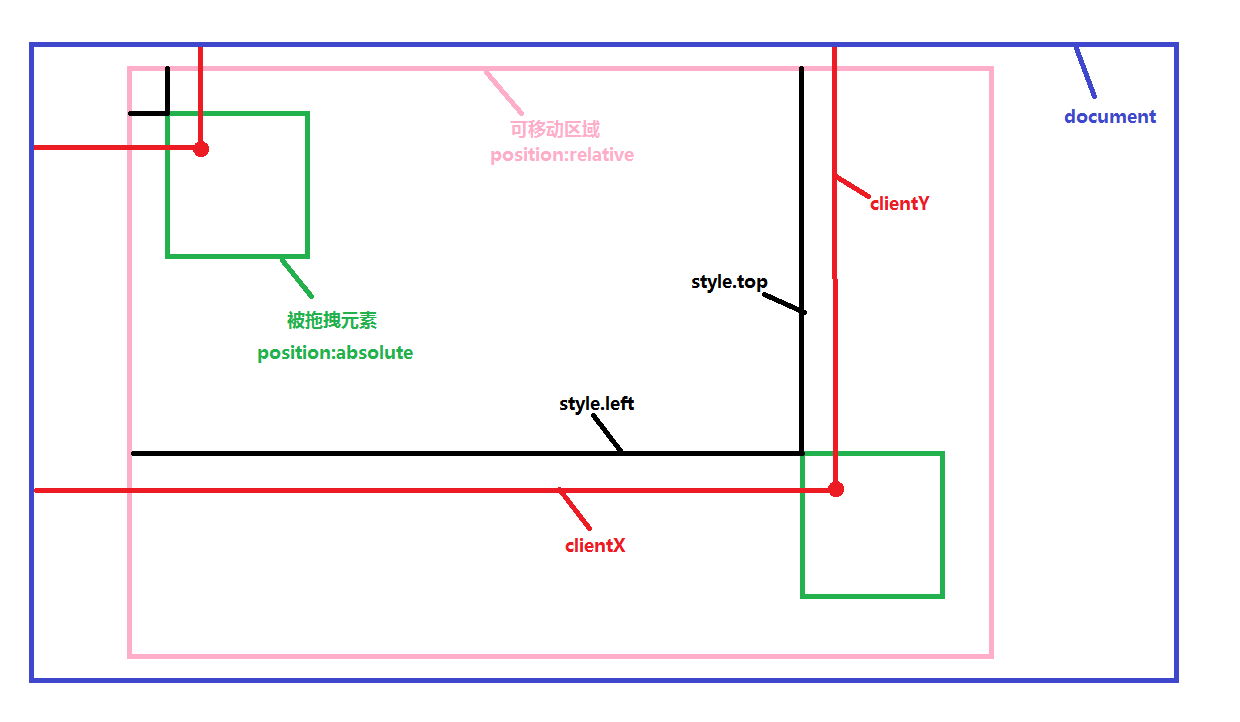
被拖拽元素位置的變化,left值的變化其實就是鼠標位置水平方向的變化值,e.clientX - 鼠標左鍵按下時e.clientX。
top值的變化其實就是鼠標位置豎直方向的變化值,e.clientY - 鼠標左鍵按下時e.clientY。
另外就是設置拖拽的范圍,上下左右不得超過父元素所在的區域。
  function Drag (config){
      this.moveTarget = document.getElementById(config.id);
      if(config.parentId){
        this.targetParent = document.getElementById(config.parentId);
        this.max_left = this.targetParent.clientWidth - this.moveTarget.offsetWidth;
        this.max_top = this.targetParent.clientHeight - this.moveTarget.offsetHeight;
      }else{
        console.log(document.documentElement.clientHeight + "||" + this.moveTarget.offsetHeight)
        this.max_left = document.documentElement.clientWidth - this.moveTarget.offsetWidth -
          parseInt(this.getStyle(document.body, "border-width"));
        this.max_top = document.documentElement.clientHeight - this.moveTarget.offsetHeight-
          parseInt(this.getStyle(document.body, "border-width"));
      }
      this.lock = true;
    }
    Drag.prototype.getStyle = function(element, attr){
      if(element.currentStyle){
        return element.currentStyle[attr];
      }else{
        return window.getComputedStyle(element,null).getPropertyValue(attr)
      }
    }
    Drag.prototype.moDown = function(e){
      e = e || window.event;
      this.clientX = e.clientX;
      this.clientY = e.clientY;
      //鼠標按下時,drag的left值,top值(寫在style中或者是css中)
      this.startLeft = parseInt(this.moveTarget.style.left || this.getStyle(this.moveTarget, "left"));
      this.startTop = parseInt(this.moveTarget.style.top || this.getStyle(this.moveTarget, "top"));
      //鼠標按下時,鼠標的clientX值,clientY值
      this.startClientX = e.clientX;
      this.startClientY = e.clientY;
      this.lock = false;
    };
    Drag.prototype.moMove = function(e){
      e = e || window.event;
      if(e.which != 1){
        this.lock = true;
      }
      if(!this.lock){
        var realLeft = this.startLeft + e.clientX - this.startClientX;//實際的移動范圍
        var realTop = this.startTop + e.clientY - this.startClientY;
          //rightLeft , rightTop; //left, top 取值(在可移動范圍內)
        var rightLeft = realLeft > this.max_left ? this.max_left : ( realLeft > 0 ? realLeft : 0 );
        var rightTop = realTop > this.max_top ? this.max_top : ( realTop > 0 ? realTop : 0 );
        this.moveTarget.style.left = rightLeft + "px";
        this.moveTarget.style.top = rightTop + "px";
      }
    };
    Drag.prototype.moUp = function(e){
      e = e || window.event;
      this.lock = true;
    };
    Drag.prototype.startDrag = function(){
      console.log(this)
      this.moveTarget.onmousedown = function(e){this.moDown(e)}.bind(this);
      this.moveTarget.onmousemove = function(e){this.moMove(e)}.bind(this);
      this.moveTarget.onmouseup = function(e){this.moUp(e)}.bind(this);
    }
說明:moDown響應鼠標左鍵按下操作,moMove響應鼠標移動操作,MoUp響應鼠標抬起操作。
在moMove中增加了e.which判斷,e.which ==1 表示鼠標左鍵按下,這是為了解決,鼠標移除可拖拽范圍外,再移回時,無需按下左鍵,被拖拽元素就會跟著動的Bug。
使用說明:
在使用時,被拖拽元素的id是必須參數,父元素的id(即可以拖拽移動的范圍)為可選參數,如果不傳遞父元素的id,則默認使用documentElement為可拖拽的范圍。
如果傳遞父元素,請別忘了將父元素的定位設為position:relative或position:absolute。
在使用時,先引入拖拽插件的js文件。
<!doctype html>
<html lang="en">
  <head>
    <meta charset="UTF-8">
    <meta name="Generator" content="EditPlus®">
    <meta name="Author" content="劉艷">
    <meta name="Keywords" content="關鍵字">
    <meta name="Description" content="描述">
    <title>Document</title>
    <style>
      *{
        margin:0px;
        padding:0px;
      }
      #content{
        width:600px;
        height:500px;
        position:relative;
        border:5px solid green;
      }
      #drag{
        position:absolute;
        height:100px;
        width:100px;
        top:50px;left:0px;
        background:pink;
        cursor:pointer;
      }
    </style>
  </head>
  <body>
    <div id = "content">
      <div id = "drag" >
      </div>
    </div>
  </body>
</html>
<script src = "url/drag.js"></script>
<script>
  window.onload = function(){
    var drag = new Drag({id: "drag", parentId: "content"});
    drag.startDrag();

  }

</script>
如果您想在整個窗口中拖拽,請不要設置被拖拽元素的父元素的定位,即,使其相對body定位。
如果您需要對body定位,但是又需要設置其父元素的position為非static,那麼您可以對本插件進行擴展。
希望本文對大家學習javascript程序設計有所幫助。
- 上一頁:詳解javascript實現自定義事件
- 下一頁:理解JS綁定事件
小編推薦
熱門推薦