JavaScript組件開發完整示例
編輯:關於JavaScript
本文實例講述了JavaScript組件開發的技巧。分享給大家供大家參考,具體如下:
使用JavaScript,按照面向對象的思想來構建組件。
現以構建一個TAB組件為例。
從功能上講,組件包括可視部分和邏輯控制部分;從代碼結構上講,組件包括代碼部分和資源部分(樣式、圖片等)。
組件的特點:高內聚,低耦合(不與其他代碼邏輯交叉,可以繼承,包含);封裝性(隱藏私有方法和變量);可重用性(可反復多次使用,用來組裝更復雜的應用)。
<html>
<head>
<meta http-equiv="Content-Type" content="text/html; charset=gb2312">
<title>JS 組件</title>
<style>
.TabControl{
 position:absolute;
}
.TabControl .tab-head{
 height:22px;width:100%;
/* border-left: solid 0px #e0e0e0;border-right: solid 0px #e0e0e0;border-top: solid 0px #e0e0e0;border-bottom: solid 1px #e0e0e0; */
 position:absolute;
 z-index:9;
}
.TabControl ul{
 position:absolute;
 top:2px;
 padding:0px;
 margin:0px;
 z-index:10;
}
.TabControl li{
 list-style:none; /* 將默認的列表符號去掉 */
 padding-left:10px; padding-right:10px;
 margin:0;
 float:left;
 border: solid 1px #e0e0e0;
 background-color:#ffffff;
 height:20px;
 cursor:default;
}
.TabControl li.selected{
 border-bottom: solid 1px #ffffff;border-top: solid 1px #ff0000;
 z-index:10;
}
.TabControl li.unselected{
 border-bottom: solid 1px #e0e0e0;border-top: solid 1px #e0e0e0;
 z-index:10;
}
.TabControl .pageSelected{
 position:absolute;
 display:block;
 border: solid 1px #e0e0e0;
 width:100%;height:100%;
 z-index:1;
 top:23px;
}
.TabControl .pageUnSelected{
 display:none;
 border: solid 1px #e0e0e0;
 width:100%;height:100%;
 z-index:1;
 top:23px;
}
</style>
</head>
<body>
<script lang="javascript">
 var TabControl = function(width, height){
  var me = this;
  //TAB控件容器,頭,列表
  var cbody,tabHead, ul;
  //最後選中的TAB頁
  var lastSelectedPage = 0;
  //TAB頁管理容器
  var pages = [];
  /**
   * 初始化函數
   * param{tabCount}, 創建tab頁的個數
   */
  me.init = function(tabCount){
   //創建TAB容器
   cbody = document.createElement("DIV");
   cbody.className = "TabControl";
   cbody.style.width = width || "400px";
   cbody.style.height = height || "300px";
   //創建TAB控件頭
   tabHead= document.createElement("DIV");
   tabHead.className = "tab-head";
   cbody.appendChild(tabHead);
   //創建TAB頭
   ul = document.createElement("UL");
   tabHead.appendChild(ul);
   //根據參數初始化TAB頁,缺省創建2個TAB頁
   var tc = tabCount || 2;
   for(var i=0;i<tc;i++){
    me.insertPage(i,"tabPage" + i)
   }
   //缺省選中第一頁
   me.selectPage(0);
  }
  /**
   * 插入TAB頁
   * param{idx},插入位置
   * param{title},TAB頁標題
   *
   */
  me.insertPage = function(idx,title){
   if(parseInt(idx)>=0){
     var li = document.createElement("LI");
     li.className = "unselected";
     li.innerText = title;
     var chd = ul.childNodes[idx];
     ul.insertBefore(li);
     li.onclick = function(){
      me.selectPage(getSelectedIndex(li));
     }
     //創建page
     var page = document.createElement("DIV");
     page.className = "pageUnSelected";
     pages.push(page);
     cbody.appendChild(page);
    }
  }
  /*
   * 內部函數
   * 根據選中的對象,獲取對應的TAB頁索引
   */
  function getSelectedIndex(li){
   var chd = ul.childNodes;
   for(var i=0;i<chd.length;i++){
    if(chd[i] == li){
     return i;
    }
   }
  }
  /**
   * 選中某頁
   * param{idx},選中頁的索引
   */
  me.selectPage = function(idx){
   if(parseInt(idx)>=0){
    var lis = ul.childNodes;
    alert(lastSelectedPage + ',' + idx);
    lis[lastSelectedPage].className = "unselected";
    lis[idx].className = "selected";
/*
    for(var i=0;i<lis.length;i++){
     if( i== idx){
      lis[i].className = "selected";
     } else{
      alert('B:'+ i + ',' + lis[idx].innerText);
      lis[i].className = "unselected";
     }
    }
*/
    //隱藏無需顯示的TAB頁,顯示選中的TAB頁
    pages[lastSelectedPage].className = "pageUnSelected";
    pages[idx].className = "pageSelected";
    lastSelectedPage = idx;
   }
  }
  //在函數尾部調用初始化函數執行初始化
  me.init();
  //最後返回DOM對象
  return cbody;
 }
 var tabControl = new TabControl();
 document.body.appendChild(tabControl);
</script>
</body>
</html>
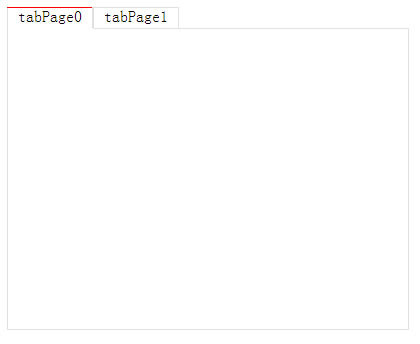
最終效果如圖:
希望本文所述對大家JavaScript程序設計有所幫助。
小編推薦
熱門推薦