JAVASCRIPT代碼編寫俄羅斯方塊網頁版
編輯:關於JavaScript
俄羅斯方塊方塊是小時候的一個回憶,從最開始的掌上的黑白游戲機,到電視游戲機,到電腦,無不有它的痕跡,今天我們來一起重溫它的一種實現方法,也算是整理一下我的思路吧......
HTML+CSS+JS實現俄羅斯方塊完整版,素材只有圖片,想要的下載圖片按提示名字保存,css中用的時候注意路徑!!主要在JS中!JS附有詳細注釋
效果:

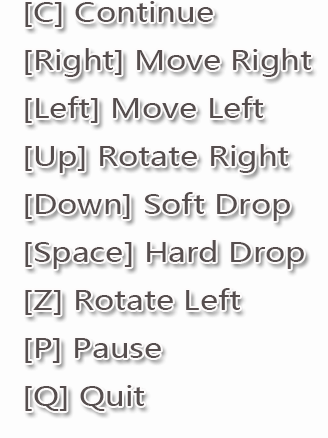
按鍵提示:[鍵盤按鍵]
素材:圖片名字與代碼裡對應
1、背景圖片:tetris.png

2、失敗時候的彈出框圖片:game-over.png

3、七種色彩小方塊圖片:
I.png:
J.png:
L.png:
O.png:
S.png:
T.png:
Z.png:
HTML代碼
<!DOCTYPE html>
<html>
  <head>
    <meta charset="UTF-8" />
    <title>俄羅斯方塊 — 經典完整版</title>
    <link rel="stylesheet" href="css/tetris.css"/>
    <script src="js/shapes.js"></script>
    <script src="js/tetris.js"></script>
  </head>
  <body>
    <div class="playground">
      <p>SCORE:<span>0</span></p>
      <p>LINES:<span>0</span></p>
      <p>LEVEL:<span>1</span></p>
    </div>
  </body>
</html>
CSS代碼
.playground {
  width: 525px;
  height: 550px;
  margin: 20px auto 0 auto;
  position: relative;
  background-image:url("tetris.png");
}
.playground img { position: absolute;}
.playground p {font-size: 30px;
        font-family: 'SimHei';
        font-weight: bold;
        color: #667799;
        position: absolute;
        left:305px;
        top:120px;
}
.playground p+p { top:176px; }
.playground p+p+p { top:232px; }
JAVASCRIPT代碼:分兩段附有詳細步驟解釋
1、tetris.js
window.$=HTMLElement.prototype.$=function(selector){
  return (this==window?document:this).querySelectorAll(selector);
}
var tetris={
  RN:20,//總行數
  CN:10,//總列數
  CSIZE:26,//每個格子的寬高都是26px
  OFFSET_X:15,//每個單元格的左側都要加15px
  OFFSET_y:15,//每個單元格的上面都要加15px
  pg:null,//保存游戲主界面對象
  currShape:null,//專門保存正在移動的圖形對象
  nextShape:null,//八、專門保存下一個圖形
  interval:500,//每秒重繪一次==>下落的速度
  timer:null,
  wall:[],//六、保存所有停止的下落的方塊
  state:1,//十、保存游戲當前狀態
  STATE_RUNNING:1,//十、游戲正在運行
  STATE_GAMEOVER:0,//十、游戲結束
  STATE_PAUSE:2,//十、游戲暫停
  IMG_GAMEOVER:"img/game-over.png",
  IMG_PAUSE:"img/pause.png",
  SCORES:[0,10,50,80,200],//十三,要加的分數檔位
  score:0,//十三、當前總分
  lines:0,//十三、當前總行數
  //十、為游戲添加不同狀態的圖片
  paintState:function(){//根據當前游戲狀態,為游戲添加不同的圖片
    var img=new Image();
    switch(this.state){
    //如果當前狀態是STATE_GAMEOVER
    case this.STATE_GAMEOVER:
    //   img.src設置為IMG_GAMEOVER
      img.src=this.IMG_GAMEOVER;
      break;
    //如果當前狀態是STATE_PAUSE
    case this.STATE_PAUSE:
    //   img.src設置為IMG_PAUSE
      img.src=this.IMG_PAUSE;
    }
    //將img追加到pg中
    this.pg.appendChild(img);
  },
  init:function(){
    this.pg=$(".playground")[0];
    //創建一個隨機圖形的對象存在currShape中
    this.currShape=this.randomShape();
    this.nextShape=this.randomShape();
    //六、將wall數組初始化為RN的空數組對象
    for(var i=0;i<this.RN;i++){
      this.wall[i]=[];
    }
    this.score=0;//十六、初始化
    this.lines=0;//十六、初始化
    this.state=1;//十六、初始化
    this.paint();
    //三、
    this.timer=setInterval(function(){
      //調用tetris的drop方法
      tetris.drop();
      //再調用tetris的paint方法;
      tetris.paint();
    },this.interval);
    //十一、
    document.onkeydown=function(){
      var e=window.event||arguments[0];
      switch(e.keyCode){
        case 37: tetris.moveL();break;//左
        case 39: tetris.moveR();break;//右
        case 40: tetris.drop();break;//下
        //十五步、
        case 38: tetris.rotateR();break;//上鍵控制右邊旋轉
        case 90: tetris.rotateL();break;//字母Z鍵控制控制左邊旋轉
        //十六步
        case 80: tetris.pause();break;//字母P鍵:暫停
        case 81: tetris.gameOver();break;//字母Q:結束游戲
        case 67: tetris.myContinue();break;//字母C,在暫停後有效:暫停後,繼續游戲
        case 83: //游戲結束後,重新開始
          if(this.state==this.STATE_GAMEOVER){
            tetris.init();
          }//字母S鍵:重新開始游戲
      }
    }
  },//init的結束
  //十六、暫停,開始,繼續、結束
  gameOver:function(){
    this.state=this.STATE_GAMEOVER;
    clearInterval(this.timer);
    this.timer=null;
    this.paint();
  },
  pause:function(){
    if(this.state==this.STATE_RUNNING){
      this.state=this.STATE_PAUSE;
    }
  },
  myContinue:function(){
    if(this.state==this.STATE_PAUSE){
      this.state=this.STATE_RUNNING;
    }
  },
  //十五、變形
  rotateR:function(){//按鍵上,向右旋轉
    if(this.state==this.STATE_RUNNING){//十六
      this.currShape.rotateR();
      if(this.outOfBounds()||this.hit()){//驗證不通過
        this.currShape.rotateL();
      }
    }
  },
  rotateL:function(){//按鍵Z,向左旋轉
    if(this.state==this.STATE_RUNNING){
      this.currShape.rotateL();
      if(this.outOfBounds()||this.hit()){//驗證不通過
        this.currShape.rotateR();
      }
    }
  },
  //十一、
  moveR:function(){
    this.currShape.moveR();
    if(this.outOfBounds()||this.hit()){//驗證不通過
      this.currShape.moveL();
    }
  },
  moveL:function(){
    this.currShape.moveL();
    if(this.outOfBounds()||this.hit()){//驗證不通過
      this.currShape.moveR();
    }
  },
  outOfBounds:function(){//檢查當前圖形是否越界
    //當前shape中任意一個單元格的col<0或>=CN
    var cells=this.currShape.cells;
    for(var i=0;i<cells.length;i++){
      if(cells[i].col<0||cells[i].col>=this.CN){
        return true;
      }
    }
    return false;
  },
  hit:function(){//檢查當前圖形是否碰撞
  //當前shape中任意一個單元格在wall中相同位置有格
    var cells=this.currShape.cells;
    for(var i=0;i<cells.length;i++){
      if(this.wall[cells[i].row][cells[i].col]){
        return true;
      }
    }
    return false;
  },
  //四、重繪所有的格子,分數等的方法
  paint:function(){
    //把所有的img格子刪除,再重繪
        /*結尾的4個/<img(.*?){4}>*/
    this.pg.innerHTML=this.pg.innerHTML.replace(/<img(.*?)>/g,"");
    this.paintShape();
    this.paintWall();
    this.paintNext();
    //十三
    this.paintScore();
    this.paintState();//十、
  },
  //十三、計分
  paintScore:function(){//找到span元素
    //第一個span中放this.score
    $("span")[0].innerHTML=this.score;
    //第二個放this.lines
    $("span")[1].innerHTML=this.lines;
  },
  drop:function(){
    //判斷能否下落
    if(this.state==this.STATE_RUNNING){//該行是第十六步加的
      if(this.canDrop()){
        this.currShape.drop();
      }else{//六、否則
        //六、如果不能下落,就將圖形中每個cell,放入wall數組中
        this.landIntoWall();
        //十二、消行、並計分
        var ln=this.deleteLines();//消除並返回本次刪除的行數
        //十三、計分
        this.score+=this.SCORES[ln];
        this.lines+=ln;
        //九、如果游戲沒有結束才。。
        if(!this.isGameOver()){
          //七、將等待的nextShape,換到currShape
          this.currShape=this.nextShape;
          //七、
          this.nextShape=this.randomShape();
        }else{//十、否則,一級結束
          clearInterval(this.timer);
          this.timer=null;
          this.state=this.STATE_GAMEOVER;
          this.paint();//手動繪制一次
        }
      }
    }
  },
  //十二、消行,並計分
  deleteLines:function(){//檢查wall中每一行是否要消除
    //遍歷wall中每一行,定義lines變量存本次共刪除的行數line
    for(var row=0,lines=0;row<this.RN;row++){
      //如果當前行是滿的:isFull(row)
      if(this.isFull(row)){
        // 就刪除當前行:
        this.deleteL(row);
        // 每刪除一行,lines++
        lines++;
      }
    }
    return lines;
  },
  isFull:function(row){//判斷指定行是否已滿
    //取出wall中第row行,存在line變量中
    var line=this.wall[row];
      //遍歷line中每個cell
    for(var c=0;c<this.CN;c++){
      // 只要當前cell無效
      if(!line[c]){
        return false;
      }
    }//遍歷結束後
    return true;
  },
  deleteL:function(row){//刪除指定行,並將其之上所有的cell下移
    this.wall.splice(row,1);//只刪除一行
    this.wall.unshift([]);//頂部壓入一個新空行
    //從row行開始,向上遍歷每一行
    for(var r=row;r>0;r--){
      //   從0開始遍歷當前行每個格
      for(var c=0;c<this.CN;c++){
      //     如果當前格有效
        if(this.wall[r][c]){
        //       將當前格的row++
          this.wall[r][c].row++;
        }
      }
    }
  },
  //九、判斷游戲是否結束
  isGameOver:function(){
    //獲取nextShape中所有cell,保存在cells中
    var cells=this.nextShape.cells;
    //遍歷cells中每個cell
    for(var i=0;i<cells.length;i++){
      //取出wall中和當前cell相同row,col位置的格子
      var cell=this.wall[cells[i].row][cells[i].col];
      //只要碰到有效的
      if(cell){
        return true;
      }
    }//for的結束
    return false;
  },
  //八、
  paintNext:function(){
    var cells=this.nextShape.cells;
    for(var i=0;i<cells.length;i++){
      //先將當前cell的row+1,存在r變量中
      var r=cells[i].row+1;
      //再將當前cell的col+11,存在c變量中
      var c=cells[i].col+11;
      var x=c*this.CSIZE+this.OFFSET_X;
      var y=r*this.CSIZE+this.OFFSET_y;
      var img=new Image();
      img.src=cells[i].img;
      img.style.left=x+"px";
      img.style.top=y+"px";
      this.pg.appendChild(img);
    }
  },
  //七、
  paintWall:function(){
    //七、遍歷二維數組wall中每個格
    for(var r=0;r<this.RN;r++){
      for(var c=0;c<this.CN;c++){
        var cell=this.wall[r][c];
    //   如果當前cell有效
        if(cell){
          var x=cell.col*this.CSIZE+this.OFFSET_X;
          var y=cell.row*this.CSIZE+this.OFFSET_y;
          var img=new Image();
          img.src=cell.img;
          img.style.left=x+"px";
          img.style.top=y+"px";
          this.pg.appendChild(img);
        }
      }
    }
  },
  //六、把所有停止下落的方塊放入wall中
  landIntoWall:function(){
    //遍歷當前圖形中每個cells
    // 每遍歷一個cell
    // 就將cell放入wall中相同row,col的位置:this.wall[?][?]=?
    var cells=this.currShape.cells;
    for(var i=0;i<cells.length;i++){
      this.wall[cells[i].row][cells[i].col]=cells[i];
    }
  },
  //五、//判斷是否繼續可以下落
  canDrop:function(){
    //遍歷當前currShape中的cells
    //   只要發現任意一個的cell的row==RN-1
    //   就返回false
    //
    var cells=this.currShape.cells;
    for(var i=0;i<cells.length;i++){
      if(cells[i].row==this.RN-1){
        return false;
      }//七、wall中,當前cell的下一行位置有效
      if(this.wall[cells[i].row+1][cells[i].col]){
        return false
      }
    }//遍歷結束後
    //七、currShape中,任意一個cell的下方有wall中的cell
    return true;
  },
  //4、隨機生成一種圖形--二
  randomShape:function(){
    switch(parseInt(Math.random()*7)){
      case 0: return new O();
      case 1: return new L();
      case 2: return new J();
      case 3: return new S();
      case 4: return new Z();
      case 5: return new I();
      case 6: return new T();
    }
  },
  //3
  paintShape:function(){//3、專門繪制當前圖形的方法
    var cells=this.currShape.cells;
    for(var i=0;i<cells.length;i++){
      var x=cells[i].col*this.CSIZE+this.OFFSET_X;
      var y=cells[i].row*this.CSIZE+this.OFFSET_y;
      var img=new Image();
      img.src=cells[i].img;
      img.style.left=x+"px";
      img.style.top=y+"px";
      this.pg.appendChild(img);
    }
  },//paintShape的結束
}//tetris結束
window.onload=function(){
  tetris.init();
}
2、shapes.js
function Cell(row,col,img){
  this.row=row;
  this.col=col;
  this.img=img;
  //三下落
  if(!Cell.prototype.drop){
    Cell.prototype.drop=function(){
      this.row++;
    }
  }
  if(!Cell.prototype.moveR){//十一
    Cell.prototype.moveR=function(){
      this.col++;
    }
  }
  if(!Cell.prototype.moveL){//十一
    Cell.prototype.moveL=function(){
      this.col--;
    }
  }
}
//十四、下落的各種變化狀態
function State(r0,c0,r1,c1,r2,c2,r3,c3){
  //第0個cell相對於參照cell的下標偏移量
  this.r0=r0;
  this.c0=c0;
  //第1個cell相對於參照cell的下標偏移量
  this.r1=r1;
  this.c1=c1;
  //第2個cell相對於參照cell的下標偏移量
  this.r2=r2;
  this.c2=c2;
  //第3個cell相對於參照cell的下標偏移量
  this.r3=r3;
  this.c3=c3;
}
function Shape(img,orgi){
  this.img=img;
  this.states=[];//十四、保存每個圖形不同狀態的數組
  this.orgi=orgi;//十四、以它為固定不變的參照點,去旋轉變形,就是數組states的下標
  this.statei=0;//默認所有圖形的最初狀態都是0
  //三
  if(!Shape.prototype.drop){
    Shape.prototype.drop=function(){
      //遍歷當前對象的cells中的每個cell對象
      //  調用當前cell對象的drop方法
      for(var i=0;i<this.cells.length;i++){
        this.cells[i].drop();
      }
    }
  }
  if(!Shape.prototype.moveR){//十一
    Shape.prototype.moveR=function(){
      //遍歷當前對象的cells中的每個cell對象
      for(var i=0;i<this.cells.length;i++){
      //  調用當前cell對象的drop方法
        this.cells[i].moveR();
      }
    }
  }
  if(!Shape.prototype.moveL){//十一
    Shape.prototype.moveL=function(){
      //遍歷當前對象的cells中的每個cell對象
      for(var i=0;i<this.cells.length;i++){
      //  調用當前cell對象的drop方法
        this.cells[i].moveL();
      }
    }
  }
  //十五
  if(!Shape.prototype.rotateR){
    Shape.prototype.rotateR=function(){
      //if(Object.getPrototypeOf(this)!=O.prototype){
      if(this.constructor!=O){
        this.statei++;
        this.statei>=this.states.length&&(this.statei=0);
        //獲得下一個狀態對象
        var state=this.states[this.statei];
        var orgr=this.cells[this.orgi].row;
        var orgc=this.cells[this.orgi].col;
        //遍歷當前圖形中的每個cell
        //按state中偏移量,設置每個cell的新位置
        for(var i=0;i<this.cells.length;i++){
          this.cells[i].row=orgr+state["r"+i];
          this.cells[i].col=orgc+state["c"+i];
        }//for的結束
      }//if的結束
    }//function的結束
  }//if的結束
  if(!Shape.prototype.rotateL){
    Shape.prototype.rotateL=function(){
      //if(Object.getPrototypeOf(this)!O.prototype){
      if(this.constructor!=O){
        this.statei--;
        this.statei<0&&(this.statei=this.states.length-1);
        //獲得下一個狀態對象
        var state=this.states[this.statei];
        var orgr=this.cells[this.orgi].row;
        var orgc=this.cells[this.orgi].col;
        //遍歷當前圖形中的每個cell
        //按照state中偏移量,設置每個cell的心位置
        for(var i=0;i<this.cells.length;i++){
          this.cells[i].row=orgr+state["r"+i];
          this.cells[i].col=orgc+state["c"+i];
        }//for的結束
      }//if的結束
    }//function的結束
  }//if的結束
}//function Shape(img,orgi)的結束
//二
function O(){//1
  Shape.call(this,"img/O.png");
  if(!Shape.prototype.isPrototypeOf(O.prototype)){
    Object.setPrototypeOf(O.prototype,Shape.prototype);//繼承
  }
  this.cells=[
    new Cell(0,4,this.img),new Cell(0,5,this.img),
    new Cell(1,4,this.img),new Cell(1,5,this.img)
  ];
}
function T(){//2
  Shape.call(this,"img/T.png",1);
  if(!Shape.prototype.isPrototypeOf(T.prototype)){
    Object.setPrototypeOf(T.prototype,Shape.prototype);//繼承
  }
  this.cells=[
    new Cell(0,3,this.img),new Cell(0,4,this.img),
    new Cell(0,5,this.img),new Cell(1,4,this.img)
  ];
  //十四
  this.states[0]=new State(0,-1, 0,0, 0,1, 1,0);
  this.states[1]=new State(-1,0, 0,0, 1,0, 0,-1);
  this.states[2]=new State(0,1, 0,0, 0,-1, -1,0);
  this.states[3]=new State(1,0, 0,0, -1,0, 0,1);
            //  [0]  [1] [2] [3]
}

function I(){//3
  Shape.call(this,"img/I.png",1);
  if(!Shape.prototype.isPrototypeOf(I.prototype)){
    Object.setPrototypeOf(I.prototype,Shape.prototype);//繼承
  }
  this.cells=[
    new Cell(0,3,this.img),new Cell(0,4,this.img),
    new Cell(0,5,this.img),new Cell(0,6,this.img)
  ];
  this.states[0]=new State(0,-1, 0,0, 0,1, 0,2);
            //  [0]  [1] [2] [3]
  this.states[1]=new State(-1,0, 0,0, 1,0, 2,0);
}
function S(){//4
  Shape.call(this,"img/S.png",3);
  if(!Shape.prototype.isPrototypeOf(S.prototype)){
    Object.setPrototypeOf(S.prototype,Shape.prototype);//繼承
  }
  this.cells=[
    new Cell(0,4,this.img),new Cell(0,5,this.img),
    new Cell(1,3,this.img),new Cell(1,4,this.img)
  ];
  //十四
  this.states[0]=new State(-1,0, -1,1, 0,-1, 0,0);
  this.states[1]=new State(0,1, 1,1, -1,0, 0,0);
            //  [0]  [1] [2] [3]
}
function Z(){//5
  Shape.call(this,"img/Z.png",1);
  if(!Shape.prototype.isPrototypeOf(Z.prototype)){
    Object.setPrototypeOf(Z.prototype,Shape.prototype);//繼承
  }
  this.cells=[
    new Cell(0,3,this.img),new Cell(0,4,this.img),
    new Cell(1,4,this.img),new Cell(1,5,this.img)
  ];
  this.states[0]=new State(0,-1, 0,0, 1,0, 1,1);
  this.states[1]=new State(-1,0, 0,0, 0,-1, 1,-1);
            //  [0]  [1] [2] [3]
}
function L(){//6
  Shape.call(this,"img/L.png",1);
  if(!Shape.prototype.isPrototypeOf(L.prototype)){
    Object.setPrototypeOf(L.prototype,Shape.prototype);//繼承
  }
  this.cells=[
    new Cell(0,3,this.img),new Cell(0,4,this.img),
    new Cell(0,5,this.img),new Cell(1,3,this.img)
  ];
  this.states[0]=new State(0,-1, 0,0, 0,1, 1,-1);
  this.states[1]=new State(-1,0, 0,0, 1,0, -1,-1);
  this.states[2]=new State(0,1, 0,0, 0,-1, -1,1);
  this.states[3]=new State(1,0, 0,0, -1,0, 1,1);
            //  [0]  [1] [2] [3]
}
function J(){//7
  Shape.call(this,"img/J.png",1);
  if(!Shape.prototype.isPrototypeOf(J.prototype)){
    Object.setPrototypeOf(J.prototype,Shape.prototype);//繼承
  }
  this.cells=[
    new Cell(0,3,this.img),new Cell(0,4,this.img),
    new Cell(0,5,this.img),new Cell(1,5,this.img)
  ];
  this.states[0]=new State(-1,0, 0,0, 1,-1, 1,0);
  this.states[1]=new State(0,1, 0,0, -1,-1, 0,-1);
  this.states[2]=new State(1,0, 0,0, -1,1, -1,0);
  this.states[3]=new State(0,-1, 0,0, 1,1, 0,1);
            //  [0]  [1] [2] [3]
}
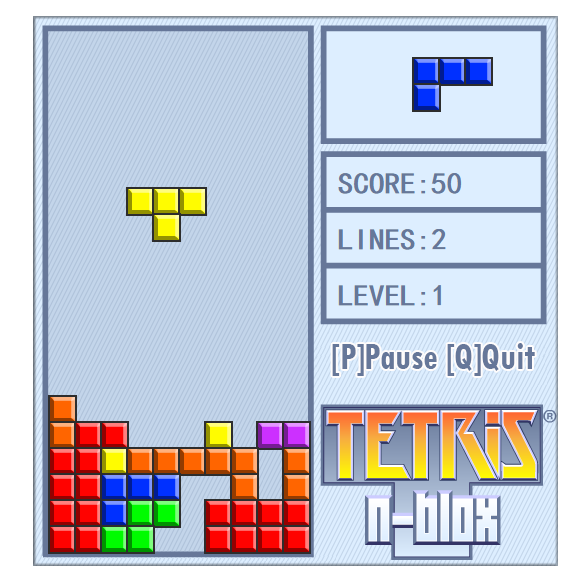
最終效果圖如下所示:
------------------------------------------------------------------------------------>為了生活而改變,為了改變而創造.
以上就是小編給大家分享的關於基於javascript代碼編寫的網頁版俄羅斯方塊。希望大家喜歡。
- 上一頁:js過濾HTML標簽完整實例
- 下一頁:Bootstrap每天必學之按鈕
小編推薦
熱門推薦