javascript發送短信驗證碼實現代碼
編輯:關於JavaScript
本文首先分析手機發送驗證碼的原理,再對javascript發送短信驗證碼予以實現,具體思路如下:
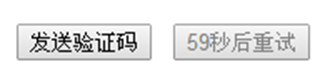
實現點擊“發送驗證碼”按鈕後,按鈕依次顯示為“59秒後重試”、“58秒後重試”…直至倒計時至0秒時再恢復顯示為“發送驗證碼”。在倒計時期間按鈕為禁用狀態 .
第一步、獲取按鈕、綁定事件、設置定時器變量和計時變量
第二步、添加定時器,每隔1秒鐘計時減 1,直至當計時小於等於 0 時清除定時器,按鈕恢復為“發送驗證碼”,否則顯示為“X秒後重試”
效果圖:
實現代碼:
<!doctype html>
<html lang="en">
<head>
  <meta charset="UTF-8">
  <title>Document</title>
  <script type="text/javascript">
  window.onload=function(){
    var send=document.getElementById('send'),
      times=60,
      timer=null;
    send.onclick=function(){
     // 計時開始
     var that = this;
      this.disabled=true;
      timer = setInterval(function(){
        times --;
        that.value = times + "秒後重試";
        if(times <= 0){
          that.disabled =false;
          that.value = "發送驗證碼";
          clearInterval(timer);
          times = 60;
        }
        //console.log(times);
      },1000);
    }
  }
  </script>
</head>
<body>
  <input type="button" id="send" value="發送驗證碼">
</body>
</html>
注意點:
設置按鈕是否為禁用時,send.disabled=true; send.disabled=false;
true和false不能加引號!true和false不能加引號!true和false不能加引號!否則值永遠為真。
也可用send.setAttribute('disabled','disabled');
或send.removeAttribute('disabled');
以上就是為大家分享的javascript發送短信驗證碼全部代碼,希望對大家的學習有所幫助。
小編推薦
熱門推薦