js實現基於正則表達式的輕量提示插件
編輯:關於JavaScript
本文實例講述了基於正則表達式的輕量提示插件,分享給大家供大家參考。具體如下:
這是一款javascript實現基於正則表達式的輕量提示插件,本插件是基於正則表達式進行文本框檢測的,通用性十分強,大家可以在實例中進行使用。
運行效果圖: -------------------查看效果-------------------
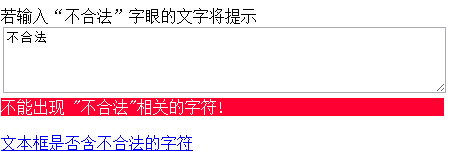
小提示:浏覽器中如果不能正常運行,可以嘗試切換浏覽模式。
關鍵代碼:
    $(document).ready(function () {
      $("#message").inputNotes(
       {
         sexwarning: {
           pattern: /(^|\s)色情(\s|$)/ig,
           type: 'warning',
           text: 'Do not type "sex"!'
         },
         numbersnote: {
           pattern: /[0-9]/,
           type: 'note',
           text: 'Do not type numbers!'
         }
       }
      );
    });
為大家分享的代碼如下
<!DOCTYPE html>
<html xmlns="http://www.w3.org/1999/xhtml">
<head>
  <meta http-equiv="Content-Type" content="text/html; charset=utf-8" />
  <title>基於正則表達式的輕量提示插件</title>
  <script src="js/jquery-1.7.1.js"></script>
  <script src="js/jquery.inputnotes-0.6.js"></script>
</head>
<style>
  div.inputnotes div.warning
  {
    color: #fff;
    background: #f03;
  }
</style>
<body>
  若輸入“不合法”字眼的文字將提示<br />
  <textarea  id="message" cols="60" rows="4" ></textarea>
  <a href="javascript:void(null);" onclick="alert( $('#message').hasInputNotes() )"><br />文本框是否含不合法的字符</a>
  <script>
    $(document).ready(function () {
      $("#message").inputNotes(
       {
         sexwarning: {
           pattern: /(^|\s)不合法(\s|$)/ig,
           type: 'warning',
           text: '不能出現 "不合法"相關的字符!'
         },
         numbersnote: {
           pattern: /[0-9]/,
           type: 'note',
           text: 'Do not type numbers!'
         }
       }
      );
    });

  </script>
</body>
</html>
以上就是為大家分享的基於正則表達式的輕量提示插件,希望大家可以喜歡,並應用到實踐中。
小編推薦
熱門推薦