純javascript判斷查詢日期是否為有效日期
編輯:關於JavaScript
以下內容主要通過js代碼給大家介紹,代碼比較簡單,包含注釋,有好的建議歡迎提出。
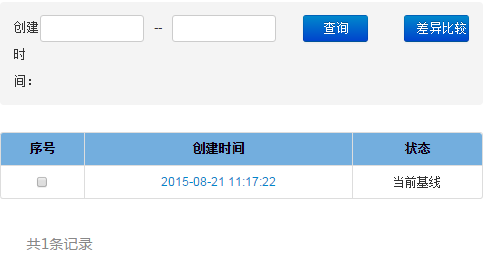
如下圖,當查詢條件含有日期時,如“2012-3-4”,查詢前校驗輸入的日期字符串是否為有效的日期
var snapshot_createTime_begin=$(selector+" input[name='createTime_begin']").val().trim();
      var snapshot_createTime_end=$(selector +" input[name='createTime_end']").val().trim();
      try{
        //判斷開始時間是否為有效的日期
        if(snapshot_createTime_begin!=""&&new Date(snapshot_createTime_begin).getDate()!=snapshot_createTime_begin.match(/-\d{0,2}$/g)[0].replace(/-/g,"")){
          throw new Error();
        }
        //判斷結束時間是否為有效的日期
        if(snapshot_createTime_end!=""&&new Date(snapshot_createTime_end).getDate()!=snapshot_createTime_end.match(/-\d{0,2}$/g)[0].replace(/-/g,"")){
          throw new Error();
        }
        if(Date.parse(snapshot_createTime_begin)>Date.parse(snapshot_createTime_end)){
          //alert("開始日期不應當超過結束日期!");
          alert("開始日期不應當超過結束日期!");
          return ;
        }
        $.extend(pageObj,{
          createTimeBegin:snapshot_createTime_begin,
          createTimeEnd:snapshot_createTime_end,
        });
        initPagination();
      }catch(e){
        //alert("請輸入有效日期!")
        alert("請輸入有效日期!");
      }
js判斷年月日是否一個有效日期
function isdate(intYear,intMonth,intDay){
 if(isNaN(intYear)||isNaN(intMonth)||isNaN(intDay)) return false;
 if(intMonth>12||intMonth<1) return false;
 if ( intDay<1||intDay>31)return false;
 if((intMonth==4||intMonth==6||intMonth==9||intMonth==11)&&(intDay>30)) return false;
 if(intMonth==2){
   if(intDay>29) return false;
   if((((intYear%100==0)&&(intYear%400!=0))||(intYear%4!=0))&&(intDay>28))return false;
  }
 return true;
}
以上代碼就是對日期的有效性校驗,希望對大家有所幫助。
小編推薦
熱門推薦