javascript制作的簡單注冊模塊表單驗證
編輯:關於JavaScript
一個注冊框 進行表單驗證處理
如圖
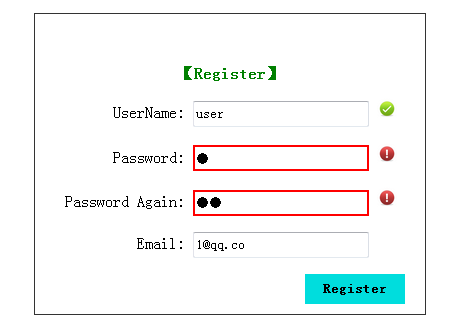
有簡單的驗證提示功能
代碼思路也比較簡單
輸入框失去焦點時便檢測,並進行處理
表單具有 onsubmit = "return check()"行為,處理驗證情況
點擊提交表單按鈕時,進行最終的驗證,達到是否通過表單提交的請求。
先是最基本的html+css部分
 <style type="text/css">
   body{margin:0;padding: 0;}
   .login{position:relative;margin:100px auto;padding:50px 20px;width: 350px;height: 200px;border:1px solid #333;}
   .login legend{font-weight: bold;color: green;text-align: center;}
   .login label{display:inline-block;width:130px;text-align: right;}
   .btn{height: 30px;width:100px;padding: 5px;border:0;background-color: #00dddd;font-weight: bold;cursor: pointer;float: right;}
   input{height: 20px;width: 170px;}
   .borderRed{border: 2px solid red;}
   img{display: none;}
 </style>
 </head>
 <body>
   <div class="login">
     <form name="form" method="post" action="register.php" onsubmit="return check()">
       <legend>【Register】</legend>
       <p><label for="name">UserName: </label>
       <input type="text" id="name" >
       <img src="./img/gou.png" width="20px" height="20px"></p>
       <p><label for="password">Password: </label>
       <input type="password" id="password" >
       <img src="./img/gantan.png" width="20px" height="20px"></p>
       <p><label for="R_password">Password Again: </label>
       <input type="password" id="R_password" >
       <img src="./img/gou.png" width="20px" height="20px"></p>
       <p><label for="email">Email: </label>
       <input type="text" id="email" >
       <img src="./img/gou.png" width="20px" height="20px"></p>
       <p><input type="submit" value="Register" class="btn"></p>
     </form>
   </div>
然後是js的class相關處理函數
  function hasClass(obj,cls){  // 判斷obj是否有此class
    return obj.className.match(new RegExp('(\\s|^)' + cls + '(\\s|$)'));
  }
  function addClass(obj,cls){ //給 obj添加class
    if(!this.hasClass(obj,cls)){
      obj.className += " "+cls;
    }
  }
  function removeClass(obj,cls){ //移除obj對應的class
    if(hasClass(obj,cls)){
      var reg = new RegExp('(\\s|^)' + cls + '(\\s|$)');
      obj.className = obj.className.replace(reg," ");
    }
  }
然後是驗證各個輸入框的值
 function checkName(name){  //驗證name
    if(name != ""){ //不為空則正確,當然也可以ajax異步獲取服務器判斷用戶名不重復則正確
      removeClass(ele.name,"borderRed"); //移除class
      document.images[0].setAttribute("src","./img/gou.png"); //對應圖標
      document.images[0].style.display = "inline"; //顯示
      return true;
    }else{ //name不符合
      addClass(ele.name,"borderRed"); //添加class
      document.images[0].setAttribute("src","./img/gantan.png"); //對應圖標
      document.images[0].style.display = "inline"; //顯示
      return false;
    }
  }
  function checkPassw(passw1,passw2){ //驗證密碼
    if(passw1 == "" || passw2 == "" || passw1 !== passw2){ //兩次密碼輸入不為空且不等 不符合
      addClass(ele.password,"borderRed");
      addClass(ele.R_password,"borderRed");
      document.images[1].setAttribute("src","./img/gantan.png");
      document.images[1].style.display = "inline";
      document.images[2].setAttribute("src","./img/gantan.png");
      document.images[2].style.display = "inline";
      return false;
    }else{  //密碼輸入正確
      removeClass(ele.password,"borderRed");
      removeClass(ele.R_password,"borderRed");
      document.images[1].setAttribute("src","./img/gou.png");
      document.images[1].style.display = "inline";
      document.images[2].setAttribute("src","./img/gou.png");
      document.images[2].style.display = "inline";
      return true;
    }
  }
  function checkEmail(email){  //驗證郵箱
    var pattern = /^([\.a-zA-Z0-9_-])+@([a-zA-Z0-9_-])+(\.[a-zA-Z0-9_-])+/;
    if(!pattern.test(email)){ //email格式不正確
      addClass(ele.email,"borderRed");
      document.images[3].setAttribute("src","./img/gantan.png");
      document.images[3].style.display = "inline";
      ele.email.select();
      return false;
    }else{ //格式正確
      removeClass(ele.email,"borderRed");
      document.images[3].setAttribute("src","./img/gou.png");
      document.images[3].style.display = "inline";
      return true;
    }
  }
然後為各個輸入框添加監聽事件:
  var ele = { //存放各個input字段obj
      name: document.getElementById("name"),
      password: document.getElementById("password"),
      R_password: document.getElementById("R_password"),
      email: document.getElementById("email")
    };
    ele.name.onblur = function(){ //name失去焦點則檢測
      checkName(ele.name.value);
    }
    ele.password.onblur = function(){ //password失去焦點則檢測
      checkPassw(ele.password.value,ele.R_password.value);
    }
    ele.R_password.onblur = function(){ //R_password失去焦點則檢測
      checkPassw(ele.password.value,ele.R_password.value);
    }
    ele.email.onblur = function(){ //email失去焦點則檢測
      checkEmail(ele.email.value);
    }
最後就是點擊提交注冊時調用的check()函數了
function check(){  //表單提交則驗證開始
    var ok = false;
    var nameOk = false;
    var emailOk = false;
    var passwOk = false;

    if(checkName(ele.name.value)){ nameOk = true; }  //驗證name
    if(checkPassw(ele.password.value,ele.R_password.value)){ passwOk = true; } //驗證password
    if(checkEmail(ele.email.value)){ emailOk = true; }  //驗證email

    if(nameOk && passwOk && emailOk){
      alert("Tip: Register Success ..");  //注冊成功
      //return true;
    }
    return false;  //有誤,注冊失敗
  }
完整代碼:
<!DOCTYPE html PUBLIC "-//W3C//DTD XHTML 1.0 Transitional//EN" "http://www.w3.org/TR/xhtml1/DTD/xhtml1-transitional.dtd">
<html xmlns="http://www.w3.org/1999/xhtml">
<head>
<meta charset="utf-8">
<meta http-equiv="X-UA-Compatible" content="IE=edge,chrome=1">
<title>Register</title>
<meta name="description" content="">
<meta name="keywords" content="">
<link href="" rel="stylesheet">
<style type="text/css">
  body{margin:0;padding: 0;}
  .login{position:relative;margin:100px auto;padding:50px 20px;width: 350px;height: 200px;border:1px solid #333;}
  .login legend{font-weight: bold;color: green;text-align: center;}
  .login label{display:inline-block;width:130px;text-align: right;}
  .btn{height: 30px;width:100px;padding: 5px;border:0;background-color: #00dddd;font-weight: bold;cursor: pointer;float: right;}
  input{height: 20px;width: 170px;}
  .borderRed{border: 2px solid red;}
  img{display: none;}
</style>
</head>
<body>
  <div class="login">
    <form name="form" method="post" action="register.php" onsubmit="return check()">
      <legend>【Register】</legend>
      <p><label for="name">UserName: </label>
      <input type="text" id="name" >
      <img src="./img/gou.png" width="20px" height="20px"></p>
      <p><label for="password">Password: </label>
      <input type="password" id="password" >
      <img src="./img/gantan.png" width="20px" height="20px"></p>
      <p><label for="R_password">Password Again: </label>
      <input type="password" id="R_password" >
      <img src="./img/gou.png" width="20px" height="20px"></p>
      <p><label for="email">Email: </label>
      <input type="text" id="email" >
      <img src="./img/gou.png" width="20px" height="20px"></p>
      <p><input type="submit" value="Register" class="btn"></p>
    </form>
  </div>
  <script type="text/javascript">
  function hasClass(obj,cls){  // 判斷obj是否有此class
    return obj.className.match(new RegExp('(\\s|^)' + cls + '(\\s|$)'));
  }
  function addClass(obj,cls){ //給 obj添加class
    if(!this.hasClass(obj,cls)){
      obj.className += " "+cls;
    }
  }
  function removeClass(obj,cls){ //移除obj對應的class
    if(hasClass(obj,cls)){
      var reg = new RegExp('(\\s|^)' + cls + '(\\s|$)');
      obj.className = obj.className.replace(reg," ");
    }
  }


  function checkName(name){  //驗證name
    if(name != ""){ //不為空則正確,當然也可以ajax異步獲取服務器判斷用戶名不重復則正確
      removeClass(ele.name,"borderRed"); //移除class
      document.images[0].setAttribute("src","./img/gou.png"); //對應圖標
      document.images[0].style.display = "inline"; //顯示
      return true;
    }else{ //name不符合
      addClass(ele.name,"borderRed"); //添加class
      document.images[0].setAttribute("src","./img/gantan.png"); //對應圖標
      document.images[0].style.display = "inline"; //顯示
      return false;
    }
  }
  function checkPassw(passw1,passw2){ //驗證密碼
    if(passw1 == "" || passw2 == "" || passw1 !== passw2){ //兩次密碼輸入不為空且不等 不符合
      addClass(ele.password,"borderRed");
      addClass(ele.R_password,"borderRed");
      document.images[1].setAttribute("src","./img/gantan.png");
      document.images[1].style.display = "inline";
      document.images[2].setAttribute("src","./img/gantan.png");
      document.images[2].style.display = "inline";
      return false;
    }else{  //密碼輸入正確
      removeClass(ele.password,"borderRed");
      removeClass(ele.R_password,"borderRed");
      document.images[1].setAttribute("src","./img/gou.png");
      document.images[1].style.display = "inline";
      document.images[2].setAttribute("src","./img/gou.png");
      document.images[2].style.display = "inline";
      return true;
    }
  }
  function checkEmail(email){  //驗證郵箱
    var pattern = /^([\.a-zA-Z0-9_-])+@([a-zA-Z0-9_-])+(\.[a-zA-Z0-9_-])+/;
    if(!pattern.test(email)){ //email格式不正確
      addClass(ele.email,"borderRed");
      document.images[3].setAttribute("src","./img/gantan.png");
      document.images[3].style.display = "inline";
      ele.email.select();
      return false;
    }else{ //格式正確
      removeClass(ele.email,"borderRed");
      document.images[3].setAttribute("src","./img/gou.png");
      document.images[3].style.display = "inline";
      return true;
    }
  }


  var ele = { //存放各個input字段obj
      name: document.getElementById("name"),
      password: document.getElementById("password"),
      R_password: document.getElementById("R_password"),
      email: document.getElementById("email")
    };
    ele.name.onblur = function(){ //name失去焦點則檢測
      checkName(ele.name.value);
    }
    ele.password.onblur = function(){ //password失去焦點則檢測
      checkPassw(ele.password.value,ele.R_password.value);
    }
    ele.R_password.onblur = function(){ //R_password失去焦點則檢測
      checkPassw(ele.password.value,ele.R_password.value);
    }
    ele.email.onblur = function(){ //email失去焦點則檢測
      checkEmail(ele.email.value);
    }

  function check(){  //表單提交則驗證開始
    var ok = false;
    var nameOk = false;
    var emailOk = false;
    var passwOk = false;

    if(checkName(ele.name.value)){ nameOk = true; }  //驗證name
    if(checkPassw(ele.password.value,ele.R_password.value)){ passwOk = true; } //驗證password
    if(checkEmail(ele.email.value)){ emailOk = true; }  //驗證email

    if(nameOk && passwOk && emailOk){
      alert("Tip: Register Success ..");  //注冊成功
      //return true;
    }
    return false;  //有誤,注冊失敗
  }
  </script>
</body>
</html>
以上所述就是本文的全部內容了,希望能夠對大家學習javascript表單驗證有所幫助。
- 上一頁:javascript繼承的六大模式小結
- 下一頁:簡化版手機端照片預覽組件
小編推薦
熱門推薦