詳解webpack 多入口配置
編輯:關於JavaScript
同事套搭建vue項目,個人推薦了VUE官網的vue-cil的方式,http://cn.vuejs.org/guide/application.html
順著官網的操作,我們可以本地測試起我們的項目 npm run dev,首先我們要理解webpack打包主要是針對js,查看下面生成的配置,首頁是index.html,模版用的index.html,入口文件用的mian.js
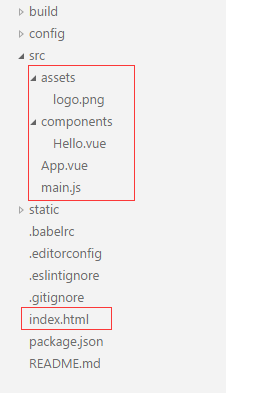
//file build/webpack.base.conf.js
//entry 配置

module.exports = {
 entry: {
  app: './src/main.js'
 },
 //....

//file build/webpack.dev.conf.js
//html配置
  new HtmlWebpackPlugin({
   filename: 'index.html',
   template: 'index.html',
   inject: true
  })
1.上面的目錄沒辦法滿足我們多入口的要求,我們希望的是html放在一個views文件夾下面,相關業務應用的vue放在一起,對就是這個樣子的
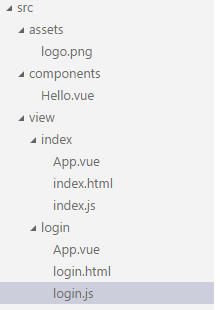
我們先簡單的改動下我們的配置,來適應這個項目結構,再尋找其中的規律,來完成自動配置(index.html)
//file build/webpack.base.conf.js
//entry 配置

module.exports = {
 entry: {
  'index': './src/view/index/index.js',
  'login': './src/view/login/login.js',
 },
 //....

//file build/webpack.dev.conf.js
//html配置,index我們保留了根目錄訪問路徑
  new HtmlWebpackPlugin({
   filename: 'index.html',
   template: './src/view/index/index.html',
   inject: true,
   chunks: ['index']
  }),
  new HtmlWebpackPlugin({
   filename: 'login/login.html', //http訪問路徑
   template: './src/view/login/login.html', //實際文件路徑
   inject: true,
   chunks: ['login']
  })
2.規律出來了,我們只要按照這樣的js和html的對應關系,就可以通過查找文件,來進行同一配置
var glob = require('glob')
function getEntry(globPath, pathDir) {
  var files = glob.sync(globPath);
  var entries = {},
    entry, dirname, basename, pathname, extname;

  for (var i = 0; i < files.length; i++) {
    entry = files[i];
    dirname = path.dirname(entry);
    extname = path.extname(entry);
    basename = path.basename(entry, extname);
    pathname = path.join(dirname, basename);
    pathname = pathDir ? pathname.replace(pathDir, '') : pathname;
    console.log(2, pathname, entry);
    entries[pathname] = './' + entry;
  }
  return entries;
}
//我們的key不是簡單用的上一個代碼的index,login而是用的index/index,login/login因為考慮在login目錄下面還有register
//文件路徑的\\和/跟操作系統也有關系,需要注意
var htmls = getEntry('./src/view/**/*.html', 'src\\view\\');
var entries = {};
var HtmlPlugin = [];
for (var key in htmls) {
  entries[key] = htmls[key].replace('.html', '.js')
  HtmlPlugin.push(new HtmlWebpackPlugin({
   filename: (key == 'index\\index' ? 'index.html' : key + '.html'),
   template: htmls[key],
   inject: true,
    chunks: [key]
  }))
}
3.多入口配置就完成了,當然下面其實還有公共js提取的相關配置,如果項目裡面用到了異步加載,即require.ensure,放在單獨目錄,進行匹配,按照上面的邏輯進行推理吧
小編推薦
熱門推薦