jQuery 雙清單穿梭框實作:左右搬移選項的完整寫法
編輯:關於JavaScript
先看效果:
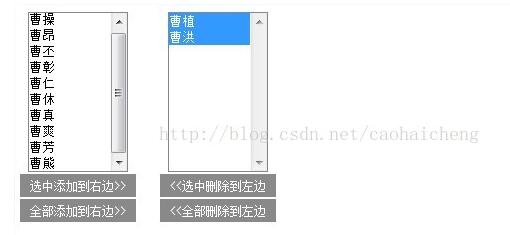
這種「左右兩個列表、中間幾個按鈕」的穿梭框在後台管理系統裡到處可見,比如人員授權、欄位配置。實作起來其實不難,核心只有一個觀念:用 appendTo 把 option 從一個 select 搬進另一個 select,節點被移動的同時自然會從原來的位置移除。
<html> <head> <meta http-equiv="Content-Type" content="text/html; charset=utf-8" /> <title></title> <style type="text/css"> * { margin:0; padding:0; } div.centent { float:left; text-align: center; margin: 10px; } span { display:block; margin:2px 2px; padding:4px 10px; background:#898989; cursor:pointer; font-size:12px; color:white; } </style> <!-- 引入jQuery --> <script src="jquery-2.1.0.min.js" type="text/javascript"></script> <script type="text/javascript"> $(function(){ //移到右邊 $('#add').click(function() { //獲取選中的選項,刪除並追加給對方 $('#select1 option:selected').appendTo('#select2'); }); //移到左邊 $('#remove').click(function() { $('#select2 option:selected').appendTo('#select1'); }); //全部移到右邊 $('#add_all').click(function() { //獲取全部的選項,刪除並追加給對方 $('#select1 option').appendTo('#select2'); }); //全部移到左邊 $('#remove_all').click(function() { $('#select2 option').appendTo('#select1'); }); //雙擊選項 $('#select1').dblclick(function(){ //綁定雙擊事件 //獲取全部的選項,刪除並追加給對方 $("option:selected",this).appendTo('#select2'); //追加給對方 }); //雙擊選項 $('#select2').dblclick(function(){ $("option:selected",this).appendTo('#select1'); }); }); </script> </head> <body> <div class="centent"> <select multiple="multiple" id="select1" style="width:100px;height:160px;"> <option value="1">曹操</option> <option value="2">曹昂</option> <option value="3">曹丕</option> <option value="4">曹彰</option> <option value="5">曹植</option> <option value="6">曹熊</option> <option value="7">曹仁</option> <option value="8">曹洪</option> <option value="9">曹休</option> <option value="10">曹真</option> <option value="11">曹爽</option> </select> <div> <span id="add" >選中添加到右邊>></span> <span id="add_all" >全部添加到右邊>></span> </div> </div> <div class="centent"> <select multiple="multiple" id="select2" style="width: 100px;height:160px;"> <option value="12">曹芳</option> </select> <div> <span id="remove"><<選中刪除到左邊</span> <span id="remove_all"><<全部刪除到左邊</span> </div> </div> </body> </html>
四個按鈕 + 雙擊,一共六種搬法
整份程式碼實際只做了一件事的六次變形:
1)把選中的 option 追加給對方——option:selected 是關鍵選擇器;
2)把全部 option 追加給對方——去掉 :selected 即可;
3)雙擊某個 option 直接搬過去——用 dblclick 綁定,並把 this 作為上下文傳給 $("option:selected", this),避免誤抓另一側的選中項。
實務上要留意兩點:select 必須帶 multiple="multiple" 才能多選;表單提交前記得把結果清單裡的 option 一併送出,否則後端拿不到資料。
- 上一篇文章: jQuery 彈窗遮罩實作:點擊浮層背景變暗並可空白處關閉
- 下一篇文章: cxSelect 多級聯動下拉選單實作教學:以省/市/區為例