用 jQuery 模擬 select 下拉選單,加上 CSS3 箭頭動畫
編輯:關於JavaScript
這個範例參考電商網站的搜尋下拉效果:用 jQuery 手寫一個可配置的 setSelect 外掛,搭配 CSS3 做出箭頭旋轉動畫,並把選到的值寫回隱藏欄位以便表單送出。
外掛本體
/*
 * 模擬搜尋下拉 select
 * 使用方式:
 * $(el).setSelect({
 *   optionList: [],          // 下拉選項,例如 ['aa','bb']
 *   hiddenInput: '#hidden',  // 用來接收選中值的隱藏 input,供表單提交
 *   getOption: '#sOptionBtn',// 顯示目前選項的元素
 *   callback: function(option){}
 * });
 */
(function ($) {
  $.fn.setSelect = function (options) {
    var opt = $.extend({
      optionList: [],
      getOption: '',
      hiddenInput: '',
      callback: function () {}
    }, options || {});

    return this.each(function () {
      opt._id = this;
      var _time;
      var arrow = $(this).find('i');

      $(opt._id).append('<ul id="selectList"></ul>');
      for (var i = 0; i < opt.optionList.length; i++) {
        $("#selectList").append('<li>' + opt.optionList[i] + '</li>');
      }

      $(opt._id).bind({
        mouseenter: function () {
          $(arrow).addClass('arrow-hover');
          $('#selectList').slideDown();
          clearTimeout(_time);
        },
        mouseleave: function () {
          _time = setTimeout(function () {
            $(arrow).removeClass('arrow-hover');
            $('#selectList').slideUp();
          }, 300);
        }
      });

      // 取得選中的值
      $('#selectList').delegate('li', 'click', function () {
        var option = $(this).text();
        $(opt.getOption).text(option);
        $(opt.hiddenInput).val(option);
        $('#selectList').slideUp();
        return opt.callback(option);
      });
    });
  };
})(jQuery);
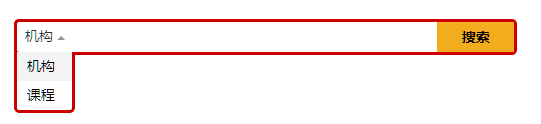
完整頁面程式碼
<!doctype html>
<html>
<head>
<meta http-equiv="Content-type" content="text/html charset=utf-8">
<title></title>
<style>
body, h1, h2, h3, h4, h5, h6, hr, p, blockquote, dl, dt, dd, ul, ol, li,
pre, form, fieldset, legend, button, input, textarea, th, td { margin: 0; padding: 0 }
body, button, input, select, textarea { font: 12px Arial, Helvetica, sans-serif }
h1, h2, h3, h4, h5, h6 { font-size: 100% }
code, kbd, pre, samp { font-family: courier new, courier, monospace }
small { font-size: 12px }
ul, ol { list-style: none }
a { text-decoration: none; color: #333 }
a:hover { text-decoration: underline }
sup { vertical-align: text-top }
sub { vertical-align: text-bottom }
legend { color: #000 }
fieldset, img { border: 0 }
button, input, select, textarea { font-size: 100% }
button { border: 0 none; cursor: pointer }
table { border-collapse: collapse; border-spacing: 0 }
em { font-style: normal }
address { font-style: normal }
textarea { resize: vertical }

.clearfix:after { content: '\20'; display: block; height: 0; clear: both; visibility: hidden }
.clearfix { *zoom: 1 }

.arrow-dn {
  display: inline-block; height: 0; width: 0; font-size: 0; overflow: hidden;
  border: 3px solid #505050; border-color: #505050 transparent transparent;
  _border-style: solid dotted dotted dotted;
}

.top-search {
  width: 497px; height: 30px; _height: 33px;
  background: url(../images/bg.png) left top no-repeat;
  margin: 20px auto; border: 3px solid #cd0001; border-radius: 5px;
  -webkit-border-radius: 5px; -moz-border-radius: 5px; -ms-border-radius: 5px;
  position: relative; z-index: 9;
}
.top-search input {
  width: 350px; float: left; padding: 7px 0; _padding: 6px 0;
  border: none 0; background: 0; color: #666; font-size: 14px;
}
.top-search input:focus { outline: 0 }
.top-search button {
  width: 77px; height: 30px; line-height: 30px; font-weight: bold;
  font-size: 14px; text-align: center; background: #f4ac1f; float: right;
}
.top-search .select {
  float: left; font-size: 14px; width: 55px; padding-top: 5px;
  margin-right: 5px; position: relative; z-index: 3;
}
.top-search .select ul {
  position: absolute; left: -3px; top: 30px; width: 55px; background: #fff;
  border: 3px solid #cd0001; border-bottom-left-radius: 5px;
  border-bottom-right-radius: 5px; border-top: 0; line-height: 1.8; display: none;
}
.top-search .select ul li { cursor: pointer; padding: 2px 0 2px 10px }
.top-search .select ul li:hover { background: #f3f3f3 }
.top-search .select .s-option {
  display: inline-block; position: absolute; top: 0; height: 32px;
  line-height: 28px; width: 45px; padding-left: 8px;
}
.top-search .select a:hover { text-decoration: none }
.top-search .select .arrow-dn {
  border-width: 4px; border-color: #939393 transparent transparent;
  position: absolute; right: 7px; top: 11px;
  -webkit-transition: -webkit-transform .2s ease-in-out;
  -webkit-transform: translate3d(0, 0, 999px);
  -webkit-backface-visibility: visible;
  -moz-transition: -moz-transform .2s ease-in-out;
  -moz-transform: translate3d(0, 0, 999px);
  -moz-backface-visibility: visible;
}
.top-search .select .arrow-hover {
  -webkit-transform: rotate(-180deg);
  -moz-transform: rotate(-180deg);
  -o-transform: rotate(-180deg);
  border-color: transparent transparent #939393\9;
  top: 10px; top: 7px\9; _top: 11px;
}
</style>
</head>
<body>
<form class="top-search clearfix">
  <!-- 隱藏的 input 用來接收 option 值 -->
  <input type="hidden" id="optionHidden" value="機構">
  <div class="select">
    <a id="sOptionBtn" class="s-option" href="javascript:void(0)">機構</a>
    <i class="arrow-dn"></i>
  </div>
  <input type="text" id="kw">
  <button type="submit">搜索</button>
</form>

<script src="https://ajax.googleapis.com/ajax/libs/jquery/1.7.2/jquery.min.js"></script>
<script>
$(function(){
  $('.top-search .select').setSelect({
    optionList: ['機構', '課程'],
    hiddenInput: '#optionHidden',
    getOption: '#sOptionBtn',
    callback: function (option) {}
  });
});
</script>
</body>
</html>
幾個設計上的巧思:
mouseleave延遲 300ms 才收合,讓滑鼠能從觸發區移動到下拉清單上而不會中途關閉;mouseenter時則clearTimeout取消待處理的收合。- 選項用
delegate綁事件委派,選項若是動態產生也不必重新綁定。 - 把選中的值同步寫入隱藏 input,表單送出時後端就能直接取得,不必另外解析 DOM。
- 箭頭是用純 CSS 邊框做出來的三角形,旋轉動畫則靠
transform: rotate(-180deg),只在較新的 Chrome 與 Firefox 上能看到動畫效果。
- 上一篇文章: jQuery 選擇器全面整理:基礎、過濾、表單一次搞懂
- 下一篇文章: jQuery 依 name 屬性取值的幾種寫法