jQuery時間軸外掛實作詳解(含拖拽功能)
編輯:關於JavaScript
這個時間軸外掛是我在工作上實際用到的,參考了不少常見產品(如 QQ 空間、百度文庫)的時間軸控件後自己動手實作。用戶點擊左側的錨點連結,三角形指示物會滾動,右側的內容區也會跟著捲動,整體互動相當流暢。
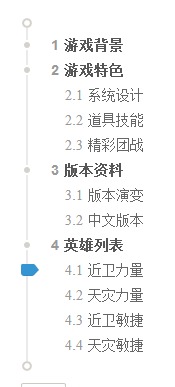
這裡有個小技巧:用 after 與 before 偽類元素來產生三角形,而點擊按鈕後的滾動效果則直接用 jQuery 的 animate() 方法完成。
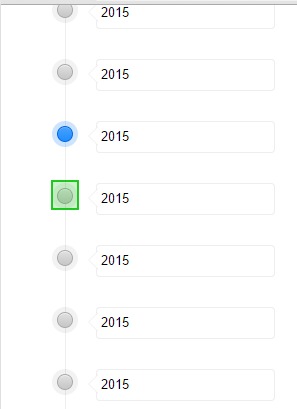
外掛對外的互動方式透過 window.onWebMessage 收送 JSON 訊息,支援設定資料、設定單一項目、切換選中態與取得目前資料等操作:
 <!-- //設置內容;
 window.onWebMessage( '{"type":"setItems","data":{"items":[{"name":1111},{"name":2222}]}}' ) ;
 //設置內容, 對應的item對象如果active為true為激活態;
 window.onWebMessage( '{"type":"setItems","data":{"items":[{"name":1000},{"name":1111},{"name":2222},{"name":3333,"active":true}]}}' ) ;
 //設置某個第n個位置的item;
 window.onWebMessage('{"type":"setItem","data":[2,{ "name" : "add-item"}]}');
 //激活第三個錨鏈接為選中態;
 window.onWebMessage( '{"type":"active","data":2}' )
 //獲取目前的數據:
 window.onWebMessage( '{"type":"getItem"}' );
 -->
 <html>
 <head>
 <meta charset="utf-8" />
 <script src="https://cdn.bootcss.com/jquery/2.1.4/jquery.js"></script>
 </head>
 <style>
 /*初始的reset樣式*/
 *{ margin:0; padding:0; }
 .time-line-wrap{ position: relative; width: 400px; margin:0 auto; }
 ul{ list-style: none; }
 body,html{ height: 100%; }
 body{ -webkit-user-select: none; -moz-user-select: none; -ms-user-select: none; user-select: none; }
 /*樣式開始*/
 .scroll-time-line{ height:100%; overflow: hidden; }
 .time-line-wrap{ position: relative; }
 .time-line-ul{ position: relative; }
 /** 時間軸的軸用偽類實現; */
 .time-line-ul::before{ display: block; position:absolute; content:""; height:100%; width:1; left:27px; top:0; background: #eee; }
 .time-line-ul li{ padding:14px; position: relative; }
 .time-line-ul input { vertical-align: super; border-radius: 4px; border:1px solid #eee; padding:4px; line-height: 22px; margin-left:10px; }
 /** 使用after和before偽類實現input前面的三角形; */
 .time-line-ul li::before{ position: absolute; content: ""; display: block; top: 21px; left: 40px; width: 0px; height: 0px; border: 10px solid rgba(0, 0, 0, 0); border-right: 10px solid #EEE; }
 .time-line-ul li::after{ position: absolute; content: ""; display: block; top: 21px; left: 41px; width: 0px; height: 0px; border: 10px solid rgba(0, 0, 0, 0); border-right: 10px solid #fff; }
 /** 默認時間軸錨鏈接的樣式 */
 .time-line-icon{ width: 26px; height: 28px; display: inline-block; background: url(https://images0.cnblogs.com/blog2015/497865/201507/131424386411828.png); }
 /** 鼠標移動上來,或者錨鏈接有active時候的背景圖樣式 */
 .time-line-icon.active,.time-line-icon:hover{ background-position: 0px 28px; }
 </style>
 <!--模板,勿刪!-->
 <script type="text/tempate" id="li-tpl">
 <% for(var i=0; i<items.length; i++ ) {%>
 <li class="li-<%=i%>">
 <a href="###" class="time-line-icon <% if(items[i].active){ %> <%="active"%> <%}%> "></a>
 <input type="text" value="<%=items[i].name%>"/>
 </li>
 <% } %>
 </script>
 <body>
 <!-- 滾動出現在這個div裡面 -->
 <div class="scroll-time-line">
 <!--- 時間軸相關的html結構 -->
 <div class="time-line-wrap">
 <ul class="time-line-ul">
 <li> <a href="###" class="time-line-icon"></a> <input type="text" value="2015"/> </li>
 <li> <a href="###" class="time-line-icon"></a> <input type="text" value="2015"/> </li>
 <li> <a href="###" class="time-line-icon"></a> <input type="text" value="2015"/> </li>
 <li> <a href="###" class="time-line-icon"></a> <input type="text" value="2015"/> </li>
 <li> <a href="###" class="time-line-icon"></a> <input type="text" value="2015"/> </li>
 <li> <a href="###" class="time-line-icon"></a> <input type="text" value="2015"/> </li>
 <li> <a href="###" class="time-line-icon"></a> <input type="text" value="2015"/> </li>
 <li> <a href="###" class="time-line-icon"></a> <input type="text" value="2015"/> </li>
 <li> <a href="###" class="time-line-icon"></a> <input type="text" value="2015"/> </li>
 <li> <a href="###" class="time-line-icon"></a> <input type="text" value="2015"/> </li>
 <li> <a href="###" class="time-line-icon"></a> <input type="text" value="2015"/> </li>
 <li> <a href="###" class="time-line-icon"></a> <input type="text" value="2015"/> </li>
 <li> <a href="###" class="time-line-icon"></a> <input type="text" value="2015"/> </li>
 <li> <a href="###" class="time-line-icon"></a> <input type="text" value="2015"/> </li>
 <li> <a href="###" class="time-line-icon"></a> <input type="text" value="2015"/> </li>
 <li> <a href="###" class="time-line-icon"></a> <input type="text" value="2015"/> <li> <a href="###" class="time-line-icon"></a> <input type="text" value="2015"/> </li>
 <li> <a href="###" class="time-line-icon"></a> <input type="text" value="2015"/> </li>
 <li> <a href="###" class="time-line-icon"></a> <input type="text" value="2015"/> </li>
 <li> <a href="###" class="time-line-icon"></a> <input type="text" value="2015"/> </li>
 <li> <a href="###" class="time-line-icon"></a> <input type="text" value="2015"/> </li>
 </ul>
 </div>
 <!--- 時間軸相關的html結構結束 -->
 </div>
 <script>
 //模板引擎的代碼
 (function () {
   //underscore抄的模板引擎;
   var escaper = /\\|'|\r|\n|\t|\u2028|\u2029/g;
   var escapes = { "'": "'", '\\': '\\', '\r': 'r', '\n': 'n', '\t': 't', '\u2028': 'u2028', '\u2029': 'u2029' };
   $.templateSettings = {
     evaluate : /<%([\s\S]+?)%>/g,
     interpolate : /<%=([\s\S]+?)%>/g,
     escape : /<%-([\s\S]+?)%>/g
   }
   $.template = function(text, data, settings) {
     var render;
     settings = $.extend({}, settings, $.templateSettings);
     var matcher = new RegExp([ (settings.escape || noMatch).source, (settings.interpolate || noMatch).source, (settings.evaluate || noMatch).source ].join('|') + '|$', 'g');
     var index = 0;
     var source = "__p+='";
     text.replace(matcher, function(match, escape, interpolate, evaluate, offset) {
       source += text.slice(index, offset).replace(escaper, function(match) { return '\\' + escapes[match]; });
       if (escape) { source += "'+\n((__t=(" + escape + "))==null?'':_.escape(__t))+\n'"; }
       if (interpolate) { source += "'+\n((__t=(" + interpolate + "))==null?'':__t)+\n'"; }
       if (evaluate) { source += "';\n" + evaluate + "\n__p+='"; }
       index = offset + match.length;
       return match;
     });
     source += "';\n";
     if (!settings.variable) source = 'with(obj||{}){\n' + source + '}\n';
     source = "var __t,__p='',__j=Array.prototype.join," + "print=function(){__p+=__j.call(arguments,'');};\n" + source + "return __p;\n";
     try { render = new Function(settings.variable || 'obj', '_', source); } catch (e) { e.source = source; throw e; }
     if (data) return render(data, _);
     var template = function(data) { return render.call(this, data); };
     template.source = 'function(' + (settings.variable || 'obj') + '){\n' + source + '}';
     return template;
   };
 })();
 (function( fn ) { $( fn.call( $ ,$) ); })(function ($) {
   $.timeLineSetting = { offsetTop : 100 };
   $.extend($.fn, {
     timeLine : function() {
       $.each(this, function() {
         var _this = this;
         $(this).delegate(".time-line-ul>li", "click", function( ev ) {
           $(".time-line-icon.active").removeClass("active");
           $(this).find(".time-line-icon").addClass("active");
           $(_this).animate({scrollTop: this.offsetTop - $.timeLineSetting.offsetTop},300);
           ev.preventDefault();
         });
       });
     }
   });
 });
 $(function() {
   var compile= $.template( $("#li-tpl").html() || "");
   var orginalData = {};
   window.onWebMessage = function( msg ) {
     msg = JSON.parse(msg);
     switch( msg.type ) {
       case "setItems" :
         $(".time-line-ul").html( compile(msg.data) );
         orginalData = JSON.parse(JSON.stringify(msg.data));
         break;
       case "setItem" :
         orginalData.items&&orginalData.items.splice(msg.data[0],0,msg.data[1]);
         $(".time-line-ul").html( compile(orginalData) );
         break;
       case "getItem" :
         alert(JSON.stringify( orginalData ));
         break;
       case "active" :
         $(".time-line-icon.active").removeClass("active");
         $(".time-line-ul>li").eq( msg.data).find(".time-line-icon").addClass("active")
         break;
     };
   };
   $(".scroll-time-line").timeLine();
 })
 </script>
 </body>
 </html>
這裡的模板引擎是參考 underscore 的 template 方法改寫而來,並掛到 $ 之下作為工具方法(依賴 jQuery)。把模板的 JS 程式碼直接內嵌在此,是為了方便一些小型專案直接取用:
 //模板引擎的代碼
 (function () {
   //underscore抄的模板引擎;
   var escaper = /\\|'|\r|\n|\t|\u2028|\u2029/g;
   var escapes = { "'": "'", '\\': '\\', '\r': 'r', '\n': 'n', '\t': 't', '\u2028': 'u2028', '\u2029': 'u2029' };
   $.templateSettings = {
     evaluate : /<%([\s\S]+?)%>/g,
     interpolate : /<%=([\s\S]+?)%>/g,
     escape : /<%-([\s\S]+?)%>/g
   }
   $.template = function(text, data, settings) {
     var render;
     settings = $.extend({}, settings, $.templateSettings);
     var matcher = new RegExp([ (settings.escape || noMatch).source, (settings.interpolate || noMatch).source, (settings.evaluate || noMatch).source ].join('|') + '|$', 'g');
     var index = 0;
     var source = "__p+='";
     text.replace(matcher, function(match, escape, interpolate, evaluate, offset) {
       source += text.slice(index, offset).replace(escaper, function(match) { return '\\' + escapes[match]; });
       if (escape) { source += "'+\n((__t=(" + escape + "))==null?'':_.escape(__t))+\n'"; }
       if (interpolate) { source += "'+\n((__t=(" + interpolate + "))==null?'':__t)+\n'"; }
       if (evaluate) { source += "';\n" + evaluate + "\n__p+='"; }
       index = offset + match.length;
       return match;
     });
     source += "';\n";
     if (!settings.variable) source = 'with(obj||{}){\n' + source + '}\n';
     source = "var __t,__p='',__j=Array.prototype.join," + "print=function(){__p+=__j.call(arguments,'');};\n" + source + "return __p;\n";
     try { render = new Function(settings.variable || 'obj', '_', source); } catch (e) { e.source = source; throw e; }
     if (data) return render(data, _);
     var template = function(data) { return render.call(this, data); };
     template.source = 'function(' + (settings.variable || 'obj') + '){\n' + source + '}';
     return template;
   };
 })();
模板的使用範例如下(也可參考官方文件 https://underscorejs.org/#template ):
 <html>
 <head>
 <body>
 <script src="https://cdn.bootcss.com/jquery/2.1.4/jquery.js"></script>
 <script>
 //模板引擎的代碼
 (function () {
   var escaper = /\\|'|\r|\n|\t|\u2028|\u2029/g;
   var escapes = { "'": "'", '\\': '\\', '\r': 'r', '\n': 'n', '\t': 't', '\u2028': 'u2028', '\u2029': 'u2029' };
   $.templateSettings = {
     evaluate : /<%([\s\S]+?)%>/g,
     interpolate : /<%=([\s\S]+?)%>/g,
     escape : /<%-([\s\S]+?)%>/g
   }
   $.template = function(text, data, settings) {
     var render;
     settings = $.extend({}, settings, $.templateSettings);
     var matcher = new RegExp([ (settings.escape || noMatch).source, (settings.interpolate || noMatch).source, (settings.evaluate || noMatch).source ].join('|') + '|$', 'g');
     var index = 0;
     var source = "__p+='";
     text.replace(matcher, function(match, escape, interpolate, evaluate, offset) {
       source += text.slice(index, offset).replace(escaper, function(match) { return '\\' + escapes[match]; });
       if (escape) { source += "'+\n((__t=(" + escape + "))==null?'':_.escape(__t))+\n'"; }
       if (interpolate) { source += "'+\n((__t=(" + interpolate + "))==null?'':__t)+\n'"; }
       if (evaluate) { source += "';\n" + evaluate + "\n__p+='"; }
       index = offset + match.length;
       return match;
     });
     source += "';\n";
     if (!settings.variable) source = 'with(obj||{}){\n' + source + '}\n';
     source = "var __t,__p='',__j=Array.prototype.join," + "print=function(){__p+=__j.call(arguments,'');};\n" + source + "return __p;\n";
     try { render = new Function(settings.variable || 'obj', '_', source); } catch (e) { e.source = source; throw e; }
     if (data) return render(data, _);
     var template = function(data) { return render.call(this, data); };
     template.source = 'function(' + (settings.variable || 'obj') + '){\n' + source + '}';
     return template;
   };
 })();
 </script>
 <script>
 //會輸出 <div>haahah</div>;
 console.log( $.template('<div><%=data%></div>')( {data:"haahah"} ) );
 </script>
 </body>
 </head>
 </html>
後來我修改了時間軸的樣式,並為這個外掛加上了拖拽功能。順帶複習一下 HTML5 的拖拽事件:ondrop、ondragover、ondrag。要讓元素可以拖拽,需為它加上 draggable="true";而要讓某個區塊能接收拖放,則要為它綁定 dragover 事件,並在裡面呼叫 ev.preventDefault(),否則 drop 事件不會觸發:
 <!DOCTYPE HTML>
 <html>
 <head>
 <meta charset="utf-8"/>
 <style type="text/css">
 #div1 {width:488px;height:70px;padding:10px;border:1px solid #aaaaaa;}
 </style>
 <script type="text/javascript">
 //當元素dragover時候一定要阻止默認事件,否則把當前拖拽的元素就無法drop;
 function dragover(ev) { console.log(ev); ev.preventDefault(); }
 //對於拖拽事件最重要的一個事件屬性就是dataTransfer;
 function drag(ev) { console.log(ev); ev.dataTransfer.setData("Text",ev.target.id); }
 function drop(ev) {
   console.log(ev);
   var data=ev.dataTransfer.getData("Text");
   ev.target.appendChild(document.getElementById(data));
 }
 </script>
 </head>
 <body>
 <p>請把圖片拖放到矩形中:</p>
 <div id="div1" ondrop="drop(event)" ondragover="dragover(event)"></div>
 <br />
 <img id="drag1" src="https://images0.cnblogs.com/news/24442/201507/081152502219706.gif" draggable="true" ondragstart="drag(event)" />
 </body>
 </html>
HTML5 的拖拽也提供了 setDragImage、effectAllowed、setData 等許多便利的方法。搭配 FileReader 讀取 File 物件,就能進一步與後端透過 Ajax 互動並操作前端 DOM:
 <!DOCTYPE HTML>
 <html>
 <head>
 <meta charset="utf-8"/>
 <style type="text/css">
 </style>
 </head>
 <body>
 <div id="div0" ondragover="dragover(event)" ondrop="drop(event)"> drop拖放文件進來 </div>
 <script>
 function dragover(ev) { ev.preventDefault(); };
 function drop(ev) {
   var reader = new FileReader();
   reader.onload = function ( ev ) {
     var oDiv = document.createElement("div");
     oDiv.innerHTML = ev.target.result;
     document.body.appendChild( oDiv );
   };
   reader.readAsText( ev.dataTransfer.files[0] );
   ev.preventDefault();
 }
 </script>
 </body>
 </html>
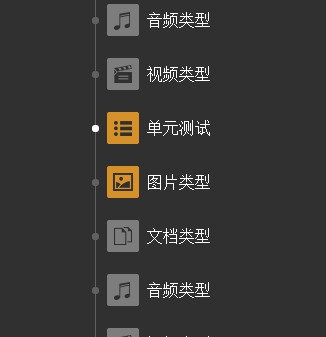
外掛的最終效果如下圖:
最後是我整合拖拽功能後的完整外掛程式碼:
 <!-- //設置內容;
 window.onWebMessage( '{"type":"setItems","data":{"items":[{"name":1111,"type":"doc"},{"name":2222,"type":"doc"}]}}' ) ;
 window.onWebMessage( '{"type":"setItems","data":{"items":[{"name":"文檔類型","type":"doc"},{"name":"音頻類型","type":"audio","active":true},{"name":"視頻類型","type":"video"},{"name":"單元測試","type":"test"},{"name":"圖片類型","type":"pic"}]}}' ) ;
 //設置內容, 對應的item對象如果active為true為激活態;
 window.onWebMessage( '{"type":"setItems","data":{"items":[{"name":1111,"type":"doc"},{"name":2222,"type":"doc","active":true}]}}' ) ;
 //設置某個第n個位置的item;
 window.onWebMessage('{"type":"setItem","data":[2,{ "name" : "add-item", "type":"doc"}]}');
 //激活第三個錨鏈接為選中態;
 window.onWebMessage( '{"type":"active","data":2}' )
 //獲取目前的數據:
 window.onWebMessage( '{"type":"getItem"}' )
 -->
 <html>
 <head>
 <meta charset="utf-8" />
 <script src="https://cdn.bootcss.com/jquery/2.1.4/jquery.js"></script>
 </head>
 <style>
 /*初始的reset樣式*/
 *{ margin:0; padding:0; }
 .time-line-wrap{ position: relative; width: 400px; margin:0 auto; }
 ul{ list-style: none; }
 body,html{ height: 100%; }
 body{ background:#303030; -webkit-user-select: none; -moz-user-select: none; -ms-user-select: none; user-select: none; }
 /*樣式開始*/
 .scroll-time-line{ height:100%; overflow: hidden; }
 .time-line-wrap{ position: relative; }
 .time-line-wrap::before{ display: block; content: ""; position: absolute; border: 2px solid #616161; width: 7px; background: #303030; height: 7px; z-index: 2; border-radius: 100%; left: 12px; top: 0; }
 .time-line-wrap::after{ display: block; content: ""; position: absolute; border: 2px solid #616161; width: 7px; background: #303030; height: 7px; z-index: 2; border-radius: 100%; left: 12px; bottom:0; }
 .time-line-ul{ position: relative; }
 /** 時間軸的軸用偽類實現; */
 .time-line-ul::before{ display: block; position:absolute; content:""; height:100%; width:1px; left:17px; top:0; background: #616161; }
 .time-line-ul li{ padding: 14px; position: relative; color: #FFF; height: 26px; }
 .time-line-ul li>* { vertical-align: middle; display: inline-block; }
 /** hover樣式管理 */
 .time-line-ul li b{ width: 32px; height: 32px; }
 .time-line-ul li b.active{ display: none; }
 .time-line-ul li:hover b{ display: none; }
 .time-line-ul li:hover .active{ display: inline-block; }
 /** 當li被點擊的時候添加的類,優先級 */
 .time-line-ul li b.show{ display: none; }
 .time-line-ul li b.active.show{ display: inline-block; }
 .time-line-ul li span{ display: inline-block; white-space: nowrap; word-wrap: normal; width: 100px; text-overflow: ellipsis; overflow: hidden; }
 /** 當拖拽LI到某個LI上面,這個LI變透明 */
 .over{ opacity: 0.4; }
 /** 占位DIV; */
 .blank{ display: block; height:50px; line-height: 50px; }
 /** 默認時間軸錨鏈接的樣式 */
 .time-line-icon{ width: 7px; height: 7px; display: inline-block; background: #616161; border-radius: 100%; }
 /** 鼠標移動上來,或者錨鏈接有active時候的背景圖樣式 */
 .time-line-icon.active,.time-line-icon:hover{ background: #fff; }
 </style>
 <!--模板,勿刪!-->
 <script type="text/tempate" id="li-tpl">
 <% for(var i=0; i<items.length; i++ ) {%>
 <li class="li-<%=i%>" draggable="true">
 <a href="###" class="time-line-icon <% if(items[i].active){ %> <%="active"%> <%}%> "></a>
 <b class=""> <img src="imgs/<%=items[i].type%>.png" /> </b>
 <b class="active"> <img src="imgs/<%=items[i].type%>1.png" /> </b>
 <span> <%=items[i].name%> </span>
 </li>
 <% } %>
 </script>
 <body>
 <div class="scroll-time-line">
 <div class="time-line-wrap">
 <ul class="time-line-ul">
 <li class="li-0" draggable="true"> <a href="###" class="time-line-icon "></a> <b class=""> <img src="imgs/doc.png"> </b> <b class="active"> <img src="imgs/doc1.png"> </b> <span> 文檔類型 </span> </li>
 <li class="li-1" draggable="true"> <a href="###" class="time-line-icon active "></a> <b class=""> <img src="imgs/audio.png"> </b> <b class="active"> <img src="imgs/audio1.png"> </b> <span> 音頻類型 </span> </li>
 </ul>
 </div>
 </div>
 <script>
 //模板引擎的代碼
 (function () {
   var escaper = /\\|'|\r|\n|\t|\u2028|\u2029/g;
   var escapes = { "'": "'", '\\': '\\', '\r': 'r', '\n': 'n', '\t': 't', '\u2028': 'u2028', '\u2029': 'u2029' };
   $.templateSettings = {
     evaluate : /<%([\s\S]+?)%>/g,
     interpolate : /<%=([\s\S]+?)%>/g,
     escape : /<%-([\s\S]+?)%>/g
   }
   $.template = function(text, data, settings) {
     var render;
     settings = $.extend({}, settings, $.templateSettings);
     var matcher = new RegExp([ (settings.escape || noMatch).source, (settings.interpolate || noMatch).source, (settings.evaluate || noMatch).source ].join('|') + '|$', 'g');
     var index = 0;
     var source = "__p+='";
     text.replace(matcher, function(match, escape, interpolate, evaluate, offset) {
       source += text.slice(index, offset).replace(escaper, function(match) { return '\\' + escapes[match]; });
       if (escape) { source += "'+\n((__t=(" + escape + "))==null?'':_.escape(__t))+\n'"; }
       if (interpolate) { source += "'+\n((__t=(" + interpolate + "))==null?'':__t)+\n'"; }
       if (evaluate) { source += "';\n" + evaluate + "\n__p+='"; }
       index = offset + match.length;
       return match;
     });
     source += "';\n";
     if (!settings.variable) source = 'with(obj||{}){\n' + source + '}\n';
     source = "var __t,__p='',__j=Array.prototype.join," + "print=function(){__p+=__j.call(arguments,'');};\n" + source + "return __p;\n";
     try { render = new Function(settings.variable || 'obj', '_', source); } catch (e) { e.source = source; throw e; }
     if (data) return render(data, _);
     var template = function(data) { return render.call(this, data); };
     template.source = 'function(' + (settings.variable || 'obj') + '){\n' + source + '}';
     return template;
   };
 })();
 (function( fn ) { $( fn.call( $ ,$) ); })(function ($) {
   $.timeLineSetting = { offsetTop : 100 };
   $.extend($.fn, {
     timeLine : function() {
       $.each(this, function() {
         var _this = this, eleDrag;
         $(this).delegate(".time-line-ul>li", "click", function( ev ) {
           $(".time-line-icon.active").removeClass("active");
           $(this).find(".time-line-icon").addClass("active");
           $("b").removeClass("show");
           $(this).find("b").addClass("show");
           $(_this).animate({scrollTop: this.offsetTop - $.timeLineSetting.offsetTop},300);
           ev.preventDefault();
         }).delegate(".time-line-ul>li","dragstart" , function(ev) {
           if( ev.target&&ev.target.tagName.toLocaleLowerCase() === "img" || ev.target.tagName.toLocaleLowerCase() === "a") { return false; };
           ev.originalEvent.dataTransfer.effectAllowed = "move";
           eleDrag = ev.originalEvent.target;
           return true;
         }).delegate(".time-line-ul>li","dragenter" , function(ev) {
           return true;
         }).delegate(".time-line-ul>li", "dragover" , function(ev) {
           $(".time-line-ul>li.over").removeClass("over");
           $(this).addClass("over");
           $(".blank").remove();
           var $blank = $("<li class='blank' draggable='true'></li>");
           $(this).after( $blank );
           ev.preventDefault();
           return true;
         });
         $(".time-line-ul").bind("drop" , function(ev) {
           if(ev.target.tagName.toLocaleLowerCase() === "li") { $(ev.target).after( eleDrag ); };
           $(".blank").remove();
           $(".time-line-ul>li.over").removeClass("over");
           return false;
         });
       });
     }
   });
 });
 $(function() {
   var compile= $.template( $("#li-tpl").html() || "");
   var orginalData = {};
   window.onWebMessage = function( msg ) {
     msg = JSON.parse(msg);
     switch( msg.type ) {
       case "setItems" :
         $(".time-line-ul").html( compile(msg.data) );
         orginalData = JSON.parse(JSON.stringify(msg.data));
         break;
       case "setItem" :
         orginalData.items&&orginalData.items.splice(msg.data[0],0,msg.data[1]);
         $(".time-line-ul").html( compile(orginalData) );
         break;
       case "getItem" :
         var result = [];
         var lis = $(".time-line-ul li");
         for(var i=0; i<lis.length; i++) {
           result.push( { index : i, src : $(lis[i]).find("img").attr("src"), name : $(lis[i]).find("span").text() });
         };
         alert(JSON.stringify( result ));
         break;
       case "active" :
         $(".time-line-icon.active").removeClass("active");
         $(".time-line-ul>li").eq( msg.data).find(".time-line-icon").addClass("active")
         break;
     };
   };
   $(".scroll-time-line").timeLine();
 })
 </script>
 </body>
 </html>
以上就是本文的全部內容,希望大家能夠喜歡。
- 上一篇文章: 用jQuery定時讀取並解析XML檔案
- 下一篇文章: 用 jQuery 讓圖片隨瀏覽器視窗自動縮放