淺談 jQuery 中 height 與 width 的相關方法
編輯:關於JavaScript
獲取元素尺寸是前端開發中的高頻操作。jQuery 提供了三組方法來獲取高度與寬度,分別是 height()、innerHeight()、outerHeight(bool),以及對應的 width()、innerWidth()、outerWidth(bool)。它們究竟各自對應哪些 CSS 屬性?下面這張圖說得明明白白:
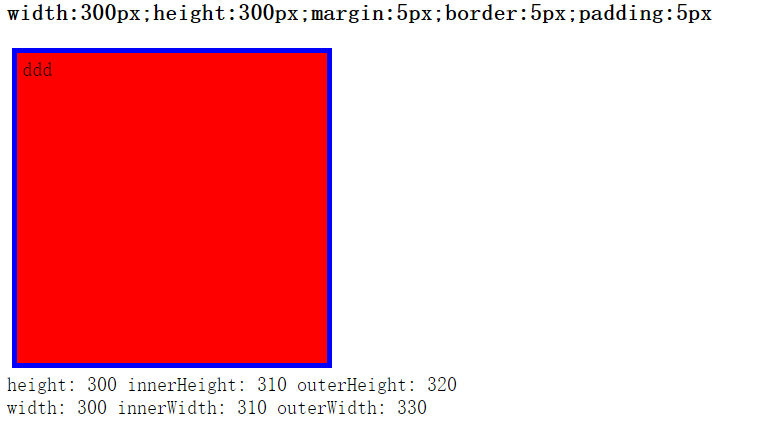
結合圖示不難理解:
height() 對應元素樣式中設置的 height 屬性;
innerHeight() 對應 height + padding-top + padding-bottom;
outerHeight() 對應 height + padding-top + padding-bottom + border-top + border-bottom。
你可能會注意到,outerHeight 與 outerWidth 的取值之所以不同,是因為 outerWidth(true) 的參數被設為 true,此時會把 margin 也計算進來:
outerWidth = width + padding-top + padding-bottom + border-top + border-bottom + margin-top + margin-bottom。
來看一個簡單的示例,點擊按鈕即可動態修改元素寬度:
<html> <head> <script type="text/javascript" src="/jquery/jquery.js"></script> <script type="text/javascript"> $(document).ready(function(){ $("button").click(function(){ $("#id200").width("300px"); }); }); </script> </head> <body> <div id="id100" style="background:yellow;height:100px;width:100px">HELLO</div> <div id="id200" style="background:yellow;height:100px;width:100px">W3SCHOOL</div> <button type="button">請點擊這裡</button> </body> </html>掌握了這幾個方法的差異,你就能在需要時精準地拿到想要的尺寸數值,避免因為 padding、border、margin 而算錯。
- 上一篇文章: 一看就懂:jQuery 中 this 與 $(this) 的區別
- 下一篇文章: 深入淺出:JavaScript 的作用域與閉包