用 JS 做星星評分:滑過預覽、點擊定案
編輯:關於JavaScript
電影評論、電商商品、文章滿意度——星星評分大概是網路上最常見的意見收集元件。它的互動有三層:滑過時預覽、移開時復原、點擊後定案。用原生 JS 就能寫得很乾淨。
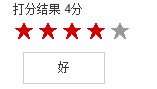
效果拆解
- 滑鼠移上時星星點亮,下方顯示對應文字;移出時星星恢復灰色,文字隱藏。
- 移到第 N 顆星時,它以及它之前的所有星星都要亮——這是評分的視覺慣例。
- 點擊後顯示評分結果。
完整程式碼
<!doctype html>
<html>
<head>
<meta charset="gbk">
<title>星星評分</title>
<style>
.wrapper { width:300px; margin:10px auto; font:14px/1.5 arial; }
#star { overflow:hidden; }
#star li {
    float:left; width:20px; height:20px; margin:2px; display:inline;
    color:#999; font:bold 18px arial; cursor:pointer;
}
#star .act { color:#c00; }
#star_word {
    width:80px; height:30px; line-height:30px; border:1px solid #ccc;
    margin:10px; text-align:center; display:none;
}
</style>
<script>
window.onload = function () {
    var star      = document.getElementById("star");
    var star_li   = star.getElementsByTagName("li");
    var star_word = document.getElementById("star_word");
    var result    = document.getElementById("result");

    var i, j, len = star_li.length;
    var word = ['很差', '差', '一般', '好', '很好'];

    for (i = 0; i < len; i++) {
        star_li[i].index = i;

        star_li[i].onmouseover = function () {
            star_word.style.display = "block";
            star_word.innerHTML = word[this.index];
            for (j = 0; j <= this.index; j++) {
                star_li[j].className = "act";
            }
        };

        star_li[i].onmouseout = function () {
            star_word.style.display = "none";
            for (j = 0; j < len; j++) {
                star_li[j].className = "";
            }
        };

        star_li[i].onclick = function () {
            result.innerHTML = (this.index + 1) + "分";
        };
    }
};
</script>
</head>
<body>
<div class="wrapper">
  打分結果 <span id="result"</span>
  <ul id="star">
    <li>★</li>
    <li>★</li>
    <li>★</li>
    <li>★</li>
    <li>★</li>
  </ul>
  <div id="star_word">一般</div>
</div>
</body>
</html>
三個值得注意的細節。第一,star_li[i].index = i 這個自訂屬性是重點——在迴圈裡建立的事件處理函式共享同一個 i,若不把索引綁到元素自己身上,全部星星都會讀到迴圈結束後的最終值。第二,內層迴圈變數刻意用 j 而非 i,避免覆蓋外層。第三,這個版本移出就清空,所以只能「預覽」不能「保留」;要做成真正的評分元件,得再維護一個 selected 狀態,讓 onmouseout 回到已選中的分數而不是歸零。
- 上一篇文章: 用原生 DOM 操作做一個簡單留言板
- 下一篇文章: JS 選項卡自動輪播:從手動切換進化到焦點圖