JavaScript 視窗間傳值實作:用 window.open 完成父子頁面雙向溝通
編輯:關於JavaScript
專案開發時常會遇到需要開新視窗挑選資料的場景。除了用 div 模擬彈窗或改用 iframe,瀏覽器原生的 window.open() 也是一種選擇。本文示範如何讓父子視窗彼此傳遞資料。
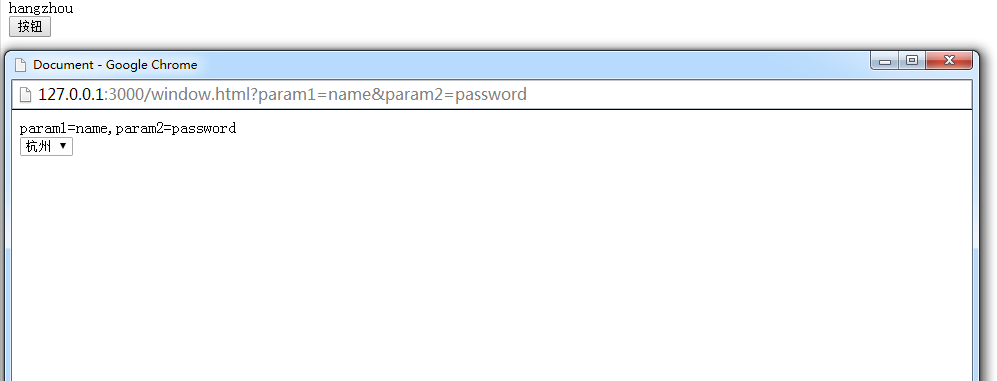
傳值原理
方向不同,手法也不同:
- 父視窗 → 子視窗:透過 URL 的查詢參數傳遞。
- 子視窗 → 父視窗:呼叫父視窗上的全域函式。
子視窗之所以能拿到父視窗的函式,靠的是 window.opener——它指向開啟目前視窗的那個視窗物件。
父頁面 index.html
<!DOCTYPE html>
<html lang="en">
<head>
<meta charset="UTF-8">
<title>Document</title>
</head>
<body>
<div id="content"></div>
<button id="test">按鈕</button>
<script>
var test = document.getElementById('test');
test.onclick = function() {
window.open(
'./window.html?param1=name¶m2=password',
'_blank',
'width=960,height=650,menubar=no,toolbar=no,location=no,directories=no,status=no,scrollbars=yes,resizable=yes'
);
};
// 這個全域函式就是留給子視窗呼叫的入口
window.getContent = function(tx) {
document.getElementById('content').innerText = tx;
}
</script>
</body>
</html>
子頁面 window.html
<!DOCTYPE html>
<html lang="en">
<head>
  <meta charset="UTF-8">
  <title>Document</title>
</head>
<body>
  <div id="content"></div>
  <select name="" id="city">
    <option value="shanghai">上海</option>
    <option value="hangzhou">杭州</option>
  </select>
  <script>
    // 取出網址中 ? 後面的參數並以 & 切開
    var params = location.href.substring(location.href.lastIndexOf('?') + 1).split('&');
    document.getElementById('content').innerText = params;

    var city = document.getElementById('city');
    city.onchange = function() {
      // 透過 opener 反向呼叫父視窗的全域函式
      window.opener.getContent(city.value);
    }
  </script>
</body>
</html>
幾個實務提醒
這個範例必須在有伺服器環境的情況下執行,直接用 file:// 開啟會因為安全性限制而失敗。
另外,參數直接拼接在 URL 上有兩個風險:中文或特殊字元必須先編碼處理,敏感資料(如密碼)絕不該放在網址列上。正式環境中,更嚴謹的做法是透過 localStorage 或訊息機制傳遞,並在父視窗的接收函式中做好來源檢查。
把「下行用參數、上行用 opener 函式」這個對稱結構記住,視窗間通訊就不難掌握。
- 上一篇文章: DOM 事件流詳解:冒泡、捕獲與跨瀏覽器的事件綁定
- 下一篇文章: iframe 父子頁面 JS 通信全攻略:同域直連與跨域繞道