Node.js 在處理請求位址、解析參數與操作檔案路徑時,最常打交道的就是 url、querystring 與 path 這三個內建模組。它們 individually 篇幅都不長,彼此之間卻有明確的依賴關係,因此很適合放在一起理解。
一、Url 模組:把字串拆成結構化物件
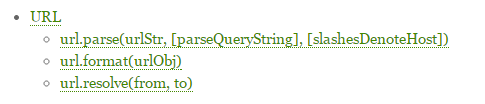
url.parse() 是整個體系的核心,它能把一條完整的 URL 字串拆解成十來個語意清晰的欄位。
var url = require('url');
var queryUrl = "https://localhost:8888/bb?name=bigbear&memo=helloworld";

console.log(typeof url.parse(queryUrl)); // object
console.log(url.parse(queryUrl));
輸出結果:
{
  protocol: 'http:',
  slashes: true,
  auth: null,
  host: 'localhost:8888',
  port: '8888',
  hostname: 'localhost',
  hash: null,
  search: '?name=bigbear&memo=helloworld',
  query: 'name=bigbear&memo=helloworld',
  pathname: '/bb',
  path: '/bb?name=bigbear&memo=helloworld',
  href: 'https://localhost:8888/bb?name=bigbear&memo=helloworld'
}
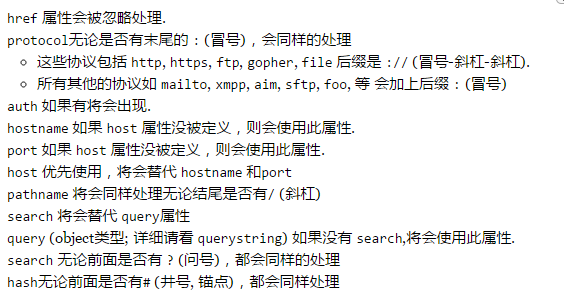
各欄位含義
- protocol:請求所使用的協議。
- host:主機名稱,已全部轉為小寫,並包含連接埠資訊。
- auth:URL 中的身分驗證片段。
- hostname:主機名稱部分,同樣已轉為小寫。
- port:連接埠號。
- pathname:路徑部分,位於主機名之後、查詢字串之前。
- search:查詢字串,含開頭的問號。
- path:pathname 與 search 的組合。
- query:問號後面的參數字串,或經
querystring.parse()解析後的物件。 - hash:「#」號後面的片段(含 # 本身)。
反過來的操作由 url.format(urlObj) 完成——傳入一個 URL 物件,回傳格式化後的 URL 字串。
二、QueryString 模組:字串與物件的雙向轉換
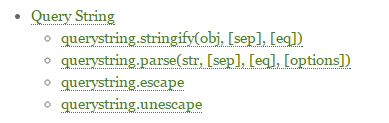
顧名思義,這個模組負責在「查詢字串」與「參數物件」之間互相轉換,是 Url 模組的天然搭檔。
var url = require('url');
var qs = require('querystring');
var queryUrl = "https://localhost:8888/bb?name=bigbear&memo=helloworld";

queryUrl = url.parse(queryUrl).query;
console.log(queryUrl);        // name=bigbear&memo=helloworld
console.log(qs.parse(queryUrl));
執行結果:
name=bigbear&memo=helloworld
{ name: 'bigbear', memo: 'helloworld' }
補充 API
querystring.stringify(obj, [sep], [eq], [options]):把物件序列化成查詢字串,可自訂分隔符(預設 &)與賦值符(預設 =)。
querystring.stringify({ foo: 'bar', baz: 'qux' }, ';', ':');
// 'foo:bar;baz:qux'
querystring.parse(str, [sep], [eq], [options]):把查詢字串反序列化成物件。options 中的 maxKeys(預設 1000)可限制處理的鍵數量,設為 0 則不限制。
querystring.parse('foo=bar&baz=qux&baz=quux&corge');
// { foo: 'bar', baz: ['qux', 'quux'], corge: '' }
值得注意的一點:同名參數會被收集成陣列,沒有賦值的鍵則對應空字串。
三、Path 模組:純字串層級的路徑運算
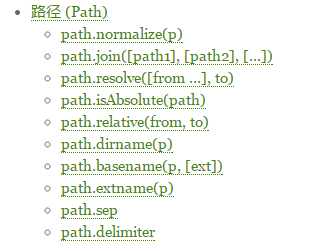
Path 模組提供了一整套處理與轉換檔案路徑的工具函式。要特別留意的是,它幾乎只做字串運算,不會去檔案系統驗證路徑是否真實存在。
var path = require("path");
var queryUrl = "https://localhost:8888/bb?name=bigbear&memo=helloworld";

var root = path.basename(queryUrl);
console.log(root); // bb?name=bigbear&memo=helloworld
basename() 會回傳路徑中最後一段,以「/」作為切分依據。
var ext = path.extname(root);
console.log(ext || "Not Ext Name !"); // Not Ext Name !
由於 API 數量眾多,這裡只列出最常見的幾個,其餘建議直接翻閱官方文件。
四、綜合範例:一個會分流的迷你 HTTP 伺服器
情境是這樣的:伺服器收到請求後,先用 path 判斷請求的是靜態資源還是頁面,再決定回應哪個檔案。
(1)index.html
<!doctype html>
<html>
<head>
  <title>Bigbear</title>
  <meta http-equiv="Content-Type" content="text/html; charset=UTF-8">
  <style type="text/css">
    div {
      margin-top: 50px;
      width: 100%;
      height: 120px;
      line-height: 120px;
      color: #fff;
      font-size: 22px;
      background: #ff9900;
      text-align: center;
    }
  </style>
  <script src="index.js"></script>
</head>
<body>
  <div>Hello,大熊!</div>
</body>
</html>
(2)index.js
alert("Hello bb !");
(3)server.js
var http = require("http");
var fs = require('fs');
var path = require("path");

http.createServer(function (request, response) {
  var method = request.method.toLowerCase();
  var fileName = path.basename(request.url);
  var extName = path.extname(fileName);
  var root = "./";

  if ("get" == method) {
    if (extName) {
      fs.readFile("./" + fileName, "utf-8", function (error, data) {
        if (error) throw error;
        response.writeHead(200, {
          "Content-Type": {
            ".css": "text/css",
            ".js": "application/javascript"
          }[extName]
        });
        response.write(data);
        response.end();
      });
    } else {
      fs.readFile(root + "index.html", "utf-8", function (error, data) {
        if (error) throw error;
        response.writeHead(200, { "Content-Type": "text/html" });
        response.write(data);
        response.end();
      });
    }
  } else if ("post" == request.url) {
    // handle post here
  }
}).listen(8888);

console.log("Web Server Running , Port On ---> 8888");
在命令列執行 node server.js,打開瀏覽器拜訪 https://localhost:8888/ 即可看到效果。
五、小結
- 釐清三個模組之間的關係:
url負責拆解、querystring負責參數轉換、path負責路徑運算。 - 熟練掌握三者各自的常用 API。
- 更重要的是理解範例背後的設計意圖,並在不斷重構與歸納中形成自己的判斷。
- 上一篇文章: 用 JS 判斷客服 QQ 是在線還是離線狀態
- 下一篇文章: Node.js 學習筆記:MongoDB 模組入門與實作