很久沒寫過東西了,感覺都不知道從何寫起,那就先寫點技術性的內容吧——AngularJS,我兄弟把它戲稱為「俺哥啦js」。本文帶你快速上手AngularJS的核心概念與常用方法。
1. 下載
代碼如下:
官方網址:https://angularjs.org/
CDN:https://ajax.googleapis.com/ajax/libs/angularjs/1.3.0-beta.5/angular.min.js
2. ng-app
ng-app決定了AngularJS的作用域範圍,你可以這樣使用:
代碼如下:
&It;html ng-app>
…
&It;/html>
來讓AngularJS渲染整個頁面,也可以使用:
代碼如下:
&It;div ng-app='myapp'>
……
&It;/div>
來渲染其中的一部分。
3. ng-model
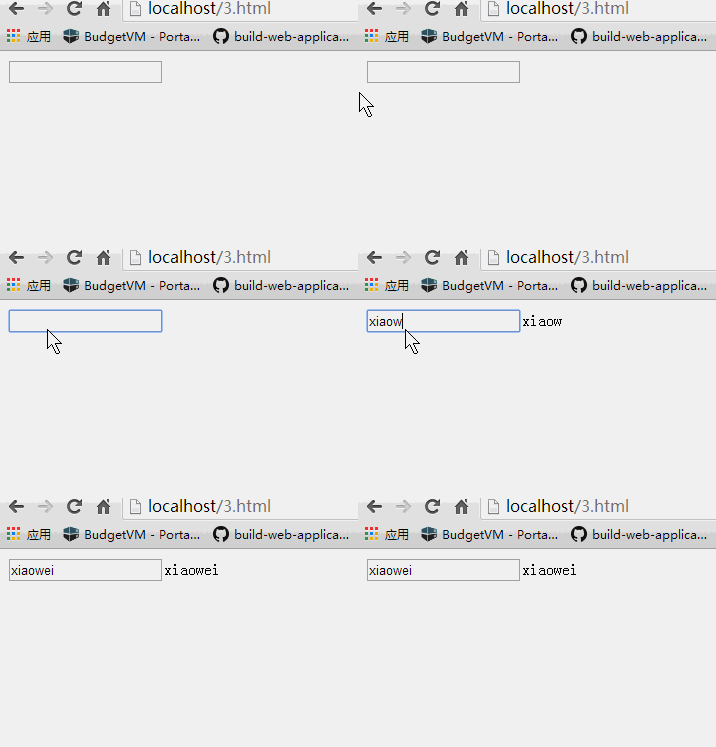
當你的資料模型被改變時,例如ng-model='test'中的test數值被改變,{{test}}的數值也會跟隨改變,也就是說連接到ng-model中的test也跟隨改變,如下:
代碼如下:
&It;!doctype html>
&It;html>
&It;head>
&It;script src="angular.min.js" type="text/javascript">&It;/script>
&It;title>learing argularjs--widuu</title>
&It;/head>
&It;body ng-app>
&It;input ng-model='test' >{{test}}
&It;/body>
&It;/html>
4. angular.module
這個主要用於模組的註冊、建立與索引。比如當我們想把ng-app註冊為一個服務時就要用到它,引用索引一個模組時也要使用:
代碼如下:
angular.module(name, [requires], [configFn]);
#name 類型string建立的檢索模組的名稱
#requires 簡單理解就是你需要包含的使用模組,譬如ngRoute路由模組
#configFn 可以選配的功能模組,功能和module.config類似
5. controller
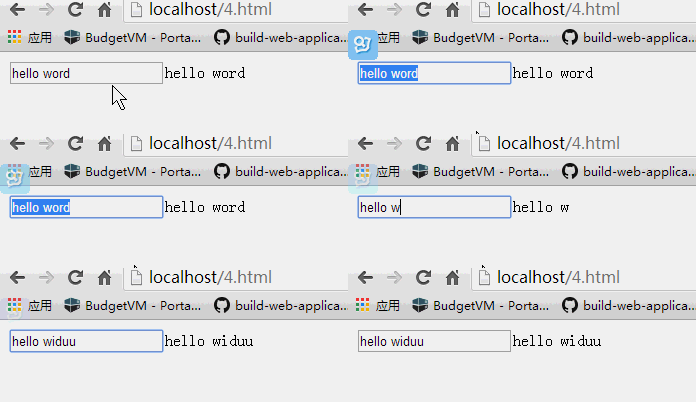
controller是angular.Module中的方法controller(name, constructor),其中name是controller的名字,constructor是控制器構造函數,我們用一段代碼來說明:
代碼如下:
&It;!doctype html>
&It;html>
&It;head>
&It;script src="angular.min.js" type="text/javascript">&It;/script>
&It;script type="text/javascript">
var app = angular.module('myapp',[]);
app.controller('mytest',function($scope){
$scope.test="hello word";
});
&It;/script>
&It;title>learing argularjs--widuu</title>
&It;/head>
&It;body ng-app='myapp' ng-controller='mytest' >
&It;input ng-model='test'>{{test}}
&It;/body>
&It;/html>
6. value
value也是angular.Module中的方法value(name, object),其中name是service的名稱,object是服務器實例對象。這時我們就可以把上面的代碼修改成這樣:
代碼如下:
&It;!doctype html>
&It;html>
&It;head>
&It;script src="angular.min.js" type="text/javascript">&It;/script>
&It;script type="text/javascript">
var app = angular.module('myapp',[])
.value('testvalue','word');
app.controller('mytest',function($scope,testvalue){
$scope.test="hello "+ testvalue;
});
&It;/script>
&It;title>learing argularjs--widuu</title>
&It;/head>
&It;body ng-app='myapp' ng-controller='mytest' >
&It;input ng-model='test'>{{test}}
&It;/body>
&It;/html>
7. factory
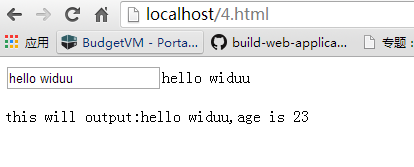
factory也是angular.Module中的方法factory(name, providerFunction),其中name是service的名稱,providerFunction是用於建立新服務器對象的函數,這時我們就可以把上面的代碼修改成這樣:
代碼如下:
&It;!doctype html>
&It;html>
&It;head>
&It;script src="angular.min.js" type="text/javascript">&It;/script>
&It;script type="text/javascript">
var app = angular.module('myapp',[])
.value('testvalue','widuu')
.factory('testfactory',function(testvalue){
return{
lable:function(){
return "this can output : hello "+ testvalue;
}
}
});
app.controller('mytest',function($scope,testvalue,testfactory){
$scope.test = "hello "+ testvalue;
$scope.output = testfactory.lable();
});
&It;/script>
&It;title>learing argularjs--widuu</title>
&It;/head>
&It;body ng-app='myapp' ng-controller='mytest' >
&It;input ng-model='test'>{{test}}
&It;/p>
{{output}}
&It;/body>
&It;/html>
8. provider
provider也是angular.Module中的方法provider(name, providerType),其中name是service的名稱,providerType是用於建立新服務器對象的函數,這個跟factory差不多,我們現在用provider重寫:
代碼如下:
&It;!doctype html>
&It;html>
&It;head>
&It;script src="angular.min.js" type="text/javascript">&It;/script>
&It;script type="text/javascript">
var app = angular.module('myapp',[])
.value('testvalue','widuu')
.provider('testprovider',
function(){
this.lable = "this will output : hello widuu";
this.$get = function () {
return this;
}
}
);
app.controller('mytest',function($scope,testvalue,testprovider){
$scope.test = "hello "+ testvalue;
$scope.output = testprovider.lable;
});
&It;/script>
&It;title>learing argularjs--widuu</title>
&It;/head>
&It;body ng-app='myapp' ng-controller='mytest' >
&It;input ng-model='test'>{{test}}
&It;/p>
{{output}}
&It;/body>
&It;/html>
9. service
service也是angular.Module中的方法service(name, constructor),其中name是service的名稱,constructor是一個將被實例化的構造函數,這個跟factory差不多,我們現在用service重寫:
代碼如下:
&It;!doctype html>
&It;html>
&It;head>
&It;script src="angular.min.js" type="text/javascript">&It;/script>
&It;script type="text/javascript">
var app = angular.module('myapp',[])
.value('testvalue','widuu')
.service('testservice',
function(testvalue){
this.lable = function(){
return "this will output:hello "+testvalue;
}
}
);
app.controller('mytest',function($scope,testvalue,testservice){
$scope.test = "hello "+ testvalue;
$scope.output = testservice.lable();
});
&It;/script>
&It;title>learing argularjs--widuu</title>
&It;/head>
&It;body ng-app='myapp' ng-controller='mytest' >
&It;input ng-model='test'>{{test}}
&It;/p>
{{output}}
&It;/body>
&It;/html>
10. constant
constant也是angular.Module中的方法constant(name, object),其中name是常量的名稱,而object是常量的值,我們可以這樣寫:
代碼如下:
&It;!doctype html>
&It;html>
&It;head>
&It;script src="angular.min.js" type="text/javascript">&It;/script>
&It;script type="text/javascript">
var app = angular.module('myapp',[])
.value('testvalue','widuu')
.constant('count',23)
.service('testservice',
function(testvalue,count){
this.lable = function(){
return "this will output:hello "+testvalue+",age is "+count;
}
}
);
app.controller('mytest',function($scope,testvalue,testservice){
$scope.test = "hello "+ testvalue;
$scope.output = testservice.lable();
});
&It;/script>
&It;title>learing argularjs--widuu</title>
&It;/head>
&It;body ng-app='myapp' ng-controller='mytest' >
&It;input ng-model='test'>{{test}}
&It;/p>
{{output}}
&It;/body>
&It;/html>
今天就寫到這裡,以後再繼續補充更多內容。
- 上一篇文章: JavaScript函數三大類型詳解:普通、匿名與閉包
- 下一篇文章: JavaScript操作Cookie對象淺析