Node.js 中 console 的各種用法完整整理
編輯:關於JavaScript
console 是 Node.js 除錯時最常用的工具,除了基本的 log,它還提供了格式化輸出、重導向、計時、堆疊追蹤與斷言等多種能力。以下依序整理。
一、基本輸出與重導向
console.log("log信息");
執行 node app.js 後,主控台會印出「log信息」。若改成 node app.js 1>info.txt(1 代表標準輸出流),則會在 app.js 同級目錄產生 info.txt,內容同樣是「log信息」。
二、依序輸出多個字串
console.log("%s", "first", "second");
// 輸出結果:first second
三、把物件轉成字串輸出
console.log("%s", "guoyansi", {name:"思思博士"});
// 輸出結果:guoyansi { name: '思思博士' }
四、以數值方式轉換
console.log("%d", "25.6");
// 輸出結果:25.6
console.log("%d", "guoyansi");
// 輸出結果:guoyansi(無法轉為數字時原樣輸出)
五、輸出百分比符號
console.log("%%");
// 輸出結果:%
console.log("%%", "gys");
// 輸出結果:% gys
六、把 console.error 導向檔案
console.error("guoyansi is error");
以 node app.js 2>err.txt 啟動(2 代表標準錯誤流),同級目錄會多出一個 err.txt,內容為「guoyansi is error」。
七、捕獲未找到模組的錯誤
執行一個不存在的檔案,例如 node javascript.js 2>info.txt,info.txt 中會記錄完整的錯誤堆疊:
module.js:340
throw err;
^
Error: Cannot find module 'E:\node\gys\javascript.js'
  at Function.Module._resolveFilename (module.js:338:15)
  at Function.Module._load (module.js:280:25)
  at Function.Module.runMain (module.js:497:10)
  at startup (node.js:119:16)
  at node.js:906:3
八、console.warn
用法與 console.error() 完全相同,同樣輸出到標準錯誤流。
九、console.time 與 console.timeEnd 計時
用來量測一段程式碼的執行時間,注意兩者的參數必須完全一致,否則會失效。
console.time("for循環的時間:");
var a = 0;
for (var i = 0; i < 10000000000000; i++) {
  a++;
}
console.timeEnd("for循環的時間:");
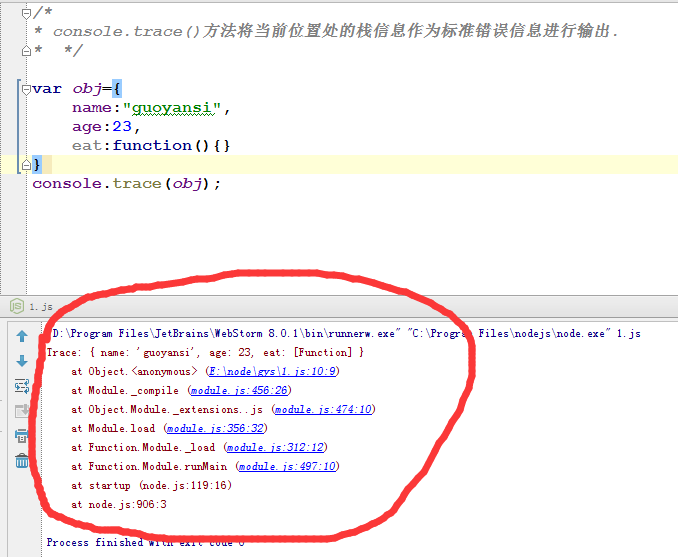
十、console.trace 輸出堆疊資訊
把目前位置的呼叫堆疊作為標準錯誤輸出。
var obj = {
  name: "guoyansi",
  age: 23,
  eat: function(){}
};
console.trace(obj);
輸出結果:
十一、console.assert 斷言
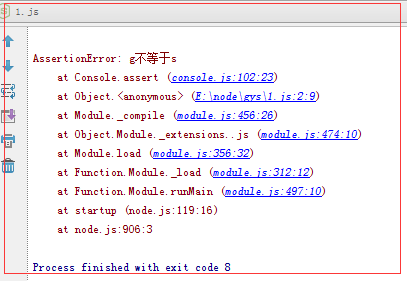
對表達式的結果進行評估,若結果為 false,則輸出一段訊息並拋出 AssertionError。
console.assert("g" === "s", "g不等於s");
以上就是 console 在 Node.js 中的常見用法,熟練之後能大幅提升除錯效率。
- 上一篇文章: Node.js 中 require 模組載入機制完整解析
- 下一篇文章: Node.js 中 fs.lstat 方法詳解與使用教學