Express 中介軟體 cookieParser 詳解
編輯:關於JavaScript
cookieParser 中介軟體用於取得 web 瀏覽器所送出的 cookie 內容。在啟用這個中介軟體之後,代表客戶端請求的 http.IncomingMessage 物件便會具備一個 cookies 屬性。該屬性是一個物件,其中存放了所有瀏覽器送來的 cookie,每一筆 cookie 都是這個屬性中的一個鍵值對。
前端 index.html
以下範例透過 XMLHttpRequest 送出兩個 cookie,並把伺服器的回應顯示在頁面上:
<!DOCTYPE html>
<html>
<head lang="en">
  <meta charset="UTF-8">
  <title>向伺服器上傳 cookie</title>
  <script type="text/javascript">
    function submitCookie() {
      var xhr = new XMLHttpRequest();
      xhr.open("post", "index.html", true);
      document.cookie = "firstName=思思";
      document.cookie = "userName=博士";
      xhr.onload = function (e) {
        if (this.status == 200)
          document.getElementById("res").innerHTML = this.response;
      };
      xhr.send();
    }
  </script>
</head>
<body>
  <h1>cookieParser 中介軟體的使用</h1>
  <input type="button" value="提交 cookie" onclick="submitCookie();" />
  <div id="res"></div>
</body>
</html>
後端 server.js
伺服器端先掛載 cookieParser 中介軟體,接著在 POST 路由中遍歷 req.cookies,把每一筆 cookie 的名稱與值輸出:
var express = require("express");
var fs = require("fs");
var app = express();
app.use(express.cookieParser());
app.get("/index.html", function (req, res) {
  res.sendfile(__dirname + "/index.html");
});
app.post("/index.html", function (req, res) {
  for (var key in req.cookies) {
    res.write("cookie名:" + key);
    res.write(",cookie值:" + req.cookies[key] + "<br />");
  }
  res.end();
});
app.listen(1337, "127.0.0.1", function () {
  console.log("開始監聽1337");
});
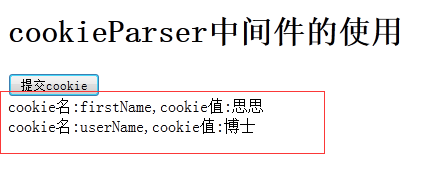
按下按鈕送出請求後,伺服器便會把收到的 cookie 名稱與值逐一印回頁面,你就能清楚看到 cookieParser 中介軟體實際取得的內容了。