用 Node.js 模擬 form 表單上傳檔案的實作分享
編輯:關於JavaScript
以前專案裡有過這個方法,最近在客戶那邊出問題了,同事說這方法從來就沒成功過。於是用了一天時間把它徹底搞定,特此分享。
先上程式碼與測試案例:
var http = require('http'); var path = require('path'); var fs = require('fs'); function postFile(fileKeyValue, req) { var boundaryKey = Math.random().toString(16); var enddata = '\r\n----' + boundaryKey + '--'; var files = new Array(); for (var i = 0; i < fileKeyValue.length; i++) { var content = "\r\n----" + boundaryKey + "\r\n" + "Content-Type: application/octet-stream\r\n" + "Content-Disposition: form-data; name=\"" + fileKeyValue[i].urlKey + "\"; filename=\"" + path.basename(fileKeyValue[i].urlValue) + "\"\r\n" + "Content-Transfer-Encoding: binary\r\n\r\n"; var contentBinary = new Buffer(content, 'utf-8');//當編碼為ascii時,中文會亂碼。 files.push({contentBinary: contentBinary, filePath: fileKeyValue[i].urlValue}); } var contentLength = 0; for (var i = 0; i < files.length; i++) { var stat = fs.statSync(files[i].filePath); contentLength += files[i].contentBinary.length; contentLength += stat.size; } req.setHeader('Content-Type', 'multipart/form-data; boundary=--' + boundaryKey); req.setHeader('Content-Length', contentLength + Buffer.byteLength(enddata)); // 將參數發出 var fileindex = 0; var doOneFile = function(){ req.write(files[fileindex].contentBinary); var fileStream = fs.createReadStream(files[fileindex].filePath, {bufferSize : 4 * 1024}); fileStream.pipe(req, {end: false}); fileStream.on('end', function() { fileindex++; if(fileindex == files.length){ req.end(enddata); } else { doOneFile(); } }); }; if(fileindex == files.length){ req.end(enddata); } else { doOneFile(); } } //測試用例 var files = [ {urlKey: "file1", urlValue: "E:\\DFBF.jpg"}, {urlKey: "file2", urlValue: "E:\\1.jpg"}, {urlKey: "file3", urlValue: "E:\\Pro 空格 中文.mp3"} ] var options = { host: "localhost", port: "8908" , method: "POST", path: "/Home/Upload" } var req = http.request(options, function(res){ console.log("RES:" + res); console.log('STATUS: ' + res.statusCode); console.log('HEADERS: ' + JSON.stringify(res.headers)); res.on("data", function(chunk){ console.log("BODY:" + chunk); }) }) req.on('error', function(e){ console.log('problem with request:' + e.message); console.log(e); }) postFile(files, req); console.log("done");服務端我用 MVC 在 Home 控制器裡寫了個 upload 方法,遍歷上傳的檔案並存到硬碟:
[HttpPost] public string Upload() { foreach (string file in this.Request.Files) { this.Request.Files[file].SaveAs(@"E:\新建文件夾\" + this.Request.Files[file].FileName); } return @"保存成功 路徑:E:\新建文件夾\"; }執行腳本:
node nodejsPostFile.js
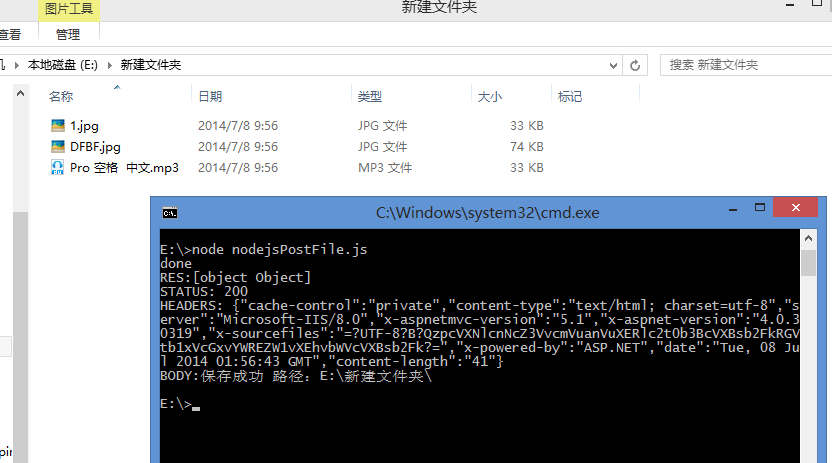
執行結果如下:
值得一提的是,上傳大檔案時會遇到問題,推測需要對服務器做相應配置,這裡暫且不深究。
- 上一篇文章: Node.js 不得不說的 12 個重點
- 下一篇文章: Express 作者 TJ 告別 Node.js 轉投 Go 的深層思考