ExtJS Grid 三種資料來源:空表格、本地資料與跨域 JSONP
編輯:關於JavaScript
ExtJS 的 Grid 要顯示資料,得先有 Store;而 Store 的資料可以來自三個地方。本文用同一個「學生成績表」的視窗,示範三種逐步加難的做法。
一、只有表格骨架
先不綁資料,把欄位與視窗外框搭起來:
<%@ page language="java" import="java.util.*" pageEncoding="UTF-8"%>
<!DOCTYPE HTML PUBLIC "-//W3C//DTD HTML 4.01 Transitional//EN">
<html>
<head>
<title>My JSP 'index.jsp' starting page</title>
<link rel="stylesheet" type="text/css" href="./extjs4.1/resources/css/ext-all.css">
<script type="text/javascript" src="./extjs4.1/ext-all-debug.js"></script>
<script type="text/javascript" src="./extjs4.1/locale/ext-lang-zh_CN.js"></script>
<script type="text/javascript">
Ext.onReady(function () {
  // 定義表格
  var grid = new Ext.grid.Panel({
    columns: [
      { text: '行號' },
      { text: '學號' },
      { text: '姓名' },
      { text: '班級' },
      { text: '語文' },
      { text: '數學' },
      { text: '英語' }
    ]
  });

  // 定義視窗
  var window = Ext.create("Ext.window.Window", {
    title: '學生成績表',
    width: 600,
    height: 400,
    items: grid,
    layout: 'fit' // 表格填滿視窗
  });

  window.show();
});
</script>
</head>
<body>
顯示表格 <br>
</body>
</html>
二、顯示本地資料
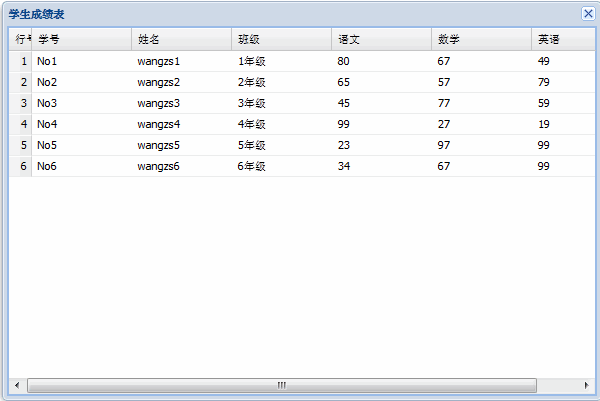
要綁資料,先定義 Model 描述每個欄位的型別,再把二維陣列餵給 Store:
<%@ page language="java" import="java.util.*" pageEncoding="UTF-8"%>
<!DOCTYPE HTML PUBLIC "-//W3C//DTD HTML 4.01 Transitional//EN">
<html>
<head>
<title>My JSP 'index.jsp' starting page</title>
<link rel="stylesheet" type="text/css" href="./extjs4.1/resources/css/ext-all.css">
<script type="text/javascript" src="./extjs4.1/ext-all-debug.js"></script>
<script type="text/javascript" src="./extjs4.1/locale/ext-lang-zh_CN.js"></script>
<script type="text/javascript">
Ext.onReady(function () {
  // 自定義資料模型
  var myModel = Ext.define("studentInfo", {
    extend: 'Ext.data.Model',
    fields: [
      { name: 'stuNo',   type: 'string' },
      { name: 'stuName', type: 'string' },
      { name: 'stuClass', type: 'string' },
      { name: 'chScore', type: 'number' },
      { name: 'maScore', type: 'number' },
      { name: 'enScore', type: 'number' }
    ]
  });

  // 本地資料
  var myData = [
    ['No1', 'wangzs1', '1年級', 80, 67, 49],
    ['No2', 'wangzs2', '2年級', 65, 57, 79],
    ['No3', 'wangzs3', '3年級', 45, 77, 59],
    ['No4', 'wangzs4', '4年級', 99, 27, 19],
    ['No5', 'wangzs5', '5年級', 23, 97, 99],
    ['No6', 'wangzs6', '6年級', 34, 67, 99]
  ];

  var myStore = Ext.create("Ext.data.Store", {
    model: 'studentInfo',
    data: myData
  });

  // 表格
  var myGrid = new Ext.grid.Panel({
    columns: [
      { xtype: 'rownumberer', text: '行號' },
      { text: '學號', dataIndex: 'stuNo' },
      { text: '姓名', dataIndex: 'stuName' },
      { text: '班級', dataIndex: 'stuClass' },
      { text: '語文', dataIndex: 'chScore' },
      { text: '數學', dataIndex: 'maScore' },
      { text: '英語', dataIndex: 'enScore' }
    ],
    store: myStore
  });

  // 視窗
  var window = Ext.create("Ext.window.Window", {
    title: '學生成績表',
    width: 600,
    height: 400,
    items: myGrid,
    layout: 'fit'
  });

  window.show();
});
</script>
</head>
<body>
顯示本地資料 <br>
</body>
</html>
兩個關鍵點:dataIndex 必須與 Model 的欄位名對上,否則該欄會是空白;rownumberer 這個 xtype 會自動產生序號欄,不必自己塞資料。
三、顯示跨域 JSONP 資料
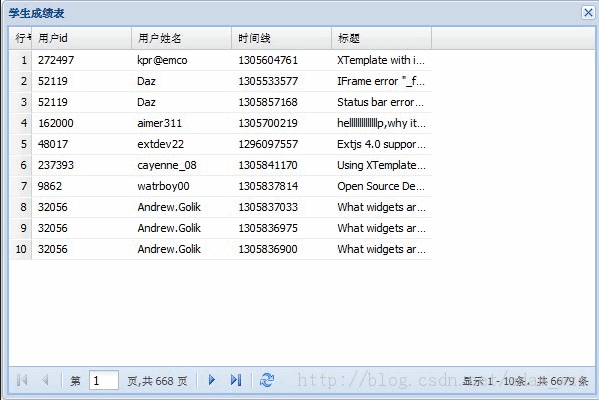
跨域請求無法用一般的 AJAX,此時改用 proxy 的 jsonp 型別,並在底部加上分頁工具列:
<%@ page language="java" import="java.util.*" pageEncoding="UTF-8"%>
<!DOCTYPE HTML PUBLIC "-//W3C//DTD HTML 4.01 Transitional//EN">
<html>
<head>
<title>My JSP 'index.jsp' starting page</title>
<link rel="stylesheet" type="text/css" href="./extjs4.1/resources/css/ext-all.css">
<script type="text/javascript" src="./extjs4.1/ext-all-debug.js"></script>
<script type="text/javascript" src="./extjs4.1/locale/ext-lang-zh_CN.js"></script>
<script type="text/javascript">
Ext.onReady(function () {
  // 自定義資料模型
  var jsonpModel = Ext.define("jsonpModel", {
    extend: 'Ext.data.Model',
    fields: [
      { name: 'userid',   type: 'string' },
      { name: 'username', type: 'string' },
      { name: 'dateline', type: 'string' },
      { name: 'title',    type: 'string' }
    ]
  });

  // Store 搭配 jsonp proxy
  var myStore = Ext.create("Ext.data.Store", {
    model: 'jsonpModel',
    pageSize: 10, // 每頁顯示記錄數
    proxy: {
      type: 'jsonp',
      url: 'https://www.sencha.com/forum/topics-browse-remote.php',
      reader: {
        totalProperty: 'totalCount',
        root: 'topics'
      }
    },
    autoLoad: true // 自動載入資料
  });

  // 表格
  var myGrid = new Ext.grid.Panel({
    columns: [
      { xtype: 'rownumberer', text: '行號' },
      { text: '用戶 id', dataIndex: 'userid' },
      { text: '用戶姓名', dataIndex: 'username' },
      { text: '時間線', dataIndex: 'dateline' },
      { text: '標題', dataIndex: 'title' }
    ],
    store: myStore,
    bbar: { // 在表格底部設定分頁
      xtype: 'pagingtoolbar',
      store: myStore,
      displayInfo: true
    }
  });

  // 視窗
  var window = Ext.create("Ext.window.Window", {
    title: '學生成績表',
    width: 600,
    height: 400,
    items: myGrid,
    layout: 'fit'
  });

  window.show();
});
</script>
</head>
<body>
顯示跨域 jsonp 資料 <br>
</body>
</html>
reader 的兩個設定是重點:root 告訴 ExtJS 實際的資料陣列在回應的哪個屬性底下,totalProperty 則是總筆數所在的位置——分頁工具列要靠它算出總頁數。這兩個值必須與伺服器回傳的 JSON 結構一致,否則表格會是空的或分頁跑不動。
另外提醒:範例中的 var window = ... 會覆蓋全域的 window 物件,實務上請改名為 myWindow 之類的名稱,以免後續程式碼取用 window 時出問題。
- 上一篇文章: PHP 傳給 JS 的時間戳對不上?位數差異與解法
- 下一篇文章: 用正則表達式解析 URL 查詢參數
熱門推薦
用 JavaScript 打造宇宙星空飛行的背景動畫
JS 如何正確取得元素的位置:用遞迴搞定 Firefox 與 IE 的絕對定位
在子視窗中關閉開啟它的父視窗
JavaScript 依文字、數字或日期為表格排序的完整實作
使用 postMessage 實現跨域 iframe 頁面間的信息傳遞
用 Node.js 取得客戶端資訊的實作分享
全面理解 JavaScript 中的繼承(必看)
JavaScript 跨域的五種解法:CORS、JSONP、window.name、document.domain 與 postMessage
JavaScript 調試技巧:把 object 對象完整打印出來