Java Swing 標準對話框(JOptionPane)的具體實現
編輯:關於JavaScript
Swing 提供了豐富的 GUI 組件,其中 JOptionPane 封裝了各類標準對話框,包括錯誤提示、確認、警告、輸入和選擇等。本文用一個可交互的示例演示它們的用法。
完整代碼
package test001;
import java.awt.event.ActionEvent;
import java.awt.event.ActionListener;
import javax.swing.JButton;
import javax.swing.JFrame;
import javax.swing.JOptionPane;
import javax.swing.JToolBar;

public class TestJOptionPane implements ActionListener {
  private JFrame jf = new JFrame("標准對話框測試");
  public static void main(String[] args) {
    new TestJOptionPane().createUI();
  }
  public void createUI(){
    JToolBar jtb = new JToolBar();
    String[] s = {"錯誤", "退出確認1", "退出確認2", "警告", "輸入", "選擇"};
    int size = s.length;
    JButton[] button = new JButton[size];
    for(int i = 0; i < size; i++){
      button[i] = new JButton(s[i]);
      button[i].addActionListener(this);
      jtb.add(button[i]);
    }
    jf.add(jtb, "North");
    jf.setSize(350, 150);
    jf.setLocation(400, 200);
    jf.setDefaultCloseOperation(JFrame.EXIT_ON_CLOSE);
    jf.setVisible(true);
  }
  @Override
  public void actionPerformed(ActionEvent e) {
    String s = e.getActionCommand();
    if(s.equals("錯誤")){
      JOptionPane.showMessageDialog(null, "要顯示的錯誤信息---",
          "錯誤提示", JOptionPane.ERROR_MESSAGE);
    }
    else if(s.equals("退出確認1")){
      int result = JOptionPane.showConfirmDialog(null, "推出前是否保存程序?");
      if(result == JOptionPane.YES_OPTION){
        System.out.println("保存程序---");
        System.exit(0);
      } else if(result == JOptionPane.NO_OPTION){
        System.exit(0);
      }
    }
    else if(s.equals("警告")){
      Object[] options = {"繼續", "撤銷"};
      int result = JOptionPane.showOptionDialog(null,
          "本操作可能導致數據丟失", "Warning", JOptionPane.DEFAULT_OPTION,
          JOptionPane.WARNING_MESSAGE, null, options, options[0]);
      if(result == 0){
        System.out.println("繼續操作---");
      }
    }
    else if(s.equals("輸入")){
      String name = JOptionPane.showInputDialog("請輸入您的姓名:");
      if(name != null){
        System.out.println("姓名:" + name);
      }
    }
    else if(s.equals("選擇")){
      Object[] possibleValues = {"體育", "政治", "經濟", "文化"};
      Object selectedValue = JOptionPane.showInputDialog(null,
          "Choose one", "Input", JOptionPane.INFORMATION_MESSAGE, null,
          possibleValues, possibleValues[0]);
      String choose = (String)selectedValue;
      if(choose != null){
        System.out.println("你選擇的是:" + choose);
      }
    }
  }
}
運行效果
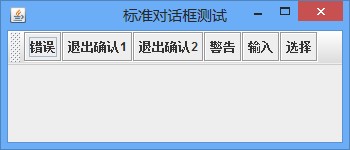
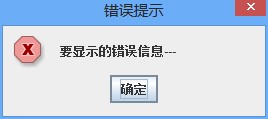
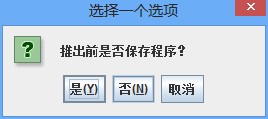
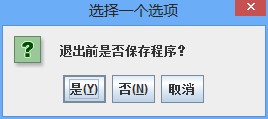
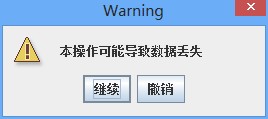
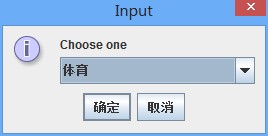
從代碼可以看出:showMessageDialog 用於顯示消息;showConfirmDialog 返回 YES/NO 等選項供判斷;showOptionDialog 支持自定義按鈕;showInputDialog 則同時支持文本輸入與下拉選擇。掌握這幾個方法, Swing 的常見交互場景基本都能覆蓋。
- 上一篇文章: JavaScript 常用全局屬性與方法整理
- 下一篇文章: Java 排列組合的三種算法實現思路