IntersectionObserver 用來監聽某個元素是否滾進了瀏覽器視口,或滾進了它某個祖先元素的可見區域。它最主要的兩個用途是圖片延遲加載與曝光量統計。
相容性備註:本文寫作時僅 Chrome 51 以上支援;Firefox 52 曾經實作,但因其團隊認為規範尚不穩定、難以保證向後相容而暫時停用,需手動開啟 dom.IntersectionObserver.enabled。
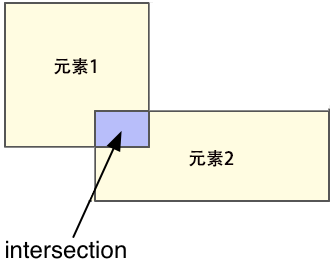
名字裡的 intersection 就是「交集」,observer 則與 MutationObserver 中的 observe 同義。在網頁裡元素都是矩形,所以判斷的就是兩個矩形的交集。

API 全貌
// 用構造函數生成觀察者實例
let observer = new IntersectionObserver((entries, observer) => {
    // 回調函數中可以拿到每次相交發生時所產生的交集的信息
    for (let entry of entries) {
        console.log(entry.time)
        console.log(entry.target)
        console.log(entry.rootBounds)
        console.log(entry.boundingClientRect)
        console.log(entry.intersectionRect)
        console.log(entry.intersectionRatio)
    }
}, {
    // 構造函數的選項
    root: null,
    threshold: [0, 0.5, 1],
    rootMargin: "50px, 0px"
})

// 實例屬性
observer.root
observer.rootMargin
observer.thresholds

// 實例方法
observer.observe()
observer.unobserve()
observer.disconnect()
observer.takeRecords()
一、構造函數
new IntersectionObserver(callback, options)
callback 為必選,一旦發生相交瀏覽器就會呼叫它;options 及其三個屬性都是可選的。
root
典型場景是:一個可滾動的根元素,內部有大量後代元素,我們想判斷某個後代是否滾進了根元素的可見範圍。root 就是用來指定這個根元素的,預設為 null。
當值為 null 時,根元素並不是某個真正的元素,而是瀏覽器視窗本身——可以理解成 window,但 window 其實既不是元素也不是節點。此時當前視窗內的所有元素都可視為 null 根元素的後代,都能被觀察。
<div id="info">我藏在頁面底部,請向下滾動</div>
<div id="target"></div>
<style>
#info { position: fixed; }
#target { position: absolute; top: calc(100vh + 500px); width: 100px; height: 100px; background: red; }
</style>
<script>
let observer = new IntersectionObserver(() => {
    if (!target.isIntersecting) {
        info.textContent = "我出來了"
        target.isIntersecting = true
    } else {
        info.textContent = "我藏在頁面底部,請向下滾動"
        target.isIntersecting = false
    }
}, {
    root: null // null 的時候可以省略
})
observer.observe(target)
</script>
這裡我在 target 上加了個 isIntersecting 屬性來記錄進出狀態,原因後面會有專門一節解釋。
root 除了 null,也可以是目標元素任意的祖先元素:
<div id="root">
  <div id="info">向下滾動就能看到我</div>
  <div id="target"></div>
</div>
<style>
#root { position: relative; width: 200px; height: 100vh; margin: 0 auto; overflow: scroll; border: 1px solid #ccc; }
#info { position: fixed; }
#target { position: absolute; top: calc(100vh + 500px); width: 100px; height: 100px; background: red; }
</style>
<script>
let observer = new IntersectionObserver(() => {
    if (!target.isIntersecting) {
        info.textContent = "我出來了"
        target.isIntersecting = true
    } else {
        info.textContent = "向下滾動就能看到我"
        target.isIntersecting = false
    }
}, {
    root: root
})
observer.observe(target)
</script>
要注意的是,當 root 不是 null,相交區域不一定落在視口內——root 與 target 的交集完全可能發生在視口下方:
<div id="root">
  <div id="info">慢慢向下滾動</div>
  <div id="target"></div>
</div>
<style>
#root { position: relative; width: 200px; height: calc(100vh + 500px); margin: 0 auto; overflow: scroll; border: 1px solid #ccc; }
#info { position: fixed; }
#target { position: absolute; top: calc(100vh + 1000px); width: 100px; height: 100px; background: red; }
</style>
<script>
let observer = new IntersectionObserver(() => {
    if (!target.isIntersecting) {
        info.textContent = "我和 root 相交了,但你還是看不見"
        target.isIntersecting = true
    } else {
        info.textContent = "慢慢向下滾動"
        target.isIntersecting = false
    }
}, {
    root: root
})
observer.observe(target)
</script>
小結:root 有兩種取值,null 代表當前視窗,或是目標元素的任意祖先元素。
threshold
目標元素與根元素相交時,用相交面積除以目標元素面積會得到一個 0 到 1 的比率:
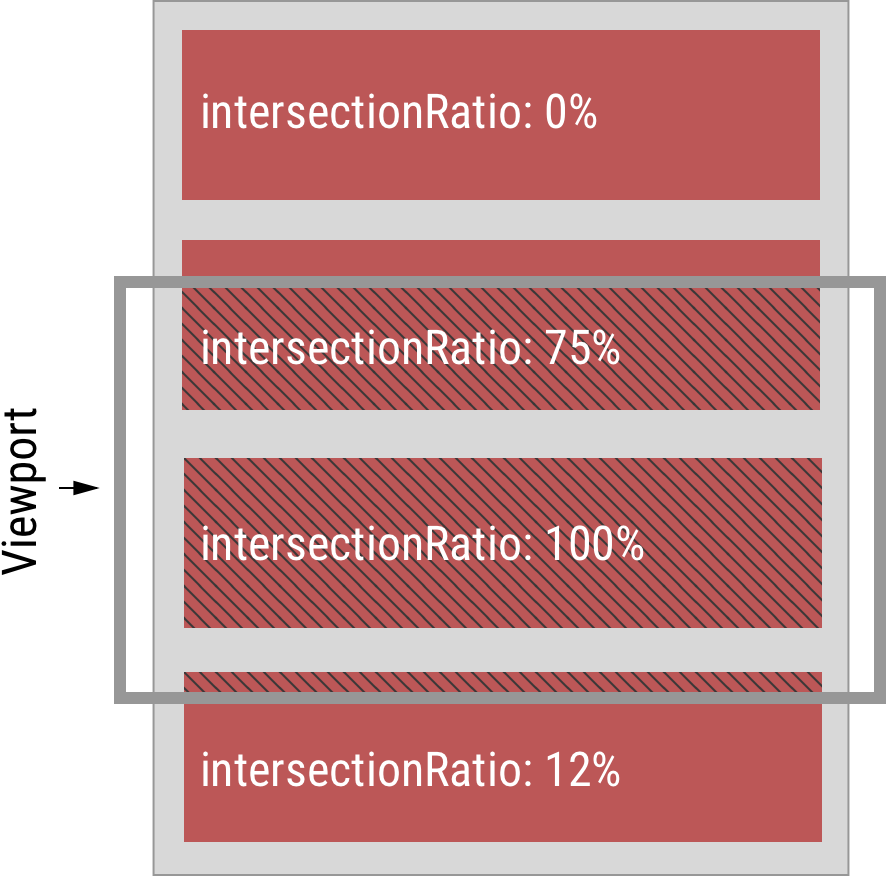
這個 API 的基本工作原理是:當相交面積佔目標元素面積的百分比到達或跨過某些指定臨界值時,就觸發回調函數。threshold 就是用來指定那些臨界值的,預設 0,代表兩元素剛挨上就觸發。有效範圍是 0 到 1 的閉區間,例如 0.5 表示相交一半時觸發;也可以傳陣列設定多個,如 [0, 0.5, 1] 代表開始相交、相交一半、完全相交三個時刻各觸發一次。傳空陣列會被自動補成 [0],等效於預設值。
下面的動畫示範 threshold 為 [0, 0.5, 1] 時回調的觸發時機:
不僅從視口外移入會觸發,從視口內移出同樣會:
<div id="info">
  慢慢向下滾動,相交次數:
  <span id="times">0</span>
</div>
<div id="target"></div>
<style>
#info { position: fixed; }
#target { position: absolute; top: 200%; width: 100px; height: 100px; background: red; margin-bottom: 100px; }
</style>
<script>
let observer = new IntersectionObserver(() => {
    times.textContent = +times.textContent + 1
}, {
    threshold: [0, 0.5, 1]
})
observer.observe(target)
</script>
臨界值陣列中的數字順序沒有強制要求,但為了可讀性建議由小到大書寫。若某個值小於 0 或大於 1,瀏覽器會報錯:
<script>
new IntersectionObserver(() => {}, {
    threshold: 2
    // SyntaxError: Failed to construct 'Intersection': Threshold values must be between 0 and 1.
})
</script>
rootMargin
既然主要用途之一是延遲加載,那麼真要等到 img 進入視口才加載就太遲了。實務上通常會提前幾百像素預載,rootMargin 就是幹這個的:它替根元素加上一層假想的 margin,進而縮放真實的根元素區域。
例如 root 為 null 時設 rootMargin: "100px",實際的根元素矩形四條邊都會外擴 100px:
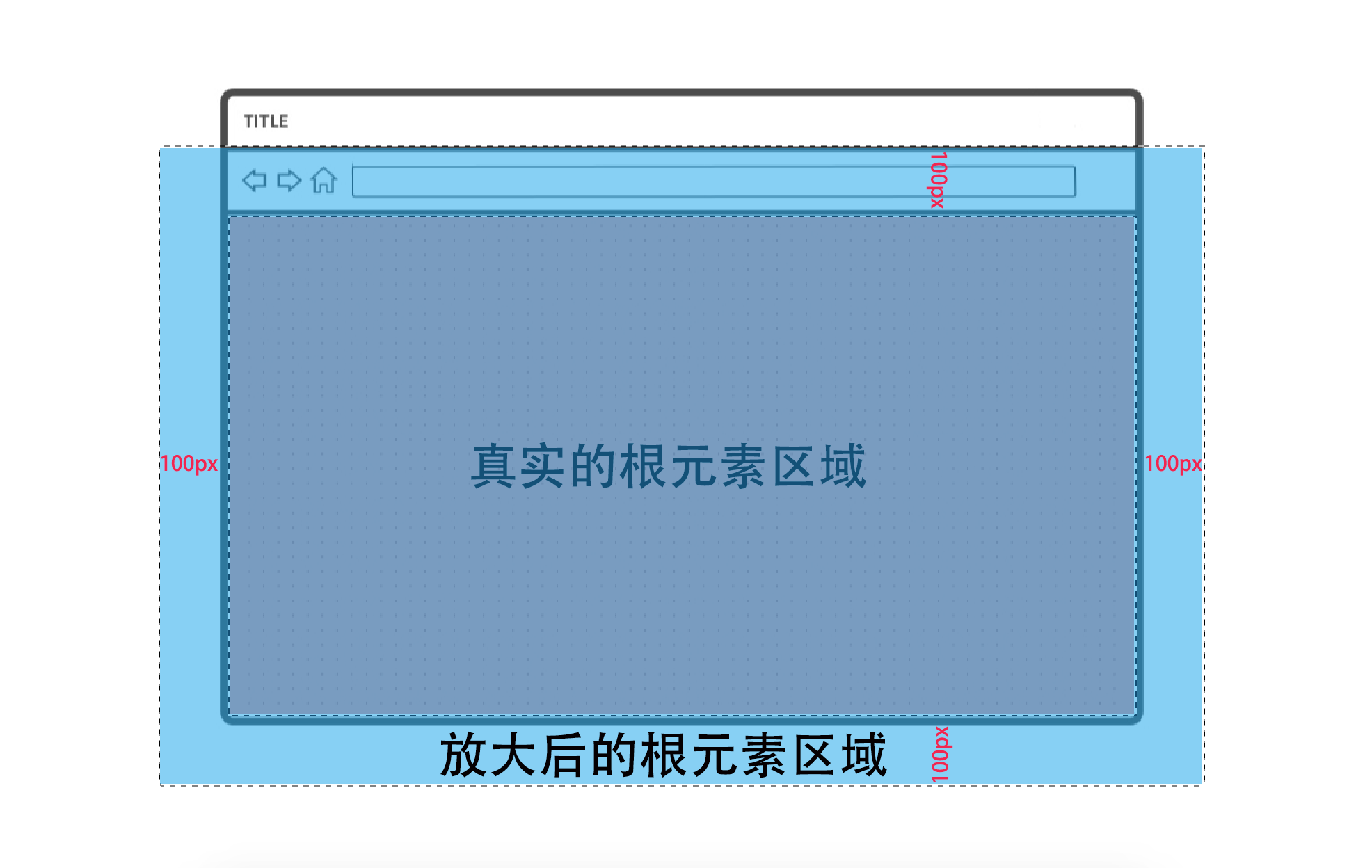
效果很直觀:若 threshold 為 0,那麼目標元素距離視口還有 100px 時(任何方向)回調就提前觸發了。由於常見頁面沒有橫向滾動需求,實務上多寫成 "100px 0px",左右保持 0。以下示範圖片在距視口 500px 時開始加載:
<div id="info">圖片在頁面底部,仍未加載,請向下滾動</div>
<img id="img" src="data:image/webp;base64,UklGRiQAAABXRUJQVlA4IBgAAAAwAQCdASoBAAEAAwA0JaQAA3AA/vuUAAA=" data-src="https://img.alicdn.com/bao/uploaded/i7/TB1BUK4MpXXXXa1XpXXYXGcGpXX_M2.SS2">
<style>
#info { position: fixed; }
#img { position: absolute; top: 300%; }
</style>
<script>
let observer = new IntersectionObserver(() => {
    observer.unobserve(img)
    info.textContent = "開始加載圖片!"
    img.src = img.dataset.src
}, {
    rootMargin: "500px 0px"
})
observer.observe(img)
</script>
rootMargin 的值格式雖然和 CSS 的 margin 一樣,但有單位限制,只能用 px 與百分比,其他單位會報錯:
<script>
new IntersectionObserver(() => {}, {
    rootMargin: "10em"
    // SyntaxError: Failed to construct 'Intersection': rootMargin must be specified in pixels or percent.
})
</script>
用百分比時是相對於根元素真實尺寸的百分比,例如 "0px 0px 50% 0px" 表示向下擴大 50%。若使用負值則會縮小根元素區域,延遲加載隨之後延——例如 rootMargin: "-100px" 時,目標元素得滾進可視區域內部 100px 才可能觸發。
二、實例屬性
root:該觀察者實例的根元素,預設 null。
new IntersectionObserver(() => {}).root // null
new IntersectionObserver(() => {}, {root: document.body}).root // document.body
rootMargin:經過序列化後的值,預設 "0px"。
new IntersectionObserver(() => {}).rootMargin // "0px 0px 0px 0px"
new IntersectionObserver(() => {}, {rootMargin: "50px"}).rootMargin // "50px 50px 50px 50px"
new IntersectionObserver(() => {}, {rootMargin: "50% 0px"}).rootMargin // "50% 0px 50% 0px"
new IntersectionObserver(() => {}, {rootMargin: "50% 0px 50px"}).rootMargin // 50% 0px 50px 0px"
new IntersectionObserver(() => {}, {rootMargin: "1px 2px 3px 4px"}).rootMargin // "1px 2px 3px 4px"
thresholds:序列化後的值,即使傳入單一數字也會變成陣列。目前 Chrome 實作中數字精度會有流失,但無礙使用。
new IntersectionObserver(() => {}).thresholds // [0]
new IntersectionObserver(() => {}, {threshold: 1}).thresholds // [1]
new IntersectionObserver(() => {}, {threshold: [0.3, 0.6]}).thresholds // [[0.30000001192092896, 0.6000000238418579]]
Object.isFrozen(new IntersectionObserver(() => {}).thresholds) // true, 是個被 freeze 過的數組
這三個屬性都是拿來標識實例的,主要供人閱讀,程式碼中用途不大。
三、實例方法
observe():觀察某個目標元素,一個實例可觀察任意多個目標。注意這裡無法事件委派——它不是事件,沒有冒泡,因此無法只呼叫一次就觀察到尚未產生的元素。
unobserve():取消對某個目標元素的觀察。延遲加載通常是一次性的,所以在回調裡就應該直接 unobserve 該元素。
disconnect():取消觀察所有已被觀察的目標元素。
takeRecords():理解這個方法得先知道底層機制。瀏覽器內部在某一時刻觀察到若干相交動作時,不會立即執行回調,而是呼叫 window.requestIdleCallback()(當時僅 Chrome 支援)來非同步執行,且規定最大延遲 100 毫秒,相當於:
requestIdleCallback(() => {
    if (entries.length > 0) {
        callback(entries, observer)
    }
}, { timeout: 100 })
你的回調可能在 1 毫秒後執行,也可能拖到第 100 毫秒,這是不確定的。在這段不確定的時間內,若你急需知道該實例是否已觀察到相交動作,就得呼叫 takeRecords(),它會同步回傳一個包含若干 IntersectionObserverEntry 物件的陣列;若此刻沒有相交記錄,則回傳空陣列。
要注意,對同一筆相交資訊而言,同步的 takeRecords() 與非同步的回調是互斥的:回調先跑了,你手動呼叫就必然拿到空陣列;反之你已用 takeRecords() 取走,回調就不會執行(因為 entries.length > 0 為 false)。
這個方法在實務上很少用得上,以下程式碼只用來驗證上述時序:
<script>
setInterval(() => {
    let observer = new IntersectionObserver(entries => {
        if (entries.length) {
            document.body.innerHTML += "<p>異步的 requestIdleCallback() 回調先執行了"
        }
    })
    requestAnimationFrame(() => {
        setTimeout(() => {
            if (observer.takeRecords().length) {
                document.body.innerHTML += "<p>同步的 takeRecords() 先執行了"
            }
        }, 0)
    })
    observer.observe(document.body)
    scrollTo(0, 1e10)
}, 100)
</script>
四、回調函數
new IntersectionObserver(function(entries, observer) {
    for (let entry of entries) {
        console.log(entry.time)
        console.log(entry.target)
        console.log(entry.rootBounds)
        console.log(entry.boundingClientRect)
        console.log(entry.intersectionRect)
        console.log(entry.intersectionRatio)
    }
})
回調共兩個參數,第二個是觀察者實例本身(通常已有變數指向它,而且回調裡的 this 也是該實例,所以一般用不上)。第一個參數是 IntersectionObserverEntry 物件組成的陣列,與 takeRecords() 的返回值相同。每個 entry 代表一次相交,entries 中的排列順序依目標元素被 observe 的先後而定。
time:相交發生時距離頁面打開的毫秒數(含小數),等同相交發生當下 performance.now() 的返回值。用 performance.now() 減去它,就能算出回調被 requestIdleCallback 延遲了多久:
<script>
let observer = new IntersectionObserver(([entry]) => {
    document.body.textContent += `相交發生在 ${performance.now() - entry.time} 毫秒前`
})
observer.observe(document.documentElement)
</script>
反覆刷新這個範例,那個數字最多一百出頭,因為瀏覽器內部設定的最大延遲就是 100 毫秒。
target:發生相交的目標元素。由於一個根元素可觀察多個目標,因此無法預期一定是哪個。
rootBounds:相交發生時根元素可見區域的矩形資訊:
{
    "top": 0,
    "bottom": 600,
    "left": 0,
    "right": 1280,
    "width": 1280,
    "height": 600
}
boundingClientRect:相交時目標元素的矩形資訊,等價於 target.getBoundingClientRect()。
intersectionRect:根元素與目標元素相交區域的矩形資訊。
intersectionRatio:0 到 1 的數值,即 intersectionRect 面積除以 boundingClientRect 面積。
五、貼邊的情況是特例
每個觀察者實例都為所有目標元素維護一個「上次相交率」(previousThreshold)欄位,執行 observe() 時會初始化为 0。之後每次檢測到新的相交率滿足某個臨界值、且該臨界值與 current previousThreshold 不同,就觸發回調並更新 previousThreshold。
但這裡有個矛盾:目標元素從很遠處移動到與根元素貼邊時也會觸發回調(若 thresholds 含 0),可是離得很遠時相交率是 0,貼邊時相交率仍是 0,值並未改變,照原理不該觸發。實際上這確實是特例——從外部遠處移到貼邊,會被視為滿足了臨界值 0,即便 0 等於 0。
反向的特例也存在:目標元素從根元素內部(相交率已是 1)移動到貼邊(仍是 1),也會觸發回調(若 thresholds 含 1)。
六、目標元素寬或高為 0 也是特例
空的 img 或空的 div 若沒有設定 CSS,寬高都是 0,面積為 0,計算相交率時就會遇到除以 0 的問題。JavaScript 中除以 0 不拋例外但會得到 Infinity,而相交率恆為 Infinity 意味著回調永遠不會觸發,因此必須特殊處理。
處理方式是:0 面積目標元素的相交率要麼 0 要麼 1。無論貼邊還是移入根元素內部,相交率都是 1;其餘情況都是 0。也就是 1 到 0 與 0 到 1 這兩種轉變會觸發回調:
因此為 0 面積的目標元素設定臨界值毫無意義,設什麼值、設幾個都是同樣效果。但要注意,相交資訊裡的 intersectionRatio 屬性永遠是 0:
<div id="target"></div>
<script>
let observer = new IntersectionObserver(([entry]) => {
    alert(entry.intersectionRatio)
})
observer.observe(target)
</script>
七、observe 之前就已經相交的情形
若 observe 一個已與根元素相交的目標元素之後完全不滾動,相交率再也不會變化,按理不該觸發回調,但實際上會觸發一次。原因是 observe() 時 previousThreshold 被初始化為 0,而不是初始化為當前真正的相交率,所以下一次相交檢測時就發現「相交率變了」。這並不屬於特殊處理。
八、瀏覽器何時檢測、多久檢測一次
常見螢幕為 60hz,代表瀏覽器每秒需繪製 60 次(60fps),約每 16.667ms 一次;若是 200hz 螢幕則每 5ms 一次。這種每次繪製的間隔稱為一幀(frame)。瀏覽器的渲染工作以幀為單位:

相交檢測發生在 Paint 之後、Composite 之前,頻率取決於顯示裝置的刷新率。可以確定的是,每次繪製不同畫面之前都會進行相交檢測,不會有漏網之魚。
九、一次性跨過多個臨界值時只取最近的
若設了 11 個臨界值 [0, 0.1, ..., 1],目標元素從完全不相交滾動到相交率為 1 這段期間,回調會觸發幾次?答案是:取決於滾動速度。滾得夠慢,每次到達下一個臨界值的時間點落在不同幀裡(至少繪製 11 次),就會有 11 次相交被檢測到;滾得夠快,從不相交到完全相交發生在同一幀內,瀏覽器雖然知道這一次滾動滿足了 11 個臨界值,但只會考慮最近的那個(也就是 1),回調僅觸發一次。
<div id="info">相交次數:
  <span id="times">0</span>
  <button onclick="document.scrollingElement.scrollTop = 10000">一下滾動到最低部</button>
</div>
<div id="target"></div>
<style>
#info { position: fixed; }
#target { position: absolute; top: 200%; width: 100px; height: 100px; background: red; margin-bottom: 100px; }
</style>
<script>
let observer = new IntersectionObserver(() => {
    times.textContent = +times.textContent + 1
}, {
    threshold: [0, 0.1, 0.2, 0.3, 0.4, 0.5, 0.6, 0.7, 0.8, 0.9, 1] // 11 個臨界值
})
observer.observe(target)
</script>
離開視口同理:若相交率先從 1 變成 0.45,再從 0.45 變成完全不相交,回調只會觸發兩次。
十、如何判斷當前是否相交
為什麼前面範例要用看起來頗麻煩的寫法記錄狀態:
if (!target.isIntersecting) {
    // 相交
    target.isIntersecting = true
} else {
    // 不想交
    target.isIntersecting = false
}
直接用 entry.intersectionRatio > 0 判斷不行嗎?
<div id="info">不可見,請非常慢的向下滾動</div>
<div id="target"></div>
<style>
#info { position: fixed; }
#target { position: absolute; top: 200%; width: 100px; height: 100px; background: red; }
</style>
<script>
let observer = new IntersectionObserver(([entry]) => {
    if (entry.intersectionRatio > 0) {
        // 快速滾動會執行到這裡
        info.textContent = "可見了"
    } else {
        // 慢速滾動會執行到這裡
        info.textContent = "不可見,請非常慢的向下滾動"
    }
})
observer.observe(target)
</script>
粗看可行,但別忘了前面講的貼邊特例。滾動很慢時,目標元素頂部剛好挨上視口底部那一刻,瀏覽器檢測到相交並觸發回調,但此時 intersectionRatio 等於 0,於是進入 else 分支;繼續往下滾,回調再也不觸發,提示文字永遠停在「不可見」。滾得快時,檢測到相交時已跨過 0 這個臨界值、存在實際相交面積,> 0 才成立。所以這樣寫會導致行為隨滾動速度而變,不可靠。
除了前面那種在元素上掛屬性記錄狀態的做法,還有一招:把 threshold 設一個極小但非零的值,例如 0.000001,再用 entry.intersectionRatio > 0 判斷,就不受貼邊情況與滾動速度影響:
<div id="info">不可見,以任意速度向下滾動</div>
<div id="target"></div>
<style>
#info { position: fixed; }
#target { position: absolute; top: 200%; width: 100px; height: 100px; background: red; }
</style>
<script>
let observer = new IntersectionObserver(([entry]) => {
    if (entry.intersectionRatio > 0) {
        info.textContent = "可見了"
    } else {
        info.textContent = "不可見,以任意速度向下滾動"
    }
}, {
    threshold: [0.000001]
})
observer.observe(target)
</script>
十一、目標元素不是根元素後代時
observe() 時若目標元素不是根元素的後代,瀏覽器不會報錯,Chrome 從 53 起會發出警告以提醒開發者。之所以不直接報錯,是因為元素的層級關係可以變化:
<div id="root"></div>
<div id="target"></div>
<style>
#target { width: 100px; height: 100px; background: red; }
</style>
<script>
let observer = new IntersectionObserver(() => alert("看見我了"), {root: root})
observer.observe(target) // target 此時並不是 root 的後代元素,Chrome 控制台會發出警告
root.appendChild(target) // 現在是了,觸發回調
</script>
被觀察的元素也可能尚未掛進 DOM 樹:
<div id="root"></div>
<style>
#target { width: 100px; height: 100px; background: red; }
</style>
<script>
let observer = new IntersectionObserver(() => alert("看見我了"), {root: root})
let target = document.createElement("div") // 還不在 DOM 樹裡
observer.observe(target) // Chrome 控制台會發出警告
root.appendChild(target) // 現在是了,觸發回調
</script>
也就是說,只要在相交發生時目標元素是根元素的後代即可,執行 observe() 時可以還不是。
十二、根元素必須是目標元素的祖先包含塊
「後代元素」只是從 DOM 結構上說的、較易理解的條件。另一個較不易察覺的限制來自 CSS:根元素矩形必須是目標元素矩形的祖先包含塊(包含塊也是鏈式的,就像原型鏈)。以下範例中 a 是 b 的父元素,但兩者 position 都是 fixed,導致 a 不是 b 的包含塊,這是無效的觀察操作——把 fixed 改成 relative 就會發現回調開始觸發:
<div id="a">
  <div id="b"></div>
</div>
<div id="info">0%</div>
<style>
#a, #b {
    position: fixed; /* 嘗試改成 relative */
    width: 200px;
    height: 200px;
    opacity: 0.8;
}
#a { background: red }
#b { background: blue }
#info { width: 200px; margin: 0 auto; }
#info::before { content: "Intersection Ratio: "; }
</style>
<script>
let animate = (element, oldCoordinate = {x: 0, y: 0}) => {
    let newCoordinate = {
        x: Math.random() * (innerWidth - element.clientWidth),
        y: Math.random() * (innerHeight - element.clientHeight)
    }
    let keyframes = [oldCoordinate, newCoordinate].map(coordinateToLeftTop)
    let duration = calcDuration(oldCoordinate, newCoordinate)
    element.animate(keyframes, duration).onfinish = () => animate(element, newCoordinate)
}
let coordinateToLeftTop = coordinate => ({ left: coordinate.x + "px", top: coordinate.y + "px" })
let calcDuration = (oldCoordinate, newCoordinate) => {
    // 移動速度為 0.3 px/ms
    return Math.hypot(oldCoordinate.x - newCoordinate.x, oldCoordinate.y - newCoordinate.y) / 0.3
}
animate(a)
animate(b)
</script>

<script>
let thresholds = Array.from({ length: 200 }, (k, v) => v / 200) // 200 個臨界值對應 200px
new IntersectionObserver(([entry]) => {
    info.textContent = (entry.intersectionRatio * 100).toFixed(2) + "%"
}, {
    root: a,
    threshold: thresholds
}).observe(b)
</script>
十三、從 DOM 樹中刪除目標元素
若兩者原本已相交,此時把目標元素甚至根元素從 DOM 樹中移除、或用 DOM 操作讓目標不再是根元素的後代、或改動 CSS 使根元素不再是包含塊、又或用 display:none 隱藏元素——這些操作都會讓相交率瞬間變成 0,回調因此可能被觸發:
<div id="info">
  刪除目標元素也會觸發回調
  <button onclick="document.body.removeChild(target)">刪除 target</button>
</div>
<div id="target"></div>
<style>
#info { position: fixed; }
#target { position: absolute; top: 100px; width: 100px; height: 100px; background: red; }
</style>
<script>
let observer = new IntersectionObserver(() => {
    if (!document.getElementById("target")) {
        info.textContent = "target 被刪除了"
    }
})
observer.observe(target)
</script>
十四、關於 iframe
在這個 API 出現之前,你無法在跨域的 iframe 頁面內判斷該頁面或其中某元素是否出現在了頂層視窗的視口裡——這正是它被發明出來的重要動機之一。

無論怎麼移動、嵌套多少層 iframe,IntersectionObserver 都能精準判斷目標元素是否出現在了頂層視窗的視口中,跨不跨域都一樣。前面提到 root 為 null 代表根元素是當前視窗的視口,更精確地說,應該是最頂層視窗的視口。
如果當前頁面是 iframe 且與頂層頁面跨域,在 root 為 null 的前提下觸發回調後,你拿到的 entry 的 rootBounds 會是 null;即便沒有跨域,rootBounds 的座標系統也和 boundingClientRect、intersectionRect 不同——前者的原點是頂層視窗左上角,後兩者是當前 iframe 視窗左上角。
考量到網路上的廣告九成都是跨域 iframe,這個 API 應該能大幅簡化廣告的延遲加載與真實曝光統計。
十五、根元素不能是其他 frame 下的元素
若沒有跨域,根元素可以是上層 frame 中的祖先元素嗎?
<div id="root">
  <iframe id="iframe"></iframe>
</div>
<script>
let iframeHTML = `
<div id="target"></div>
<style>
#target { width: 100px; height: 100px; background: red; }
</style>
<script>
let observer = new IntersectionObserver(() => {
    alert("intersecting")
}, { root: top.root })
observer.observe(target)
<\/script>`
iframe.src = URL.createObjectURL(new Blob([iframeHTML], {"type": "text/html"}))
</script>
姑且不論此處 root 是否算 target 的祖先包含塊,規範明確規定這種觀察操作無效,根元素不能來自別的 frame。總結:根元素要麼是 null,要麼是同一 frame 內的某個祖先包含塊元素。
十六、真的只是判斷兩個矩形相交嗎
<div id="parent">
  <div id="target"></div>
</div>
<style>
#parent { width: 20px; height: 20px; background: red; overflow: hidden; }
#target { width: 100px; height: 100px; background: blue; }
</style>
<script>
let observer = new IntersectionObserver(([entry]) => {
    alert(`相交矩形為: ${entry.intersectionRect.width} x ${entry.intersectionRect.width}`)
})
observer.observe(target)
</script>
這個範例中 root 是當前視口,目標元素是 100×100 的矩形。若真只是求兩矩形交集,相交矩形應該是 100×100,但實際彈出的是 20×20。原因是相交檢測之前還有一道裁剪步驟,先把目標元素矩形被「目標元素與根元素之間那些元素」遮擋的部分剪掉,再拿去和根元素比。裁剪步驟如下(rect 代表最終的目標元素矩形):
- 讓 rect 為目標元素矩形。
- 讓 current 為目標元素的父元素。
- 若 current 不是根元素,則循環執行:如果 current 的 overflow 不是 visible(是 scroll、hidden 或 auto),或 current 是 iframe 元素(iframe 天生自帶 overflow: auto),就讓 rect 等於 rect 與 current 矩形(需排除滾動條區域)的交集;然後讓 current 變為 current 的父元素(iframe 內 html 元素的父元素就是父頁面裡的 iframe 元素)。
也就是沿著目標元素的 DOM 樹一路向上求交集。回到範例:目標元素矩形起初 100×100,與父元素相交後成 20×20,而 body 與 html 沒有設 overflow,所以最終與視口求交集的是 20×20。
十七、關於雙指縮放
行動裝置與 OS X 允許使用者用兩指放大頁面的某一部分:
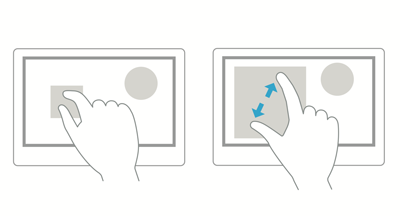
放大後,頁面邊緣某些區域會被推到視口之外:
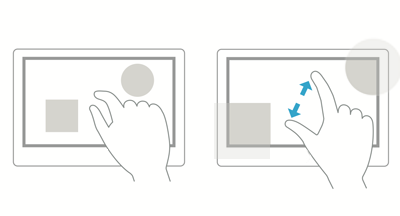
這些情況 IntersectionObserver 都不做專門處理:無論根元素還是目標元素,它們的矩形都是縮放前的真實尺寸(就像 getBoundingClientRect() 所表現的那樣),而且即便相交真的發生在那些因縮放而使用者看不到的區域內,回調照樣觸發。
十八、關於垃圾回收
觀察者實例對根元素與目標元素都是弱引用,就像 WeakMap 對自己的 key 一樣。若目標元素被回收,影響不大,瀏覽器不再檢測它即可;但若根元素被回收,問題就来了——根元素已消失而實例仍在,此時再操作該實例會發生什麼?
<div id="root"></div>
<div id="target"></div>
<script>
let observer = new IntersectionObserver(() => {}, {root: root})
// root 元素一共有兩個引用,一個是 DOM 樹裡的引用,一個是全局變量 root 的引用
document.body.removeChild(root) // 從 DOM 樹裡移除 root
root = null // 全局變量置空
setTimeout(() => {
    gc() // 手動 gc,需要在啟動 Chrome 時傳入 --js-flags='--expose-gc' 選項
    console.log(observer.root) // null,觀察者實例的根元素已經被垃圾回收了
    observer.observe(target)
    // Uncaught InvalidStateError: observe() called on an IntersectionObserver with an invalid root
    // 執行 observer 的任意方法都會報錯。
})
</script>
也就是說該實例等同於死了。這個報錯是 Chrome 53 才開始有的,51 與 52 上只會靜默失敗。
十九、後台標籤頁
Chrome 不會渲染後台標籤頁,因此也不會檢測相交,切換回去才會繼續。你可以用 Command/Ctrl + 左鍵開啟本文任一範例來驗證。
二十、關於命名的一些吐槽
threshold 與 thresholds:構造函數參數用單數、實例屬性用複數。前者既可以是數字也可以是陣列所以用單數,後者序列化後只能是陣列所以用複數。道理我懂,但統一性更重要吧?當初我試著傳 {thresholds: [1]},折騰半天才發現多了個 s。
disconnect:為什麼不叫 unobserveAll?這個命名容易讓人一頭霧水,其實只是為了和 MutationObserver、PerformanceObserver 保持一致。
rootBounds / boundingClientRect / intersectionRect:三者都回傳矩形資訊,本是同類,但命名毫無規律可循。叫 rootRect、targetRect、intersectionRect 一遍就記住了。
二十一、Polyfill 與其他瀏覽器進度
規範維護者在 GitHub 倉庫上維護一份 polyfill,當時尚未完成。polyfill 顯然無法支援 iframe 內元素的檢測,不少細節也無法模擬。
- Firefox:https://bugzilla.mozilla.org/show_bug.cgi?id=1243846
- Safari:https://bugs.webkit.org/show_bug.cgi?id=159475
- Edge:https://developer.microsoft.com/en-us/microsoft-edge/platform/status/intersectionobserver
總結
該 API 的規範當時已有一年歷史,但仍不完善,大量細節沒有規定;Chrome 的實作也有半年,bug 不少(多數是疑似 bug,畢竟規範本身 incomplete)。因此有些細節我刻意略過,例如目標元素大於根元素、根元素面積為 0、是否支援 svg 等,因為我也無從得知什麼才是正確表現。
最後補一個真實需求案例:「統計淘寶搜尋頁面在打開兩秒後展現面積超過 50% 的商品」。
setTimeout(() => {
    let observer = new IntersectionObserver(entries => {
        entries.forEach(entry => {
            console.log(entry.target) // 拿到了想要的寶貝元素
        })
        observer.disconnect() // 統計到就不再需要繼續觀察了
    }, {
        threshold: 0.5 // 只要展現面積達到 50% 的寶貝元素
    })
    // 觀察所有的寶貝元素
    Array.from(document.querySelectorAll("#mainsrp-itemlist .item")).forEach(item => observer.observe(item))
}, 2000)
完全不需要任何數學計算,簡單到爆——當然,受相容性所限,這段程式碼在當時還不能直接上 production。