目錄
- AJAX 示例:優缺點與 jQuery 實作
- 延遲對象 Deferred:擺脫回調地獄
- 跨域:JSONP 與 CORS 的完整對比
- 彈出層:artDialog 實踐
- 模板引擎:artTemplate 與 AJAX 的結合
一、AJAX
AJAX 全稱 Asynchronous JavaScript and XML,指用非同步方式與伺服器交換資料、局部更新頁面,从而实现無刷新效果。

優點
- 不需要額外插件支持
- 用戶體驗優秀,操作不被整頁刷新打斷
- 提升 Web 應用性能
- 降低伺服器與頻寬負擔
缺點
- 舊瀏覽器對
XMLHttpRequest支持不一(如今基本已不是問題) - 會破壞瀏覽器「后退 / 前進」的正常功能,需額外手段彌補
- 對搜索引擎的支持不足
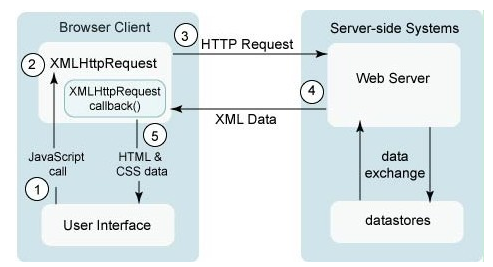
jQuery 封裝的 AJAX
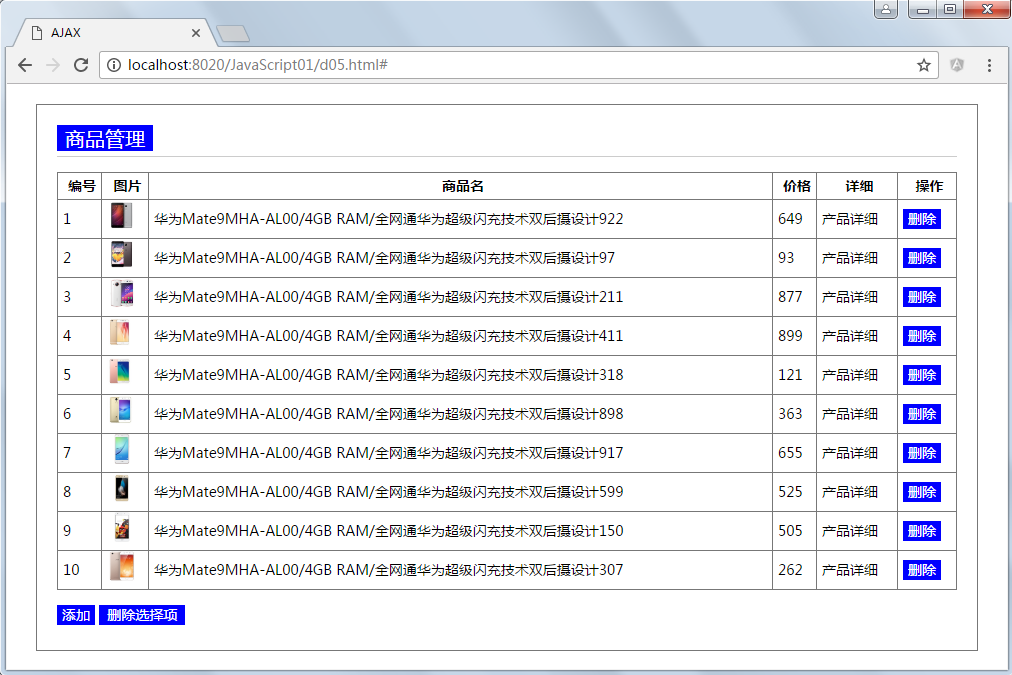
HTML5 對原生 XMLHttpRequest 做了升級(XHR2),能力更強;jQuery 則在此之上封裝得更好用。下面以一個簡單的商品管理為例。
Product.java
 package com.gomall.bean;

 /** 產品 */
 public class Product {
   private int id;          // 編號
   private String name;     // 名稱
   private double price;    // 價格
   private String picture;  // 圖片
   private String detail;   // 詳細

   public Product(int id, String name, double price, String picture) {
     this(id, name, price, picture, null);
   }

   public Product(int id, String name, double price, String picture, String detail) {
     this.id = id;
     this.name = name;
     this.price = price;
     this.picture = picture;
     this.detail = detail;
   }

   // getter / setter 省略
 }
IProductService.java
 package com.gomall.service;

 import java.util.List;
 import com.gomall.bean.Product;

 public interface IProductService {
   List<Product> getAll();
   boolean add(Product entity);
   Product findById(int id);
   boolean deleteById(int id);
 }
ProductService.java
 package com.gomall.service;

 import java.util.ArrayList;
 import java.util.List;
 import java.util.Random;
 import com.gomall.bean.Product;

 public class ProductService implements IProductService {
   public static ArrayList<Product> products;

   static {
     products = new ArrayList<>();
     Random random = new Random();
     for (int i = 1; i <= 10; i++) {
       Product product = new Product(
           i,
           "華為Mate9 MHA-AL00/4GB RAM/全網通 超級閃充 雙後攝" + random.nextInt(999),
           random.nextDouble() * 1000,
           "pic(" + i + ").jpg",
           "產品詳細");
       products.add(product);
     }
   }

   @Override
   public List<Product> getAll() {
     return products;
   }

   @Override
   public boolean add(Product entity) {
     try {
       entity.setId(products.size() + 1);
       entity.setPicture("pic(" + entity.getId() + ").jpg");
       products.add(entity);
     } catch (Exception e) {
       e.printStackTrace();
       return false;
     }
     return true;
   }

   @Override
   public Product findById(int id) {
     for (Product product : products) {
       if (product.getId() == id) {
         return product;
       }
     }
     return null;
   }

   @Override
   public boolean deleteById(int id) {
     try {
       Product product = findById(id);
       if (product != null) {
         products.remove(product);
       }
     } catch (Exception e) {
       e.printStackTrace();
       return false;
     }
     return true;
   }
 }
ProductAction.java(Servlet,同時演示 JSONP 與 CORS)
 package com.gomall.action;

 @WebServlet("/Product")
 public class ProductAction extends HttpServlet {
   private static final long serialVersionUID = 1L;

   protected void doGet(HttpServletRequest request, HttpServletResponse response)
       throws ServletException, IOException {
     /* 模擬網絡延時 */
     try {
       Thread.sleep(3000);
     } catch (InterruptedException e) {
       e.printStackTrace();
     }

     request.setCharacterEncoding("utf-8");
     response.setCharacterEncoding("utf-8");

     String act = request.getParameter("act");
     IProductService productService = new ProductService();
     ObjectMapper mapper = new ObjectMapper();   // 用於序列化 json
     PrintWriter out = response.getWriter();

     if (act.equals("getAll")) {
       out.append(mapper.writeValueAsString(productService.getAll()));

     } else if (act.equals("area")) {
       // JSONP:回傳一段以 callback 包裹的 javascript
       String callback = request.getParameter("callback");
       out.append(callback + "('" + new Date() + "')");

     } else if (act.equals("getJSONP")) {
       String callback = request.getParameter("callback");
       String json = mapper.writeValueAsString(productService.getAll());
       out.append(callback + "(" + json + ")");

     } else if (act.equals("getAllCORS")) {
       // CORS:在響應頭部宣告允許的來源與方法
       response.addHeader("Access-Control-Allow-Origin", "*");
       response.addHeader("Access-Control-Allow-Methods", "GET,POST");
       out.append(mapper.writeValueAsString(productService.getAll()));

     } else if (act.equals("del")) {
       response.addHeader("Access-Control-Allow-Origin", "*");
       response.addHeader("Access-Control-Allow-Methods", "GET,POST");
       int id = Integer.parseInt(request.getParameter("id"));
       out.append(mapper.writeValueAsString(productService.deleteById(id)));

     } else if (act.equals("add")) {
       response.addHeader("Access-Control-Allow-Origin", "*");
       response.addHeader("Access-Control-Allow-Methods", "GET,POST");
       Product entity = new Product(
           0,
           request.getParameter("name"),
           Double.parseDouble(request.getParameter("price")),
           "",
           request.getParameter("detail"));
       out.append(mapper.writeValueAsString(productService.add(entity)));
     }
   }

   protected void doPost(HttpServletRequest request, HttpServletResponse response)
       throws ServletException, IOException {
     doGet(request, response);
   }
 }
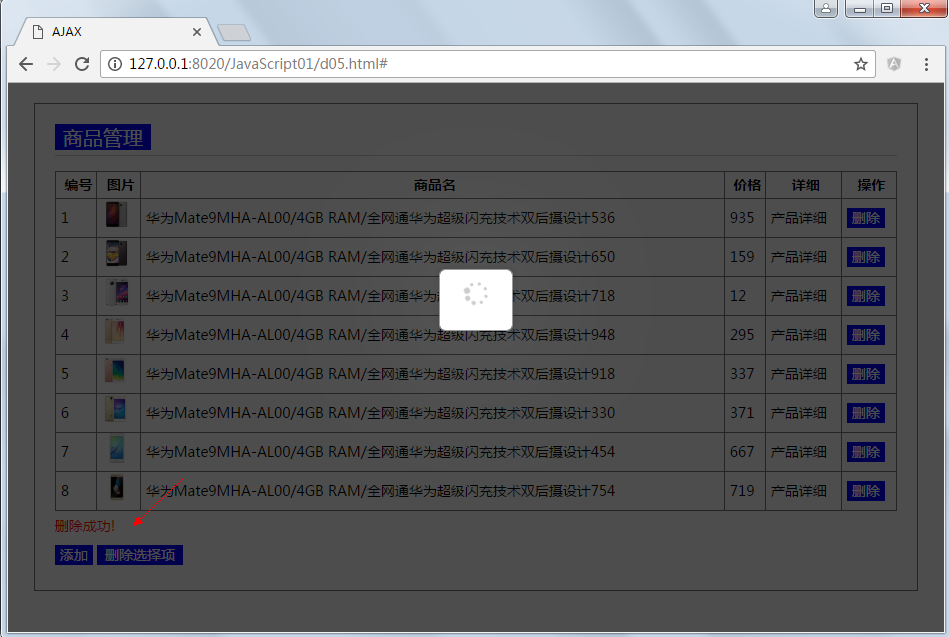
刪除:
二、延遲對象 Deferred
Deferred 是 jQuery 1.5 之後新增的回調解決方案,專為馴服非同步流程而生。
為什麼需要它
 <!DOCTYPE html>
<html>
<head>
<meta charset="UTF-8">
<title>回調</title>
</head>
<body>
<script src="js/jQuery1.11.3/jquery-1.11.3.min.js" type="text/javascript" charset="utf-8"></script>
<script type="text/javascript">
var student;
$.get("student.json", function(data){
  student = data;
}, "json");
alert(student);
</script>
</body>
</html>
student.json 內容為 {"name":"tom","id":"01"}。
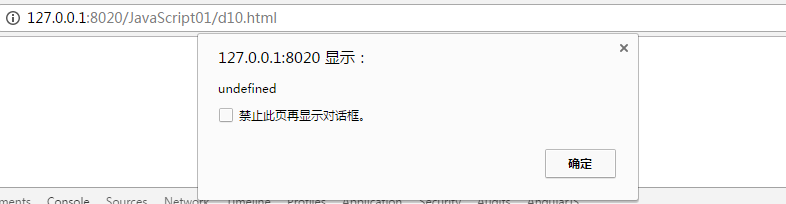
AJAX 是非同步的,請求發出後代碼並不會在 $.get 處阻塞,alert 先跑,此時資料還沒回來,結果自然是 undefined。初學者最常犯的錯誤就是這種:
 function getStudentById(id){
   $.get("students.do", {"id":id}, function(stu){
     return stu;   // 這個 return 只回給了回調,函數本身仍返回 undefined
   }, "json");
 }
改成同步確實能解決:
 $.ajax({
   type: "get",
   url: "student.json",
   async: false,          // 非同步改為同步
   success: function(data){
     student = data;
   }
 });
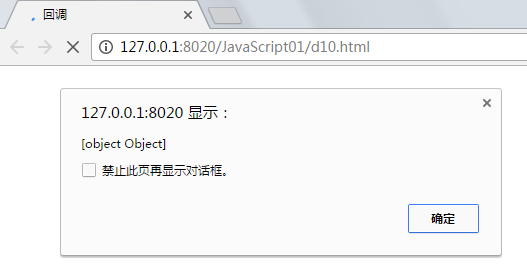
但把所有請求都改成同步,AJAX 的意義也就沒了。更好的做法是回調:
 <!DOCTYPE html>
<html>
<head>
<meta charset="UTF-8">
<title>回調</title>
</head>
<body>
<script src="js/jQuery1.11.3/jquery-1.11.3.min.js" type="text/javascript" charset="utf-8"></script>
<script type="text/javascript">
/* callback 是 ajax 請求成功時的回調方法 */
function getStudent(callback) {
  $.get("student.json", function(data) {
    callback(data);
  }, "json");
}

/* 傳入的參數本身也是函數,類似 C++ 的函數指針,也稱作委托 */
getStudent(function(stu){ alert(stu.id); });
getStudent(function(stu){ alert(stu.name); });
</script>
</body>
</html>
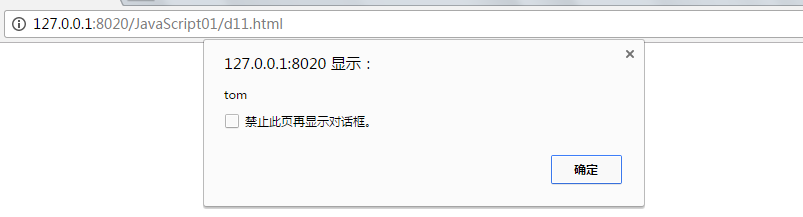
看起來很美好,但真實開發要複雜得多。比如編輯用戶時要依序載入用戶、省、市、縣:
 $.get("url1", function(){
   $.get("url2", function(){
     $.get("url3", function(){
       // ...
     });
   });
 });
回調一多,嵌套就深,可讀性直線下降;若還註冊了多個回調,更是一場噩夢。jQuery 1.5 引入的 Deferred 正是為了解決這個問題。
done / fail / always / then
jQuery 1.5 之後,$.ajax() 返回的是 deferred 物件(低版本返回 XHR),因此可以鏈式調用。
deferred.done(doneCallbacks) — 返回 Deferred 物件。延遲成功時執行,功能近似舊的 success。參數可以是函數或函數陣列,依註冊順序執行。
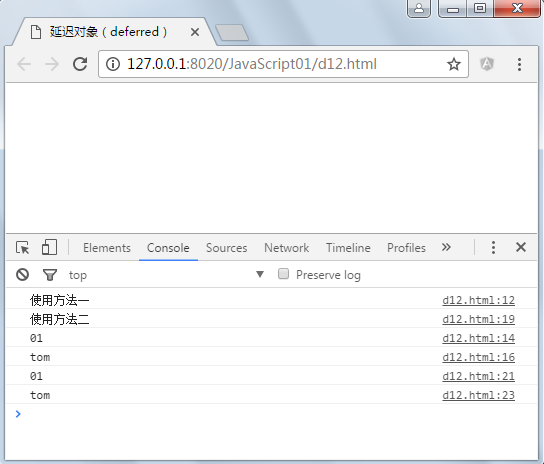
 console.log("使用方法一");
$.get("student.json", "json").done(function(stu) {
  console.log(stu.id);
}).done(function(stu) {
  console.log(stu.name);
});

console.log("使用方法二");
$.get("student.json", "json").done(function(stu) {
  console.log(stu.id);
}, function(stu) {
  console.log(stu.name);
});
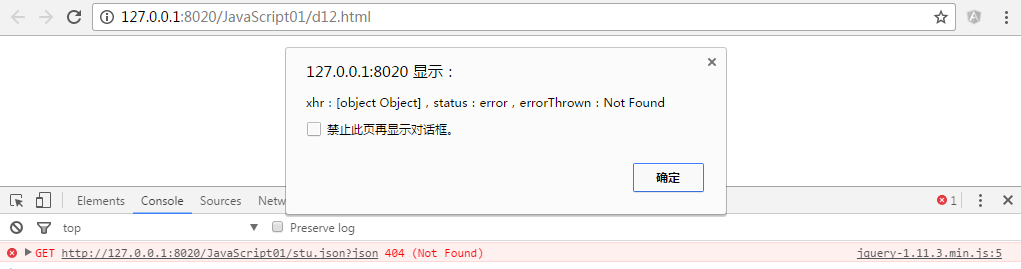
deferred.fail(failCallbacks) — 延遲失敗時執行,對應舊的 error。
 $.get("stu.json", "json").done(function(stu) {
  console.log(stu.name);
}).fail(function(xhr, status, errorThrown){
  alert("xhr:" + xhr + ",status:" + status + ",errorThrown:" + errorThrown);
});
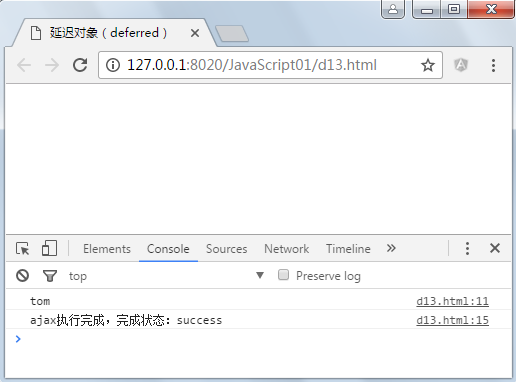
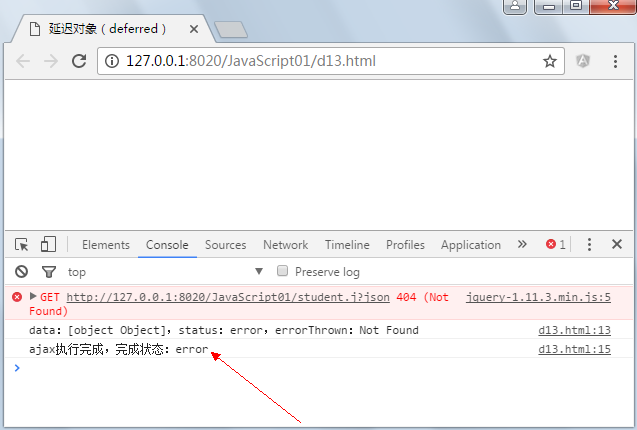
deferred.always(alwaysCallbacks) — 無論成功或失敗都執行,對應舊的 complete,常用於收尾清理。
 $.get("student.j", "json").done(function(stu) {
  console.log(stu.name);
}).fail(function(data, status, errorThrown){
  console.log("data:" + data + ",status:" + status + ",errorThrown:" + errorThrown);
}).always(function(data, textStatus){
  console.log("ajax 執行完成,完成狀態:" + textStatus);
});
成功時:
失敗時:
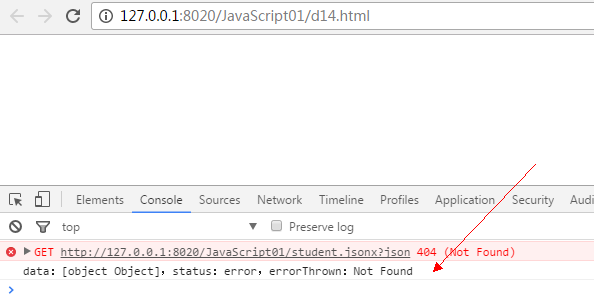
deferred.then(doneFilter, failFilter, progressFilter) — 一次註冊多個環節的處理器,三個參數都可為函數、函數陣列或留空。
 $.get("student.jsonx", "json").then(function(stu) {
  console.log(stu.name);
}, function(data, status, errorThrown) {
  console.log("data:" + data + ",status:" + status + ",errorThrown:" + errorThrown);
});
在自己的代碼裡使用 Deferred
Deferred 不只是 jQuery 內部的機制,自訂的非同步任務同樣能用它優雅地封裝。
 var myTask = function(){
   var def = $.Deferred();          // 建立延遲對象
   setTimeout(function(){
     var n = Math.round(Math.random()*100);
     if(n % 2 == 0){
       console.log("一個耗時的操作終於完成了,n=" + n);
       def.resolve();               // 任務成功
     }else{
       console.log("一個耗時的操作失敗,n=" + n);
       def.reject();                // 任務失敗
     }
   }, 3000);
   return def.promise();            // 只暴露狀態相關方法,防止外部篡改
 };

 /* 為 myTask 的完成與失敗分別掛上回調 */
 $.when(myTask()).done(function(){
   console.log("執行成功");
 }).fail(function(){
   console.log("執行失敗");
 });
失敗時:
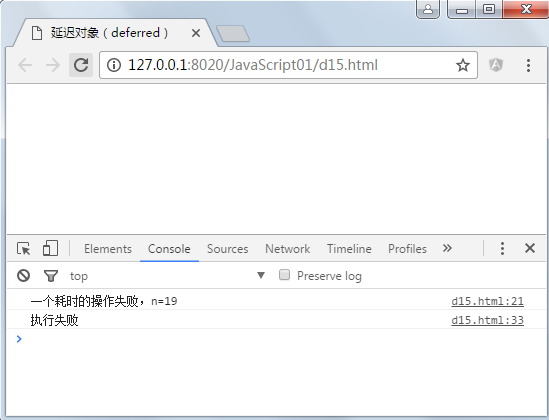
成功時:
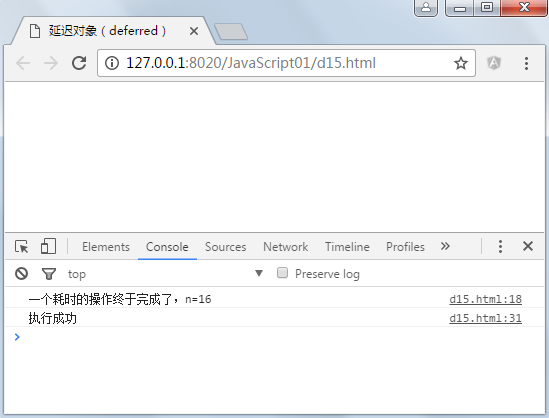
promise() 的關鍵作用在於:它在原 deferred 物件上回傳另一個物件,只開放與狀態查詢相關的方法(done、fail),屏蔽 resolve、reject 等可改變狀態的方法,從而保證狀態不被外部隨意改動。
API 速查
$.Deferred():生成 deferred 物件deferred.done():指定成功回調deferred.fail():指定失敗回調deferred.always():無論成敗都執行deferred.then():done 與 fail 的合併寫法,只有一個參數時等同 donedeferred.promise():無參數時回傳狀態不可變的新物件;有參數時在參數物件上部署 deferred 接口deferred.resolve():手動將狀態改為「已完成」,立即觸發 donedeferred.reject():與 resolve 相反,改為「已失敗」,立即觸發 fail$.when():為多個操作統一指定回調
三、跨域
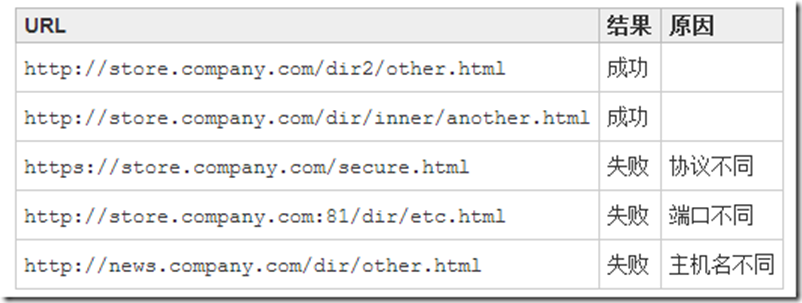
互聯網上的主機由 IP 標識,域名系統只是為了方便記憶。URL 的結構是 協議://主機名.公司名.機構類型.地域類型:端口/路徑,例如 https://www.zhangguo.com.cn:8080/products/list.do?id=1#a1。

什麼是跨域
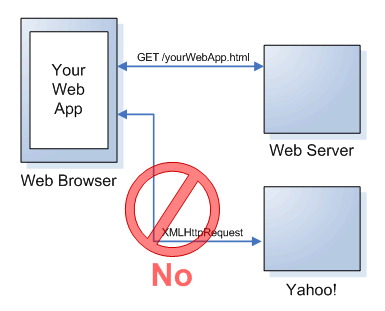
受同源策略限制,A 域名下的 JavaScript 無法操作 B 或 C 域名下的資源。假設頁面在 https://store.company.com/index.html:
客戶端 d05.html(https://localhost:8087/jQuery601_JAVA/d05.html):
 <!DOCTYPE html>
<html>
<head>
<meta charset="UTF-8">
<title>跨域 AJAX 請求</title>
</head>
<body>
<h2>跨域 AJAX 請求</h2>
<h2 id="message"></h2>
<button type="button" id="btnAjax">ajax請求</button>
<script type="text/javascript" src="js/jQuery/jquery.min.js"></script>
<script type="text/javascript">
$("#btnAjax").click(function() {
  $.get("https://localhost:12833/Action/FindUserById.ashx", {"id":1001}, function(data){
    log(data);
  }, "text");
});
function log(msg) {
  $("#message")[0].innerHTML += msg + "<br/>";
}
</script>
</body>
</html>
另一個域下的 .NET 一般處理程序:
 public class FindUserById : IHttpHandler {
   public void ProcessRequest(HttpContext context) {
     context.Response.ContentType = "text/plain";
     String name = "";
     int id = Convert.ToInt32(context.Request.Params["id"]);
     if (id == 1001) {
       name = "Mark";
     } else if (id == 1002) {
       name = "Jack";
     }
     context.Response.Write(name);
   }
   public bool IsReusable { get { return false; } }
 }
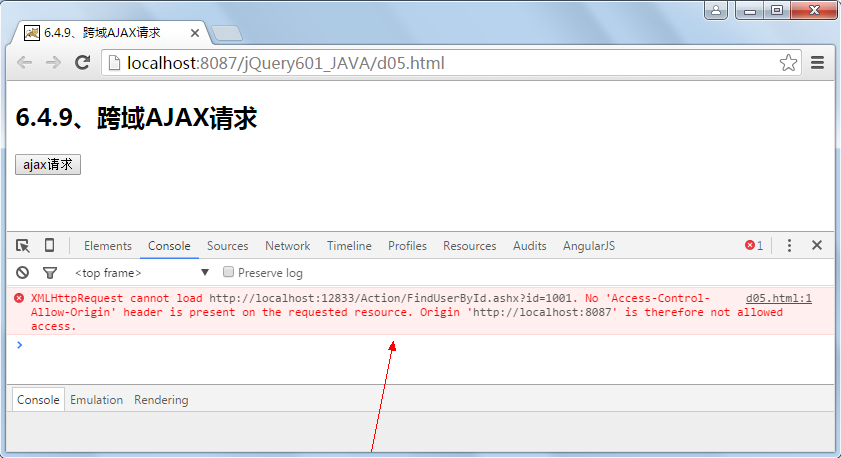
JSONP 跨域
原理是利用 <script> 標籤允許跨域引用的特性:把回調函數名帶給伺服器,伺服器回傳一段以該函數名包裹的 JavaScript,瀏覽器執行時便完成資料傳遞。
客戶端:
 <body>
<script type="text/javascript">
/* 回調方法 */
function show(data) {
  alert(data);
}
</script>
<script src="https://localhost:8087/JavaScript001/Product?act=area&callback=show"
        type="text/javascript" charset="utf-8"></script>
</body>
伺服器:
 String callback = request.getParameter("callback");
 out.append(callback + "('" + new Date() + "')");
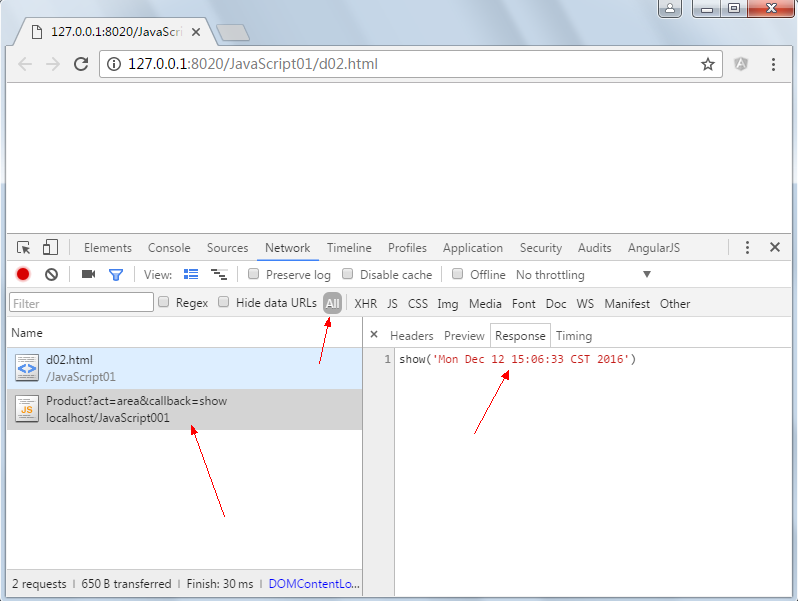
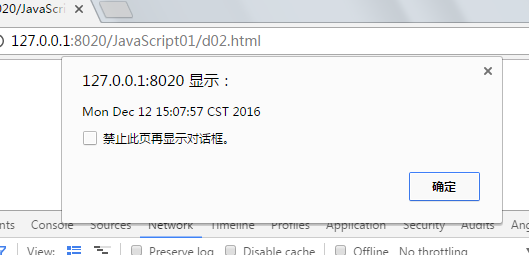
從圖中可以看到,JSONP 不再走 XMLHttpRequest,而是同步的腳本載入。
jQuery 使用 JSONP
jQuery 內建了 JSONP 支持。若把 dataType 指定為 jsonp,它會自動在 URL 後附加 callback=? 查詢參數,伺服器端需在 JSON 前加上回調函數名。若要自訂參數名,可透過 $.ajax() 的 jsonp 選項指定。
 $.get("https://localhost:8087/JavaScript001/Product?callback=?",
       {act:"getJSONP"},
       function(data){
         $.each(data, function(index, obj){
           $("<p/>").html(obj.name).appendTo("body");
         });
       },
       "jsonp");
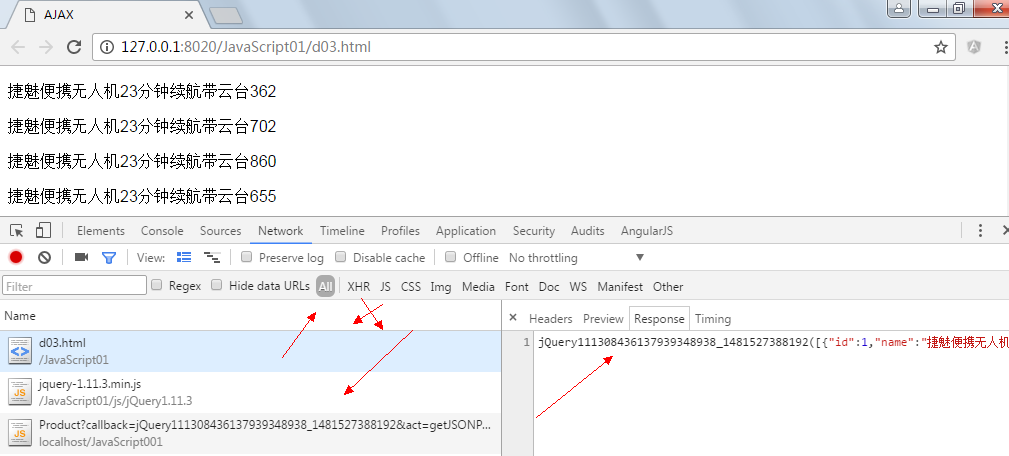

JSONP 的限制很明確:只支援 GET、本質是同步腳本載入、伺服器需要為每個介面額外處理回調包裝。
CORS 跨域資源共享
CORS(Cross-Origin Resource Sharing)是一項瀏覽器技術規範,為 Web 伺服器提供一種方式,宣告允許其他域讀取自己的資源。
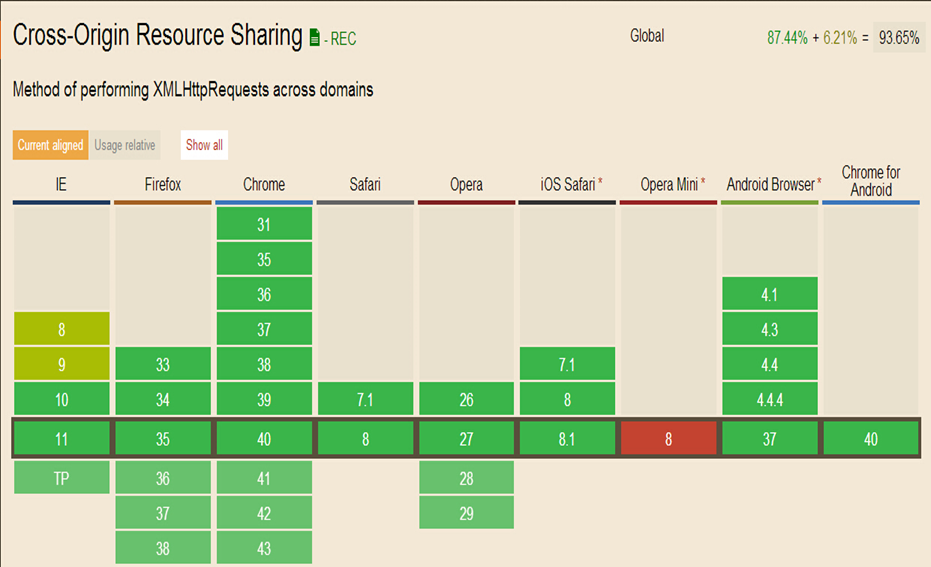
CORS 相比 JSONP 的優勢:
- JSONP 只能 GET,CORS 支援所有 HTTP 方法。
- CORS 使用普通的
XMLHttpRequest,錯誤處理更完善。 - JSONP 主要面向不支援 CORS 的老瀏覽器,而現代瀏覽器幾乎都已支援 CORS。
兩種模型:
1. 簡單模型:支援 get/post/put/delete,回應 Access-Control-Allow-Origin: * 即可。但不允許自訂 header、忽略 cookies,且 POST 的 Content-Type 僅限 text/plain、application/x-www-urlencoded、multipart/form-data,後兩者需經預檢協商。
2. 預檢請求(Preflighted Request):瀏覽器先發 OPTIONS 請求,伺服器回應允許的方法與來源,瀏覽器確認後才發出真正的請求,並再次收到 CORS 標頭後才允許腳本讀取回應。
 // 允許跨域訪問的域名,公共資源可直接返回 *
 response.addHeader("Access-Control-Allow-Origin", "https://www.company.com");

 // 允許跨域訪問的方法,如 GET,POST,DELETE,PUT(REST)
 response.addHeader("Access-Control-Allow-Methods", "GET,POST,OPTIONS");
.NET 一般處理程序:
 public class FindUserById : IHttpHandler {
   public void ProcessRequest(HttpContext context) {
     context.Response.ContentType = "text/plain";
     context.Response.Headers.Add("Access-Control-Allow-Origin", "*");
     context.Response.Headers.Add("Access-Control-Allow-Methods", "GET,POST");
     String name = "";
     int id = Convert.ToInt32(context.Request.Params["id"]);
     if (id == 1001) {
       name = "Mark";
     } else if (id == 1002) {
       name = "Jack";
     }
     context.Response.Write(name);
   }
   public bool IsReusable { get { return false; } }
 }
客戶端:
 $("#btnAjax").click(function() {
  $.get("https://localhost:12833/Action/FindUserById.ashx", {"id":1001}, function(data){
    log(data);
  }, "text");
});
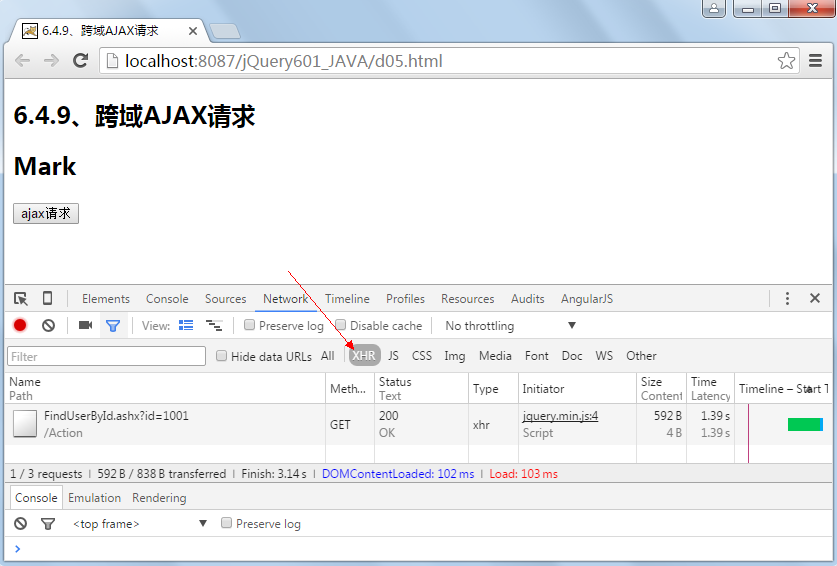
可以看到,跨域請求成功且為非同步。
Java Servlet:在 getAllCORS 分支中加上兩個響應頭即可(見前文 ProductAction 代碼)。
 $.get("https://localhost:8087/JavaScript001/Product?act=getAllCORS", function(data){
  alert(data);
});


兩個實務坑
a) 若不想每個介面都手寫標頭,Java 端可用 Filter 統一處理,.NET 端可用 Module 或 HttpHandler 全域註冊(需登記到 Web.config,部署時特別注意)。
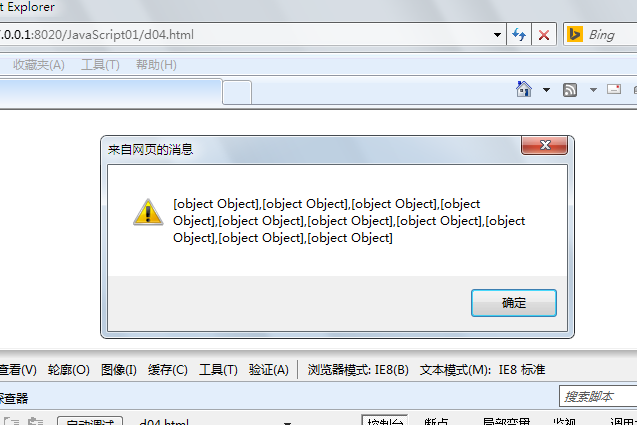
b) IE8 並未完整支援 CORS,需要額外插件:javascript-jquery-transport-xdr(github.com/gfdev/javascript-jquery-transport-xdr)。
 <script src="js/jQuery1.11.3/jquery-1.11.3.min.js" type="text/javascript" charset="utf-8"></script>
<!--[if (IE 8)|(IE 9)]>
<script src="js/jquery.transport.xdr.min.js" type="text/javascript" charset="utf-8"></script>
<![endif]-->
<script type="text/javascript">
$.get("https://localhost:8087/JavaScript001/Product?act=getAllCORS&type=meat-and-filler&format=json",
      {},
      function(data){ alert(data); },
      "json");
</script>
c) Tomcat 官方也提供了支援 CORS 的過濾器,詳見 Tomcat 文檔的 filter 章節。
小結:除了 JSONP 與 CORS,還有 iframe + location.hash、window.name、HTML5 postMessage、Flash 等方案。個人認為 CORS 才是長遠之選,其餘多屬權宜之計。
四、彈出層:artDialog
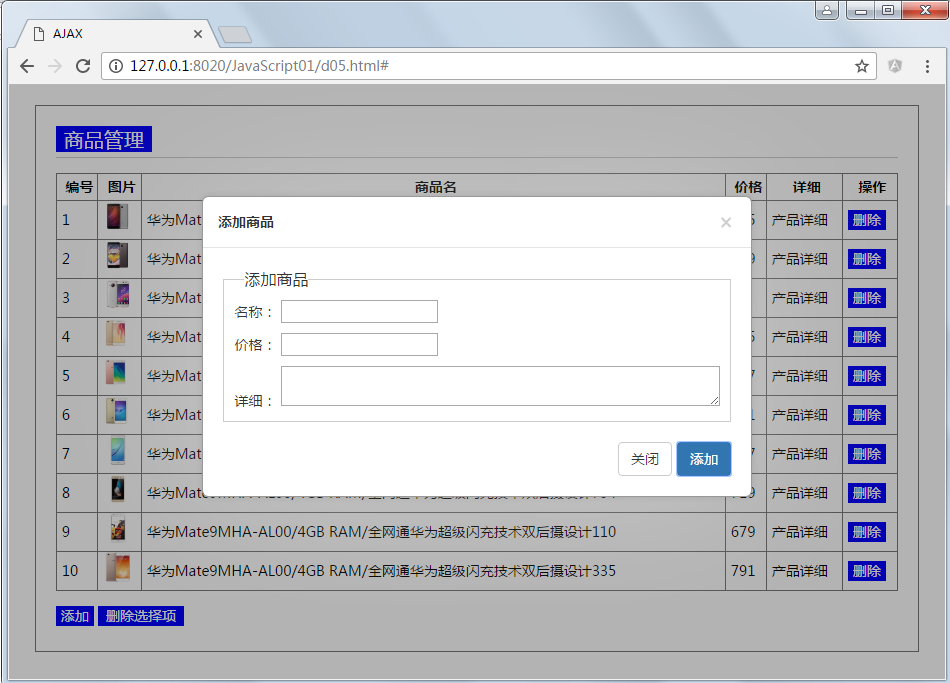
前面的商品管理若把表單放進彈出層,布局會緊湊很多。登入、提示資訊等場景更是離不開彈出層。常見選擇有 FancyBox、LightBox、colorBox、artDialog、BlockUI、Layer 等,這裡介紹騰訊開源的 artDialog——輕量、實用。

它設計得頗為巧妙:個子小,接口豐富,外觀也講究。特點是自適應內容、接口優雅、細節到位、跨平台相容、輕量實用。
用法:
 <!DOCTYPE html>
<html>
<head>
<meta charset="UTF-8">
<title>artDialog</title>
</head>
<body>
<button onclick="btn_dialog()"> 彈出框 </button>
<button onclick="btn_loading()"> 加載中 </button>
<script src="js/jQuery1.11.3/jquery-1.11.3.js" type="text/javascript" charset="utf-8"></script>
<script src="js/artDialog6/dialog-min.js" type="text/javascript" charset="utf-8"></script>
<link rel="stylesheet" type="text/css" href="js/artDialog6/ui-dialog.css" />
<script type="text/javascript">
function btn_dialog() {
  var d = dialog({
    title: '消息',
    content: '風吹起的青色衣衫,夕陽裡的溫暖容顏,<br>——許巍《難忘的一天》',
    okValue: '確 定',
    ok: function() {
      var that = this;
      setTimeout(function() {
        that.title('提交中..');
      }, 2000);
      return false;      // 返回 false 阻止對話框關閉
    },
    cancelValue: '取消',
    cancel: function() {
      alert('你點了取消按鈕');
    }
  });
  d.show();
}

function btn_loading(){
  dialog({ modal: true }).show();
}
</script>
</body>
</html>
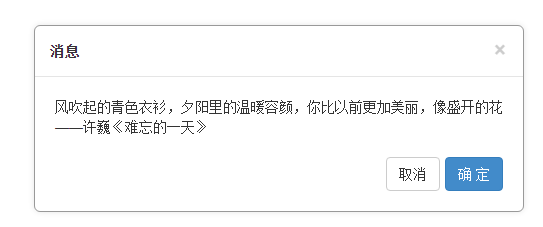

常用屬性:
 // 對齊方式
 // align: 'bottom left',
 // 是否固定定位
 // fixed: false,
 // 對話框疊加高度值(此值不能超過瀏覽器最大限制)
 // zIndex: 1024,
 backdropBackground: '#000',   // 遮罩背景顏色
 backdropOpacity: 0.7,         // 遮罩透明度
 content: '...',               // 消息內容
 title: '',                    // 標題
 statusbar: '',                // 狀態欄區域 HTML
 button: null,                 // 自定義按鈕
 ok: null,                     // 確定按鈕回調
 cancel: null,                 // 取消按鈕回調
 okValue: 'ok',                // 確定按鈕文本
 cancelValue: 'cancel',        // 取消按鈕文本
 cancelDisplay: true,
 width: '',                    // 內容寬度
 height: '',                   // 內容高度
 padding: '',                  // 內容與邊界填充距離
 skin: '',                     // 自定義 className
 quickClose: false,            // 點擊遮罩層是否自動關閉
 cssUri: '../css/ui-dialog.css',
常用方法與事件:
 show()          // 顯示對話框,可指定位置
 showModal()     // 以模態方式顯示
 close(retVal)   // 關閉,返回值可被 onclose 取得
 remove()        // 銷毀
 reset()         // 重置位置
 focus() / blur()// 聚焦 / 失焦
 addEventListener(type, listener) / removeEventListener(type, listener)
 onshow / onclose / onbeforeremove / onremove / onreset / onfocus / onblur
其中 ok 回調返回 false 可以阻止自動關閉,這一點在「點確定後要做非同步校驗」時特別有用。
五、模板引擎:artTemplate
回到商品管理的示例,那段 JavaScript 裡塞了大量 HTML 字串,HTML 屬性裡又有 onclick 之類的腳本,兩者高度耦合,改動起來處處掣肘。模板引擎正是為了解決這個問題——讓視圖與資料分離。
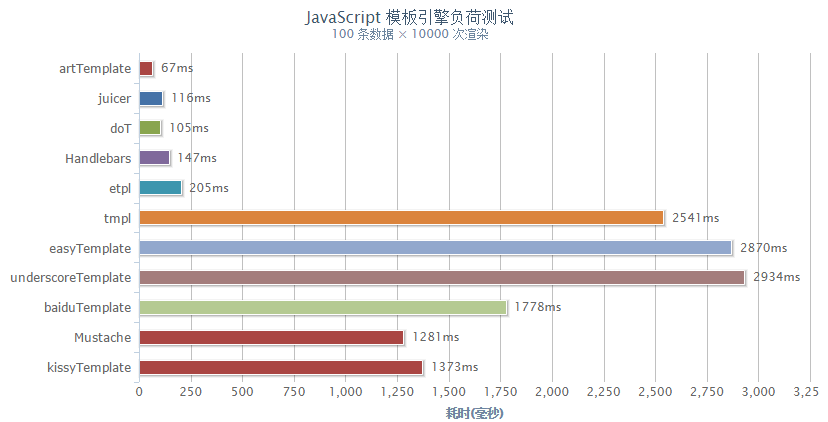
上圖是常見的前端模板引擎,其中 artTemplate 速度較快,與 artDialog 出自同一作者。當然評價一個模板引擎不只看性能,語法表達力、調ability、社群維護都要綜合考量。
Hello World
 <!DOCTYPE html>
<html>
<head>
<meta charset="UTF-8">
<title>artTemplate</title>
</head>
<body>
<div id="result">
</div>
<script src="js/artTemplate3/template.js" type="text/javascript" charset="utf-8"></script>
<script type="text/html" id="template1">
{{if isShow}}
<h2>姓名:{{name}}</h2>
<ul>
  {{each hobbies as hobby index}}
  <li> {{index+1}} {{hobby}} </li>
  {{/each}}
</ul>
{{/if}}
</script>
<script type="text/javascript">
var data = {
  isShow: true,
  name: "Tom",
  hobbies: ["看書","上網","運動","電影","購物"]
};
// 用數據與模板渲染出結果
var html = template("template1", data);
document.getElementById("result").innerHTML = html;
</script>
</body>
</html>
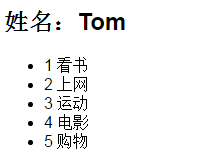
最終生成的 HTML:
 <h2>姓名:Tom</h2>
<ul>
<li> 看書 </li>
<li> 上網 </li>
<li> 運動 </li>
<li> 電影 </li>
<li> 購物 </li>
</ul>
核心方法
template(id, data):依 id 渲染模板;不傳 data 時回傳渲染函數template.compile(source, options):回傳一個渲染函數template.render(source, options):直接回傳渲染結果template.helper(name, callback):註冊輔助方法,供模板調用自訂 JS 函數template.config(name, value):修改引擎配置
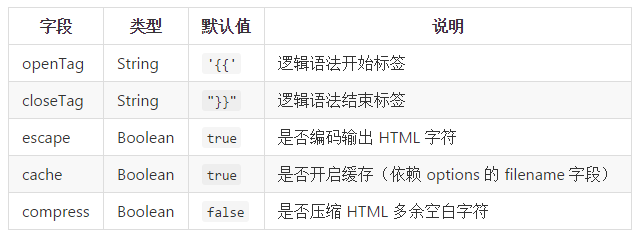
可定價的常用配置包括邏輯標籤的起訖符與是否轉義:
 <script type="text/html" id="template1">
$$if isShow##
<h2>姓名:$$name##</h2>
<ul>
  $$include "template2"##   <!-- 包含模板2 -->
</ul>
$$/if##
</script>

<script type="text/html" id="template2">
$$each hobbies as hobby index##
<li>
  $$index+1##
  $$#hobby##                <!-- 默認會轉義,加 # 號則不轉義 -->
</li>
$$/each##
</script>

<script type="text/javascript">
var data = {
  isShow: true,
  name: "Tom",
  hobbies: ["看書","上網","運動","<b>電影</b>","<i>購物</i>"]
};
template.config("openTag", "$$");    // 邏輯語法開始標簽
template.config("closeTag", "##");   // 邏輯語法結束標簽
template.config("escape", false);    // 關閉自動轉義

var html = template("template1", data);
document.getElementById("result").innerHTML = html;
</script>
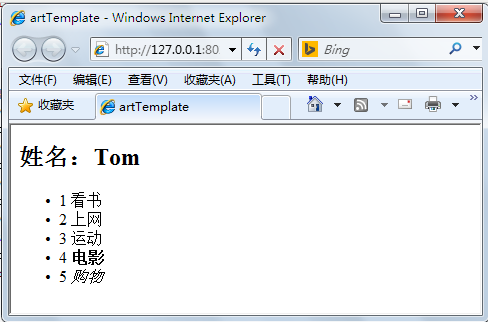
這裡有個安全提醒:escape 關閉或加上 # 前綴都會跳過 HTML 轉義。若資料來源包含使用者輸入,務必保留轉義,否則容易埋下 XSS 隱患。
與 AJAX 結合的完整示例
把 AJAX、模板引擎、彈出層三者串起來,就是一個結構清晰的小型後台:
 <script type="text/html" id="tmpl">
{{each list as pdt}}
<tr>
  <td>{{pdt.id}}</td>
  <td><img src="https://localhost:8087/JavaScript001/images/{{pdt.picture}}" class="pic"></td>
  <td>{{pdt.name}}</td>
  <td>{{pdt.price | round:'¥'}}</td>
  <td>{{pdt.detail}}</td>
  <td><a href="#" class="abtn del" data-id={{pdt.id}}>刪除</a></td>
</tr>
{{/each}}
</script>

<script type="text/javascript">
var app = {
  url: "https://localhost:8087/JavaScript001/",   // 提供服務的域名

  // 添加:把表單 HTML 丟進彈出層,提交後刷新列表
  add: function() {
    var d = dialog({
      title: '添加商品',
      content: $('#divFrom').html(),
      okValue: '添加',
      modal: true,
      backdropOpacity: 0.3,
      ok: function() {
        var that = this;
        $.ajax({
          type: "post",
          data: $(".ui-dialog #formPdt").serialize() + "&act=add",
          success: function(data) {
            if (data) {
              app.log("添加成功!");
              app.loadAll();
              that.close();
            } else {
              app.log("添加失敗!");
            }
          }
        });
        return false;    // 阻止對話框立即關閉,等 ajax 回來再關
      },
      cancelValue: '關閉',
      cancel: function() { alert('你點了取消按鈕'); },
      onclose: function() { alert("關閉了"); }
    });
    d.show();
  },

  // 刪除:動態綁定的事件回調中,this 指向被點擊的元素
  del: function() {
    var id = $(this).data("id");
    var that = $(this);
    $.ajax({
      type: "get",
      data: { "id": id, "act": "del" },
      success: function(data) {
        if (data) {
          that.closest("tr").remove();
          app.log("刪除成功!");
        } else {
          app.log("刪除失敗!");
        }
      }
    });
  },

  // 載入全部:用模板渲染表格內容
  loadAll: function() {
    $.ajax({
      type: "get",
      data: { "act": "getAllCORS" },
      success: function(data) {
        $("#tabGoods tr:gt(0)").remove();
        $("#tabGoods").append(template("tmpl", {list: data}));
      }
    });
  },

  init: function() {
    /* 動態綁定刪除事件(事件委托,才能作用於後續新增的節點) */
    $("#tabGoods").on("click", "a.del", {}, app.del);
    /* 綁定添加事件 */
    $("#btnSave").click(app.add);

    /* 設置全局 AJAX 默認值 */
    $.ajaxSetup({
      dataType: "json",
      url: app.url + "Product?type=meat-and-filler&format=json",
      beforeSend: app.ajaxBefore,
      complete: app.clearMsg,
      error: function(xhr, textStatus, errorThrown) {
        app.log("錯誤" + textStatus + errorThrown);
      }
    });

    // 為模板引擎定義輔助函數:價格取整並加上貨幣符
    template.helper("round", function(value, mark){
      return (mark || "") + Math.round(value);
    });

    this.loadAll();
  },

  clearMsg: function() { this.box.remove(); },
  ajaxBefore: function() {
    this.box = dialog({ modal: true });
    this.box.show();
  },
  log: function(msg) { $("#message").html(msg); }
};

app.init();
</script>
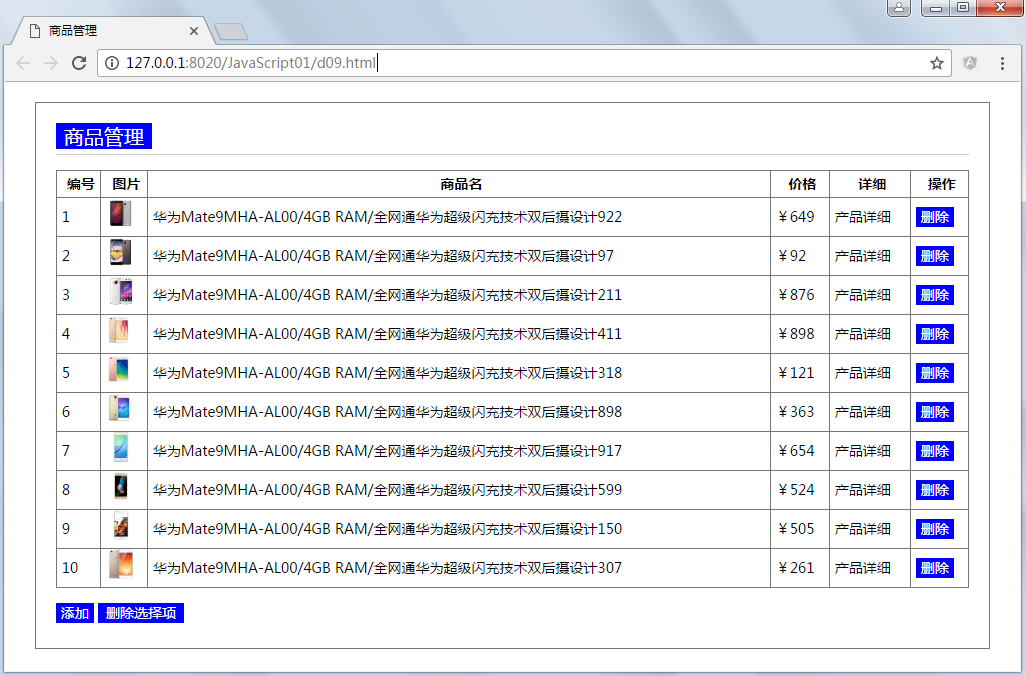
這段代碼示範了幾個可以複用到其他項目的模式:用 $.ajaxSetup 統一設定 baseUrl 與 loading 行為,避免每個請求重複寫;用事件委托處理動態生成的刪除按鈕;用 template.helper 把格式化邏輯交給模板層,視圖與資料徹底分家。
結語
這五個主題串起來,基本覆蓋了傳統前端異步開發的主要場景:AJAX 負責資料流動,Deferred 負責流程編排,跨域方案負責打通邊界,彈出層與模板引擎負責視圖組織。理解它們背後的思想,比記住 API 更重要。
- 上一篇文章: BootstrapValidator 表單校驗的接入方式
- 下一篇文章: 徹底搞懂 JavaScript 中 this 的指向規律