Ajax 是目前很普遍、也很值得探討的一門技術。本文將結合它在不同框架中的用法,梳理 Ajax 的新老語法。
Ajax 簡介
Ajax 全稱 Asynchronous JavaScript And XML,即「非同步 JavaScript 和 XML」。透過 Ajax,我們能在不阻塞頁面的情況下與伺服器進行資料交互,也可理解為非同步資料傳輸。有了它,網頁只需局部刷新即可更新資料顯示,減少不必要的資料量,大大提升使用者體驗,讓 web 應用更小、更快、更友好。
原生 Ajax
現代瀏覽器基本都支援原生 Ajax,下面詳細說明如何用原生 JS 發起並處理 Ajax 請求。
1. 獲取 XMLHttpRequest 物件
var xhr = new XMLHttpRequest();
若不考慮低版本 IE,可直接這樣用;若要相容老版 IE(IE5、IE6),則需用 ActiveX:
var xhr; if (window.XMLHttpRequest) { xhr=new XMLHttpRequest(); } else if (window.ActiveXObject) { // 兼容老版本浏覽器 xhr=new ActiveXObject("Microsoft.XMLHTTP"); }
2. 參數配置,用 open 方法:
var xhr; if (window.XMLHttpRequest) { xhr=new XMLHttpRequest(); } else if (window.ActiveXObject) { xhr=new ActiveXObject("Microsoft.XMLHTTP"); } if (xhr) { xhr.open('GET', '/test/', true); // 以GET請求的方式向'/test/'路徑發送異步請求 }
open 的第一個參數為請求方式(GET 或 POST),第二個為請求 url,第三個為是否非同步(預設 true)。
3. 發送請求,呼叫 send 方法:
var xhr; if (window.XMLHttpRequest) { xhr=new XMLHttpRequest(); } else if (window.ActiveXObject) { xhr=new ActiveXObject("Microsoft.XMLHTTP"); } if (xhr) { xhr.open('GET', '/test/', true); xhr.send(); // 調用send方法發送請求 }
用 GET 傳參時可直接把參數放在 url 後(如 '/test/?name=luozh&size=12');用 POST 時參數要寫在 send 裡:
xhr.open('POST', '/test/', true); xhr.setRequestHeader("Content-type","application/x-www-form-urlencoded"); // 將請求頭設置為表單方式提交 xhr.send('name=luozh&size=12');
最終會以 Form Data 形式傳遞:

若不設請求頭,原生 Ajax 預設用 Content-Type 為 text/plain;charset=UTF-8 的方式發送,這顯然不是伺服器期望的格式。此時可以改傳 JSON 字串:
xhr.open('POST', '/test/', true); xhr.send(JSON.stringify({name: 'luozh', size: 12}));

4. 監測狀態,用 onreadystatechange:
var xhr; if (window.XMLHttpRequest) { xhr=new XMLHttpRequest(); } else if (window.ActiveXObject) { xhr=new ActiveXObject("Microsoft.XMLHTTP"); } if (xhr) { xhr.open('GET', '/test/', true); // 以GET請求的方式向'/test/'路徑發送異步請求 xhr.send(); xhr.onreadystatechange = function () { // 利用onreadystatechange監測狀態 if (xhr.readyState === 4) { // readyState為4表示請求響應完成 if (xhr.status === 200) { // status為200表示請求成功 console.log('執行成功'); } else { console.log('執行出錯'); } } } }
readyState 共有 5 個階段,為 4 時表示響應內容解析完成;此時再用 status 判斷狀態碼,200 表示成功。也可用 onload 代替(它只在狀態為 4 時呼叫):
xhr.onload = function () { // 調用onload if (xhr.status === 200) { // status為200表示請求成功 console.log('執行成功'); } else { console.log('執行出錯'); } }
但要注意 IE 對 onload 的支援並不友好。此外還有 onloadstart、onprogress、onabort、ontimeout、onerror、onloadend 等事件,有興趣可自行實踐。
其他框架中的 Ajax
1. jQuery 中的 Ajax:它很好地封裝了原生程式碼,在相容性與易用性上都有提升:
$.ajax({ method: 'GET', // 1.9.0本版前用'type' url: "/test/", dataType: 'json' }) .done(function() { console.log('執行成功'); }) .fail(function() { console.log('執行出錯'); })
jQuery 預設 Content-type 是 application/x-www-form-urlencoded; charset=UTF-8。
2. Vue.js 中的 Ajax:Vue 本身不含 Ajax,需透過外掛(官方推薦 vue-resource):
Vue.http.get('/test/').then((response) => { console.log('執行成功'); }, (response) => { console.log('執行出錯'); });
vue-resource 支援 Promise API,相容 Firefox、Chrome、Safari、Opera 與 IE9+。
3. Angular.js 中的 Ajax(1.x 版):
var myApp = angular.module('myApp',[]); var myCtrl = myApp.controller('myCtrl',['$scope','$http',function($scope, $http){ $http({ method: 'GET', url: '/test/', headers: {'Content-Type': 'application/x-www-form-urlencoded; charset=UTF-8'} }).success(function (data) { console.log('執行成功'); }).error(function () { console.log('執行出錯'); }); }]);
Angular 需在控制器上註冊 $http,其預設 Content-type 是 application/json;charset=UTF-8,若要用表單方式提交需自行設定 headers。
4. React 中的 Ajax:我比較推薦用 fetch,它不局限於 React,在任何框架中都能用。
Fetch API
Fetch API 基於 Promise 設計,由於相容性問題,部分瀏覽器暫不支援:
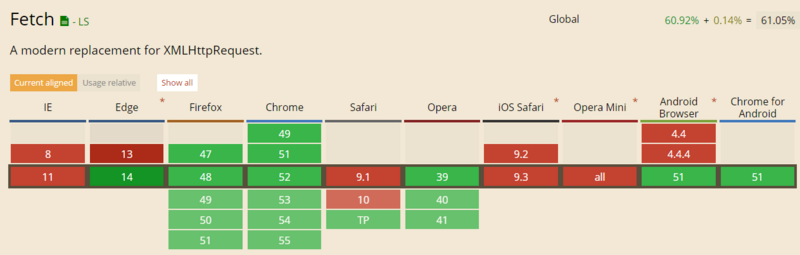
可透過 fetch-polyfill、es6-promise、fetch-ie8 等外掛解決。用原生 XHR 與 Fetch 對比:
// XMLHttpRequst API var xhr = new XMLHttpRequest(); xhr.open('GET', '/test/', true); xhr.onload = function() { console.log('執行成功'); }; xhr.onerror = function() { console.log('執行出錯'); }; xhr.send();
fetch('/test/').then(function(response) { return response.json(); }).then(function(data) { console.log('執行成功'); }).catch(function(e) { console.log('執行出錯'); });
可見 Fetch 更簡潔、語義化,鏈式調用也更流暢。隨著瀏覽器內核完善,未來 XHR 會逐漸被 Fetch 取代。
跨域 Ajax
處理 Ajax 跨域主要有 4 種方式:利用 iframe、利用 JSONP、利用代理、利用 HTML5 的 XMLHttpRequest Level2。前兩種屬前端工作,這裡重點講後兩種。
代理方式:在同域名的 web 伺服器端建立一個代理。例如北京伺服器(www.beijing.com)的後台去調用上海伺服器(www.shanghai.com)的服務,再把結果返回前端,如此前端調用同域服務就等同於調用上海的服務。
XMLHttpRequest Level2 方式則需後台配置請求頭:
// php語法 header('Access-Control-Allow-Origin: *'); header('Access-Control-Allow-Methods: GET,POST');
其中的 * 可替換為允許訪問的域名,* 表示所有域名都可訪問。可見後兩種主要是後台的工作,前端只需調用。
總結
無論 Ajax 語法如何變化、框架如何封裝,它都只是實現非同步資料交互的工具。只要理解原生 JS 中 Ajax 的實現原理,掌握 XMLHttpRequest 及 Promise 的概念與流程,就能在資料非同步交互的時代游刃有餘。
- 上一篇文章: 深入理解 jQuery() 方法的建構原理
- 下一篇文章: 深入理解 vue.js 雙向綁定的實現原理