Ionic 上拉選單 ActionSheet 實作範例
編輯:關於JavaScript
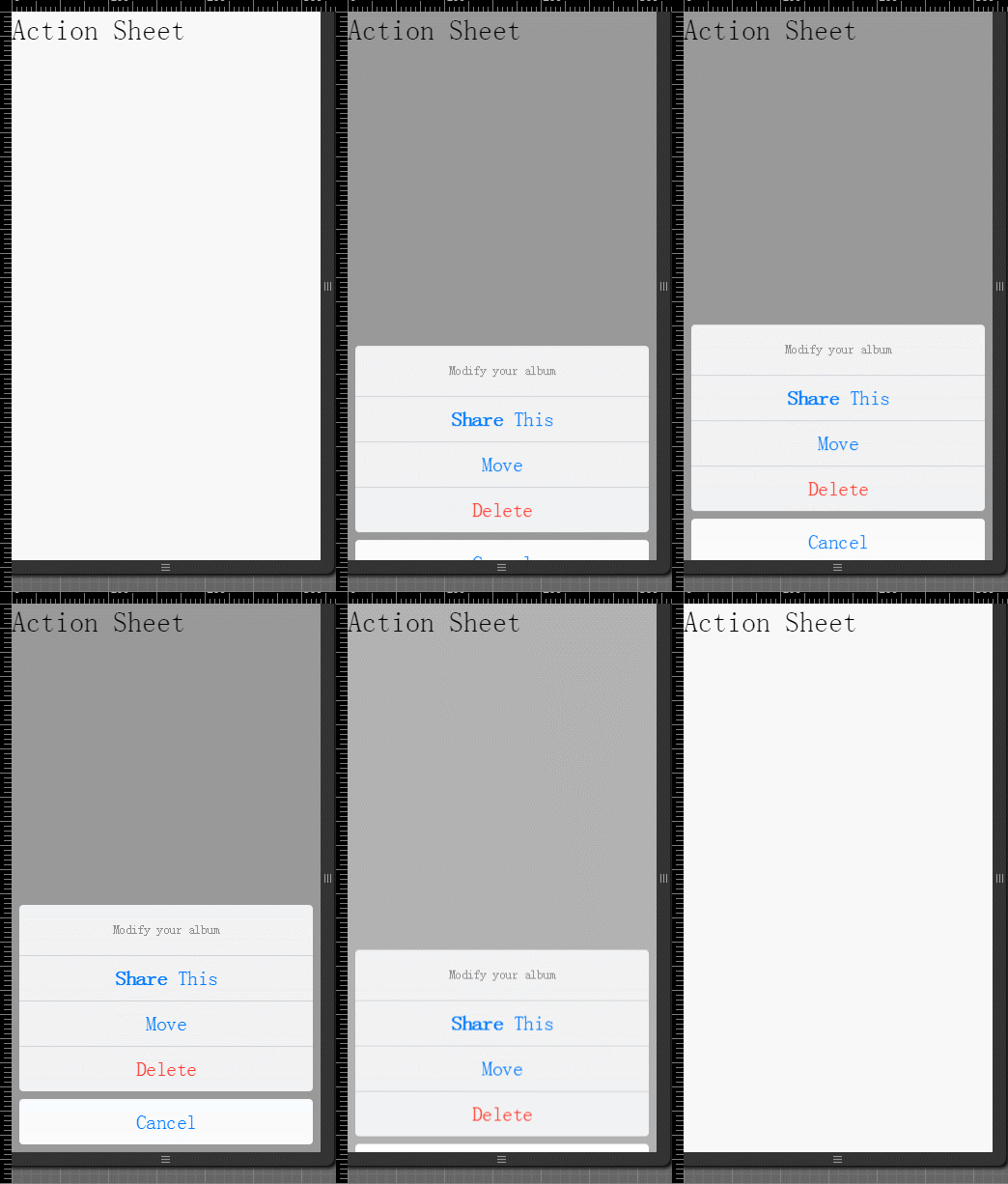
Ionic 的 ActionSheet 是一種從底部彈出的選單,常用於提供分享、刪除、移動等快速操作。本文示範如何在 Angular 控制器中觸發 ActionSheet。
HTML 結構
<body ng-app="starter" ng-controller="actionsheetCtl">
  <ion-pane>
    <ion-content>
      <h2 ng-click="show()">Action Sheet</h2>
    </ion-content>
  </ion-pane>
</body>
JavaScript 控制器
在 Angular 控制器中注入 $ionicActionSheet 與 $timeout,即可顯示並自動關閉選單。
.controller("actionsheetCtl", [
  "$scope",
  "$ionicActionSheet",
  "$timeout",
  function ($scope, $ionicActionSheet, $timeout) {
    $scope.show = function () {
      var hideSheet = $ionicActionSheet.show({
        buttons: [
          { text: "<b>Share</b> This" },
          { text: "Move" }
        ],
        destructiveText: "Delete",
        titleText: "Modify your album",
        cancelText: "Cancel",
        cancel: function () {
          // 可加入取消時的處理
        },
        buttonClicked: function (index) {
          return true;
        }
      });

      $timeout(function () {
        hideSheet();
      }, 2000);
    };
  }
]);
重點說明
buttons 可定義一般選項,destructiveText 通常用來標示危險操作,例如刪除。cancelText 則是取消按鈕文字。若要讓選單在指定時間後自動關閉,可使用 $timeout 呼叫 hideSheet。
透過 ActionSheet,Ionic 應用可以快速提供清楚且易於操作的行動選單。
- 上一篇文章: 淺談 jQuery $.getJSON 的異步與同步請求
- 下一篇文章: JavaScript 中 URL 編碼的三種方式完整解析
相關文章
-
Angular 搭配 Node 產生隨機數的實作教學 Angular + ui-grid 實戰:讓模態框裡的表格正確撐開寬度 HTML5 手機 App 開發入門(1):Ionic、Angular 2 與 Android 開發環境建置 HTML5 手機 App 開發入門(2):Ionic v2 與 Angular 2 聯絡人清單實作 Angular中的Promise物件($q詳解) Angular 依 Service 狀態更新 Directive Angular 的 Bootstrap(引導)與 Compiler(編譯)機制解析 在 Angular 外部用原生 JS 呼叫控制器的方法與變數 Ionic 實現下拉刷新與上拉加載更多的完整方案 Ionic 從零創建一個 APP 項目的完整教程
熱門推薦
在 JavaScript 中重現 PHP 的 strtotime() 與 date() 時間戳轉換
JavaScript 三種常見提示框:alert、confirm、prompt
讀取圖片像素顏色並轉成 CSS3 box-shadow 的技法
用 JavaScript 地理位置 API 讀取使用者所在座標
JavaScript 產生 GUID / UUID 的四種演算法與標準演進
寫出高品質 JavaScript 的關鍵習慣:從減少全域變數到團隊規範
自製 JavaScript 對話框:從瀏覽器判斷到拖曳實作的完整拆解
getYear、getFullYear 與 getUTCFullYear 的差異
Bootstrap 導航條 Navbar 完整用法與源碼解析