SWFUpload 多文件上傳實戰:事件 callbacks、進度條與後端約定
編輯:關於JavaScript
SWFUpload 可以說是 Flash 時代最優秀的多文件上傳方案之一。雖然依賴 flash 插件,但相比當時的純 JS 方案仍有明顯優勢:
- 可一次選擇多個文件加入隊列並依次上傳
- 全程無刷新
- 能顯示真實進度條
- 瀏覽器兼容性良好
- 可與其他 JS 庫共存
它另一大優點是設計優秀:提供了一組簡明的 JavaScript 事件回調,開發者可以在上傳的各個階段靈活更新頁面內容。
事件處理:MultiFileHandler.js
function fileQueueError(file, errorCode, message) {
  try {
    var imageName = "error.gif";
    var errorName = "";
    if (errorCode === SWFUpload.errorCode_QUEUE_LIMIT_EXCEEDED) {
      errorName = "文件超過最大上傳個數!";
    }
    if (errorName !== "") { alert(errorName); return; }
    switch (errorCode) {
      case SWFUpload.QUEUE_ERROR.ZERO_BYTE_FILE: imageName = "zerobyte.gif"; break;
      case SWFUpload.QUEUE_ERROR.FILE_EXCEEDS_SIZE_LIMIT: imageName = "toobig.gif"; break;
      case SWFUpload.QUEUE_ERROR.INVALID_FILETYPE:
      default: alert(message); break;
    }
    addImage("/modules/commons/view/multifileupload/images/" + imageName);
  } catch (ex) { this.debug(ex); }
}

function fileDialogComplete(numFilesSelected, numFilesQueued) {
  try {
    if (numFilesQueued > 0) this.startUpload();   // 選完自動開始
  } catch (ex) { this.debug(ex); }
}

function uploadProgress(file, bytesLoaded) {
  try {
    var percent = Math.ceil((bytesLoaded / file.size) * 100);
    var progress = new FileProgress(file, this.customSettings.upload_target);
    progress.setProgress(percent);
    if (percent == 100) {
      if (showThumbnail) progress.setStatus("正在創建縮略圖...");
      progress.toggleCancel(false, this);
      uploadNum++;
      setUploadNumber(uploadNum);
    } else {
      progress.setStatus("正在上傳中,已完成" + percent + "%");
      progress.toggleCancel(true, this);
    }
  } catch (ex) { this.debug(ex); }
}

// 文件數據發送成功;serverData 為服務端返回值,約定必須為 success 才算成功
var serverErrorInfo = "";
function uploadSuccess(file, serverData) {
  try {
    var sd = serverData.replace(/ /gi, '').replace(/\r/gi, '')
                      .replace(/\n/gi, '').replace(/\t/gi, '');
    if (showThumbnail) {
      var filePath = "..";
      if (savePath != '') filePath = filePath + "/" + savePath;
      filePath = filePath + '/' + file.name;
      addImage(filePath);
    }
    var progress = new FileProgress(file, this.customSettings.upload_target);
    if (showThumbnail) progress.setStatus("縮略圖創建完成!");
    if (sd != '') {
      if (sd != 'success') {
        if (serverErrorInfo != '') serverErrorInfo += '<br />';
        serverErrorInfo += sd;
        document.getElementById('divError').innerHTML = serverErrorInfo;
      }
    }
    progress.toggleCancel(false);
  } catch (ex) { this.debug(ex); }
}

// 隊列還有剩餘則繼續下一個
function uploadComplete(file) {
  try {
    if (this.getStats().files_queued > 0) {
      this.startUpload();
    } else {
      var progress = new FileProgress(file, this.customSettings.upload_target);
      progress.setComplete();
      progress.setStatus(isCancel ? "上傳已取消!" : "文件上傳成功!");
      isCancel = false;
      progress.toggleCancel(false);
    }
  } catch (ex) { this.debug(ex); }
}

function uploadError(file, errorCode, message) {
  var imageName = "error.gif";
  var progress;
  try {
    switch (errorCode) {
      case SWFUpload.UPLOAD_ERROR.FILE_CANCELLED:
        try {
          progress = new FileProgress(file, this.customSettings.upload_target);
          progress.setCancelled();
          progress.setStatus("取消完成!");
          progress.toggleCancel(false);
        } catch (ex1) { this.debug(ex1); }
        break;
      case SWFUpload.UPLOAD_ERROR.UPLOAD_STOPPED:
        try {
          progress = new FileProgress(file, this.customSettings.upload_target);
          progress.setCancelled();
          progress.setStatus("已停止!");
          progress.toggleCancel(true);
        } catch (ex2) { this.debug(ex2); }
        break;
      case SWFUpload.UPLOAD_ERROR.UPLOAD_LIMIT_EXCEEDED:
        imageName = "uploadlimit.gif"; break;
      default: alert(message); break;
    }
    addImage("/modules/commons/view/multifileupload/images/" + imageName);
  } catch (ex3) { this.debug(ex3); }
}

// 生成縮略圖佔位並淡入
function addImage(src) {
  var imageName = getFileName(src);
  var divImage = document.createElement("span");
  divImage.style.cssText = "margin:5px;padding:1px;width:59px;height:85px;display:block;float:left;";
  divImage.attachEvent("onmouseover", setBackground(divImage, "#FFFACD"));
  divImage.attachEvent("onmouseout", setBackground(divImage, "#FFFFFF"));

  var newImg = document.createElement("img");
  newImg.style.width = "59px";
  newImg.style.height = "59px";
  newImg.alt = imageName;

  var divImageName = document.createElement("div");
  divImageName.style.cssText = "margin-top:5px;width:59px;height:20px;text-align:center;";
  divImageName.innerHTML = imageName;

  divImage.appendChild(newImg);
  divImage.appendChild(divImageName);
  document.getElementById("thumbnails").appendChild(divImage);

  if (newImg.filters) {
    try { newImg.filters.item("DXImageTransform.Microsoft.Alpha").opacity = 0; }
    catch (e) { newImg.style.filter = 'progid:DXImageTransform.Microsoft.Alpha(opacity=0)'; }
  } else {
    newImg.style.opacity = 0;
  }
  newImg.onload = function () { fadeIn(newImg, 0); };
  newImg.src = src;
}

function fadeIn(element, opacity) {
  var reduceOpacityBy = 5, rate = 30;
  if (opacity < 100) {
    opacity += reduceOpacityBy;
    if (opacity > 100) opacity = 100;
    if (element.filters) {
      try { element.filters.item("DXImageTransform.Microsoft.Alpha").opacity = opacity; }
      catch (e) { element.style.filter = 'progid:DXImageTransform.Microsoft.Alpha(opacity=' + opacity + ')'; }
    } else {
      element.style.opacity = opacity / 100;
    }
  }
  if (opacity < 100) setTimeout(function () { fadeIn(element, opacity); }, rate);
}

var isCancel = false;  // 是否取消上傳
var uploadNum = 0;     // 已成功上傳數

cancelUpload = function () {
  document.getElementById('imgCancelButton').style.visibility = 'hidden';
  swfu.cancelUpload();
  isCancel = true;
};

setUploadNumber = function (num) {
  document.getElementById("lgdUploadNumber").innerHTML =
    "文件上傳(已上傳<span id='spNumber'>" + num + "</span>個文件)";
};

getFileName = function (filePath) {
  var i = filePath.indexOf('/') == -1 ? filePath.lastIndexOf('\\') : filePath.lastIndexOf('/');
  var j = filePath.lastIndexOf('.');
  return filePath.substring(i + 1, j);
};

setBackground = function (obj, color) {
  return function () {
    obj.style.backgroundColor = color;
    obj.style.border = "1px solid red";
  };
};

/* FileProgress:進度條控制對象 */
function FileProgress(file, targetID) {
  this.fileProgressID = "divFileProgress";
  this.fileProgressWrapper = document.getElementById(this.fileProgressID);
  if (!this.fileProgressWrapper) {
    this.fileProgressWrapper = document.createElement("div");
    this.fileProgressWrapper.className = "progressWrapper";
    this.fileProgressWrapper.id = this.fileProgressID;

    this.fileProgressElement = document.createElement("div");
    this.fileProgressElement.className = "progressContainer";

    var progressCancel = document.createElement("a");
    progressCancel.className = "progressCancel";
    progressCancel.href = "#";
    progressCancel.id = "imgCancelButton";
    progressCancel.attachEvent("onclick", cancelUpload);
    progressCancel.style.visibility = "hidden";
    progressCancel.appendChild(document.createTextNode(" "));

    var progressText = document.createElement("div");
    progressText.className = "progressName";
    progressText.appendChild(document.createTextNode(file.name));

    var progressBar = document.createElement("div");
    progressBar.className = "progressBarInProgress";

    var progressStatus = document.createElement("div");
    progressStatus.className = "progressBarStatus";
    progressStatus.innerHTML = " ";

    this.fileProgressElement.appendChild(progressCancel);
    this.fileProgressElement.appendChild(progressText);
    this.fileProgressElement.appendChild(progressStatus);
    this.fileProgressElement.appendChild(progressBar);
    this.fileProgressWrapper.appendChild(this.fileProgressElement);
    document.getElementById(targetID).appendChild(this.fileProgressWrapper);
    fadeIn(this.fileProgressWrapper, 0);
  } else {
    this.fileProgressElement = this.fileProgressWrapper.firstChild;
    this.fileProgressElement.childNodes[1].firstChild.nodeValue = file.name;
  }
  this.height = this.fileProgressWrapper.offsetHeight;
}

FileProgress.prototype.setProgress = function (percentage) {
  this.fileProgressElement.className = "progressContainer green";
  this.fileProgressElement.childNodes[3].className = "progressBarInProgress";
  this.fileProgressElement.childNodes[3].style.width = percentage + "%";
};
FileProgress.prototype.setComplete = function () {
  this.fileProgressElement.className = "progressContainer blue";
  this.fileProgressElement.childNodes[3].className = "progressBarComplete";
  this.fileProgressElement.childNodes[3].style.width = "";
};
FileProgress.prototype.setError = function () {
  this.fileProgressElement.className = "progressContainer red";
  this.fileProgressElement.childNodes[3].className = "progressBarError";
  this.fileProgressElement.childNodes[3].style.width = "";
};
FileProgress.prototype.setCancelled = function () {
  this.fileProgressElement.className = "progressContainer";
  this.fileProgressElement.childNodes[3].className = "progressBarError";
  this.fileProgressElement.childNodes[3].style.width = "";
};
FileProgress.prototype.setStatus = function (status) {
  this.fileProgressElement.childNodes[2].innerHTML = status;
};
FileProgress.prototype.toggleCancel = function (show, swfuploadInstance) {
  this.fileProgressElement.childNodes[0].style.visibility = show ? "visible" : "hidden";
  if (swfuploadInstance) {
    var fileID = this.fileProgressID;
    this.fileProgressElement.childNodes[0].onclick = function () {
      swfuploadInstance.cancelUpload(fileID);
      return false;
    };
  }
};
實例化:MultiFileUpload.js
var uploadUrl = '$!{request.uploadUrl}';       // 上傳處理的 url
var savePath = '$!{request.savePath}';
var fileType = '$!{request.fileType}';
var sizeLimit = '$!{request.sizeLimit}';
var uploadLimit = '$!{request.uploadLimit}';
var buttonText = '$!{request.buttonText}';
var buttonAlign = '$!{request.buttonAlign}';
var componentHeight = '$!{request.componentHeight}';
var showThumbnail = '$!{request.showThumbnail}';   // 是否顯示縮略圖,圖片上傳時常用
var thumbnailScroll = '$!{request.thumbnailScroll}';

if (uploadUrl == '') uploadUrl = '/commons/paste.do?template=/multifileupload/data/upload.htm';
if (fileType == '') fileType = '*.*';
if (uploadLimit == '') uploadLimit = 0;      // 0 表示不限
if (buttonText == '') buttonText = '選 擇 文 件';
if (buttonAlign == '') buttonAlign = 'left';
if (showThumbnail == '') showThumbnail = false; else showThumbnail = true;
if (thumbnailScroll == '') thumbnailScroll = false; else thumbnailScroll = true;

if (uploadUrl.indexOf('?') != -1) {
  uploadUrl = uploadUrl + '&savePath=' + encodeURIComponent(savePath);
} else {
  uploadUrl = uploadUrl + '?savePath=' + encodeURIComponent(savePath);
}

var swfu;
window.onload = function () {
  swfu = new SWFUpload({
    upload_url: uploadUrl,
    file_size_limit: sizeLimit,
    file_types: fileType,
    file_upload_limit: uploadLimit,       // 0 表示不限
    file_queue_error_handler: fileQueueError,
    file_dialog_complete_handler: fileDialogComplete,
    upload_progress_handler: uploadProgress,
    upload_error_handler: uploadError,
    upload_success_handler: uploadSuccess,
    upload_complete_handler: uploadComplete,
    button_image_url: "/modules/commons/view/multifileupload/images/XPButtonNoText_160x22.png",
    button_placeholder_id: "spanButtonPlaceholder",
    button_width: 101,
    button_height: 22,
    button_text: buttonText,
    button_text_style: '.button { font-family: 華文行楷,宋體, Arial, sans-serif; font-size: 14pt; }',
    button_text_top_padding: 1,
    button_text_left_padding: 20,
    flash_url: "/modules/commons/js/swfupload/swfupload.swf",
    custom_settings: { upload_target: "divFileProgressContainer" },
    debug: false
  });

  if (thumbnailScroll) {
    var divThumbnails = document.getElementById("thumbnails");
    var divContent = document.getElementById("content");
    divContent.style.width = "400px";
    divThumbnails.style.height = '200px';
    divThumbnails.style.overflowY = "scroll";
    divThumbnails.style.border = "solid 1px #DDF0DD";
  }
  document.getElementById("divButtonPlaceholder").style.textAlign = buttonAlign;
  if (componentHeight != '') {
    componentHeight = Number(componentHeight.replace("px", "")) - 25;
    document.getElementById("fsProgress").style.height = componentHeight + "px";
  }
};
兩個文件的分工很清晰:MultiFileHandler.js 處理上傳各階段的事件,MultiFileUpload.js 負責 SWFUpload 的初始化;以 $ 開頭的變量在實際項目中可按需定制。savePath 是文件的最終保存路徑,後端讀取該變量存到相應位置即可。
後端實現(ASP.NET)
using System;
using System.Web;

namespace WebApplication1
{
    public partial class FileUpload : System.Web.UI.Page
    {
        protected void Page_Load(object sender, EventArgs e)
        {
            string path = "";
            HttpPostedFile file = Request.Files["FileData"];
            string relationPath = Request["savePath"];
            if (relationPath != string.Empty)
            {
                path = Server.MapPath("~/") + relationPath + "\\" + file.FileName;
            }
            file.SaveAs(path);
            Response.Write("success");
        }
    }
}
務必注意:後端一定要返回內容(如上面的 Response.Write("success")),否則 SWFUpload 不認為上傳完成。前端 uploadSuccess 正是拿這個返回值做判斷,非 success 時會把錯誤信息收集到 divError 中展示。此外,直接拼接 file.FileName 存在路徑穿越風險,正式環境應做文件名白名單過濾或重命名。
實際效果:


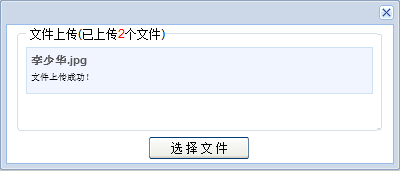
最後提醒一句:Flash 已於 2020 年底停止支持,主流瀏覽器全面移除 Flash 運行時,SWFUpload 今天只能用於維護存量系統。新項目請改用 HTML5 方案——input[type=file] 加 multiple、XMLHttpRequest 的 upload.onprogress、FormData,或直接用成熟的 file-upload 類庫,能力更強且無插件依賴。
以上就是本文的全部內容,希望對大家的學習有所幫助。
- 上一篇文章: Canvas 手寫支付寶芝麻信用分儀表盤:刻度、動點與三角函數
- 下一篇文章: 用 Uploadify 打造多檔案上傳功能(完整實作教學)
相關文章
-
JavaScript 檔案上傳實作:影片、圖片與壓縮檔 Ajax 載入進度條的呈現方式 HTML5 + WebSocket 實現多文件並發上傳實例 改造 prototype.js:加入進度條與輸入框驗證 以 AJAX 實作網頁無刷新進度條 Ajax 搭配 JSF 自訂組件實作高效能檔案上傳(二):組件與三階段編碼 Ajax 搭配 JSF 自訂組件實作高/Contents>
<xID>69483</xID>
<xTitle>Ajax 搭配 JSF 自訂組件實作高效能檔案上傳(三):解碼與進度回饋 自己動手做播放器控制面板:播放、暫停、音量與進度都能拉 加載進度頁面的設置方法 HTML5 自定義播放器核心程式碼