Canvas 手寫支付寶芝麻信用分儀表盤:刻度、動點與三角函數
編輯:關於JavaScript
這是一個仿支付寶芝麻信用分的 canvas 動畫儀表盤。
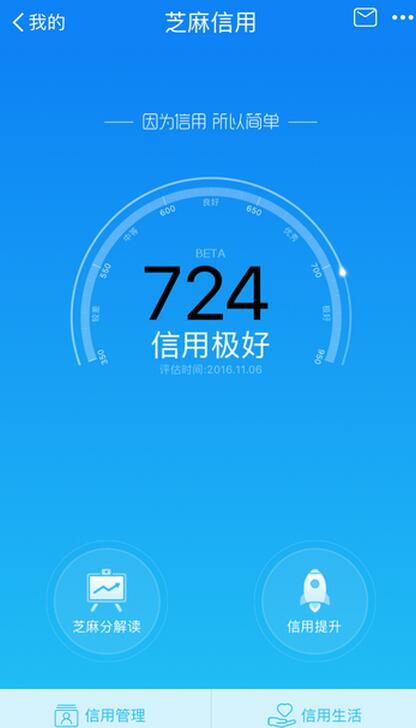
先看原圖(取自支付寶截圖,分數低,見笑了):
再看 canvas 實現的效果:
<canvas id="canvas" width="400" height="700" data-score="724"></canvas>
<!-- 設置 data-score,分數區間 [400, 900] -->
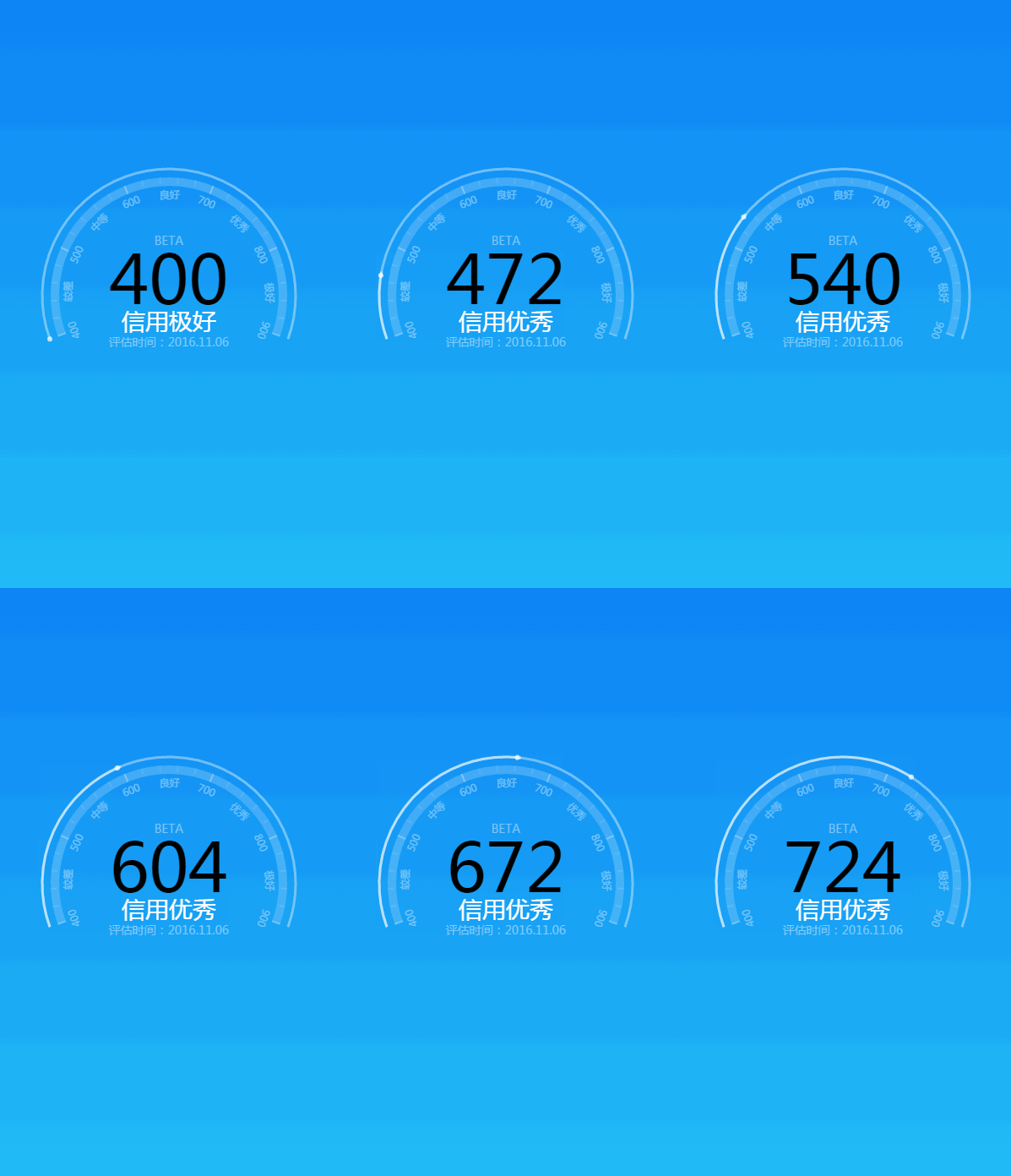
總感覺不太像。這裡是 GIF,網頁上的效果會好一些。有兩處不完美:真實表盤的刻度是不均勻的,我為了簡化用了等分;運動的點缺少模糊光暈效果,暫時還沒解決。
第一步:創建畫布
var canvas = document.getElementById('canvas'),
    ctx = canvas.getContext('2d'),
    cWidth = canvas.width,
    cHeight = canvas.height;
第二步:確定開口角度
雖不是處女座,但也想盡量還原。用 PS 量了一下,環形開口約 136°,這個角度實在刁鑽,為了後續計算方便,取約 140°。於是一個分數段(100 分)對應的弧度為:
var deg1 = Math.PI * 11 / 45; // 140° / 4 = 35°,即 11π/45
先畫中間那層半透明刻度軌道:
ctx.save();
ctx.beginPath();
ctx.strokeStyle = 'rgba(255, 255, 255, .2)';
ctx.lineWidth = 10;
ctx.arc(0, 0, 135, 0, 11 * deg0, false);
ctx.stroke();
ctx.restore();
接著用 for 循環畫 6 條主刻度,每畫一條就把坐標系旋轉一個分數段:
ctx.save();
for (var i = 0; i < 6; i++) {
  ctx.beginPath();
  ctx.lineWidth = 2;
  ctx.strokeStyle = 'rgba(255, 255, 255, .3)';
  ctx.moveTo(140, 0);
  ctx.lineTo(130, 0);
  ctx.stroke();
  ctx.rotate(deg1);
}
ctx.restore();
同理,把每個主刻度再細分為 5 小格:
ctx.save();
for (i = 0; i < 25; i++) {
  if (i % 5 !== 0) {
    ctx.beginPath();
    ctx.lineWidth = 2;
    ctx.strokeStyle = 'rgba(255, 255, 255, .1)';
    ctx.moveTo(140, 0);
    ctx.lineTo(133, 0);
    ctx.stroke();
  }
  ctx.rotate(deg1 / 5);
}
ctx.restore();
刻度文字與信用級別的繪製原理相同,這裡不再贅述。
第三步:讓那個「動點」跑起來
它本質上就是一個半徑很小的圓,只不過畫在最外層環形軌道上。canvas 畫圓的方法是:
ctx.arc(x, y, radius, sAngle, eAngle, false);
只要控制 x、y 就能讓它移動。於是建一個點對象:
function Dot() {
  this.x = 0;
  this.y = 0;
  this.draw = function (ctx) {
    ctx.save();
    ctx.beginPath();
    ctx.fillStyle = 'rgba(255, 255, 255, .7)';
    ctx.arc(this.x, this.y, 3, 0, Math.PI * 2, false);
    ctx.fill();
    ctx.restore();
  };
}
var dot = new Dot(),
    dotSpeed = 0.03,  // 動點角速度
    angle = 0,        // 關鍵變量,用來求 x、y
    credit = 400;     // 信用最低分數
求坐標要用到三角函數:
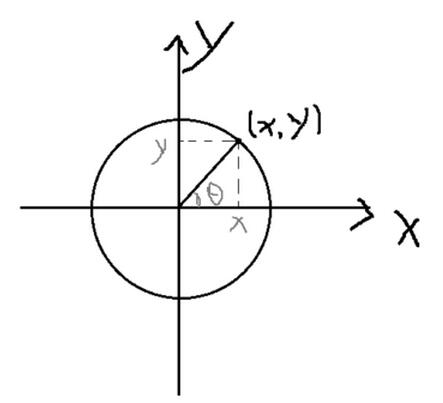
dot.x = radius * Math.cos(angle);   // radius 為最外層軌道半徑
dot.y = radius * Math.sin(angle);
而 angle 由「分數與弧度的比例關係」推出:
var aim = (score - 400) * deg1 / 100;
if (angle < aim) { angle += dotSpeed; }
dot.draw(ctx);
第四步:讓分數同步跳動
中間的數字要與動點保持一致,因此速度必須按同一比例換算:
function text(process) {
  ctx.save();
  ctx.rotate(10 * deg0);
  ctx.fillStyle = '#000';
  ctx.font = '80px Microsoft yahei';
  ctx.textAlign = 'center';
  ctx.fillText(process, 0, 10);
  ctx.restore();
}

var textSpeed = Math.round(dotSpeed * 100 / deg1);
if (credit < score - textSpeed) {
  credit += textSpeed;
} else if (credit >= score - textSpeed && credit < score) {
  credit += 1;   // 收尾,確保最終停在輸入的分數上
}
text(credit);
最後一切都交給 window.requestAnimationFrame 驅動,配合 ctx.clearRect(0, 0, cWidth, cHeight) 清屏。
完整代碼
<!DOCTYPE html>
<html>
<head>
<meta charset="UTF-8">
<title>芝麻信用儀表盤</title>
<style type="text/css">
html, body { width:100%; height:100%; margin:0; }
canvas {
  border:1px solid #eee; position:relative; left:50%; top:50%;
  transform:translate(-50%,-50%);
  background:-webkit-linear-gradient(top,#0e83f5 0%,#21bdf6 100%);
  background:linear-gradient(top,#0e83f5 0%,#21bdf6 100%);
}
</style>
<script type="text/javascript">
window.onload = function () {
  var canvas = document.getElementById('canvas'),
      ctx = canvas.getContext('2d'),
      cWidth = canvas.width,
      cHeight = canvas.height,
      score = canvas.attributes['data-score'].value,
      stage = ['較差', '中等', '良好', '優秀', '極好'],
      radius = 150,
      deg0 = Math.PI / 9,
      deg1 = Math.PI * 11 / 45;

  if (score < 400 || score > 900) {
    alert('信用分數區間:400~900');
  } else {
    var dot = new Dot(),
        dotSpeed = 0.03,
        textSpeed = Math.round(dotSpeed * 100 / deg1),
        angle = 0,
        credit = 400;

    (function drawFrame() {
      ctx.save();
      ctx.clearRect(0, 0, cWidth, cHeight);
      ctx.translate(cWidth / 2, cHeight / 2);
      ctx.rotate(8 * deg0);

      // 動點與已走弧線
      dot.x = radius * Math.cos(angle);
      dot.y = radius * Math.sin(angle);
      var aim = (score - 400) * deg1 / 100;
      if (angle < aim) angle += dotSpeed;
      dot.draw(ctx);

      // 分數同步
      if (credit < score - textSpeed) credit += textSpeed;
      else if (credit >= score - textSpeed && credit < score) credit += 1;
      text(credit);

      ctx.save();
      ctx.beginPath();
      ctx.lineWidth = 3;
      ctx.strokeStyle = 'rgba(255,255,255,.5)';
      ctx.arc(0, 0, radius, 0, angle, false);
      ctx.stroke();
      ctx.restore();

      window.requestAnimationFrame(drawFrame);

      // 中間刻度層
      ctx.save();
      ctx.beginPath();
      ctx.strokeStyle = 'rgba(255,255,255,.2)';
      ctx.lineWidth = 10;
      ctx.arc(0, 0, 135, 0, 11 * deg0, false);
      ctx.stroke();
      ctx.restore();

      // 主刻度
      ctx.save();
      for (var i = 0; i < 6; i++) {
        ctx.beginPath();
        ctx.lineWidth = 2;
        ctx.strokeStyle = 'rgba(255,255,255,.3)';
        ctx.moveTo(140, 0); ctx.lineTo(130, 0); ctx.stroke();
        ctx.rotate(deg1);
      }
      ctx.restore();

      // 細分刻度
      ctx.save();
      for (i = 0; i < 25; i++) {
        if (i % 5 !== 0) {
          ctx.beginPath();
          ctx.lineWidth = 2;
          ctx.strokeStyle = 'rgba(255,255,255,.1)';
          ctx.moveTo(140, 0); ctx.lineTo(133, 0); ctx.stroke();
        }
        ctx.rotate(deg1 / 5);
      }
      ctx.restore();

      // 分數標註
      ctx.save();
      ctx.rotate(Math.PI / 2);
      for (i = 0; i < 6; i++) {
        ctx.fillStyle = 'rgba(255,255,255,.4)';
        ctx.font = '10px Microsoft yahei';
        ctx.textAlign = 'center';
        ctx.fillText(400 + 100 * i, 0, -115);
        ctx.rotate(deg1);
      }
      ctx.restore();

      // 分數段標註
      ctx.save();
      ctx.rotate(Math.PI / 2 + deg0);
      for (i = 0; i < 5; i++) {
        ctx.fillStyle = 'rgba(255,255,255,.4)';
        ctx.font = '10px Microsoft yahei';
        ctx.textAlign = 'center';
        ctx.fillText(stage[i], 5, -115);
        ctx.rotate(deg1);
      }
      ctx.restore();

      // 信用階段與評估時間
      ctx.save();
      ctx.rotate(10 * deg0);
      ctx.fillStyle = '#fff';
      ctx.font = '28px Microsoft yahei';
      ctx.textAlign = 'center';
      if (score < 500) ctx.fillText('信用較差', 0, 40);
      else if (score < 600) ctx.fillText('信用中等', 0, 40);
      else if (score < 700) ctx.fillText('信用良好', 0, 40);
      else if (score < 800) ctx.fillText('信用優秀', 0, 40);
      else ctx.fillText('信用極好', 0, 40);
      ctx.fillStyle = '#80cbfa';
      ctx.font = '14px Microsoft yahei';
      ctx.fillText('評估時間:2016.11.06', 0, 60);
      ctx.fillStyle = '#7ec5f9';
      ctx.fillText('BETA', 0, -60);
      ctx.restore();

      // 最外層軌道
      ctx.save();
      ctx.beginPath();
      ctx.strokeStyle = 'rgba(255,255,255,.4)';
      ctx.lineWidth = 3;
      ctx.arc(0, 0, radius, 0, 11 * deg0, false);
      ctx.stroke();
      ctx.restore();
    })();
  }

  function Dot() {
    this.x = 0; this.y = 0;
    this.draw = function (ctx) {
      ctx.save();
      ctx.beginPath();
      ctx.fillStyle = 'rgba(255,255,255,.7)';
      ctx.arc(this.x, this.y, 3, 0, Math.PI * 2, false);
      ctx.fill();
      ctx.restore();
    };
  }

  function text(process) {
    ctx.save();
    ctx.rotate(10 * deg0);
    ctx.fillStyle = '#000';
    ctx.font = '80px Microsoft yahei';
    ctx.textAlign = 'center';
    ctx.textBaseLine = 'top';
    ctx.fillText(process, 0, 10);
    ctx.restore();
  }
};
</script>
</head>
<body>
<canvas id="canvas" width="400" height="700" data-score="724"></canvas>
</body>
</html>
寫得不好,大家將就看。我相信各位理解代碼的能力一定強於理解我這些文字。
好了,以上。