JavaScript 實作伸縮式側邊欄選單
編輯:關於JavaScript
側邊欄平時藏在畫面左側,滑鼠移上去才滑出來,這個效果靠 onmouseover 與 onmouseout 兩個事件就能完成,關鍵是加上一段位移動畫讓它不要「瞬移」。
HTML 結構
<body>
<div id="div1">
  <span>側邊欄</span>
</div>
</body>
CSS 樣式
#div1 {
  width: 150px; height: 200px; background: #999999;
  position: absolute; left: -150px;   /* 預設整塊藏到畫面外 */
}
span {
  width: 20px; height: 70px; line-height: 23px; background: #09C;
  position: absolute; right: -20px; top: 70px;   /* 突出的小把手留在畫面內 */
}
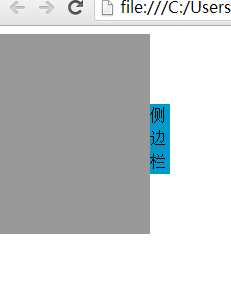
預設狀態下側邊欄本體被推到 left: -150px,只有右側那塊藍色把手露在畫面邊緣:

滑鼠移入後整塊滑出:
完整程式碼
<!DOCTYPE html PUBLIC "-//W3C//DTD XHTML 1.0 Transitional//EN"
  "https://www.w3.org/TR/xhtml1/DTD/xhtml1-transitional.dtd">
<html xmlns="https://www.w3.org/1999/xhtml">
<head>
<meta http-equiv="Content-Type" content="text/html; charset=utf-8" />
<title>無標題文檔</title>
<style type="text/css">
#div1 {
  width: 150px; height: 200px; background: #999999;
  position: absolute; left: -150px;
}
span {
  width: 20px; height: 70px; line-height: 23px; background: #09C;
  position: absolute; right: -20px; top: 70px;
}
</style>
<script>
window.onload = function () {
  var odiv = document.getElementById('div1');

  odiv.onmouseover = function () {
    startmove(0, 10);        // 參數一:left 的目標值;參數二:每次移動的像素
  };
  odiv.onmouseout = function () {
    startmove(-150, -10);
  };
};

var timer = null;

function startmove(target, speed) {
  var odiv = document.getElementById('div1');
  clearInterval(timer);      // 每次重新啟動前先清掉舊計時器,避免多組動畫打架
  timer = setInterval(function () {
    if (odiv.offsetLeft == target) {
      clearInterval(timer);
    } else {
      odiv.style.left = odiv.offsetLeft + speed + 'px';
    }
  }, 30);
}
</script>
</head>
<body>
<div id="div1">
  <span>側邊欄</span>
</div>
</body>
</html>
這段程式有個細節值得留意:startmove() 開頭的 clearInterval(timer) 不可省。少了它,快速連續移入移出時會同時存在多組計時器互相搶同一個元素,導致位置錯亂。另一個潛在問題是 offsetLeft == target 用等值判斷終止動畫,若步長無法整除距離就會永遠停不下來;改成 (speed > 0 && offsetLeft >= target) || (speed < 0 && offsetLeft <= target) 會更穩健。若只要求效果,用 CSS 的 transition: left .3s 搭配 class 切換會簡潔得多。
- 上一篇文章: Ajax 入門圖文詳解:從搭建環境到 GET 與 POST 實作
- 下一篇文章: iPhone Safari 不認得 new Date('YYYY-MM-DD HH:mm:ss') 怎麼辦