自己動手做一個 jQuery 提示框(Tip)外掛
編輯:關於JavaScript
這支外掛涵蓋了日常最常見的提示需求:支援 12 個方位、邊框與背景與文字顏色自訂,還能微調位置、層級、寬度與內距,透過 CSS 三角形做出指向氣泡,完全不需要圖片。
先看效果:

可用參數
- msg:提示內容,支援 HTML
- dire:方向,1 到 12 共 12 個方位
- w:提示框寬度
- _x / _y:橫向與縱向偏移量
- zIndex:層級
- borderColor / bgColor / color:邊框、背景與文字顏色
- useHover:是否採滑入滑出觸發
- padding / arrWidth:內距與箭頭尺寸
JavaScript 主體:
(function ($) { var defaults = { dire: 12, w: 250, _x: 0, _y: 0, borderColor: '#FFBB76', bgColor: '#FFFCEF', color: '#FF0000', padding: [5, 10], arrWidth: 10, useHover: true, zIndex: 100000 }; $.fn.tips = function (opt) { var tip, opts = $.extend({}, defaults, opt); if (this[0]) { opts.tag = this; if (opts.useHover) { opts.tag.hover(function () { tip = new Tip(opts); tip.show(); }, function () { tip.close(); }); } else { tip = new Tip(opts); tip.show(); } return this; } }; function Tip(opts) { this.dire = opts.dire; this.width = opts.w; this.zIndex = opts.zIndex; this.borderColor = opts.borderColor; this.bgColor = opts.bgColor; this.color = opts.color; this.padding = opts.padding; this.arrWidth = opts.arrWidth; this.offsetX = opts._x; this.offsetY = opts._y; this.tag = opts.tag; this.msg = opts.msg; this.wrap = $('<div class="tip-wrap"></div>'); this.innerArr = $('<div class="tip-arr-a"></div>'); this.outerArr = $('<div class="tip-arr-b"></div>'); this.init(); }; Tip.prototype = { init: function () { var msg = this.tag.data('tipMsg'); if (!this.msg) { this.msg = msg; } this.createTemp(); }, createTemp: function () { var t = this; t.createWrap(); t.setPosition(); }, createWrap: function () { var t = this; t.wrap.html(t.msg); var wrapCSS = { width: t.width, border: '1px solid ' + t.borderColor, 'border-radius': '5px', background: t.bgColor, color: t.color, padding: t.getPadding() }; t.outerArr.css(t.getArrStyle(t.dire, t.arrWidth, t.borderColor)); t.innerArr.css(t.getArrStyle(t.dire, t.arrWidth, t.bgColor)); t.wrap.prepend(t.innerArr).prepend(t.outerArr).css(wrapCSS); $('body').append(t.wrap); }, setPosition: function () { var t = this; var posObj = t.getPos(t.dire, t.getPosition(t.tag), t.getPosition(t.wrap), t.arrWidth), pos = posObj.pos, innerPos = posObj.innerPos, outerPos = posObj.outerPos; t.wrap.css({top: pos.y, left: pos.x}); t.innerArr.css({top: innerPos.y, left: innerPos.x}); t.outerArr.css({top: outerPos.y, left: outerPos.x}); }, getPadding: function () { var t = this, pad = '0px', padArr = t.padding, len = padArr.length; switch (len) { case 1: pad = padArr[0] + 'px'; break; case 2: pad = padArr[0] + 'px ' + padArr[1] + 'px'; break; case 3: pad = padArr[0] + 'px ' + padArr[1] + 'px ' + padArr[2] + 'px'; break; case 4: pad = padArr[0] + 'px ' + padArr[1] + 'px ' + padArr[2] + 'px ' + padArr[3] + 'px'; break; } return pad; }, getPosition: function (tag) { return {t: tag.offset().top, l: tag.offset().left, h: tag.outerHeight(), w: tag.outerWidth()}; }, getArrStyle: function (dir, width, color) { var style; switch (dir) { case 11: case 12: case 1: style = { 'border-bottom-style': 'solid', 'border-width': '0px ' + width + 'px ' + width + 'px', 'border-bottom-color': color }; break; case 2: case 3: case 4: style = { 'border-left-style': 'solid', 'border-width': width + 'px 0px ' + width + 'px ' + width + 'px', 'border-left-color': color }; break; case 5: case 6: case 7: style = { 'border-top-style': 'solid', 'border-width': width + 'px ' + width + 'px 0px', 'border-top-color': color }; break; case 8: case 9: case 10: style = { 'border-right-style': 'solid', 'border-width': width + 'px ' + width + 'px ' + width + 'px 0px', 'border-right-color': color }; break; } return style || {}; }, getPos: function (d, tagPos, pos, arrWidth) { var _pos, _innerPos, _outerPos, l = tagPos.l, t = tagPos.t, w = tagPos.w, h = tagPos.h, ww = pos.w, hh = pos.h; switch (d) { case 0: case 1: _pos = {x: l + w / 2 + arrWidth + 20 + 1 - ww, y: t + h + arrWidth}; _outerPos = {x: ww - 2 - 20 - arrWidth * 2, y: -arrWidth}; _innerPos = {x: ww - 2 - 20 - arrWidth * 2, y: -arrWidth + 1}; break; case 2: _pos = {x: l - ww - arrWidth, y: t + h / 2 - arrWidth - 20 - 1}; _outerPos = {x: ww - 2, y: 20}; _innerPos = {x: ww - 2 - 1, y: 20}; break; case 3: _pos = {x: l - ww - arrWidth, y: t + h / 2 - hh / 2}; _outerPos = {x: ww - 2, y: (hh - 2) / 2 - arrWidth}; _innerPos = {x: ww - 2 - 1, y: (hh - 2) / 2 - arrWidth}; break; case 4: _pos = {x: l - ww - arrWidth, y: t + h / 2 + arrWidth + 20 + 1 - hh}; _outerPos = {x: ww - 2, y: hh - 2 - 20 - arrWidth * 2}; _innerPos = {x: ww - 2 - 1, y: hh - 2 - 20 - arrWidth * 2}; break; case 5: _pos = {x: l + w / 2 + arrWidth + 20 + 1 - ww, y: t - arrWidth - hh}; _outerPos = {x: ww - 2 - 20 - arrWidth * 2, y: hh - 2}; _innerPos = {x: ww - 2 - 20 - arrWidth * 2, y: hh - 2 - 1}; break; case 6: _pos = {x: l + w / 2 - ww / 2, y: t - arrWidth - hh}; _outerPos = {x: (ww - 2) / 2 - arrWidth, y: hh - 2}; _innerPos = {x: (ww - 2) / 2 - arrWidth, y: hh - 2 - 1}; break; case 7: _pos = {x: l + w / 2 - 20 - arrWidth, y: t - arrWidth - hh}; _outerPos = {x: 20, y: hh - 2}; _innerPos = {x: 20, y: hh - 2 - 1}; break; case 8: _pos = {x: l + w + arrWidth, y: t + h / 2 + arrWidth + 20 + 1 - hh}; _outerPos = {x: -arrWidth, y: hh - 2 - 20 - arrWidth * 2}; _innerPos = {x: -arrWidth + 1, y: hh - 2 - 20 - arrWidth * 2}; break; case 9: _pos = {x: l + w + arrWidth, y: t + h / 2 - hh / 2}; _outerPos = {x: -arrWidth, y: (hh - 2) / 2 - arrWidth}; _innerPos = {x: -arrWidth + 1, y: (hh - 2) / 2 - arrWidth}; break; case 10: _pos = {x: l + w + arrWidth, y: t + h / 2 - arrWidth - 20 - 1}; _outerPos = {x: -arrWidth, y: 20}; _innerPos = {x: -arrWidth + 1, y: 20}; break; case 11: _pos = {x: l + w / 2 - 20 - arrWidth, y: t + h + arrWidth}; _outerPos = {x: 20, y: -arrWidth}; _innerPos = {x: 20, y: -arrWidth + 1}; break; case 12: _pos = {x: l + w / 2 - ww / 2, y: t + h + arrWidth}; _outerPos = {x: (ww - 2) / 2 - arrWidth, y: -arrWidth}; _innerPos = {x: (ww - 2) / 2 - arrWidth, y: -arrWidth + 1}; break; default: _pos = {x: 0, y: 0}; } return { pos: _pos, innerPos: _innerPos, outerPos: _outerPos }; }, show: function () { this.wrap.show(); }, close: function () { this.wrap.remove(); } }; })(jQuery);
CSS:
.tip-wrap { position: absolute; display: none; } .tip-arr-a, .tip-arr-b { position: absolute; width: 0; height: 0; line-height: 0; border-style: dashed; border-color: transparent; }
頁面使用方式:
<div class="test"> <span data-tip-msg="我是測試數據<br>我是測試數據<br>我是測試數據">我是測試數據</span> </div> <script> $('.test span').tips(); </script>
效果如下:
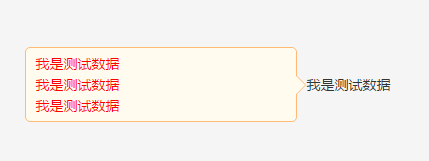
設計上有幾個點值得學。箭頭是「雙層三角形」疊出來的:外層 tip-arr-b 用邊框色、內層 tip-arr-a 用背景色,內層往外位移 1px 蓋住外層,於是就出現了帶描邊的效果。方位則靠 getArrStyle 決定要畫哪一邊的三角形、getPos 決定提示框要落在物件的哪個方位,兩者搭配就撐起了 12 個方向。另外內容除了用參數傳入,也支援直接讀取 DOM 上的 data-tip-msg,寫法更直覺。
以上就是這支小巧的 jQuery 提示框外掛,希望各位能把它用在自己的專案裡,有所收穫。
- 上一篇文章: JS 取得滑鼠座標的三種方式與跨瀏覽器處理
- 下一篇文章: JavaScript 設計模式入門:模板方法模式