用 JS 自定義提示框替代系統 alert(支持自動關閉)
編輯:關於JavaScript
系統自帶的 alert 有個讓人頭疼的問題:在手機端(比如微信打開的頁面)彈出時,頂部會把網站地址一起顯示出來,觀感很差。而且 alert 是阻塞式的,後續邏輯只能寫在之後,靈活性也有限。
於是用 div 簡單封裝了一個提示框,順帶支持定時自動關閉。
效果預覽
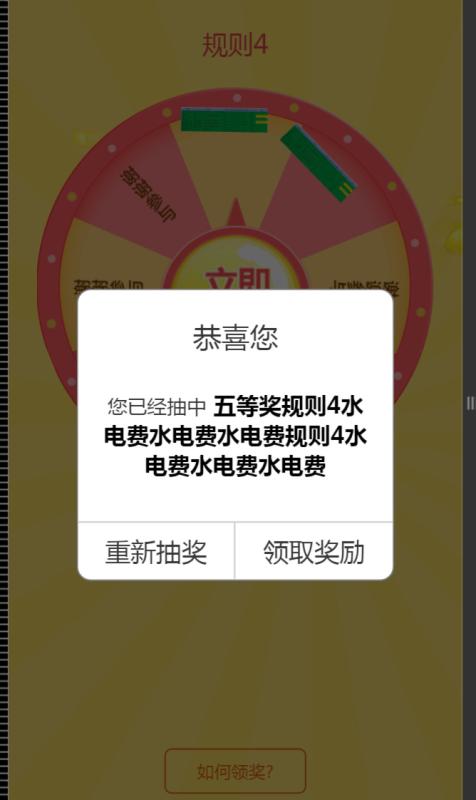
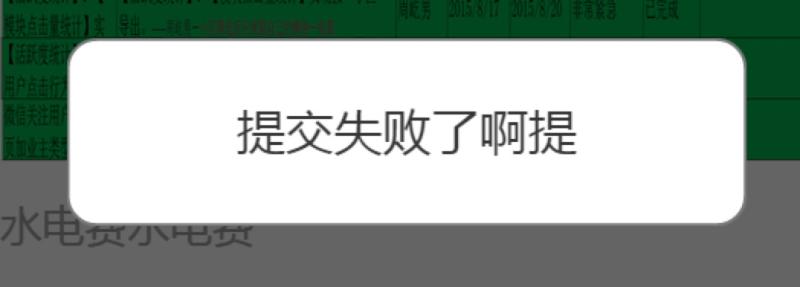
CSS 樣式
/*彈出消息對話框樣式*/
.show_alert_box{
  width:100%; height:100%; position:fixed;
  top:0px; left:0px;
  background-color:rgba(0,0,0,0.6);
  display:none; z-index:200;
}
.show_alert_div{
  width:70%; position:absolute;
  top:50%; left:15%; margin-top:-80px;
  background-color:#fff;
  -webkit-border-radius:10px; -moz-border-radius:10px; border-radius:10px;
  border:1px solid #797979;
  overflow:hidden; box-sizing:border-box;
}
.show_alert_div h1{
  width:100%; float:left; font-size:20px; color:#353535;
  text-align:center; line-height:26px; margin-top:20px;
}
.show_alert_div h2{
  width:100%; float:left; font-size:16px; color:#353535;
  text-align:center; line-height:20px;
  margin:20px 0px 70px 0px; box-sizing:border-box; padding:0px 15px;
}
.show_alert_div h3{
  width:100%; float:left; font-size:16px; color:#353535;
  text-align:center; line-height:20px;
  margin:25px 0px 20px 0px; box-sizing:border-box; padding:0px 15px;
}
/*僅顯示消息時 showInformation 方法填充提示信息*/
.alert_message_font{
  width:100%; float:left; font-size:16px; color:#353535;
  text-align:center; line-height:20px;
  margin:25px 0px 20px 0px !important;
  box-sizing:border-box; padding:0px 15px;
}
.show_alert_div .show_alert_button_box{
  width:100%; height:40px; position:absolute;
  bottom:0px; left:0px; border-top:1px solid #ccc;
}
.show_alert_div .show_alert_button_box .alert_button_div{
  width:50%; height:40px; float:left;
  font-size:18px; line-height:40px; text-align:center; color:#353535;
  box-sizing:border-box; border-right:1px solid #ccc;
}
.show_alert_div .show_alert_button_box .show_close_button{
  width:100%; height:40px; float:left;
  font-size:18px; line-height:40px; text-align:center; color:#353535;
  box-sizing:border-box; border-right:1px solid #ccc;
}
.show_cancel_button{ width:50%; border-right:0; }

/*輸入對話框樣式*/
.show_alert_box_input{
  width:100%; position:fixed; top:0px; left:0px;
  background-color:rgba(0,0,0,0.6); display:none; z-index:200;
}
.show_alert_div_input{
  width:90%; position:absolute;
  top:50%; left:5%; margin-top:-80px;
  background-color:#fff;
  -webkit-border-radius:10px; -moz-border-radius:10px; border-radius:10px;
  border:1px solid #797979;
  overflow:hidden; box-sizing:border-box;
}
.show_alert_div_input h1{
  width:100%; float:left; font-size:20px; color:#353535;
  text-align:center; line-height:26px; margin-top:20px;
}
.show_alert_div_input h2{
  width:100%; float:left; font-size:14px; color:#353535;
  text-align:center; line-height:20px;
  margin:25px 0px 70px 0px; box-sizing:border-box; padding:0px 15px;
}
.show_alert_div_input .show_alert_button_box_input{
  width:100%; height:40px; position:absolute;
  bottom:0px; left:0px; border-top:1px solid #ccc;
}
.show_alert_div_input .show_alert_button_box_input .alert_button_div_input{
  width:50%; height:40px; float:left;
  font-size:18px; line-height:40px; text-align:center; color:#353535;
  box-sizing:border-box; border-right:1px solid #ccc;
}
.show_alert_div_input .show_alert_button_box_input .show_close_button_input{
  width:100%; height:40px; float:left;
  font-size:18px; line-height:40px; text-align:center; color:#353535;
  box-sizing:border-box; border-right:1px solid #ccc;
}

/*如何領獎提示框樣式*/
.show_alert_box_how_button{
  width:100%; position:fixed; top:0px; left:0px;
  background-color:rgba(0,0,0,0.6); display:none; z-index:200;
}
.show_alert_div_how_button{
  width:90%; position:absolute;
  top:50%; left:5%; margin-top:-80px;
  background-color:#fff;
  -webkit-border-radius:10px; -moz-border-radius:10px; border-radius:10px;
  border:1px solid #797979;
  overflow:hidden; box-sizing:border-box;
}
.show_alert_div_how_button h1{
  width:100%; float:left; font-size:20px; color:#353535;
  text-align:center; line-height:26px; margin-top:20px;
}
.show_alert_div_how_button h2{
  width:100%; float:left; font-size:14px; color:#353535;
  text-align:center; line-height:20px;
  margin:25px 0px 70px 0px; box-sizing:border-box; padding:0px 15px;
}
.show_alert_div_how_button .show_alert_button_box_how_button{
  width:100%; height:40px; position:absolute;
  bottom:0px; left:0px; border-top:1px solid #ccc;
}
.show_alert_div_how_button .show_alert_button_box_how_button .alert_button_div_how_button{
  width:50%; height:40px; float:left;
  font-size:18px; line-height:40px; text-align:center; color:#353535;
  box-sizing:border-box; border-right:1px solid #ccc;
}
.show_alert_div_how_button .show_alert_button_box_how_button .show_close_button_how_button{
  width:100%; height:40px; float:left;
  font-size:18px; line-height:40px; text-align:center; color:#353535;
  box-sizing:border-box; border-right:1px solid #ccc;
}
JS 邏輯
$(function () {
  $(".show_close_button").click(function () {
    $(".show_alert_box").css("display", "none");
  });
  $(".show_cancel_button").click(function () {
    $(".show_alert_box").css("display", "none");
  });
});

/*
 * 顯示提示對話框
 * title            標題
 * content          提示內容
 * isShowTitle      是否顯示標題
 * isShowAlertButton 是否顯示操作按鈕(僅用於錯誤提示)
 * isTimer          是否自動關閉對話框
 * url              多按鈕時主按鈕跳轉地址
 * urltxt           主按鈕文案
 *
 * 頁面布局:在頁面中添加如下代碼
 * <div class="show_alert_box">
 *   <div class="show_alert_div">
 *     <h1>恭喜您</h1>
 *     <h2></h2>
 *     <div class="show_alert_button_box">
 *       <div class="show_close_button">知道了</div>
 *       <div onclick="requestLotteryPrize()" class="alert_button_div viewawardbtn">領取獎勵</div>
 *       <div class="alert_button_div show_cancel_button">取消</div>
 *     </div>
 *   </div>
 * </div>
 */
function showInformation(title, content, isShowTitle, isShowAlertButton, isTimer, url, urltxt) {
  $(".show_alert_div h1").html(title);
  $(".show_alert_div h2").html(content);

  //隱藏標題
  if (isShowTitle != null && isShowTitle == false) {
    $(".show_alert_div h1").css("display", "none");
  }

  if (url == null || url == "") {
    //顯示單條
    $(".alert_button_div").css("display", "none");
    $(".show_close_button").css("display", "block");

    //隱藏底部按鈕
    if (isShowAlertButton != null && isShowAlertButton == false) {
      $(".show_alert_button_box").css("display", "none");
      $(".show_alert_div h2").addClass("alert_message_font");
    }

    //定時自動關閉
    if (isTimer != null && isTimer == true) {
      setTimeout("timerCloseAlertBox()", 2000);
    }
  } else {
    //顯示多條
    $(".show_alert_div h2").css("display", "block");
    $(".viewaward").attr('href', url);
    $(".viewawardbtn").html(urltxt);
    $(".alert_button_div").css("display", "block");
    $(".show_close_button").css("display", "none");
  }

  $('.show_alert_box').css("display", "block");
}

/*
 * 彈出簡單信息提示
 * 頁面布局:
 * <div class="show_alert_box">
 *   <div class="show_alert_div"><h3></h3></div>
 * </div>
 */
function showAlertMessage(message) {
  $('.show_alert_box').css("display", "block");
  $(".show_alert_div h3").html(message);
  setTimeout("timerCloseAlertBox()", 2000);   //自動關閉
}

//定時關閉提示框
function timerCloseAlertBox() {
  $('.show_alert_box').css("display", "none");
}
使用步驟
第一步,引入 jQuery 與這份 JS 文件;第二步,引入樣式文件;第三步,在頁面任意位置放入對應的 div 結構:
<div class="show_alert_box">
  <div class="show_alert_div">
    <h1>恭喜您</h1>
    <h2></h2>
    <div class="show_alert_button_box">
      <div class="show_close_button">知道了</div>
      <div onclick="requestLotteryPrize()" class="alert_button_div viewawardbtn">領取獎勵</div>
      <div class="alert_button_div show_cancel_button">取消</div>
    </div>
  </div>
</div>
第四步,在 JS 裡調用:
//參數依次為:標題、提示內容、是否顯示標題、是否顯示操作按鈕、
//是否啟用自動關閉、要跳轉的 url、按鈕文案
showInformation(title, content, isShowTitle, isShowAlertButton, isTimer, url, urltxt);

//或者只用簡單的單行提示
showAlertMessage(message);
這個封裝的好處是把「顯示內容」「按鈕形態」「是否自動關閉」都抽成了參數,一個結構就能覆蓋提示、確認、跳轉等多種場景,不用每種情況寫一套彈層。