JavaScript 列表操作實戰:全選、反選、無刷新刪除與即點即改(Yii 框架篇)
編輯:關於JavaScript
後台管理的列表頁幾乎一定會遇到這幾件事:勾選多筆批次刪除、單筆快速刪除、以及直接點一下就能就地編輯並存入資料庫。本文以 Yii 框架為例,把這些互動完整串起來。
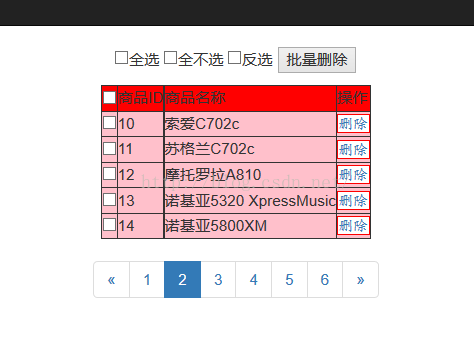
效果展示:
控制器:四個 action 各司其職
 <?php
namespace app\controllers;

use Yii;
use yii\filters\AccessControl;
use yii\web\Controller;
use yii\filters\VerbFilter;
use app\models\LoginForm;
use app\models\ContactForm;
use yii\data\Pagination;
use app\models\EcsGoods;

class PageController extends Controller
{
    // 展示與分頁
    public function actionList()
    {
        $query = EcsGoods::find();
        $pagination = new Pagination([
            'defaultPageSize' => 5,
            'totalCount' => $query->count(),
        ]);
        $countries = $query
            ->offset($pagination->offset)
            ->limit($pagination->limit)
            ->all();

        return $this->render('list', [
            'brr' => $countries,
            'pagination' => $pagination,
        ]);
    }

    // 即點即改
    public function actionUpdates()
    {
        $request = Yii::$app->request;
        $id   = $request->get('old_id');
        $name = $request->get('old_val');
        $connection = Yii::$app->db;
        $command = $connection->createCommand(
            "update ecs_goods set goods_name='$name' where goods_id='$id'"
        );
        $re = $command->execute();
        if ($re) {
            echo 1;
        }
    }

    // 單筆刪除
    public function actionDel()
    {
        $request = Yii::$app->request;
        $id = $request->get('ids');
        $connection = Yii::$app->db;
        $command = $connection->createCommand(
            "delete from ecs_goods where goods_id='$id'"
        );
        $re = $command->execute();
        echo $re ? 1 : 0;
    }

    // 批次刪除
    public function actionAlldel()
    {
        $request = Yii::$app->request;
        $id = $request->get('new_str');
        $connection = Yii::$app->db;
        $command = $connection->createCommand(
            "delete from ecs_goods where goods_id in($id)"
        );
        $re = $command->execute();
        echo $re ? 1 : 0;
    }
}
視圖層:表格與前端腳本
 <?php
use yii\helpers\Html;
use yii\widgets\LinkPager;
?>
<!DOCTYPE html PUBLIC "-//W3C//DTD XHTML 1.0 Transitional//EN" "https://www.w3.org/TR/xhtml1/DTD/xhtml1-transitional.dtd">
<html xmlns="https://www.w3.org/1999/xhtml" xml:lang="en">
<head>
<meta http-equiv="Content-Type" content="text/html;charset=UTF-8">
<title>循環數據</title>
</head>
<style>
table{ background-color: pink; }
.dels{ border: 1px solid red; font-family: 楷體; background-color: white; }
.trs{ background-color: red; }
</style>
<body>
<center>
<p>
<input type="checkbox" value="全選" onclick="check_qx(this);">全選
<input type="checkbox" value="全不選" onclick="check_bx(this);">全不選
<input type="checkbox" value="反選" onclick="check_fx();">反選
<input type="button" value="批量刪除" onclick="check_del();">
</p>
<table border="1">
<tr class="trs">
<td><input type="checkbox" onclick="check_qx(this);"></td>
<td>商品ID</td>
<td>商品名稱</td>
<td>操作</td>
</tr>
<?php foreach ($brr as $val) { ?>
<tr>
<td><input type="checkbox" name="check[]" value="<?php echo $val['goods_id']?>"></td>
<td><?php echo $val['goods_id']?></td>
<td><span class='num' id="<?php echo $val['goods_id']?>"><?php echo $val['goods_name']?></span></td>
<td><a href="javascript:void(0)" id="<?php echo $val['goods_id']?>" onclick="del(this);" class="dels">刪除</a></td>
</tr>
<?php } ?>
</table>
<?= LinkPager::widget(['pagination' => $pagination]) ?>
</center>
</body>
</html>
前端互動腳本
 <script src="jq.js"</script>
<script type="text/javascript">
// 即點即改:點擊文字變輸入框,離開時送出
$(function(){
  $(document).on('click', '.num', function(){
    var id = $(this).attr('id');
    var _this = $(this);
    var new_val = $(this).html();
    _this.parent().html(
      "<input type='text' class='asdf' value=" + new_val + " id=" + id + ">"
    );
    var inp = $('.asdf');
    inp.focus();
    inp.blur(function(){
      var old_id  = $(this).attr('id');
      var old_val = $(this).val();
      $.get("index.php?r=page/updates",
            { old_val: old_val, old_id: old_id },
            function(e){
              if (e == 1) {
                inp.parent().html(
                  "<span class='num' id=" + old_id + ">" + old_val + "</span>"
                );
              } else {
                inp.parent().html(
                  "<span class='num' id=" + old_id + ">" + new_val + "</span>"
                );
              }
            });
    });
  });
});

// 單筆刪除
function del(obj) {
  var ids = obj.id;
  ajax = new XMLHttpRequest();
  ajax.onreadystatechange = function() {
    if (ajax.readyState == 4) {
      if (ajax.responseText == 1) {
        obj.parentNode.parentNode.parentNode
           .removeChild(obj.parentNode.parentNode);
      } else {
        alert("刪除失敗");
      }
    }
  };
  ajax.open("get", "index.php?r=page/del&ids=" + ids);
  ajax.send(null);
}

// 全選
function check_qx(obj) {
  var ids = document.getElementsByName("check[]");
  if (obj.checked) {
    for (var i = 0; i < ids.length; i++) {
      ids[i].checked = true;
    }
  }
}

// 全不選
function check_bx(obj) {
  var ids = document.getElementsByName("check[]");
  if (obj.checked) {
    for (var i = 0; i < ids.length; i++) {
      ids[i].checked = false;
    }
  }
}

// 反選
function check_fx() {
  var ids = document.getElementsByName("check[]");
  for (var i = 0; i < ids.length; i++) {
    ids[i].checked = !ids[i].checked;
  }
}

// 批次刪除
function check_del() {
  var ids = document.getElementsByName("check[]");
  var str = '';
  for (var i = 0; i < ids.length; i++) {
    if (ids[i].checked) {
      str = str + ',' + ids[i].value;
    }
  }
  var new_str = str.substr(1);
  ajax = new XMLHttpRequest();
  ajax.onreadystatechange = function() {
    if (ajax.readyState == 4) {
      if (ajax.responseText == 1) {
        for (var j = ids.length - 1; j >= 0; j--) {
          if (ids[j].checked) {
            ids[j].parentNode.parentNode.parentNode
               .removeChild(ids[j].parentNode.parentNode);
          }
        }
      } else {
        alert("刪除失敗");
      }
    }
  };
  ajax.open("get", "index.php?r=page/alldel&new_str=" + new_str);
  ajax.send(null);
}
</script>
幾個必須正視的問題
這份程式碼作為教學示範是完整的,但若要用在真實環境,有幾個地方一定要處理。
第一,SQL 注入風險極高。 範例把 $name、$id、$new_str 直接串進 SQL 字串,這是典型的注入漏洞。正確做法是改用參數綁定:
 // 單筆更新
$command = Yii::$app->db->createCommand()
    ->update('ecs_goods', ['goods_name' => $name], ['goods_id' => $id]);

// 批次刪除:先驗證每個 id 都是整數
$ids = array_filter(array_map('intval', explode(',', $new_str)));
if ($ids) {
    Yii::$app->db->createCommand()
        ->delete('ecs_goods', ['in', 'goods_id', $ids])->execute();
}
用 Yii 的 ActiveRecord 或 Query Builder 就能自然避開這個問題,同時程式碼也更短。
第二,缺少 CSRF 與權限驗證。 刪除與修改都應該走 POST,並開啟 Yii 的 CSRF 驗證;同時每個 action 都要確認目前登入者是否有權操作該筆資料。註解掉的 AccessControl 不該被註解掉。
第三,回傳值用 1/0 字串判斷太脆弱。 建議統一改用 JSON 回應,前端再以狀態碼處理成功與失敗分支。
把這三點補上,這套「全選、反選、無刷新刪除、即點即改」的互動就能安全地用在正式專案中了。