仿騰訊微博無刷新刪除:原生 JS + AJAX 實戰
編輯:關於JavaScript
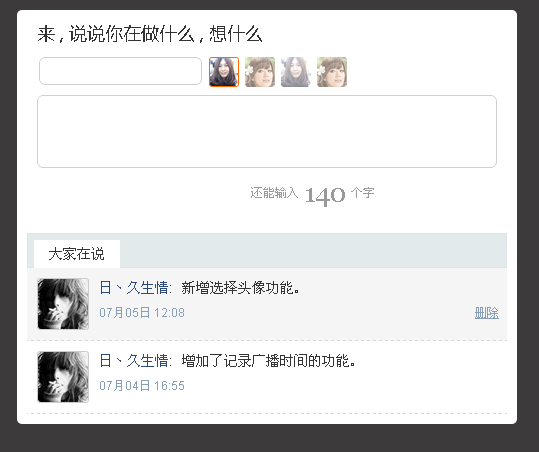
本文實現一個仿騰訊微博的無刷新刪除效果:把列表裡的某條微博刪掉,全程使用 AJAX 技術,頁面不重載。對初學 AJAX 的朋友參考價值比較高。
運行效果截圖如下:
在線演示地址:
https://demo.jb51.net/js/2015/js-f-sina-web-ajax-del-info-demo/
完整代碼
<!DOCTYPE html PUBLIC "-//W3C//DTD XHTML 1.0 Transitional//EN" "https://www.w3.org/TR/xhtml1/DTD/xhtml1-transitional.dtd">
<html xmlns="https://www.w3.org/1999/xhtml">
<head>
<title>仿騰訊微博效果</title>
<style type="text/css">
body,div,h2,h3,ul,li,p{margin:0;padding:0;}
a{text-decoration:none;}
a:hover{text-decoration:underline;}
ul{list-style-type:none;}
body{color:#333;background:#3c3a3b;font:12px/1.5 \5b8b\4f53;}
#msgBox{width:500px;background:#fff;border-radius:5px;margin:10px auto;padding-top:10px;}
#msgBox form h2{font-weight:400;font:400 18px/1.5 \5fae\8f6f\96c5\9ed1;}
#msgBox form{background:url() repeat-x 0 bottom;padding:0 20px 15px;}
#userName,#conBox{color:#777;border:1px solid #d0d0d0;border-radius:6px;background:#fff url(img/inputBG.png) repeat-x;padding:3px 5px;font:14px/1.5 arial;}
#userName.active,#conBox.active{border:1px solid #7abb2c;}
#userName{height:20px;}
#conBox{width:448px;resize:none;height:65px;overflow:auto;}
#msgBox form div{position:relative;color:#999;margin-top:10px;}
#msgBox img{border-radius:3px;}
#face{position:absolute;top:0;left:172px;}
#face img{width:30px;height:30px;cursor:pointer;margin-right:6px;opacity:0.5;filter:alpha(opacity=50);}
#face img.hover,#face img.current{width:28px;height:28px;border:1px solid #f60;opacity:1;filter:alpha(opacity=100);}
#sendBtn{border:0;width:112px;height:30px;cursor:pointer;margin-left:10px;background:url(img/btn.png) no-repeat;}
#sendBtn.hover{background-position:0 -30px;}
#msgBox form .maxNum{font:26px/30px Georgia, Tahoma, Arial;padding:0 5px;}
#msgBox .list{padding:10px;}
#msgBox .list h3{position:relative;height:33px;font-size:14px;font-weight:400;background:#e3eaec;border:1px solid #dee4e7;}
#msgBox .list h3 span{position:absolute;left:6px;top:6px;background:#fff;line-height:28px;display:inline-block;padding:0 15px;}
#msgBox .list ul{overflow:hidden;zoom:1;}
#msgBox .list ul li{float:left;clear:both;width:100%;border-bottom:1px dashed #d8d8d8;padding:10px 0;background:#fff;overflow:hidden;}
#msgBox .list ul li.hover{background:#f5f5f5;}
#msgBox .list .userPic{float:left;width:50px;height:50px;display:inline;margin-left:10px;border:1px solid #ccc;border-radius:3px;}
#msgBox .list .content{float:left;width:400px;font-size:14px;margin-left:10px;font-family:arial;word-wrap:break-word;}
#msgBox .list .userName{display:inline;padding-right:5px;}
#msgBox .list .userName a{color:#2b4a78;}
#msgBox .list .msgInfo{display:inline;word-wrap:break-word;}
#msgBox .list .times{color:#889db6;font:12px/18px arial;margin-top:5px;overflow:hidden;zoom:1;}
#msgBox .list .times span{float:left;}
#msgBox .list .times a{float:right;color:#889db6;display:none;}
.tr{overflow:hidden;zoom:1;}
.tr p{float:right;line-height:30px;}
.tr *{float:left;}
</style>
<script type="text/javascript">
var get = {
byId: function(id) { return typeof id === "string" ? document.getElementById(id) : id },
byClass: function(sClass, oParent) {
var aClass = [];
var reClass = new RegExp("(^| )" + sClass + "( |$)");
var aElem = this.byTagName("*", oParent);
for (var i = 0; i < aElem.length; i++) reClass.test(aElem[i].className) && aClass.push(aElem[i]);
return aClass
},
byTagName: function(elem, obj) { return (obj || document).getElementsByTagName(elem) }
};
/*-------------------------- 事件綁定與移除 --------------------------*/
var EventUtil = {
addHandler: function (oElement, sEvent, fnHandler) {
oElement.addEventListener
? oElement.addEventListener(sEvent, fnHandler, false)
: (oElement["_" + sEvent + fnHandler] = fnHandler,
oElement[sEvent + fnHandler] = function () { oElement["_" + sEvent + fnHandler]() },
oElement.attachEvent("on" + sEvent, oElement[sEvent + fnHandler]))
},
removeHandler: function (oElement, sEvent, fnHandler) {
oElement.removeEventListener
? oElement.removeEventListener(sEvent, fnHandler, false)
: oElement.detachEvent("on" + sEvent, oElement[sEvent + fnHandler])
},
addLoadHandler: function (fnHandler) { this.addHandler(window, "load", fnHandler) }
};
/*-------------------------- 讀取與設置 css 樣式 --------------------------*/
function css(obj, attr, value) {
switch (arguments.length) {
case 2:
if (typeof arguments[1] == "object") {
for (var i in attr)
i == "opacity"
? (obj.style["filter"] = "alpha(opacity=" + attr[i] + ")", obj.style[i] = attr[i] / 100)
: obj.style[i] = attr[i];
} else {
return obj.currentStyle ? obj.currentStyle[attr] : getComputedStyle(obj, null)[attr]
}
break;
case 3:
attr == "opacity"
? (obj.style["filter"] = "alpha(opacity=" + value + ")", obj.style[attr] = value / 100)
: obj.style[attr] = value;
break;
}
};
EventUtil.addLoadHandler(function () {
var oMsgBox = get.byId("msgBox");
var oUserName = get.byId("userName");
var oConBox = get.byId("conBox");
var oSendBtn = get.byId("sendBtn");
var oMaxNum = get.byClass("maxNum")[0];
var oCountTxt = get.byClass("countTxt")[0];
var oList = get.byClass("list")[0];
var oUl = get.byTagName("ul", oList)[0];
var aLi = get.byTagName("li", oList);
var aFtxt = get.byClass("f-text", oMsgBox);
var aImg = get.byTagName("img", get.byId("face"));
var bSend = false;
var timer = null;
var oTmp = "";
var i = 0;
var maxNum = 140;
// 禁止表單提交
EventUtil.addHandler(get.byTagName("form", oMsgBox)[0], "submit", function () { return false });
// 綁定發送按鈕
EventUtil.addHandler(oSendBtn, "click", fnSend);
// Ctrl + Enter 快捷發送
EventUtil.addHandler(document, "keyup", function (event) {
var event = event || window.event;
event.ctrlKey && event.keyCode == 13 && fnSend()
});
// 發送函數
function fnSend () {
var reg = /^\s*$/g;
if (reg.test(oUserName.value)) {
alert("請填寫您的姓名"); oUserName.focus()
} else if (!/^[u4e00-\u9fa5\w]{2,8}$/g.test(oUserName.value)) {
alert("姓名由2-8位字母、數字、下劃線、漢字組成!"); oUserName.focus()
} else if (reg.test(oConBox.value)) {
alert("隨便說點什麼吧!"); oConBox.focus()
} else if (!bSend) {
alert("你輸出的內容已超出限制,請檢查!"); oConBox.focus()
} else {
var oLi = document.createElement("li");
var oDate = new Date();
oLi.innerHTML = "<div class=\"userPic\"><img src=\"" + get.byClass("current", get.byId("face"))[0].src + "\"></div>\
<div class=\"content\">\
<div class=\"userName\"><a href=\"javascript:;\">" + oUserName.value + "</a>:</div>\
<div class=\"msgInfo\">" + oConBox.value.replace(/<[^>]*>| /ig, "") + "</div>\
<div class=\"times\"><span>" + format(oDate.getMonth() + 1) + "月" + format(oDate.getDate()) + "日 " +
format(oDate.getHours()) + ":" + format(oDate.getMinutes()) + "</span>\
<a class=\"del\" href=\"javascript:;\">刪除</a></div>\
</div>";
// 插入元素
aLi.length ? oUl.insertBefore(oLi, aLi[0]) : oUl.appendChild(oLi);
// 重置表單
get.byTagName("form", oMsgBox)[0].reset();
for (i = 0; i < aImg.length; i++) aImg[i].className = "";
aImg[0].className = "current";
// 緩存元素高度,做展開動畫
var iHeight = oLi.clientHeight - parseFloat(css(oLi, "paddingTop")) - parseFloat(css(oLi, "paddingBottom"));
var alpah = count = 0;
css(oLi, {"opacity" : "0", "height" : "0"});
timer = setInterval(function () {
css(oLi, {"display" : "block", "opacity" : "0", "height" : (count += 8) + "px"});
if (count > iHeight) {
clearInterval(timer);
css(oLi, "height", iHeight + "px");
timer = setInterval(function () {
css(oLi, "opacity", (alpah += 10));
alpah > 100 && (clearInterval(timer), css(oLi, "opacity", 100))
}, 30)
}
}, 30);
liHover();
delLi()
}
}
};
// 字符輸入限制
EventUtil.addHandler(oConBox, "keyup", confine);
EventUtil.addHandler(oConBox, "focus", confine);
EventUtil.addHandler(oConBox, "change", confine);
function confine () {
var iLen = 0;
for (i = 0; i < oConBox.value.length; i++)
iLen += oConBox.value.charAt(i).charCodeAt() > 255 ? 1 : 0.5;
oMaxNum.innerHTML = Math.abs(maxNum - Math.floor(iLen));
maxNum - Math.floor(iLen) >= 0
? (css(oMaxNum, "color", ""), oCountTxt.innerHTML = "還能輸入", bSend = true)
: (css(oMaxNum, "color", "#f60"), oCountTxt.innerHTML = "已超出", bSend = false)
}
confine();
EventUtil.addHandler(oSendBtn, "mouseover", function () { this.className = "hover" });
EventUtil.addHandler(oSendBtn, "mouseout", function () { this.className = "" });
// li 鼠標劃過 / 離開
function liHover() {
for (i = 0; i < aLi.length; i++) {
EventUtil.addHandler(aLi[i], "mouseover", function (event) {
this.className = "hover";
oTmp = get.byClass("times", this)[0];
var aA = get.byTagName("a", oTmp);
if (!aA.length) {
var oA = document.createElement("a");
oA.innerHTML = "刪除"; oA.className = "del"; oA.href = "javascript:;";
oTmp.appendChild(oA)
} else {
aA[0].style.display = "block";
}
});
EventUtil.addHandler(aLi[i], "mouseout", function () {
this.className = "";
var oA = get.byTagName("a", get.byClass("times", this)[0])[0];
oA.style.display = "none"
})
}
}
liHover();
// 刪除功能:先淡出,再收合高度
function delLi() {
var aA = get.byClass("del", oUl);
for (i = 0; i < aA.length; i++) {
aA[i].onclick = function () {
var oParent = this.parentNode.parentNode.parentNode;
var alpha = 100;
var iHeight = oParent.offsetHeight;
timer = setInterval(function () {
css(oParent, "opacity", (alpha -= 10));
if (alpha < 0) {
clearInterval(timer);
timer = setInterval(function () {
iHeight -= 10;
iHeight < 0 && (iHeight = 0);
css(oParent, "height", iHeight + "px");
iHeight == 0 && (clearInterval(timer), oUl.removeChild(oParent))
}, 30)
}
}, 30);
this.onclick = null
}
}
}
delLi();
// 輸入框焦點樣式
for (i = 0; i < aFtxt.length; i++) {
EventUtil.addHandler(aFtxt[i], "focus", function () { this.className = "active" });
EventUtil.addHandler(aFtxt[i], "blur", function () { this.className = "" })
}
// 時間補零
function format(str) { return str.toString().replace(/^(\d)$/,"0$1") }
// 頭像切換
for (i = 0; i < aImg.length; i++) {
aImg[i].onmouseover = function () { this.className += " hover" };
aImg[i].onmouseout = function () { this.className = this.className.replace(/\s?hover/,"") };
aImg[i].onclick = function () {
for (i = 0; i < aImg.length; i++) aImg[i].className = "";
this.className = "current"
}
}
});
</script>
</head>
<body>
<div id="msgBox">
<form>
<h2>來 , 說說你在做什麼 , 想什麼</h2>
<div>
<input id="userName" class="f-text" value="" />
<p id="face"><img src="images/face1.gif" class="current" /><img src="images/face2.gif" /><img src="images/face1.gif" /><img src="images/face2.gif" /></p>
</div>
<div><input id="conBox" class="f-text"></div>
<div class="tr">
<p>
<span class="countTxt">還能輸入</span><strong class="maxNum">140</strong><span>個字</span>
<input id="sendBtn" type="button" value="" title="快捷鍵 Ctrl+Enter" />
</p>
</div>
</form>
<div class="list">
<h3><span>大家在說</span></h3>
<ul>
<li>
<div class="userPic"><img src="images/face.gif" /></div>
<div class="content">
<div class="userName"><a href="javascript:;">日丶久生情</a>:</div>
<div class="msgInfo">新增Ctrl+Enter快捷鍵發送廣播。</div>
<div class="times"><span>07月05日 12:20</span><a class="del" href="javascript:;">刪除</a></div>
</div>
</li>
<li>
<div class="userPic"><img src="images/face.gif" /></div>
<div class="content">
<div class="userName"><a href="javascript:;">日丶久生情</a>:</div>
<div class="msgInfo">新增選擇頭像功能。</div>
<div class="times"><span>07月05日 12:08</span><a class="del" href="javascript:;">刪除</a></div>
</div>
</li>
<li>
<div class="userPic"><img src="images/face.gif" /></div>
<div class="content">
<div class="userName"><a href="javascript:;">日丶久生情</a>:</div>
<div class="msgInfo">增加了記錄廣播時間的功能。</div>
<div class="times"><span>07月04日 16:55</span><a class="del" href="javascript:;">刪除</a></div>
</div>
</li>
</ul>
</div>
</div>
</body>
</html>
值得反覆看的三處實現
字符計數:confine 用 charCodeAt 大於 255 來判斷漢字,一個漢字算 1、半角字符算 0.5,从而實現「140 字」的雙字節計數邏輯,並在超出時變色提示、鎖定發送。
新增動畫:先緩存目標高度,再把 height 與 opacity 從 0 逐步遞增,用兩個串接的 setInterval 完成「撐開 + 淡入」的組合動畫。
刪除動畫:思路正好相反,先把透明度降到 0,再逐步收縮高度,最後 removeChild 移除節點。這種「先淡出後收合」的順序,視覺上比直接消失自然得多。
示例中的删除是純前端的 DOM 操作,真實業務裡這一步應該換成 AJAX 請求,成功後再移除節點。CSS 轉場(transition)也能替代這裡手寫的定時器動畫,代碼量會少很多。
希望本文所述對大家的 JavaScript 程序設計有所幫助。