看看手機裡的計算器,分為普通計算器和科學計算器兩種。
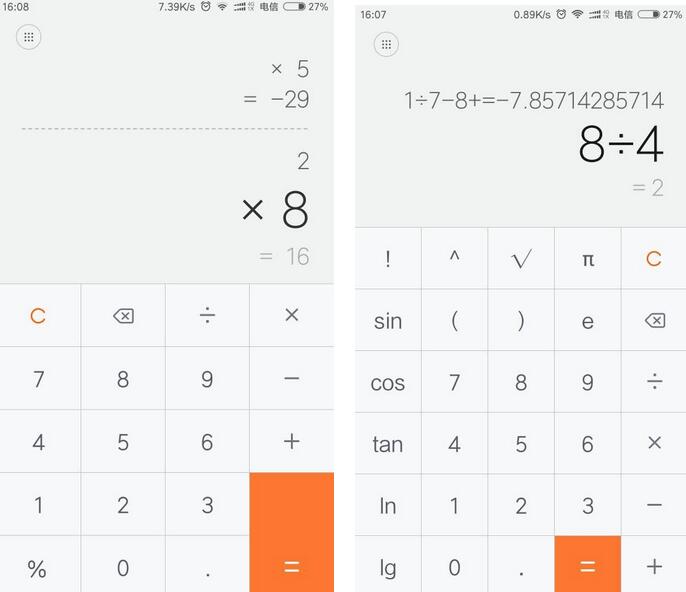
自認腦袋不夠大,那就先實現一個普通版本吧(支持正負數的加減乘除等基本連續運算,暫未提供括號功能)。
看看圖示效果:
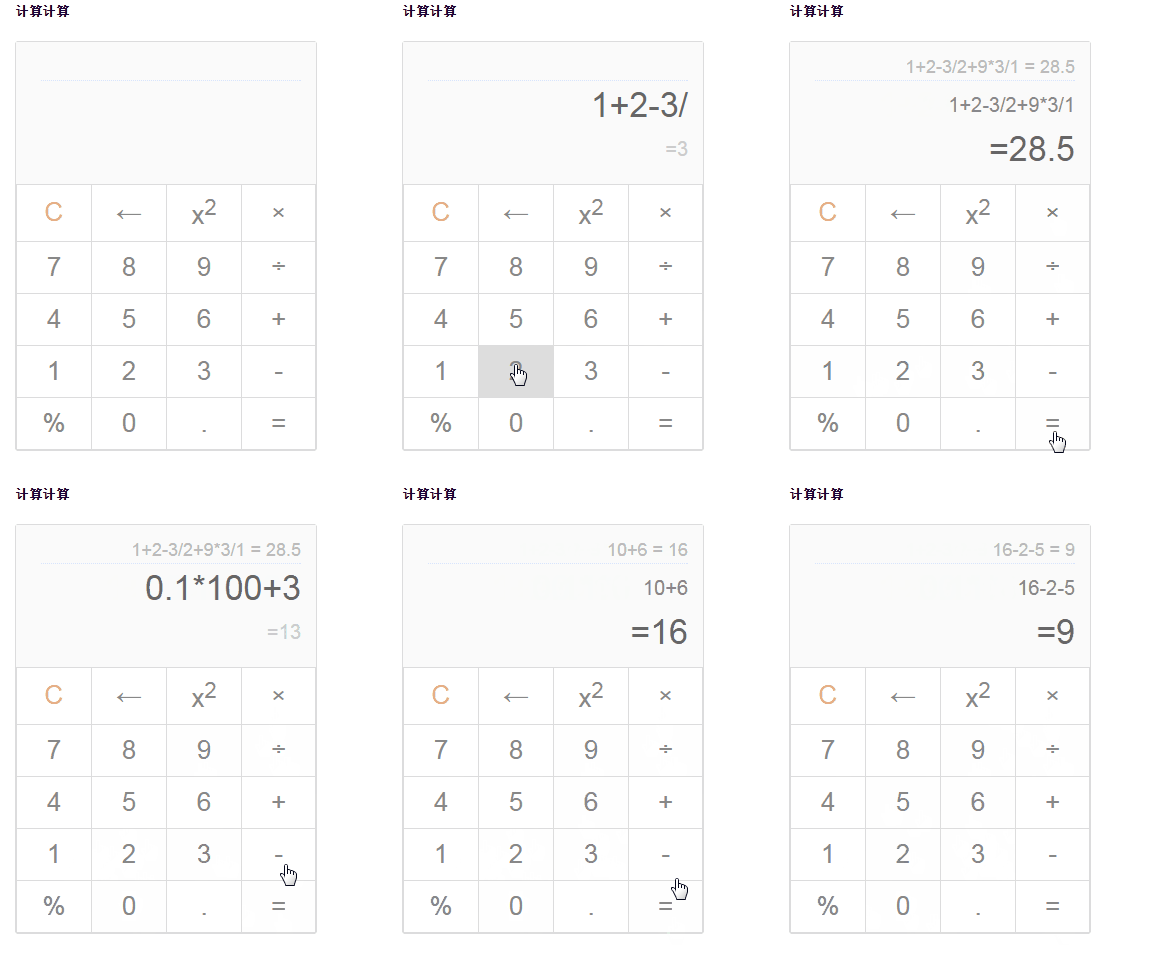
一、知識准備
1+1 = ?
正常來說,我們看到這個表達式都知道怎麼算、結果是多少。但計算機不一樣,它無法直接識別這串表達式,只能識別特定的規則:前綴表達式 + 1 1,或後綴表達式 1 1 +。
舉個栗子
(3 + 4) × 5 - 6 是中綴表達式
- × + 3 4 5 6 是前綴表達式
3 4 + 5 × 6 - 是後綴表達式
所以,為了讓程序能自動運算,我們需要把輸入的數據轉換成前綴或後綴表達式。前綴、中綴、後綴的概念與相互轉換方法這裡不再展開,本文採用後綴表達式的實現方式,重點關注以下兩個算法:
與轉換為前綴表達式相似,遵循以下步驟:
(1) 初始化兩個棧:運算符棧 S1 和儲存中間結果的棧 S2;
(2) 從左至右掃描中綴表達式;
(3) 遇到操作數時,將其壓入 S2;
(4) 遇到運算符時,比較其與 S1 棧頂運算符的優先級:
(4-1) 如果 S1 為空,或棧頂運算符為左括號「(」,則直接將此運算符入棧;
(4-2) 否則,若優先級比棧頂運算符高,也將運算符壓入 S1;
(4-3) 否則,將 S1 棧頂運算符彈出並壓入 S2,再轉到 (4-1) 與新的棧頂運算符比較;
(5) 遇到括號時:
(5-1) 若是左括號「(」,直接壓入 S1;
(5-2) 若是右括號「)」,則依次彈出 S1 棧頂運算符並壓入 S2,直到遇到左括號為止,然後丟棄這對括號;
(6) 重復步驟 (2) 至 (5),直到表達式最右端;
(7) 將 S1 中剩餘的運算符依次彈出並壓入 S2;
(8) 依次彈出 S2 中的元素並輸出,其逆序即為對應的後綴表達式。
後綴表達式的求值 similarly 從左至右:掃描表達式,遇到數字壓入堆棧,遇到運算符則彈出棧頂兩個數,用運算符對它們做相應計算(次頂元素 op 棧頂元素),再把結果入棧;重復直到最右端,最終棧中剩下的值即為結果。
例如後綴表達式「3 4 + 5 × 6 -」:
(1) 從左至右掃描,將 3 和 4 壓入堆棧;
(2) 遇到 +,彈出 4 和 3,算出 3+4=7,將 7 入棧;
(3) 將 5 入棧;
(4) 遇到 ×,彈出 5 和 7,算出 7×5=35,將 35 入棧;
(5) 將 6 入棧;
(6) 最後遇到 -,算出 35-6=29,即為最終結果。
二、實現過程
第一步當然是搭建計算器的頁面結構。作為普通計算器,它提供基本運算功能,同時能即時運算、顯示完整的中綴表達式,並在運算後保存上一條記錄。
這裡要先說明一下:本來想實現小數點功能,但小數點讓數據存儲與顯示的實現變得頗有壓力,折騰起來實在頭大,索性先取消這個功能。
1. 頁面結構:
<h5>計算計算</h5> <!-- 計算器 --> <div class="calc-wrap"> <div class="calc-in-out"> <!-- 上一條運算記錄 --> <p class="calc-history" title=""></p> <!-- 輸入的數據 --> <p class="calc-in"></p> <!-- 輸出的運算結果 --> <p class="calc-out active"></p> </div> <table class="calc-operation"> <thead></thead> <tbody> <tr> <td data-ac="cls" class="cls">C</td> <td data-ac="del">←</td> <td data-ac="sq">x<sup>2</sup></td> <td data-ac="mul">×</td> </tr> <tr> <td data-val="7">7</td> <td data-val="8">8</td> <td data-val="9">9</td> <td data-ac="div">÷</td> </tr> <tr> <td data-val="4">4</td> <td data-val="5">5</td> <td data-val="6">6</td> <td data-ac="plus">+</td> </tr> <tr> <td data-val="1">1</td> <td data-val="2">2</td> <td data-val="3">3</td> <td data-ac="minus">-</td> </tr> <td data-ac="per">%</td> <td data-val="0">0</td> <td data-ac="dot">.</td> <td data-ac="eq" class="eq">=</td> </tbody> </table> </div>
2. 結合一點樣式:
body { padding: 20px; font-family: Arial; } .calc-wrap { width: 300px; border: 1px solid #ddd; border-radius: 3px; } .calc-operation { width: 100%; border-collapse: collapse; } .calc-in-out { width: 100%; padding: 10px 20px; text-align: right; box-sizing: border-box; background-color: rgba(250, 250, 250, .9); } .calc-in-out p { overflow: hidden; margin: 5px; width: 100%; } .calc-history { margin-left: -20px; font-size: 18px; color: #bbb; border-bottom: 1px dotted #ddf; min-height: 23px; } .calc-in, .calc-out { font-size: 20px; color: #888; line-height: 39px; min-height: 39px; } .calc-in { color: #888; } .calc-out { color: #ccc; } .calc-in.active, .calc-out.active { font-size: 34px; color: #666; } .calc-operation td { padding: 10px; width: 25%; text-align: center; border: 1px solid #ddd; font-size: 26px; color: #888; cursor: pointer; } .calc-operation td:active { background-color: #ddd; } .calc-operation .cls { color: #ee8956; }
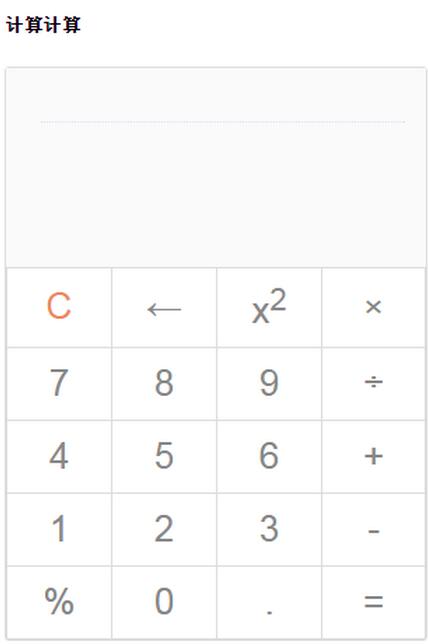
這樣,一個靜態的計算器雛形就出來了。
3. JS 邏輯
這部分是重點,我們一步步來說。
首先是對計算器的監聽,也就是這個表格。可以用事件委托的方式,在父級節點上統一監聽處理:
// 綁定事件 bindEvent: function() { var that = this; that.$operation.on('click', function(e) { e = e || window.event; var elem = e.target || e.srcElement, val, action; if (elem.tagName === 'TD') { val = elem.getAttribute('data-val') || elem.getAttribute('data-ac');
監聽到的只是頁面上某個值或操作符,所以需要把數據存起來形成中綴表達式,再由中綴轉後綴,最後通過後綴進行計算:
// 中綴表達式 this.infix = []; // 後綴表達式 this.suffix = []; // 後綴表達式運算結果集 this.result = [];
按照算法步驟實現出來(這裡沒有用到括號,如有需要可在相應位置調整判斷條件):
// 中綴表達式轉後綴 infix2Suffix: function() { var temp = []; this.suffix = []; for (var i = 0; i < this.infix.length; i++) { // 數值,直接壓入 if (!this.isOp(this.infix[i])) { this.suffix.push(this.infix[i]); } else { if (!temp.length) { temp.push(this.infix[i]); } else { var opTop = temp[temp.length - 1]; // 循環判斷運算符優先級,將運算符較高的壓入後綴表達式 if (!this.priorHigher(opTop, this.infix[i])) { while (temp.length && !this.priorHigher(opTop, this.infix[i])) { this.suffix.push(temp.pop()); opTop = temp[temp.length - 1]; } } // 將當前運算符也壓入後綴表達式 temp.push(this.infix[i]); } } } // 將剩余運算符號壓入 while (temp.length) { this.suffix.push(temp.pop()); } },
// 後綴表達式計算 calcSuffix: function() { this.result = []; for (var i = 0; i < this.suffix.length; i++) { // 數值,直接壓入結果集 if (!this.isOp(this.suffix[i])) { this.result.push(this.suffix[i]); } // 運算符,從結果集中取出兩項進行運算,並將運算結果置入結果集合 else { this.result.push(this.opCalc(this.result.pop(), this.suffix[i], this.result.pop())); } } // 此時結果集中只有一個值,即為結果 return this.result[0]; }
其實實現下來會發現,中綴、後綴只是一個難點,更複雜的地方在於整個計算器的狀態變化(或者說是數據變化)。
在這個簡單的計算器裡,就有數字(0-9)、運算符(+ - * /)、操作(清除、刪除)、預運算(百分號、平方)、小數點、即時運算等多種數據與操作。如果是科學計算器那就更複雜了。所以理清如何控制這些東西很關鍵,而其中最重要的就是中綴表達式的構建與存儲。
當連續點擊 + 號時是不符合實際操作的,所以需要一個變量 lastVal 來記錄上一個值,隨著操作更新,再通過判斷防止程序出錯。在點擊 = 號之後,我們既可以繼續用這個結果運算,也可以重新開始。
// 構建中綴表達式 buildInfix: function(val, type) { // 直接的點擊等於運算之後, if (this.calcDone) { this.calcDone = false; // 再點擊數字,則進行新的運算 if (!this.isOp(val)) { this.resetData(); } // 再點擊運算符,則使用當前的結果值繼續進行運算 else { var re = this.result[0]; this.resetData(); this.infix.push(re); } } var newVal; ...
點擊刪除,是刪除一位數,而不是直接刪掉整個數,然後更新中綴表達式的值:
// 刪除操作 if (type === 'del') { newVal = this.infix.pop(); // 刪除末尾一位數 newVal = Math.floor(newVal / 10); if (newVal) { this.infix.push(newVal); } this.lastVal = this.infix[this.infix.length - 1]; return this.infix; }
而添加操作要考慮的情況就更多了,比如連續的運算符、連續的數字、運算符 + - 接數字表示正負數、小數點的連接存取等:
// 添加操作,首先得判斷運算符是否重復 else if (type === 'add') { // 兩個連續的運算符 if (this.isOp(val) && this.isOp(this.lastVal)) { return this.infix; } // 兩個連續的數字 else if (!this.isOp(val) && !this.isOp(this.lastVal)) { newVal = this.lastVal * 10 + val; this.infix.pop(); this.infix.push(this.lastVal = newVal); return this.infix; } // 首個數字正負數 if (!this.isOp(val) && this.infix.length === 1 && (this.lastVal === '+' || this.lastVal === '-')) { newVal = this.lastVal === '+' ? val : 0 - val; this.infix.pop(); this.infix.push(this.lastVal = newVal); return this.infix; } this.infix.push(this.lastVal = val); return this.infix; }
在很多次操作過程中,計算器都需要即時運算。為簡化代碼,可以封裝成一個方法,在相應位置調用即可:
// 即時得進行運算 calculate: function(type) { this.infix2Suffix(); var suffixRe = this.calcSuffix(); if (suffixRe) { this.$out.text('=' + suffixRe) .attr('title', suffixRe) .removeClass('active'); // 如果是直接顯示地進行等於運算 if (type === 'eq') { this.$in.removeClass('active'); this.$out.addClass('active'); // 設置標記:當前已經顯示地進行計算 this.calcDone = true; this.lastVal = suffixRe; // 設置歷史記錄 var history = this.infix.join('') + ' = ' + suffixRe; this.$history.text(history).attr('title', history); } } },
剩下的就是點擊之後的處理流程了,也就是各種調用:傳遞數據 → 構建中綴處理數據 → 中綴轉後綴 → 後綴運算顯示。比如點擊了數字:
// 數字:0-9 if (!isNaN(parseInt(val, 10))) { // 構建中綴表達式並顯示 var infixRe = that.buildInfix(parseInt(val, 10), 'add'); that.$in.text(infixRe.join('')).addClass('active'); that.calculate(); return; }
又比如幾個預運算,其實長得也差不多:
// 預運算:百分比、小數點、平方 else if (['per', 'dot', 'sq'].indexOf(action) !== -1) { if (!that.infix.length || that.isOp(that.lastVal)) { return; } if (action === 'per') { that.lastVal /= 100; } else if (action === 'sq') { that.lastVal *= that.lastVal; } else if (action === 'dot') { // that.curDot = true; } // 重新構建中綴表達式 var infixRe = that.buildInfix(that.lastVal, 'change'); that.$in.text(infixRe.join('')).addClass('active'); that.calculate(); }
以上就是這個簡單計算器的實現步驟了。由於狀態變化較多,暫不敢保證完全不會出錯。基本邏輯如此,若要再加上小數點運算、括號運算、正余弦等科學計算器功能,就留給感興趣的同學自己去實現吧。完整代碼如下:
$(function() { function Calculator($dom) { this.$dom = $($dom); // 歷史運算 this.$history = this.$dom.find('.calc-history'); // 輸入區 this.$in = this.$dom.find('.calc-in'); // 輸出區 this.$out = this.$dom.find('.calc-out'); this.$operation = this.$dom.find('.calc-operation'); // 運算符映射 this.op = { 'plus': '+', 'minus': '-', 'mul': '*', 'div': '/' }; this.opArr = ['+', '-', '*', '/']; // 中綴表達式 this.infix = []; // 後綴表達式 this.suffix = []; // 後綴表達式運算結果集 this.result = []; // 存儲最近的值 this.lastVal = 0; // 當前已經計算等於完成 this.calcDone = false; // 當前正在進行小數點點(.)相關值的修正 this.curDot = false; this.init(); } Calculator.prototype = { constructor: Calculator, // 初始化 init: function() { this.bindEvent(); }, // 綁定事件 bindEvent: function() { var that = this; that.$operation.on('click', function(e) { e = e || window.event; var elem = e.target || e.srcElement, val, action; if (elem.tagName === 'TD') { val = elem.getAttribute('data-val') || elem.getAttribute('data-ac'); // 數字:0-9 if (!isNaN(parseInt(val, 10))) { // 構建中綴表達式並顯示 var infixRe = that.buildInfix(parseInt(val, 10), 'add'); that.$in.text(infixRe.join('')).addClass('active'); that.calculate(); return; } action = val; // 操作:清除、刪除、計算等於 if (['cls', 'del', 'eq'].indexOf(action) !== -1) { if (!that.infix.length) { return; } // 清空數據 if (action === 'cls' || (action === 'del' && that.calcDone)) { that.$in.text(''); that.$out.text(''); that.resetData(); } // 清除 else if (action === 'del') { // 重新構建中綴表達式 var infixRe = that.buildInfix(that.op[action], 'del'); that.$in.text(infixRe.join('')).addClass('active'); that.calculate(); } // 等於 else if (action === 'eq') { that.calculate('eq'); } } // 預運算:百分比、小數點、平方 else if (['per', 'dot', 'sq'].indexOf(action) !== -1) { if (!that.infix.length || that.isOp(that.lastVal)) { return; } if (action === 'per') { that.lastVal /= 100; } else if (action === 'sq') { that.lastVal *= that.lastVal; } else if (action === 'dot') { // that.curDot = true; } // 重新構建中綴表達式 var infixRe = that.buildInfix(that.lastVal, 'change'); that.$in.text(infixRe.join('')).addClass('active'); that.calculate(); } // 運算符:+ - * / else if (that.isOp(that.op[action])) { if (!that.infix.length && (that.op[action] === '*' || that.op[action] === '/')) { return; } var infixRe = that.buildInfix(that.op[action], 'add'); that.$in.text(infixRe.join('')).addClass('active'); } } }); }, resetData: function() { this.infix = []; this.suffix = []; this.result = []; this.lastVal = 0; this.curDot = false; }, // 構建中綴表達式 buildInfix: function(val, type) { // 直接的點擊等於運算之後, if (this.calcDone) { this.calcDone = false; // 再點擊數字,則進行新的運算 if (!this.isOp(val)) { this.resetData(); } // 再點擊運算符,則使用當前的結果值繼續進行運算 else { var re = this.result[0]; this.resetData(); this.infix.push(re); } } var newVal; // 刪除操作 if (type === 'del') { newVal = this.infix.pop(); // 刪除末尾一位數 newVal = Math.floor(newVal / 10); if (newVal) { this.infix.push(newVal); } this.lastVal = this.infix[this.infix.length - 1]; return this.infix; } // 添加操作,首先得判斷運算符是否重復 else if (type === 'add') { // 兩個連續的運算符 if (this.isOp(val) && this.isOp(this.lastVal)) { return this.infix; } // 兩個連續的數字 else if (!this.isOp(val) && !this.isOp(this.lastVal)) { newVal = this.lastVal * 10 + val; this.infix.pop(); this.infix.push(this.lastVal = newVal); return this.infix; } // 首個數字正負數 if (!this.isOp(val) && this.infix.length === 1 && (this.lastVal === '+' || this.lastVal === '-')) { newVal = this.lastVal === '+' ? val : 0 - val; this.infix.pop(); this.infix.push(this.lastVal = newVal); return this.infix; } this.infix.push(this.lastVal = val); return this.infix; } // 更改操作,比如%的預運算 else if (type === 'change') { this.infix.pop(); this.infix.push(this.lastVal = val); return this.infix; } }, // 判斷是否為運算符 isOp: function(op) { return op && this.opArr.indexOf(op) !== -1; }, // 判斷運算符優先級 priorHigher: function(a, b) { return (a === '+' || a === '-') && (b === '*' || b === '/'); }, // 進行運算符的運算 opCalc: function(b, op, a) { return op === '+' ? a + b : op === '-' ? a - b : op === '*' ? a * b : op === '/' ? a / b : 0; }, // 即時得進行運算 calculate: function(type) { this.infix2Suffix(); var suffixRe = this.calcSuffix(); if (suffixRe) { this.$out.text('=' + suffixRe) .attr('title', suffixRe) .removeClass('active'); // 如果是直接顯示地進行等於運算 if (type === 'eq') { this.$in.removeClass('active'); this.$out.addClass('active'); // 設置標記:當前已經顯示地進行計算 this.calcDone = true; this.lastVal = suffixRe; // 設置歷史記錄 var history = this.infix.join('') + ' = ' + suffixRe; this.$history.text(history).attr('title', history); } } }, // 中綴表達式轉後綴 infix2Suffix: function() { var temp = []; this.suffix = []; for (var i = 0; i < this.infix.length; i++) { // 數值,直接壓入 if (!this.isOp(this.infix[i])) { this.suffix.push(this.infix[i]); } else { if (!temp.length) { temp.push(this.infix[i]); } else { var opTop = temp[temp.length - 1]; // 循環判斷運算符優先級,將運算符較高的壓入後綴表達式 if (!this.priorHigher(opTop, this.infix[i])) { while (temp.length && !this.priorHigher(opTop, this.infix[i])) { this.suffix.push(temp.pop()); opTop = temp[temp.length - 1]; } } // 將當前運算符也壓入後綴表達式 temp.push(this.infix[i]); } } } // 將剩余運算符號壓入 while (temp.length) { this.suffix.push(temp.pop()); } }, // 後綴表達式計算 calcSuffix: function() { this.result = []; for (var i = 0; i < this.suffix.length; i++) { // 數值,直接壓入結果集 if (!this.isOp(this.suffix[i])) { this.result.push(this.suffix[i]); } // 運算符,從結果集中取出兩項進行運算,並將運算結果置入結果集合 else { this.result.push(this.opCalc(this.result.pop(), this.suffix[i], this.result.pop())); } } // 此時結果集中只有一個值,即為結果 return this.result[0]; } }; new Calculator('.calc-wrap'); });
以上就是本文的全部內容,希望對大家的學習有所幫助。
- 上一篇文章: Bootstrap 使用中的常見問題與排查思路
- 下一篇文章: JavaScript 排序算法動畫演示效果的實現思路