章節導覽連動:點目錄跳轉、內文跟著目錄滾動的實作
編輯:關於JavaScript
長篇文件的側邊目錄要做到「點擊跳轉」與「滾動時高亮目前章節」兩件事,核心是記錄目前索引,並把滾輪事件換算成索引的加減。
JavaScript
 <script>
require(["jquery", "bootstrap"], function($) {
    $(function() {
        // 讓左側欄至少與視窗同高
        $('.left').height(($('body').height() > $(window).height())
            ? $('body').height() : $(window).height());
    });

    var goTo = $(".con");
    var guide = $(".sideGuide");
    var guideLi = $(".sideGuide li");
    var index = 0;
    var direct = 0;

    var goToFun = function() {
        // 取得該章節距頁面頂端的距離
        var len = document.getElementById("box" + index).offsetTop - 30;
        direct = 0;

        if (index < 0) { index = 0; return; }
        if (index >= guideLi.size()) { index = guideLi.size() - 1; return; }

        // 平滑捲動到目標位置
        $("html,.tree").stop().animate({ scrollTop: len }, 300, "swing", function() {
            direct = 0;
        });

        guideLi.removeClass("on").eq(index).addClass("on");
    };

    // 點擊目錄項 → 跳轉
    guideLi.each(function(i) {
        $(this).click(function() {
            index = guideLi.index($(this));
            goToFun();
        });
    });

    // 滾輪事件 → 換算成索引變化
    var scrollFunc = function(e) {
        e = e || window.event;
        if (e.wheelDelta) {
            direct += (-e.wheelDelta / 120);
        } else if (e.detail) {
            direct += e.detail / 3;
        }
        var first = document.getElementById("first").val();
        if (direct >= first) { goToFun(index++); }
        if (direct <= 0 - first) { goToFun(index--); }
    };
});
</script>
這裡有兩個關鍵設計:一是用 direct 累積滾輪方向,累積到門檻值才跳一次,避免一次滾動觸發好幾個章節;二是 wheelDelta 與 detail 並存,前者對應 IE/WebKit、後者對應 Firefox,這是滾輪事件跨瀏覽器的標準處理方式。
CSS
 <style>
.return{ padding-top:0.5em; }
.title{ text-align:center; font-weight:bold; padding-bottom:1em; border-bottom:2px solid #eee; line-height:1em; }
.extend{ text-align:center; color:#666; font-size:1.6em; line-height:3em; }
.content{ line-height:2.2em; }
.content table{ width:100%; }
.left{ background-color:#fff; }
.left .desc{ color:#666; margin:2em 0; }
.left .list{ line-height:3em; }
.left .list li{ border-top:1px solid #E4E1E1; }
.href{ cursor:pointer; }
.lh2{ line-height:2.4em; }
.lh2 li{ border-top:1px solid #eee; }
.tree{ max-height:1000px; overflow-y:scroll; border:1px solid #DDD; border-top:0; border-left:0; margin-top:20px; }
.sub-title{ margin:2em auto 1em; text-align:center; font-size:20px; }
.on a{ color:#000; font-weight:bold; }
</style>
HTML
 <body style="position:fixed;" ondragstart="return false" onselectstart="return false"
      onkeypress="return false" oncontextmenu="return false">
<div class="container-fluid">
  <div class="text-right return">
    <a class="btn btn-default" href="javascript:history.back()">返回</a>
  </div>
  <h2 class="title">《日常管理機制》</h2>
  <div class="row">
    <div class="col-sm-3 hidden-xs left" style="height:1193px;">
      <div class="container-fluid">
        <h3>目錄</h3>
        <div class="sideGuide">
          <ul class="list-unstyled lh2">
            <li><span class="text-muted"><a href="javascript:void(0)">第一章 總則</a></span></li>
            <li><span class="text-muted"><a href="javascript:void(0)">第二章 分校運營管理規定</a></span></li>
            <li><span class="text-muted"><a href="javascript:void(0)">第三章 分校人員管理規定</a></span></li>
            <li><span class="text-muted"><a href="javascript:void(0)">第四章 品牌管理規定</a></span></li>
            <li><span class="text-muted"><a href="javascript:void(0)">第五章 分校宣傳管理規定</a></span></li>
            <li><span class="text-muted"><a href="javascript:void(0)">第六章 分校咨詢管理規定</a></span></li>
            <li><span class="text-muted"><a href="javascript:void(0)">第七章 分校教學管理規定</a></span></li>
            <li><span class="text-muted"><a href="javascript:void(0)">第八章 增設分校的管理規定</a></span></li>
            <li></li>
          </ul>
        </div>
      </div>
    </div>
    <div class="col-sm-9">
      <div class="container-fluid" style="background-color:#f5f5f5">
        <div class="tree mb40">
          <div id="box0" class="con">
          <div id="box1" class="con">
          <div id="box2" class="con">
          <div id="box3" class="con">
          <div id="box4" class="con">
          <div id="box5" class="con">
          <div id="box6" class="con">
          <div id="box7" class="con">
          </div></div></div></div></div></div></div></div></div>
          <input id="first" type="hidden" value="8">
        </div>
      </div>
    </div>
  </div>
</div>
</body>
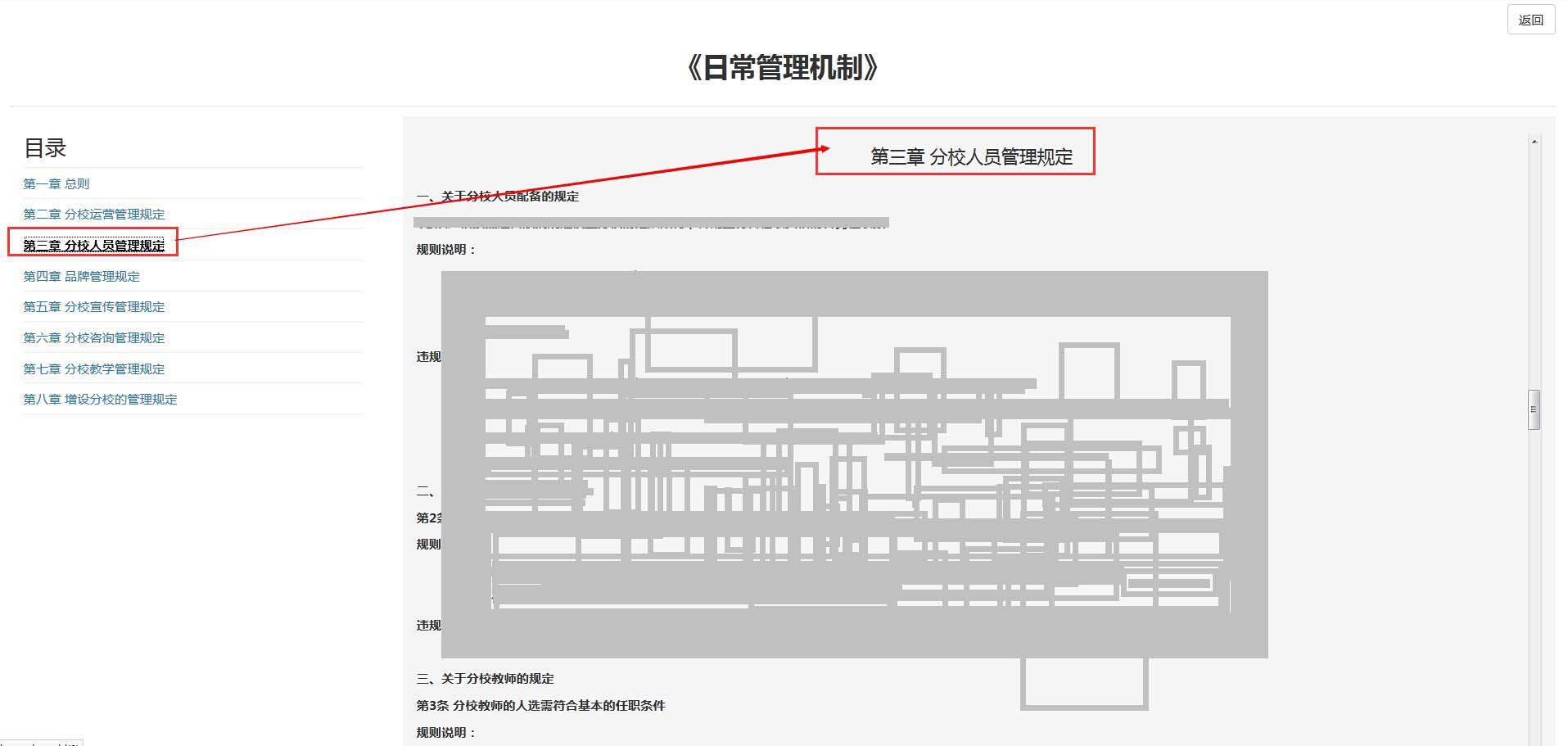
目錄項的索引必須與 box0~box7 的 id 一一對應,這是整份程式能運作的前提;章節數量若由後端動態決定,記得同步調整隐藏的 first 門檻值。
【效果預覽】
- 上一篇文章: JavaScript 隨機產生顏色的三種寫法
- 下一篇文章: JS 控制 div 層疊顯示:用遮罩加彈出層實作收藏管理視窗