JS 控制 div 層疊顯示:用遮罩加彈出層實作收藏管理視窗
編輯:關於JavaScript
彈出視窗的經典做法是「半透明遮罩 + 上層內容框」,靠 z-index 決定層級,靠 display 控制顯示與隱藏。以下以一個收藏清單管理頁面為例。
關鍵樣式
 <style type="text/css">
/* 遮罩層:鋪滿整個視窗,層級 1001 */
.black_overlay{
    display:none; position:absolute; top:0%; left:0%;
    width:100%; height:100%; background-color:black;
    z-index:1001; -moz-opacity:0.8; opacity:.10; filter:alpha(opacity=80);
}
/* 內容層:浮在遮罩之上,層級 1002 */
.white_content{
    display:none; position:absolute; top:15%; left:25%;
    width:500px; height:250px; padding:16px;
    border:1px solid #ccc; background-color:white; z-index:1002; overflow:auto;
}
.white_content a{ float:right; color:#aca7a7; text-decoration:none; }
</style>
兩個層級差 1 就足以決定前後關係。遮罩的 opacity 設在 0.1 左右是為了保留頁面可見度、又不干擾焦點;同時加上 filter:alpha(opacity=80) 以相容舊版 IE。
結構與互動
 <div class="favorite_title">
  <div class="favorite_label">
    <img class="favorite_icon" width="48" height="48"
         src="https://127.0.0.1/phpcms/statics/images/favorite/favorite_icon_48_48.jpg"/>
    <h2>  收藏<span id="favorite_count">(n個)</span>
      <a class="add_favorite" href="javascript:void(0)" onclick="add_shoucang();">添加收藏</a>
    </h2>
  </div>
</div>

<div class="favorite_list">
  <div class="list_type">
    <ul class="all">
      <li> <a href="#">全部(<span class="nums"></span>)</a></li>
      <li> <a href="#">鋼琴譜(<span class="nums"></span>)</a></li>
      <li> <a href="#">鋼琴曲(<span class="nums"></span>)</a></li>
    </ul>
  </div>
  <div class="list_line"></div>
  <div class="list_content">
    <ul class="navigation" id="navigation">
      {loop $info $r}
      <li class="t1">
        <a href="#">
          <label class="shoucangId" style="display:none;">{$r[id]}</label>
          <h3>{$r[title]}</h3>
        </a>
        <span class="date">{date("Y-m-d", $r[inputtime])}</span>
        <a class="edit" href="javascript:void(0)" onclick="edit_shoucang();">
          <img alt="編輯" src="https://127.0.0.1/phpcms/statics/images/favorite/edit.jpg"/></a>
        <a class="delete" href="JavaScript:void(0)" onclick="ConfirmDel();">
          <img alt="刪除" src="https://127.0.0.1/phpcms/statics/images/favorite/delete.jpg"/></a>
      </li>
      {/loop}
      <li class="t1"> </li>
    </ul>
  </div>
</div>

<!-- 彈出層 -->
<div id="light" class="white_content">
  <a href="javascript:void(0)"
     onclick="document.getElementById('light').style.display='none';
              document.getElementById('fade').style.display='none'">
    <span>關閉</span></a>
  <h2 style="color:#999292;">添加收藏</h2>

  <div class="form-group">
    <label for="url" class="control-label col-xs-2"><span>*</span>網址:</label>
    <div class="col-xs-9">
      <input id="url" type="text" name="url" class="form-control" value="https://"/>
    </div>
  </div>

  <div class="form-group">
    <label for="title" class="control-label col-xs-2"><span>*</span>標題:</label>
    <div class="col-xs-9">
      <input id="title" type="text" name="title" class="form-control" />
    </div>
  </div>

  <div class="form-group">
    <label class="control-label col-xs-2"><span>*</span>類別:</label>
    <div class="col-xs-9">
      <label id="m1"><input type="radio" name="radio" id="radio_pu" value="鋼琴譜" checked="checked"/><span>鋼琴譜</span></label>
      <label id="m2"><input type="radio" name="radio" id="radio_qu" value="鋼琴曲" /><span>鋼琴曲</span></label>
    </div>
  </div>

  <div class="form-group">
    <div class="col-xs-5 text-right">
      <input type="submit" value="收藏" name="dosumbit" class="btn btn-primary"/>
      <button type="button" class="btn btn-default"
              onclick="document.getElementById('light').style.display='none';
                       document.getElementById('fade').style.display='none'">取消</button>
    </div>
  </div>
</div>
顯示與隱藏的 JS
 <script type="text/javascript">
// 開啟彈出層:同時顯示內容與遮罩
function add_shoucang() {
    document.getElementById('light').style.display = 'block';
    document.getElementById('fade').style.display  = 'block';
    $("#title").val('');
    $("#url").val('https://');
    $("#shoucnag_id").val('');
    $("input[name='radio'][value='鋼琴譜']").attr("checked", true);
}

// 刪除確認
function ConfirmDel() {
    if (confirm('確定刪除?')) {
        $('.navigation>li').click(function(){
            var iVal = $(this).index();
            $('.navigation>li').eq(iVal).hide();
        });
    } else {
        document.getElementById('light').style.display = 'none';
        document.getElementById('fade').style.display  = 'none';
    }
}
</script>
【效果預覽】
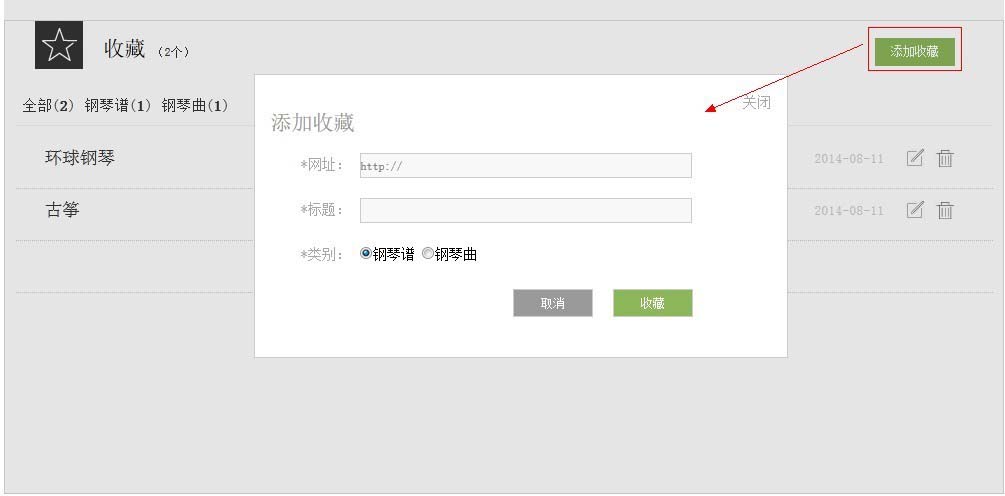
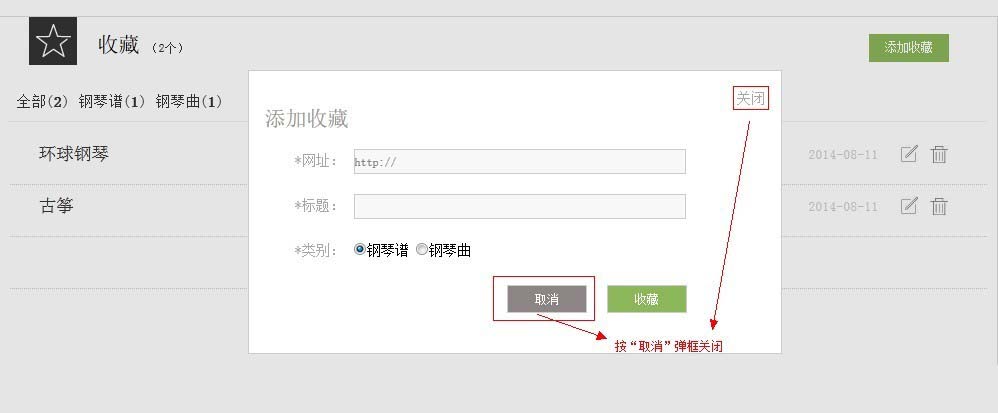
這份程式有兩處值得修正:一是遮罩層的 id 在樣式中叫 black_overlay,JS 裡卻用 fade 存取,名稱不一致會導致關不掉遮罩;二是彈出層設為 position:absolute,頁面捲動後位置會跑掉,改成 fixed 並加上垂直置中的計算會更穩妥。另外,彈出時記得把焦點移入視窗、關閉後還給原本的觸發元素,鍵盤使用者才不會迷失。
- 上一篇文章: 章節導覽連動:點目錄跳轉、內文跟著目錄滾動的實作
- 下一篇文章: JS 操作 table:動態新增 tr、刪除單行與清空全部