在實際開發中,「如何取得一張圖片的原始尺寸」看似簡單,卻是不少前端新手容易踩坑的地方。網路上相關討論很多,本文就從一個常見的誤區說起,帶大家理清背後的原理,並給出可靠的相容方案。
為什麼 innerWidth 拿到的不是原始寬度
頁面上有一個 img 元素,想取得它的寬度,很多人的第一直覺是去讀取元素的 innerWidth 屬性,或是使用 jQuery 提供的 width() 方法。
<img id="img" src="1.jpg"> <script type="text/javascript"> var img = document.getElementById("img"); console.log(img.innerWidth); // 600 </script>
看上去似乎確實拿到了尺寸。但問題在於:一旦你替這個 img 加上了 width 屬性,情況就變了。假設圖片實際寬度是 600,而你透過屬性把它設成了 400,這時 innerWidth 回傳的會是 400,而非真實的 600。
<img id="img" src="1.jpg" width="400"> <script type="text/javascript"> var img = document.getElementById("img"); console.log(img.innerWidth); // 400 </script>
原因很直接:innerWidth 取得的是元素在盒模型中實際渲染出來的寬度,而不是圖片檔案本身的原生尺寸。jQuery 的 width() 方法底層同樣依賴 innerWidth,因此它也無法繞過這個限制。
正解:naturalWidth 與 naturalHeight
HTML5 為了解決這個問題,提供了 naturalWidth 與 naturalHeight 兩個屬性,可以直接讀取圖片的原始寬高。這兩個屬性在 Firefox、Chrome、Safari、Opera 以及 IE9 中均已實作。
var naturalWidth = document.getElementById('img').naturalWidth, naturalHeight = document.getElementById('img').naturalHeight;
naturalWidth / naturalHeight 在各大瀏覽器中的相容性如下:
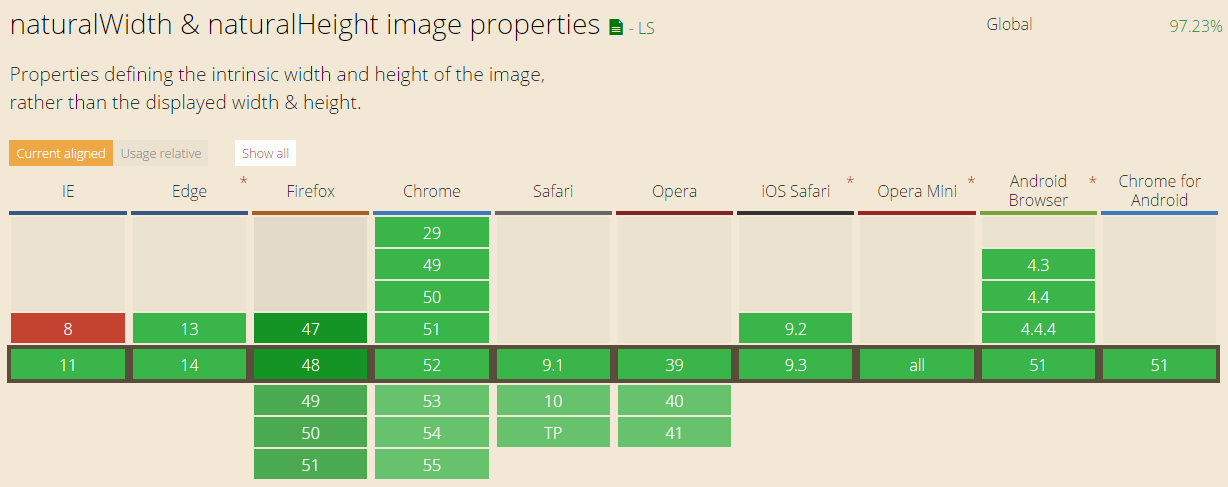
圖片截取自:https://caniuse.com/#search=naturalWidth
換句話說,如果你的專案不需要向下相容到 IE8,那麼就可以放心大膽地使用 naturalWidth 與 naturalHeight 了。
兼顧 IE7/8 的向下相容寫法
IE8 及更早的版本並不支援這兩個屬性。在這些老瀏覽器裡,我們可以借助 new Image() 的方式迂迴取得圖片的真實尺寸:
function getNaturalSize (Domlement) { var img = new Image(); img.src = DomElement.src; return { width: img.width, height: img.height }; } // 使用 var natural = getNaturalSize (document.getElementById('img')), natureWidth = natural.width, natureHeight = natural.height;
若希望同時兼容 IE7 以上的所有瀏覽器,可以將兩種方案整合成一個通用函數:
function getNaturalSize (Domlement) { var natureSize = {}; if(window.naturalWidth && window.naturalHeight) { natureSize.width = Domlement.naturalWidth; natureSizeheight = Domlement.naturalHeight; } else { var img = new Image(); img.src = DomElement.src; natureSize.width = img.width; natureSizeheight = img.height; } return natureSize; } // 使用 var natural = getNaturalSize (document.getElementById('img')), natureWidth = natural.width, natureHeight = natural.height;
小結
取得圖片原始尺寸時,記得避開 innerWidth 這個陷阱,優先採用 naturalWidth 與 naturalHeight;若确需支援老舊 IE,再用 new Image() 做降級處理即可。希望這份整理能幫你在開發中少走一點冤枉路。
- 上一篇文章: 深入理解 JavaScript 原生拖放
- 下一篇文章: 純手繪!用 HTML5 Canvas 打造會走動的圓形時鐘