JavaScript 彈窗基礎:confirm、prompt 與 window.open
編輯:關於JavaScript
confirm():確認框
 <!DOCTYPE html>
<html>
<head>
<meta charset="UTF-8">
<title>confirm</title>
</head>
<body>
<script>
var con = confirm("do you like to study javascript?");
if (con) {
  document.write("I love javascript!");
} else {
  document.write("I love other lanuages!");
}
</script>
</body>
</html>

confirm 回傳布林值,因此可以直接用在 if 條件裡,讓程式依使用者的選擇分成兩條路。
prompt():輸入提示框
 <!DOCTYPE html>
<html>
<head>
<meta charset="UTF-8">
<title>confirm</title>
</head>
<body>
<script>
var pro = prompt("what is your name?");
document.write(pro);
</script>
</body>
</html>
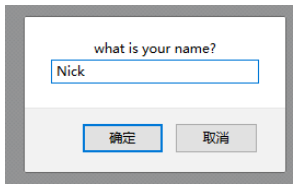
prompt 回傳使用者輸入的字串;若使用者直接按確定沒填東西,得到的是空字串,按取消則是 null,實務上要分辨這兩種情況。
window.open():開啟新視窗
 <!DOCTYPE html>
<html>
<head>
<meta charset="UTF-8">
<title>confirm</title>
</head>
<body>
<a href="#" title="https://www.cnblogs.com/yuzheCyril/">click me</a>
<script>
var link = document.getElementsByTagName("a")[0];
link.onclick = function () {
  window.open(link.title, "blog", "width=400px,height=400px");
}
</script>
</body>
</html>
window.open 的三個參數分別是網址、視窗名稱與特徵字串。常見特徵還包括 height、scroll、status、toolbar、resizable、location 等;但要注意現代瀏覽器基於安全與體驗考量,大幅限制了可隱藏的 UI 項目,多數瀏覽器只會尊重寬高,位置與工具列往往會被忽略。
關閉視窗則是 window.close(),不過它通常只能關閉由腳本開啟的視窗,使用者手動開的分頁多數會被瀏覽器擋下。
這三個原生方法加上 window.open/close,構成了 JavaScript 最基礎的視窗互動能力,理解它們的限制,比記住語法更重要。
- 上一篇文章: JS 產生器實作:姓名、手機、身分證、卡號一次搞定
- 下一篇文章: 純前端圖片預覽實作:FileReader 與 IE 濾鏡降級方案
相關文章
-
window.open() 參數完整解析:從最簡單彈窗到 Cookie 控制只跳一次 JS 彈窗返回值詳解(window.open 方式) window.open 回傳 [object] 怎麼辦?寫法與參數一次講完 用 alert、prompt 與 confirm 和使用者互動 用按鈕開啟新視窗:window.open 參數與視窗屬性完整控制 下拉選單當站內導航:三個步驟做出「Go!」跳轉與新視窗開啟 window.open 的參數怎麼寫:開一個乾淨的小視窗 用 JavaScript 動手做一個簡易圖片瀏覽器視窗 用 channelmode 開啟無邊框全螢幕視窗 滑鼠移入就開新視窗:onMouseOver 搭配 window.open 的參數怎麼填