Chrome 裡如何判斷點擊的是 input 還是清除鍵?用延遲執行破解
編輯:關於JavaScript
要實現的功能是這樣的:當 input 框失焦、且點擊的不是清除鍵時,執行 reset 方法重置 input 樣式;而當點擊的正是清除鍵時,則執行 clear 方法清空 input 內容。
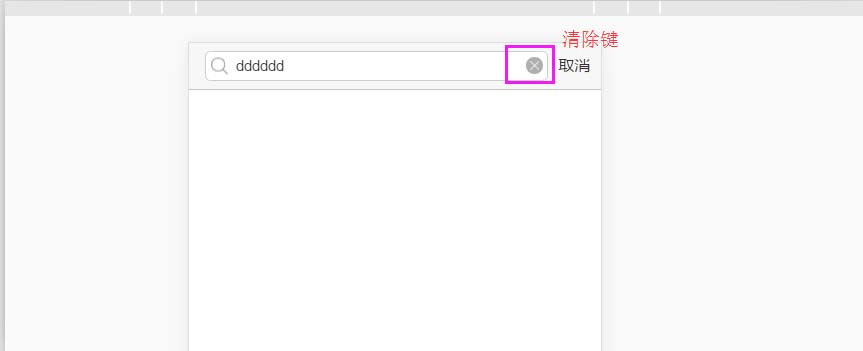
失敗的直覺寫法
一開始我很自然地想用下面這段程式碼來判斷:
$(".search-input").focusout(function () { if (document.activeElement.className !== 'close-t') {//close-t為清除鍵類名 $('.search-input').addClass('search-before'); $('.close').css('display', 'none'); document.getElementById('search').value = ''; } });
沒想到 input 框失焦之後,第一個獲得焦點的竟是 body 標籤,導致這個判斷完全失效。
用延遲執行破解
$("#search").focusout(function () { //判斷失焦後是否點擊的是清除鈕,若是則不重置 var tapCloseButton = false; $('.close-t').focus(function () { tapCloseButton = true; }); setTimeout(function () { if (!tapCloseButton) { $('.search-input').addClass('search-before'); $('.close').css('display', 'none'); document.getElementById('search').value = ''; } },10); });
關鍵就在 setTimeout 的這 10 毫秒:把焦點判斷延後執行,此時焦點已經從 body 移到了使用者真正點擊的那個元素上,再來判斷它是不是清除鍵就準確多了。這是一個很典型的「事件時序」問題——瀏覽器的焦點切換並非瞬間完成,善用一點點延遲,就能巧妙地繞過這個坑。以上就是這個問題的分享,希望能給你一個參考。
- 上一篇文章: 深入淺析 JavaScript:到底是按值傳遞還是按引用傳遞?
- 下一篇文章: 行動端 JS 觸摸事件完全指南:從單點、多點到手勢