jQuery 實用技巧:為輸入框製作提示文字效果
編輯:關於JavaScript
表單輸入框的提示文字該怎麼做才優雅?不同人有不同答案。在 placeholder 屬性尚未普及的年代,常見做法是透過 focus / blur 事件動態切換提示文字,而密碼框還需要額外處理。這個思路今天仍然值得理解,因為它示範了事件驅動的表單狀態管理。
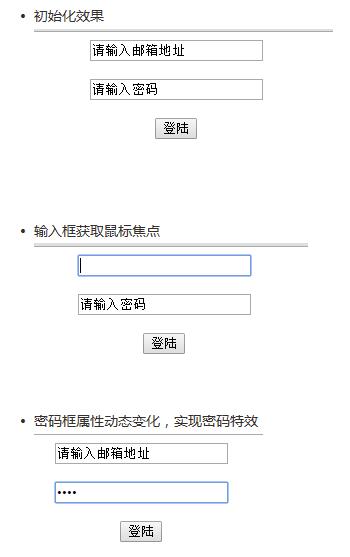
實現思路
輸入框未取得焦點時,顯示提示文字;取得焦點後,如果當前值就是提示文字則清空,否則保留使用者已輸入的內容;離開焦點時,若值為空則還原提示文字。密碼框需要額外把 type 在 text 與 password 之間切換,否則提示文字會顯示成圓點。
核心代碼
$("#address").focus(function () {
  if ($(this).val() == "請輸入郵箱地址") {
    $(this).val("");
  }
});

$("#address").blur(function () {
  if ($(this).val() == "") {
    $(this).val("請輸入郵箱地址");
  }
});
完整示例
<!DOCTYPE html>
<html>
<head>
<meta charset="utf-8">
<title>文本輸入框中內容的提示效果</title>
<script type="text/javascript" src="jquery-2.2.4.min.js"></script>
</head>
<body>
<script>
$(function () {
  $("#address").focus(function () {
    if ($(this).val() == "請輸入郵箱地址") { $(this).val(""); }
  });

  $("#password").focus(function () {
    if ($(this).val() == "請輸入密碼") {
      $(this).attr("type", "password");   // 關鍵:切換為密碼框
      $(this).val("");
    }
  });

  $("#address").blur(function () {
    if ($(this).val() == "") { $(this).val("請輸入郵箱地址"); }
  });

  $("#password").blur(function () {
    if ($(this).val() == "") {
      $(this).attr("type", "text");       // 還原為明文提示
      $(this).val("請輸入密碼");
    }
  });
});
</script>

<div align="center">
  <input type="text" id="address" value="請輸入郵箱地址"><br><br>
  <input type="text" id="password" value="請輸入密碼"><br><br>
  <input type="button" name="登錄" value="登陸">
</div>
</body>
</html>
兩個值得留意的點
$(function(){}) 是 $(document).ready(function(){}) 的簡寫,確保 DOM 就緒後才綁定事件。
$(this).attr("type", "password") 動態修改 type 屬性,讓同一個輸入框在「提示狀態」下顯示明文、在「輸入狀態」下顯示圓點。這是整個效果能成立的關鍵一步。
現代的更好做法
如果目標瀏覽器都支援 HTML5,直接用 <input type="email" placeholder="請輸入郵箱地址"> 即可,瀏覽器原生處理了 focus 隱藏、blur 還原、以及表單提交時的驗證問題。上面這套方案的主要價值在於:需要兼容舊版 IE,或者提示文字需要承載額外樣式與圖示時,仍然可以派上用場。
- 上一篇文章: 陣列宣告與向陣列中放入物件的常見寫法
- 下一篇文章: RegExp 物件與括號用法深度解析:從 match/exec 到貪婪匹配與預搜尋
相關文章
-
仿淘寶搜尋框:oninput 與 onpropertychange 的使用 封裝 jQuery placeholder 插件,讓舊版瀏覽器也有提示文字 用 CSS 打造符合 Web 標準的表單:五個實用技巧 現在就把HTML 5用在你的站點上(中):即學即用的實用特性 讓 HTML5 placeholder 在舊版 IE 也能顯示 HTML5 placeholder 屬性用法與樣式美化技巧 HTML5 表單自動聚焦與占位提示文本示例 HTML5 input 標籤常用屬性示例整理 HTML5 入門技巧(二):表單輸入與佔位符 讓舊版 IE 也能用 placeholder:一段 JavaScript 補上缺失屬性