JavaScript 取得視窗、螢幕與元素尺寸位置的完整方法整理
編輯:關於JavaScript
做自適應佈局、彈層定位、無限滾動時,總離不開「拿尺寸」。但 screen、window、element、event 四類物件各自提供的屬性差異微妙,混淆之後就會出現各種偏移 bug。下面系統整理一遍。
一、screen 物件:螢幕相關
screen.width        // 螢幕寬度
screen.height       // 螢幕高度
screen.availWidth   // 可用寬度(螢幕寬度扣除系統部件)
screen.availHeight  // 可用高度(螢幕高度扣除系統部件)
二、window 物件:視窗相關
window.screenTop    // 視窗頂部距螢幕頂部的距離
window.screenLeft   // 視窗左側距螢幕左側的距離

window.innerWidth   // 可視區域寬度
window.innerHeight  // 可視區域高度(受選單列等影響)

window.outerWidth    // 瀏覽器視窗整體寬度(可視區域 + 邊框)
window.outerHeight   // 瀏覽器視窗整體高度
實測差異:Chrome 最大化時幾乎沒有邊框寬度,非最大化時左右約 8px;Firefox 與 IE 上下左右通常都有 8px 邊框。因此 innerWidth 與 outerWidth 的差值並不固定,需要精確計算時應以 innerWidth / innerHeight 為準。
三、element 物件:元素相關
先回顧預設盒模型 box-sizing: content-box:
boxWidth  = 2*margin + 2*border + 2*padding + width
boxHeight = 2*margin + 2*border + 2*padding + height

clientWidth / clientHeight:內容可視尺寸,不含邊框、邊距與捲軸。
body { margin: 0; }
#demo {
  width: 100px; height: 100px;
  padding: 10px; border: 20px; margin: 30px;
  background-color: red;
}
clientWidth  = 2*padding + width  - scrollbarWidth
clientHeight = 2*padding + height - scrollbarHeight

// 無捲軸時
document.getElementById('demo').clientWidth;   // 120
document.getElementById('demo').clientHeight;  // 120
offsetWidth / offsetHeight:含 border 與 padding,不含 margin
offsetWidth  = 2*border + 2*padding + width
offsetHeight = 2*border + 2*padding + height

document.getElementById('demo').offsetWidth;   // 160
document.getElementById('demo').offsetHeight;  // 160
offsetLeft / offsetTop:相對於 offsetParent 的距離
document.getElementById('demo').offsetLeft;   // 30
document.getElementById('demo').offsetTop;    // 30

scrollWidth / scrollHeight:包含被隱藏部分的完整尺寸
body { margin: 0; padding: 20px; width: 1000px; height: 500px; }

scrollWidth  = 2*padding + width
scrollHeight = 2*padding + height

document.body.scrollWidth;   // 1040
document.body.scrollHeight;  // 540
scrollTop / scrollLeft:捲動距離
向下捲動時元素被隱藏內容的高度;不設定時預設為 0,數值隨捲動即時變化。scrollLeft 同理,用於水平方向。
四、event 物件:滑鼠座標
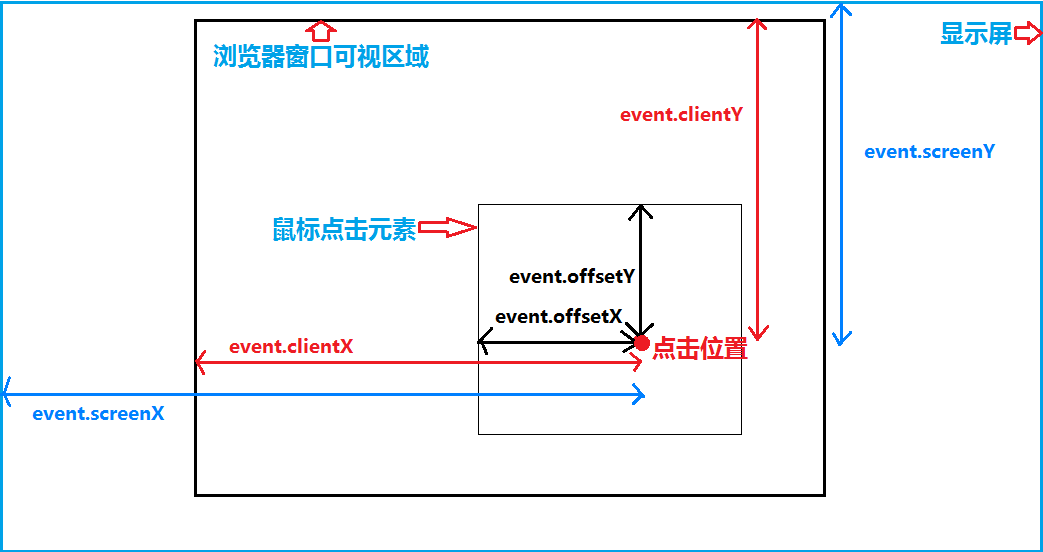
Event 物件代表事件狀態,包含發生元素、按鍵狀態、滑鼠位置等資訊。座標屬性共有四組,參考原點各不相同:
- pageX / pageY:相對於整個頁面,原點為頁面左上角(含捲動量)。IE8 不支援。
- clientX / clientY:相對於可視區域,原點為瀏覽器視窗左上角。
- screenX / screenY:相對於電腦螢幕,原點為螢幕左上角。
- offsetX / offsetY:相對於事件來源元素自身,原點為該元素 padding 的左上角。
五、實務選擇建議
- 需要元素「佔據多大空間」(含 padding、border)用
offsetWidth / offsetHeight。 - 需要元素「內容區多大」用
clientWidth / clientHeight。 - 需要「包含溢出內容的完整尺寸」用
scrollWidth / scrollHeight。 - 需要「元素距頁面頂部的距離」時,offsetTop 只是相對 offsetParent,跨多層巢狀時應用
getBoundingClientRect().top + window.pageYOffset才是準確值。 - 彈層定位首選
getBoundingClientRect(),它一次給出 top / left / right / bottom / width / height 六個值,比逐個讀取屬性方便得多。
把這幾組屬性的含義記清楚,寫定位相關代碼時就不必靠試錯調整數字了。