分享一個 JavaScript 時間差小工具:把日期變成「幾分鐘前」
編輯:關於JavaScript
社群網站上常見的「3 分鐘前」「上週」這類相對時間顯示,實作起來並不難。這裡分享一個可以直接呼叫的 timeDifference() 函式。
HTML 部分
<html>
<head>
<title></title>
<script src="js/TimeDifference.js" type="text/javascript"></script>
<script src="js/jquery-1.10.2-min.js" type="text/javascript"></script>
</head>
<body>
<h2>該插件發布時間:<small id="allDemo"></small></h2>

<font color="red" id="demo1Font">2016-06-03 10:20:23</font><br>
距離目前時間差:
<strong><font color="red"><span id="timeDifferenceDemo1"></span></font></strong><br>

<font color="red" id="demo2Font">2016-06-07 10:02:23</font><br>
距離目前時間差:
<strong><font color="red"><span id="timeDifferenceDemo2"></span></font></strong>

<script type="text/javascript">
$("#allDemo").text(timeDifference("2016-06-05 10:11:00"));

$(document).ready(function(){
  var demo1Result = timeDifference($("#demo1Font").text());
  $("#timeDifferenceDemo1").text(demo1Result);
  $("#timeDifferenceDemo2").text(timeDifference($("#demo2Font").text()));
});
</script>
</body>
</html>
TimeDifference.js
/**
 * 使用說明:
 * 直接呼叫 timeDifference(時間字串)
 * 回傳值:該時間距離現在的相對描述
 */
function timeDifference(tmpTime) {
  var mm = 1000;             // 1000 毫秒 = 1 秒
  var minute = mm * 60;
  var hour = minute * 60;
  var day = hour * 24;
  var month = day * 30;
  var ansTimeDifference = 0; // 記錄結果

  // 將 yyyy-mm-dd H:m:s 正則化後轉為時間戳
  var tmpTimeStamp = tmpTime
    ? Date.parse(tmpTime.replace(/-/gi, "/"))
    : new Date().getTime();

  var nowTime = new Date().getTime();
  var tmpTimeDifference = nowTime - tmpTimeStamp;

  if (tmpTimeDifference < 0) {
    // 時間超出範圍,無法計算
    alert("開始日期大於結束日期,計算失敗!");
    return 0;
  }

  // 用各時間單位去除差值,取整後判斷落在哪個量級
  var DifferebceMonth  = tmpTimeDifference / month;
  var DifferebceWeek   = tmpTimeDifference / (7 * day);
  var DifferebceDay    = tmpTimeDifference / day;
  var DifferebceHour   = tmpTimeDifference / hour;
  var DifferebceMinute = tmpTimeDifference / minute;

  if (DifferebceMonth >= 1) {
    return tmpTime;                                  // 超過一個月,直接顯示原日期
  } else if (DifferebceWeek >= 1) {
    ansTimeDifference = parseInt(DifferebceWeek) + "個星期前";
  } else if (DifferebceDay >= 1) {
    ansTimeDifference = parseInt(DifferebceDay) + "天前";
  } else if (DifferebceHour >= 1) {
    ansTimeDifference = parseInt(DifferebceHour) + "個小時前";
  } else if (DifferebceMinute >= 1) {
    ansTimeDifference = parseInt(DifferebceMinute) + "分鐘前";
  } else {
    ansTimeDifference = "剛剛";
  }
  return ansTimeDifference;
}
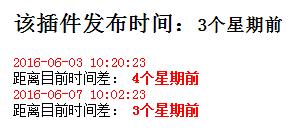
結果如圖:
幾個可以調整的地方:把 /-/gi 的替換換成更嚴謹的日期解析,可以避免不同瀏覽器對 Date.parse 的相容差異;月份用固定 30 天估算只是近似值,若要精準可依需求改成真正的月差計算;另外超過一個月就直接回傳原始日期這個策略,也可以依產品調性改成顯示「2016 年 6 月」之類的格式。