Ext JS 實戰:從伺服器動態載入 JavaScript 即時生成視窗
編輯:關於JavaScript
JavaScript 天生免編譯、執行即見效,這份特性讓前端架構具備了很高的彈性。我們完全可以在應用運行期間,向伺服器索取一段腳本,再依取得的內容動態建構並控制介面元件。本文以 Ext JS 為例,完整示範如何從後端拉取 JS 程式碼,進而在執行期拼出視窗。
一、專案結構規劃
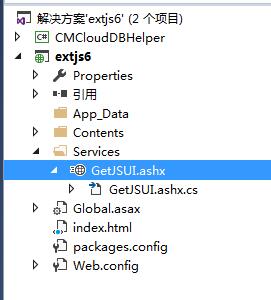
整體拆成兩塊:一個名為 GetJSUI 的一般事件處理常式,負責從資料表讀取 UI 設定並回傳前端;另一塊是 Contents 目錄,用來擺放 HTML 頁面與 JS 函式庫等靜態資源。
二、資料表設計
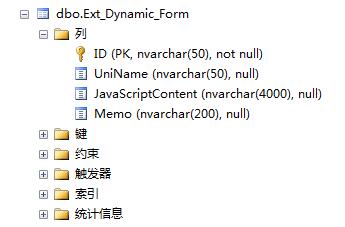
在 MSSQL 中建一張表即可,關鍵欄位是 JavaScriptContent,用來存放真正的腳本內容。
CREATE TABLE [dbo].[Ext_Dynamic_Form]( [ID] [nvarchar](50) NOT NULL, [UniName] [nvarchar](50) NULL, [JavaScriptContent] [nvarchar](4000) NULL, [Memo] [nvarchar](200) NULL, CONSTRAINT [PK_Ext_Dynamic_Form] PRIMARY KEY CLUSTERED ( [ID] ASC ) ) ON [PRIMARY]
三、寫入初始設定
表建好之後,先塞入幾筆示範資料,方便後續驗證讀取流程是否正確。

四、GetJSUI 的服務端實作
這個 handler 依 ID 撈出對應的腳本字串,指定 UTF-8 編碼後直接輸出,前端拿到的就是一段可執行的 JavaScript。
using System; using System.Collections.Generic; using System.Linq; using System.Web; using CMCloudDBHelper; namespace extjs6.Services { /// <summary> /// author:jackwangcumt /// </summary> public class GetJSUI : IHttpHandler { public void ProcessRequest(HttpContext context) { string js = ""; context.Response.ContentType = "text/plain"; //context.Response.ContentType = "text/javascript"; CMCDataAccess da = new CMCDataAccess(); string SQLForJS = "select * FROM Ext_Dynamic_Form where ID='006'"; System.Data.DataTable dt= da.GetDataTable(SQLForJS); if(dt!=null) { if(dt.Rows.Count==1) { js = dt.Rows[0]["JavaScriptContent"].ToString(); } } //utf-8 context.Response.ContentEncoding = System.Text.Encoding.UTF8; context.Response.Write(js); } public bool IsReusable { get { return false; } } } }
五、主頁面的 HTML
頁面裡自寫了兩個載入函式:loadScript 以 URL 方式掛載外部 js 檔,loadScriptSrc 則把伺服器回傳的字串塞進 script 節點的 text 屬性。取得腳本後,再用 Ext.create 建立視圖並掛到目標 Tab 上。
<html> <head> <title>Dynamically generate forms from server javascript</title> <!-- Library Files --> <meta http-equiv="X-UA-Compatible" content="IE=edge" charset="UTF-8"> <meta name="viewport" content="width=device-width, initial-scale=1, maximum-scale=1, user-scalable=no"> <script type="text/javascript" src="ext6/ext-all-debug.js"></script> <link rel="stylesheet" type="text/css" href="ext6/classic/theme-triton/resources/theme-triton-all-debug.css"> <script type="text/javascript" src="ext6/classic/theme-triton/theme-triton-debug.js"></script> <script type="text/javascript"> //load *.js file from server function loadScript(url, callback) { var script = document.createElement("script") script.type = "text/javascript"; if (script.readyState) { //IE script.onreadystatechange = function() { if (script.readyState == "loaded" || script.readyState == "complete") { script.onreadystatechange = null; callback(); } }; } else { //Others script.onload = function() { callback(); }; } script.src = url; document.getElementsByTagName("head")[0].appendChild(script); } //load js text from server function loadScriptSrc(js, callback) { var script = document.createElement("script") script.type = "text/javascript"; //script.async = true; if (script.readyState) { //IE script.onreadystatechange = function() { if (script.readyState == "loaded" || script.readyState == "complete") { script.onreadystatechange = null; callback(); } }; } else { //Others script.onload = function() { callback(); }; } script.text = js; console.log(script); document.getElementsByTagName("head")[0].appendChild(script); //不能少 callback(); } //Ext JS 6 Ext.onReady(function() { //https://www.sencha.com/forum/showthread.php?268193-How-to-load-content-dynamically-for-tabpanel var pmain = Ext.widget('panel', { renderTo: document.body, height: 800, width: 800, layout: 'border', items: [{ title: 'West', region: 'west', width: 200, collapsible: true }, { xtype: 'tabpanel', region: 'center', items: [{ title: 'First Tab', itemId: 'tab01', }, { title: 'Second Tab', layout: 'fit', loader: { url: 'Form.json', autoLoad: true, renderer: 'component' } }] }] }); //ajax config var reqConfig = { url: '../Services/GetJSUI.ashx', method: 'get', callback: function (options, success, response) { // var msg = ['success:', success, '\n', 'data:', response.responseText]; // alert(msg.join('')); loadScriptSrc(response.responseText, function() { Ext.Msg.alert("loaded js","從服務器加載JS完成"); var gp = Ext.create("gpView"); Ext.ComponentQuery.query('#tab01')[0].add(gp); }); } }; Ext.Ajax.request(reqConfig); //loadScript("dynamicLoadJS2.js", function() { // Ext.Msg.alert("loaded"); // var gp = Ext.create("gpView"); // //console.log(gp); // //gp.body.renderTo(pmain); // // Ext.ComponentQuery.query('#tab01')[0].add({ // // html: 'Oh, Hello.' // // }); // Ext.ComponentQuery.query('#tab01')[0].add(gp); //}); }); </script> </head> <body> </body> </html>
六、執行結果與延伸應用
跑起來之後,頁面上的視窗內容其實是資料庫裡那串腳本即時產生的,畫面與程式碼完全解耦。
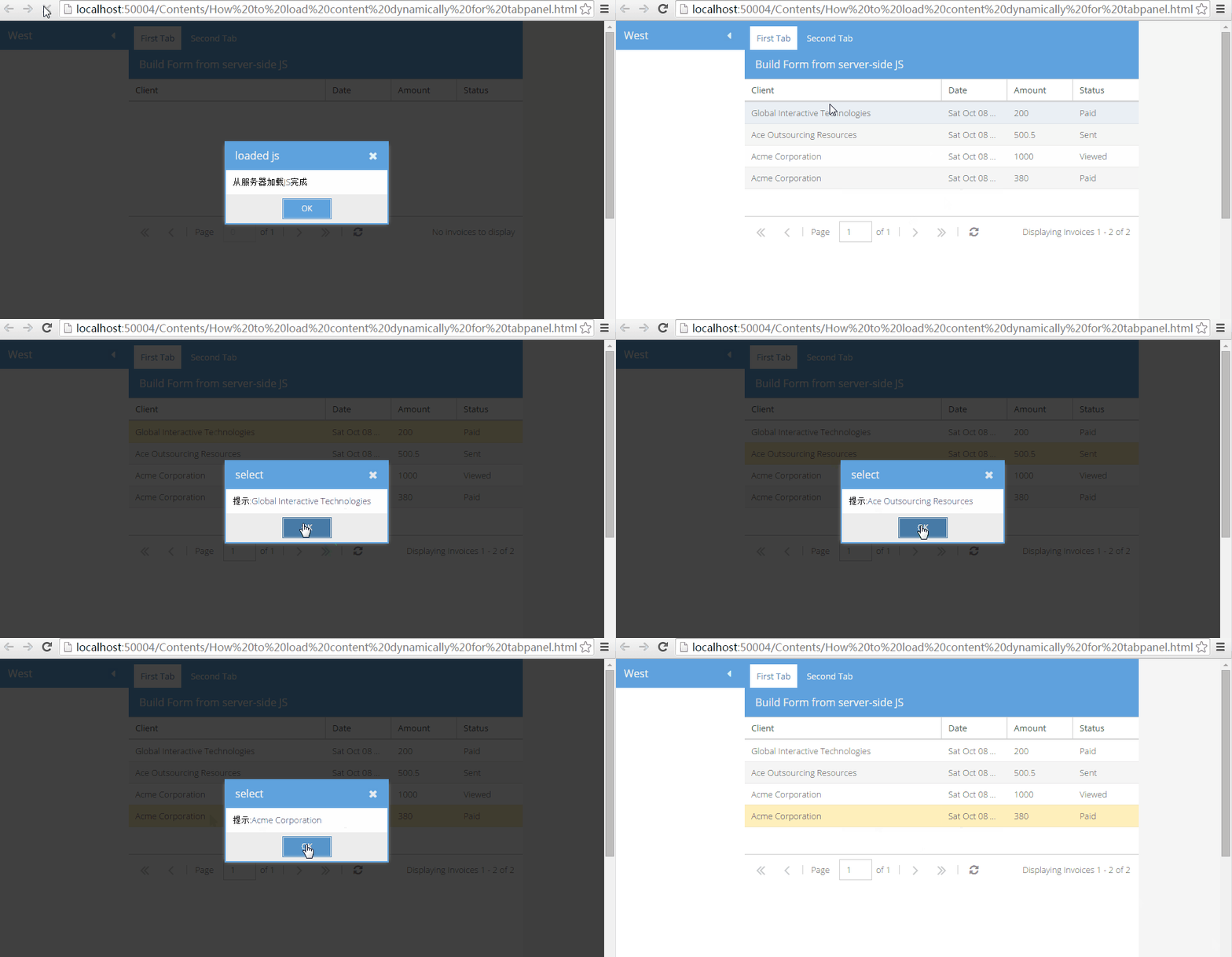
這套思路可以往上再抽象一層:先搭一個固定的主框架,再把選單、權限、表單等通用能力抽出來,然後僅僅透過資料庫設定就能決定每個頁面長什麼樣子。後續要擴充功能時,不必重新發版,改設定即可上線,維護成本大幅降低。