JavaScript 實現點擊文字自動定位並選中下拉選項
編輯:關於JavaScript
本文分享如何以 JavaScript 做到「輸入文字後,自動定位並選中對應下拉選單選項」的效果,供參考。
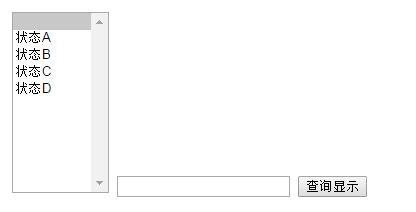
<html>
<head runat="server">
<title></title>
<style type="text/css">
#SiteStat { width: 97px; height: 181px; }
</style>
</head>
<body>
<from>
<script language="javascript">
function foo(){
  var i = document.getElementById("ds").value;
  o = document.getElementById("SiteStat");
  for (c = 0; c < o.length; c++) {
    dy = o.options[c].value.indexOf(i);
    if (dy == 0) {          // 找到開頭符合的值
      o.options[c].selected = true;
      break;
    }
  }
}
</script>
<select name="SiteStat" multiple="multiple" class="select1" id="SiteStat">
  <option value="-1" selected></option>
  <option value="1">狀態A</option>
  <option value="0">狀態B</option>
  <option value="22">狀態C</option>
  <option value="33">狀態D</option>
</select>
</from>
<input type='text' name='olala' id='ds'/>
<input type='submit' name='sub' value='查詢顯示' onclick="foo()"/>
</body>
</html>
程式的關鍵在 foo():先取得輸入框的值,再迴圈遍歷下拉選單的每個 option,以 indexOf(i) == 0 判斷该选项的值是否以輸入內容開頭,若符合便將 selected 設為 true 並跳出迴圈。這樣使用者只要輸入部分文字,就能快速定位並選中目標選項,對於選項眾多的下拉選單特別實用。
- 上一篇文章: JavaScript 物件陣列排序的實例方法淺析
- 下一篇文章: JavaScript 物件陣列依指定屬性與排序方向排序