Angular + ui-grid 實戰:讓模態框裡的表格正確撐開寬度
編輯:JQuery入門技巧
把 ui-grid 放進彈出的模態框中,是一個經典的坑。特別是在 Bootstrap 的 modal 裡,表格常常渲染得過窄,甚至有列顯示不全。
問題根源
原因在於 modal 打開時帶有淡入與位移的過渡動畫,而 ui-grid 在初始化那一刻去測量容器寬度,此時元素尚未完成佈局,量到的可用空間自然偏小。後續即使容器變正常了,表格也不會自己重算。
解決思路
ui-grid 的 API 提供了 handleWindowResize(),調用它就能讓表格重新依容器尺寸計算佈局。但麻煩之處是:動畫到底什麼時候結束並不好確定,寫死一個 setTimeout 並不可靠。
實踐中比較穩妥的做法是用 $interval:在模態框打開後的一段時間內,每隔 500ms 調一次 handleWindowResize(),大約 5 秒後自動停止。這本質上是一種「短期內反覆自愈」的策略——只在最需要的那幾秒裡生效,過後就不再消耗資源。
index.html
 <!doctype html>
 <html ng-app="app">
 <head>
 <script src="https://ajax.googleapis.com/ajax/libs/angularjs/1.5.0/angular.js"></script>
 <script src="https://ajax.googleapis.com/ajax/libs/angularjs/1.5.0/angular-touch.js"></script>
 <script src="https://ajax.googleapis.com/ajax/libs/angularjs/1.5.0/angular-animate.js"></script>
 <script src="https://ui-grid.info/docs/grunt-scripts/csv.js"></script>
 <script src="https://ui-grid.info/docs/grunt-scripts/pdfmake.js"></script>
 <script src="https://ui-grid.info/docs/grunt-scripts/vfs_fonts.js"></script>
 <script src="/release/ui-grid.js"></script>
 <script src="/release/ui-grid.css"></script>
 <script src="app.js"></script>
 </head>
 <body>
 <div ng-controller="MainCtrl">
 <button id="showButton" class="btn btn-success" ng-click="showModal()">Show Modal</button>
 </div>
 </body>
 </html>
main.css
.grid { width: 300px; height: 250px; }
app.js
 var app = angular.module('app', ['ngTouch', 'ui.grid']);

 app.controller('MainCtrl', ['$rootScope', '$scope', '$http', 'modal', '$interval', function ($rootScope, $scope, $http, modal, $interval) {
   var myModal = new modal();

   $scope.hideGrid = true;

   $rootScope.gridOptions = {
     onRegisterApi: function (gridApi) {
       $scope.gridApi = gridApi;
       // call resize every 500 ms for 5 s after modal finishes opening
       // - usually only necessary on a bootstrap modal
       $interval( function() {
         $scope.gridApi.core.handleWindowResize();
       }, 500, 10);
     }
   };

   $http.get('/data/100.json')
     .success(function(data) {
       $rootScope.gridOptions.data = data;
     });

   $scope.showModal = function() {
     myModal.open();
   };
 }]);

 app.factory('modal', ['$compile', '$rootScope', function ($compile, $rootScope) {
   return function() {
     var elm;
     var modal = {
       open: function() {
         var html = '<div class="modal" ng-style="modalStyle">{{modalStyle}}<div class="modal-dialog"><div class="modal-content"><div class="modal-header"></div><div class="modal-body"><div id="grid1" ui-grid="gridOptions" class="grid"></div></div><div class="modal-footer"><button id="buttonClose" class="btn btn-primary" ng-click="close()">Close</button></div></div></div></div>';
         elm = angular.element(html);
         angular.element(document.body).prepend(elm);
         $rootScope.close = function() {
           modal.close();
         };
         $rootScope.modalStyle = {"display": "block"};
         $compile(elm)($rootScope);
       },
       close: function() {
         if (elm) {
           elm.remove();
         }
       }
     };
     return modal;
   };
 }]);
效果演示
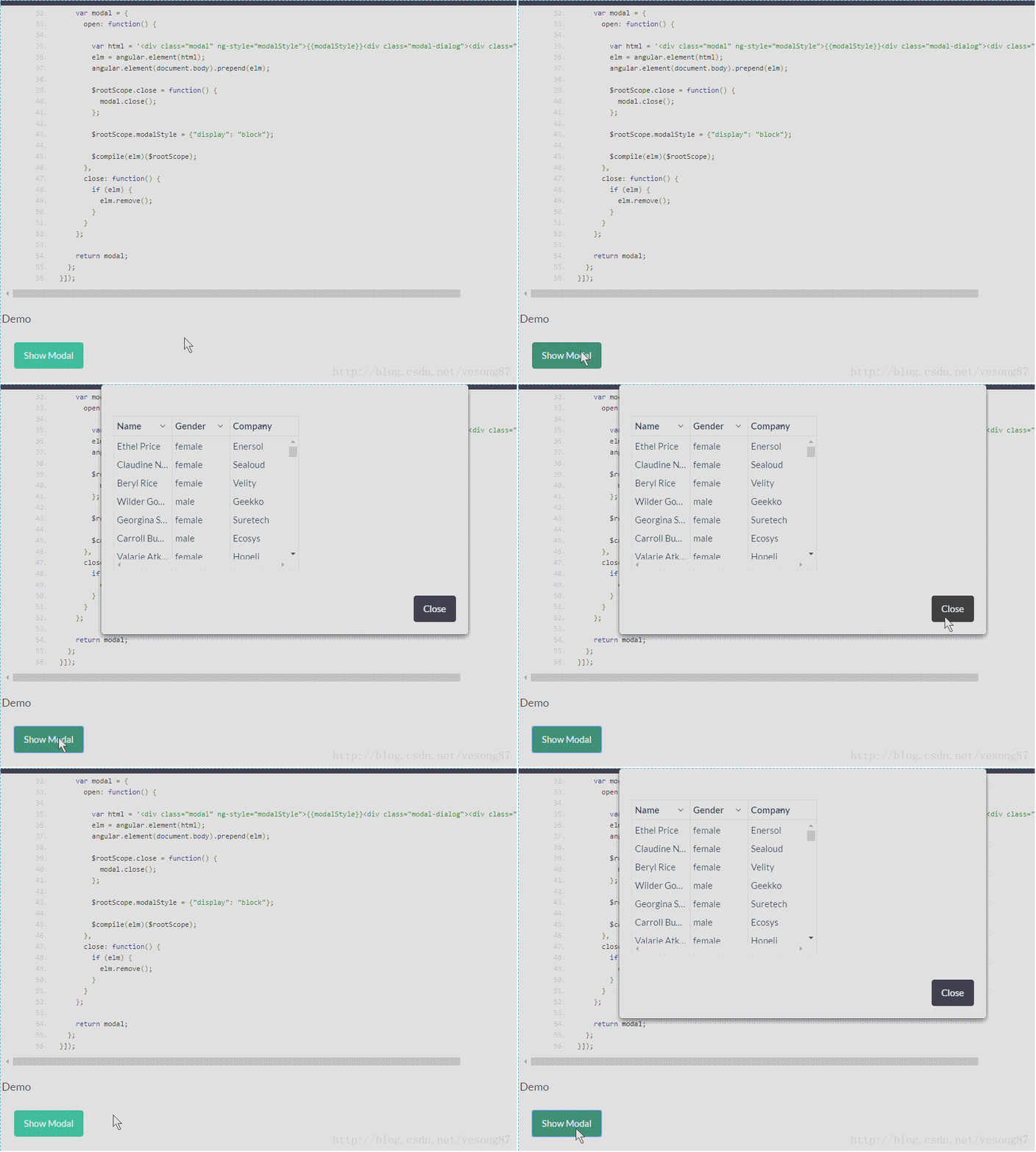
補充幾點實踐經驗
如果不方便輪詢,另一條路是監聽 modal 的 shown.bs.modal 事件,在裡面延遲一次調用,效果類似但更省資源。$interval 的第三個參數是執行次數,寫 10 表示 500ms × 10 ≈ 5 秒後自動取消,記得別漏掉,否則定時器會一直跑。
以上就是關於 ui-grid 在模態框中渲染的處理方式,希望對你有所幫助。有任何疑問歡迎留言,看到後會及時回復。
熱門推薦
動手寫一個 minijQuery:從源碼理解 jQuery 選擇器的實現原理
徹底搞懂 jQuery 的事件冒泡:stopPropagation 與 preventDefault 的差別
jQuery Validation 插件完全指南:規則、提示、美化與遠程校驗
jQuery + 正則表達式實現文本框只能輸入數字
jQuery Validate 表單驗證實作:格式檢查與重名校驗
讓 jquery.validate 的錯誤提示改用 Bootstrap Tooltip 顯示
jQuery Mobile 事件體系完整整理
用 jQuery 實作 ToolTip:跟隨元素定位的提示氣泡
jQuery 攔截 AJAX 重複請求的實作