用 JavaScript 動手做一台簡易計算機
編輯:關於JavaScript
某個無聊的午後想找點事做,於是決定用 JavaScript 寫一台計算機。成品還留著一些 bug,先記錄下來,之後再慢慢修。
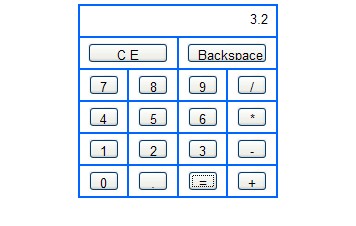
程式碼
<!DOCTYPE html PUBLIC "-//W3C//DTD XHTML 1.0 Transitional//EN" "https://www.w3.org/TR/xhtml1/DTD/xhtml1-transitional.dtd">
<html xmlns="https://www.w3.org/1999/xhtml">
<head>
<meta http-equiv="Content-Type" content="text/html; charset=utf-8" />
<title>javascript 實現簡易計算器</title>
<style type="text/css">
input{ width:30px; height:20px; text-align:center; }
#tbCalculator td { text-align:center; vertical-align:middle; }
</style>
<script type="text/javascript">
var result;              // 保存點擊運算子之前輸入框中的數值
var operator;            // 保存運算子
var isPressEqualsKey = false; // 記錄是否按下「=」鍵

// 數字鍵事件
function connectionDigital(control) {
  var txt = document.getElementById('txtScream');
  if (isPressEqualsKey) {
    txt.value = "";       // 已進行過計算,清空輸入框重新開始
    isPressEqualsKey = false;
  }
  // 已有小數點,則不允許再輸入小數點
  if (txt.value.indexOf('.') > -1 && control.value == '.') return false;
  txt.value += control.value;
}

// 退格鍵事件
function backspace() {
  var txt = document.getElementById('txtScream');
  txt.value = txt.value.substring(0, txt.value.length - 1);
}

// CE 鍵事件:清空數字輸入框
function clearAll() {
  document.getElementById('txtScream').value = "";
  result = "";
  operator = "";
}

// +、-、*、/ 事件
function calculation(control) {
  operator = control.value;              // 將運算子保存入全域變數
  var txt = document.getElementById('txtScream');
  if (txt.value == "") return false;     // 輸入框沒數字,則不能輸入運算子
  result = txt.value;                    // 保存左運算元
  txt.value = "";                        // 清空輸入框,等待輸入右運算元
}

// 計算結果
function getResult() {
  var opValue;
  var sourseValue = parseFloat(result);
  var txt = document.getElementById('txtScream');
  if (operator == '*')      opValue = sourseValue * parseFloat(txt.value);
  else if (operator == '/') opValue = sourseValue / parseFloat(txt.value);
  else if (operator == '+') opValue = sourseValue + parseFloat(txt.value);
  else if (operator == '-') opValue = sourseValue - parseFloat(txt.value);
  txt.value = opValue;
  isPressEqualsKey = true;
  result = "";
  opValue = "";
}
</script>
</head>
<body>
<table id="tbCalculator" width="200" border="1" align="center" cellpadding="0" cellspacing="0" bordercolor="#0066FF">
  <tr>
    <td height="30" colspan="4" align="center">
      <input type="text" name="txtScream" id="txtScream"
             style="width:180px; border-style:none; text-align:right;" readonly="readonly" />
    </td>
  </tr>
  <tr>
    <td height="30" colspan="2">
      <input type="button" name="btnCE" id="btnCE" value="C E"
             style="width:80px;" onclick="clearAll();" />
    </td>
    <td height="30" colspan="2">
      <input type="button" name="btnBack" id="btnBack" value="Backspace"
             style="width:80px;" onclick="backspace();" />
    </td>
  </tr>
  <tr>
    <td height="30"><input type="button" id="btn7" value="7" onclick="connectionDigital(this);"/></td>
    <td><input type="button" id="btn8" value="8" onclick="connectionDigital(this);"/></td>
    <td><input type="button" id="btn9" value="9" onclick="connectionDigital(this);"/></td>
    <td><input type="button" id="btnDiv" value="/" onclick="calculation(this);" /></td>
  </tr>
  <tr>
    <td height="30"><input type="button" id="btn4" value="4" onclick="connectionDigital(this);"/></td>
    <td><input type="button" id="btn5" value="5" onclick="connectionDigital(this);"/></td>
    <td><input type="button" id="btn6" value="6" onclick="connectionDigital(this);"/></td>
    <td><input type="button" id="btnMul" value="*" onclick="calculation(this);" /></td>
  </tr>
  <tr>
    <td height="30"><input type="button" id="btn1" value="1" onclick="connectionDigital(this);"/></td>
    <td><input type="button" id="btn2" value="2" onclick="connectionDigital(this);"/></td>
    <td><input type="button" id="btn3" value="3" onclick="connectionDigital(this);"/></td>
    <td><input type="button" id="btnSub" value="-" onclick="calculation(this);" /></td>
  </tr>
  <tr>
    <td height="30"><input type="button" id="btn0" value="0" onclick="connectionDigital(this);"/></td>
    <td><input type="button" id="btnDot" value="." onclick="connectionDigital(this);" /></td>
    <td><input type="button" id="btnEq" value="=" onclick="getResult();" /></td>
    <td><input type="button" id="btnAdd" value="+" onclick="calculation(this);" /></td>
  </tr>
</table>
</body>
</html>
設計思路與已知問題
整體邏輯是「三段式狀態機」:按運算子時把左運算元存進 result 並清空輸入框,按等號時取出 result 與目前輸入框的值做運算。isPressEqualsKey 這個旗標用來處理「算完之後再按數字該重新開始」的行為。
而作者自己也承認的 bug,其實都很典型:
- 不支援連續運算。打完
1 + 2再按+ 3,前一步的結果不會被帶入下一步。 - 沒有運算子優先順序。它是一次算一步,不會像真正的計算機那樣先乘除後加減。
- 除以零沒有處理。
1 / 0會得到 Infinity 並直接顯示在畫面上。 - 小數點輸入不夠嚴謹。只擋了「已含小數點還要再輸入」,沒擋「小數點開頭」這種情況。
- 浮點誤差。
0.1 + 0.2會得到 0.30000000000000004,這是 IEEE 754 的先天限制。
如果要把它寫得更好,方向是:把狀態收進一個物件避免全域變數污染;用 Number() 取代 parseFloat()(後者遇到 "12abc" 會靜靜回傳 12);對結果做精度處理,例如 parseFloat(opValue.toFixed(10));並在除零時給出明確提示。更進一步的做法則是先把輸入存成字串表達式,實作一個簡單的 shunting-yard 演算法處理優先順序,而不是急著逐鍵計算。
這個練習的價值不在計算機本身,而在於它逼你思考狀態管理、輸入驗證與數值精度——這三件事在任何真實專案中都會再遇到。
- 上一篇文章: 用 JavaScript 實現跑馬燈效果的簡單範例
- 下一篇文章: 用 JavaScript 實現工作列標題閃爍的消息提示