用 JavaScript 做經典拼圖遊戲:完整實作教學
編輯:關於JavaScript
這篇文章分享用 JavaScript 製作傳統拼圖遊戲的關鍵程式碼。玩法就是大家熟悉的那一套:把九宮格打乱,點擊空格旁邊的方塊來移動,看你能用幾步把圖片拼回原樣。
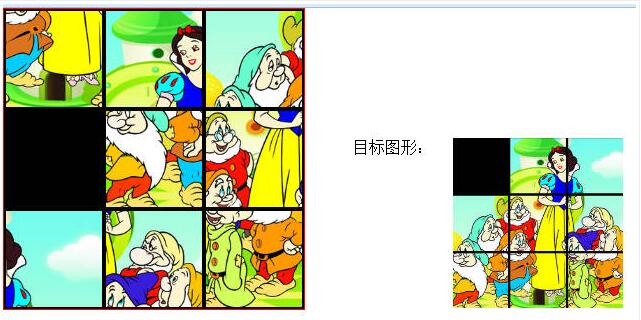
效果圖——試著把白雪公主與七個小矮人拼回來:
實作程式碼
 <!DOCTYPE html>
 <html>
 <head>
 <title>pingtu.html</title>
 <meta http-equiv="keywords" content="keyword1,keyword2,keyword3">
 <meta http-equiv="description" content="this is my page">
 <meta http-equiv="content-type" content="text/html; charset=gb2312">
 <style type="text/css">
 *{ margin-bottom:0px; margin-top: 0px; margin-left: 0px; margin-right: 0px;
    padding-right: 0px; padding-left: 0px; padding-top: 0px; padding-bottom: 0px; border: 0px; }
 #box{ position:absolute; top:0px; left:0px; width: 300px; height: 300px; border: 1px solid red; }
 #box img{ float:left; width: 100px; height: 100px; }
 #box .pj,#box .p2,#box .p3,#box .p4,#box .p5,#box .p6,#box .p7,#box .p8,#box .p9{ position: absolute; }
 #box .pj,#box .p2,#box .p3{ top:0px; }
 #box .p4,#box .p5,#box .p6{ top:100px; }
 #box .p7,#box .p8,#box .p9{ top:200px; }
 #box .pj,#box .p4,#box .p7{ left:0px; }
 #box .p2,#box .p5,#box .p8{ left:100px; }
 #box .p3,#box .p6,#box .p9{ left:200px; }
 #button{ font-size:25px; font-weight:20px; float: left; position: absolute; top:400px; left:100px; }
 #output{ position:absolute; width: 270px; height: 170px; top:130px; left: 350px; }
 #output img{ height: 170px; width:170px; float: right; }
 #notice{ position: absolute; left: 650px; top:150px; width: 150px; height: 120px;
          border: 1px solid blue; font-size: 15px; }
 </style>
 </head>
 <body>
 <div id="box">
 <img class="pj" src="img1/pj.png">
 <img class="p2" src="img1/p2.png">
 <img class="p3" src="img1/p3.png">
 <img class="p4" src="img1/p4.png">
 <img class="p5" src="img1/p5.png">
 <img class="p6" src="img1/p6.png">
 <img class="p7" src="img1/p7.png">
 <img class="p8" src="img1/p8.png">
 <img class="p9" src="img1/p9.png">
 </div>
 <div id="output">
 目標圖形:
 <img alt="" src="img1/output.jpg">
 </div>
 <div id="notice">
 游戲提示:<br><br>
 點擊「開始新游戲」開始游戲。鼠標點擊黑色方塊周圍的方塊時,即可移動方塊。
 </div>
 <input type="button" id="button" value="開始新游戲">
 <script type="text/javascript">
 var times=0;
 var src= Array();
 src.push("img1/pj.png");
 src.push("img1/p2.png");
 src.push("img1/p3.png");
 src.push("img1/p4.png");
 src.push("img1/p5.png");
 src.push("img1/p6.png");
 src.push("img1/p7.png");
 src.push("img1/p8.png");
 src.push("img1/p9.png");

 function addLoadEvent(func) { // 為 window 添加新事件函數
   var oldonload = window.onload;
   if (typeof window.onload != 'function') {
     window.onload = func;
   } else {
     window.onload = function() {
       oldonload();
       func();
     };
   }
 }

 function getInfor(){
   var ps=document.getElementById("box");
   var Arrps=ps.getElementsByTagName("img");
   for(var i=0;i<Arrps.length;i++){
     Arrps[i].onclick=function(){
       if (this.getAttribute("src")=="img1/pj.png"); // 空白格
       changeP(this,Arrps);
     };
   }
 }

 function tostar(){
   var butt=document.getElementById("button");
   butt.onclick=function(){
     toST();
     times=0;
     getInfor();
   };
 }

 function changeP(ob,Arrps){
   var Ni=0, Nj=0;
   for(var i=0;i<Arrps.length;i++){
     if(Arrps[i]==ob) Ni=i;
     if(Arrps[i].getAttribute("src")=="img1/pj.png") Nj=i;
   }
   // 上下相鄰
   if(Math.abs(Ni-Nj)==3) {
     var temperOb=ob.getAttribute("src");
     ob.setAttribute("src","img1/pj.png");
     Arrps[Nj].setAttribute("src",temperOb);
     times++;
     ifright();
   // 左右相鄰,且不可跨行
   }else if((Ni-Nj)==1 && (Ni%3)!=0){
     var temperOb=ob.getAttribute("src");
     ob.setAttribute("src","img1/pj.png");
     Arrps[Nj].setAttribute("src",temperOb);
     times++;
     ifright();
   }else if((Ni-Nj)==-1 && (Ni%3)!=2){
     var temperOb=ob.getAttribute("src");
     ob.setAttribute("src","img1/pj.png");
     Arrps[Nj].setAttribute("src",temperOb);
     times++;
     ifright();
   }
 }

 function ifright(){
   var ps=document.getElementById("box");
   var Arrps=ps.getElementsByTagName("img");
   for(var i=0;i<src.length;i++){
     if(src[i]!=Arrps[i].getAttribute("src")) return;
   }
   if(times<50) alert("恭喜,你成功了。。"+"\n"+"僅用了"+times+"步哦");
   else alert("恭喜,你成功了。。"+"\n"+"用了"+times+"步");
 }

 function toST(){
   var srcUsing= new Array();
   for(var p=0; p<src.length;p++){
     srcUsing[p]=src[p];
   }
   var ps=document.getElementById("box");
   var Arrps=ps.getElementsByTagName("img");
   var newArry= new Array();
   for(var i=0;i<Arrps.length;i++){
     newArry.push(srcUsing.splice(Math.floor(Math.random()*srcUsing.length), 1));
   }
   for(var j=0;j<newArry.length;j++) {
     Arrps[j].setAttribute("src",String(newArry[j]));
   }
 }

 addLoadEvent(tostar);
 </script>
 </body>
 </html>
幾個實作重點
版面用絕對定位排版。九張圖各自掛 pj 到 p9 的 class,用 top 與 left 決定它在九宮格中的位置,其中 pj.png 就是那個空格。
移動規則靠索引判斷。把九個 img 依 DOM 順序編號,空白格的索引記為 Nj、被點擊者記為 Ni。上下相鄰的判斷是索引差為 3;左右相鄰則是差 1 或 -1,而且必須額外檢查 Ni % 3 不能跨到別行,否則第一列的格子會「繞」到上一列去。
完成判定。每次移動後比對所有 img 的 src 是否與 src 陣列的順序完全一致,一致就恭喜過關,並依步數給不同訊息。
以上就是拼圖遊戲的完整實作,動手做一遍,你也能拼出自己最喜歡的圖。