原生 JavaScript 打造可控制方向的無縫滾動
編輯:關於JavaScript
圖片無縫滾動是首頁 Banner、產品牆常見的需求。這裡示範一個不依賴任何套件、可用按鈕控制左右方向的版本。
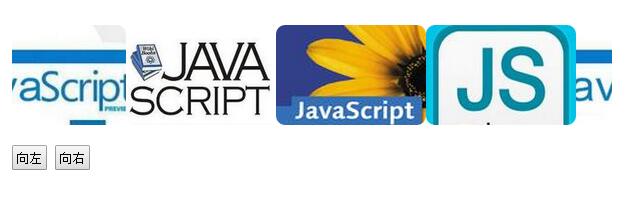
實現原理
無縫的關鍵只有一句話:把 ul 的內容複製一份接在後面。當滾動位移超過一半寬度時,就把位置瞬間拉回原點。由於視覺上第二份內容與第一份完全相同,這個跳躍不會被察覺。
方向控制則更簡單——用一個變數 speed 存速度,正數往一邊滾、負數往另一邊滾,按鈕只需要改變正負號。
完整程式碼
<!DOCTYPE html>
<html>
<head>
<meta charset="utf-8" />
<title>無縫滾動</title>
<style>
* { margin: 0; padding: 0; }
body { width: 1000px; margin: 100px auto; background-color: #fff; }

#wrapper {
    overflow: hidden;
    width: 600px;
    height: 100px;
    position: relative;
}
#wrapper ul { position: absolute; left: 0; top: 0; }
#wrapper li { float: left; list-style: none; }
#wrapper li img { width: 150px; height: 100px; border-radius: 9px; }

input[type=button] { margin-top: 20px; width: 35px; height: 25px; line-height: 25px; }
</style>

<script type="text/javascript">
window.onload = function () {
    var timer = null;
    var speed = 4;
    var od = document.getElementById("wrapper");
    var au = od.getElementsByTagName('ul')[0];
    var ali = au.getElementsByTagName('li');

    // 複製一份內容,並重設 ul 寬度
    au.innerHTML = au.innerHTML + au.innerHTML;
    au.style.width = ali[0].offsetWidth * ali.length + 'px';

    timer = setInterval(move, 30);

    function move() {
        // 位移超過一半寬度就拉回原點,形成無縫
        if (au.offsetLeft < -au.offsetWidth / 2) {
            au.style.left = '0';
        }
        if (au.offsetLeft > 0) {
            au.style.left = -au.offsetWidth / 2 + 'px';
        }
        au.style.left = au.offsetLeft + speed + 'px';
    }

    // 滑鼠移入暫停,移出恢復
    od.onmouseover = function () { clearInterval(timer); };
    od.onmouseout = function () { timer = setInterval(move, 30); };

    // 左右方向控制
    document.getElementById("btn1").onclick = function () { speed = -4; };
    document.getElementById("btn2").onclick = function () { speed = 4; };
}
</script>
</head>
<body>
<div id="wrapper">
    <ul>
        <li><img src="img/pic4.jpg" /></li>
        <li><img src="img/pic3.jpg" /></li>
        <li><img src="img/pic2.jpg" /></li>
        <li><img src="img/pic1.jpg" /></li>
    </ul>
</div>
<input type="button" id="btn1" value="向左" />
<input type="button" id="btn2" value="向右" />
</body>
</html>
幾個實作細節
第一,ul 必須是絕對定位,wrapper 相對定位並隱藏溢出,這樣位移才不會撐開版面。第二,複製內容之後要重算 ul 寬度,否則 offsetWidth / 2 的判斷基準會失準。第三,setInterval 間隔 30 毫秒配上 4 像素的步長,大致是流暢的入門數值,可依實際視覺調整。
若要進一步優化,可以把 setInterval 換成 requestAnimationFrame,並依時間差計算位移,如此在不同刷新率的螢幕上速度才會一致。另外建議加上左右邊界無效的防護,例如圖片尚未載入完成時 offsetWidth 為 0 的情形。
熱門推薦
用 JS 為博客文章自動生成兩級目錄,並自定義標題樣式
setInterval 與 setTimeout 的用法差異及正確停止方式
jQuery 實戰:製作 slideMenu 滑動菜單
徹底搞懂 Array.prototype.slice.call 的「借方法」技巧
用JavaScript實現Div居中並隨視窗縮放自適應
JavaScript 動畫踩坑總整理:單物體與多物體運動的常見錯誤
Uncaught SyntaxError: Unexpected token ) 的兩個常見成因
Math.round 四捨五入:0.5 的處理方式跟你想的不一樣
jQuery 如何跨 iframe 讀取父頁面的元素與方法