onclick 與 onblur 衝突怎麼辦?兩種實用解法
編輯:關於JavaScript
新浪首頁的搜尋框有一個以 AJAX 產生的下拉建議清單。需求是:點擊清單中的某一項,把該項文字填進搜尋框並讓清單收起;同時,當使用者點擊頁面其他地方時,清單也應該消失。示意圖如下:
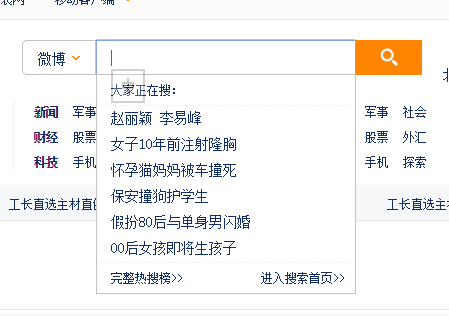
問題就在這裡爆發:我們同時用 onblur 負責「點外面就收起」,用 onclick 負責「點選項就填值」,結果 onblur 的執行時機太早、太強勢,onclick 根本沒機會跑完,搜尋框永遠拿不到被點擊的那個值。這就是典型的 onclick 與 onblur 衝突。
解法一:用 setTimeout 延後 onblur
把 onblur 的收合動作往後推一點(實測需 100ms 以上才穩),讓 onclick 先執行完,再交給 onblur 收尾:
 <!DOCTYPE html>
<html>
<head lang="en">
<meta charset="UTF-8">
<title></title>
<style>
*{ margin: 0; padding: 0; list-style: none; }
form{ width:500px; margin:0 auto; position:relative; zoom:1; }
form:after{ clear:both; content:""; display:block; }
.text{ float:left; border:1px solid #cccccc; padding-left:14px; width:300px; height:34px; line-height:34px; font-size:14px; }
.button{ width:50px; height:34px; border:1px solid #cccccc; line-height:34px; font-size:14px; color:#ffffff; background:#ff8400; }
ul{ position:absolute; top:36px; left:0; width:300px; border-right:1px solid #cccccc; border-left:1px solid #cccccc; background:green; display:none; }
li{ font-size:14px; line-height:34px; height:34px; color:#000000; border-bottom:1px solid #cccccc; }
li:hover{ background:yellow; color:red; cursor:pointer; }
</style>
<script>
window.onload=function(){
  var oText=document.getElementById('text');
  var oUl=document.getElementById('ul');
  var aLi=oUl.getElementsByTagName('li');
  var timer=null;
  oText.onfocus=function(){
    this.value='';
    oUl.style.display='block';
    for(var i=0;i<aLi.length;i++){
      aLi[i].onclick=function(){
        clearTimeout(timer);
        oText.value=this.innerHTML;
        oUl.style.display='none';
      };
    }
  };
  oText.onblur=function(){
    timer=setTimeout(function(){
      oUl.style.display='none';
      if(!oText.value){
        oText.value='請輸入關鍵字';
      }
    },120);
  };
};
</script>
</head>
<body>
<form>
<input type="text" value="請輸入關鍵字" id="text" class="text"/>
<input type="button" value="搜索" class="button"/>
<ul id="ul">
<li>返回窗口是否已被關閉</li>
<li>返回窗口的文檔顯示區的高度</li>
<li>返回窗口的文檔顯示區的寬度。</li>
<li>設置或返回窗口的名稱。</li>
<li>返回窗口的外部高度。</li>
</ul>
</form>
</body>
</html>
注意 onclick 裡的 clearTimeout(timer):一旦使用者真的點了選項,就把待執行的收合計時器取消掉,避免互相打架。
解法二:改用 document.onmousedown 取代 onblur
更乾淨的做法是換一個判斷依據:不再依賴焦點離開,而是監聽整個文件的 mousedown,判斷落點是否在下拉清單或輸入框之外,是則收起。
 <!DOCTYPE html>
<html>
<head lang="en">
<meta charset="UTF-8">
<title></title>
<style>
*{ margin: 0; padding: 0; list-style: none; }
form{ width:500px; margin:0 auto; position:relative; zoom:1; }
form:after{ clear:both; content:""; display:block; }
.text{ float:left; border:1px solid #cccccc; padding-left:14px; width:300px; height:34px; line-height:34px; font-size:14px; }
.button{ width:50px; height:34px; border:1px solid #cccccc; line-height:34px; font-size:14px; color:#ffffff; background:#ff8400; }
ul{ position:absolute; top:36px; left:0; width:300px; border-right:1px solid #cccccc; border-left:1px solid #cccccc; background:green; display:none; }
li{ font-size:14px; line-height:34px; height:34px; color:#000000; border-bottom:1px solid #cccccc; }
li:hover{ background:yellow; color:red; cursor:pointer; }
</style>
<script>
window.onload=function(){
  var oText=document.getElementById('text');
  var oUl=document.getElementById('ul');
  var aLi=oUl.getElementsByTagName('li');
  var timer=null;
  oText.onfocus=function(){
    this.value='';
    oUl.style.display='block';
    for(var i=0;i<aLi.length;i++){
      aLi[i].onclick=function(){
        clearTimeout(timer);
        oText.value=this.innerHTML;
        oUl.style.display='none';
      };
    }
  };
  document.onmousedown=function(ev){
    var oEvent=ev||event;
    var target=oEvent.target||oEvent.srcElement;
    if(target.parentNode!==oUl&&target!==oText){
      oUl.style.display='none';
    }
  };
  oText.onblur=function(){
    if(!oText.value){
      oText.value='請輸入關鍵字';
    }
  };
};
</script>
</head>
<body>
<form>
<input type="text" value="請輸入關鍵字" id="text" class="text"/>
<input type="button" value="搜索" class="button"/>
<ul id="ul">
<li>返回窗口是否已被關閉</li>
<li>返回窗口的文檔顯示區的高度</li>
<li>返回窗口的文檔顯示區的寬度。</li>
<li>設置或返回窗口的名稱。</li>
<li>返回窗口的外部高度。</li>
</ul>
</form>
</body>
</html>
兩種思路的取捨很直白:setTimeout 改動最小,但依賴時間的猜測;document.onmousedown 則從根本上避開了焦點順序問題,行為更可預期,是比較推薦的做法。