用 JavaScript 實現黑客帝國字符下落特效
編輯:關於JavaScript
《黑客帝國》電影裡那如瀑布般傾瀉而下的綠色字符,是許多開發者心中的經典視覺。本文提供兩種用 JavaScript 實現這一效果的完整方案,供大家動手嘗試。
方案一:基於 jQuery 的字符瀑布
這個版本借助 jQuery 動態生成下落字符列,字符的顏色、字號都隨機變化,並帶有發光陰影效果,視覺上更貼近電影質感。
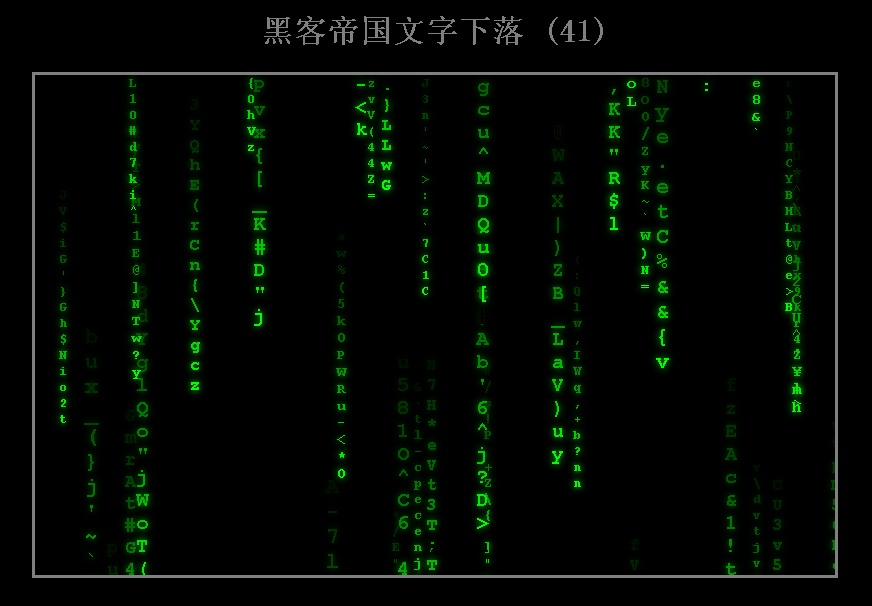
源代碼如下:
<!DOCTYPE html> <html> <head> <meta charset="utf-8"> <title>黑客帝國文字下落</title> <style> html, body {margin:0; padding:0; background-color:#000;} #divList {width:800px; height:500px; border:solid 3px gray; margin: 0px auto; overflow:hidden; position: relative;} .divText {position: absolute;} .divText span {display:block; font-weight: bold; font-family:Courier New; } </style> <script src="https://apps.bdimg.com/libs/jquery/1.9.0/jquery.min.js"></script> </head> <body> <h1 style="text-align:center; color:gray;">黑客帝國文字下落 (<span id="spanCount">0</span>)</h1> <div id="divList"> </div> <script> function rand(min, max) { return min + Math.round(Math.random() * (max - min)); } function add() { var x = rand(0, 800); var html = '<div class="divText" style="left:' + x + 'px; bottom:500px;">'; var color = []; for (var i=1; i<17; i++) { var f = i.toString(16); color.push('0' + f + '0'); } var fontSize = rand(9, 24); for (var i=1; i<17; i++) { var c = rand(33, 127); var c = String.fromCharCode(c); html += '<span class="s' + i + '" style="color:#' + color[i-1] + '; font-size:' + fontSize + 'px; text-shadow:0px 0px 10px #' + color[i-1] + ';">' + c + '</span>'; } html += '</div>'; $('#divList').append(html); } function run() { var x = rand(0, 100); if (x < 100) { add(); } $('#spanCount').html($('.divText').size()); $('.divText').each(function(){ var y = $(this).css('bottom'); y = parseInt(y); y -= $(this).find('span').eq(0).height(); $(this).css('bottom', '' + y + 'px'); if (y + $(this).height() <= 0) { $(this).remove(); return; } $(this).find('span').each(function(){ var c = rand(33, 127); var c = String.fromCharCode(c); $(this).html(c); }); }); window.setTimeout(run, 100); } run(); </script> </body> </html>
方案二:純原生 JS 版本
這個版本不依賴任何庫,通過控制字符的顏色和下落速度來營造效果,適合想深入理解原理的讀者。
<HTML> <HEAD> <TITLE>《黑客帝國》中的字符下落效果</TITLE> <meta http-equiv="Content-Type" content="text/html;charset=gb2312"> </HEAD> <style type="text/css"> body { overflow:hidden; margin:0; background-color:#000000; font-family:宋體; } DIV.#heike { overflow:hidden; position:relative; top:5%; width:90%; height:90%; border-style:solid; border-width:1; border-color:#009900; } </style> <script language="javascript"> var strCount; var str; var Color; var Font; var sLine = "0<br/>1<br/>0<br/>1<br/>0<br/>0<br/>1<br/>0<br/>1<br/>0<br/>"; function OnLoad() { strCount = 40; str = []; Color = []; Font = []; Color[0] = "#002211"; Color[1] = "#003311"; Color[2] = "#005511"; Color[3] = "#008811"; Color[4] = "#00BB99"; Color[5] = "#114411"; Color[6] = "#335566"; Color[7] = "#668899"; Color[8] = "#99BBAA"; Color[9] = "#CECECC"; Font[0] = "10px"; Font[1] = "12px"; Font[2] = "14px"; Font[3] = "16px"; Font[4] = "18px"; setTimeout("strik()",50); } function strik() { for(var i=0;i<strCount;i++) { if(typeof(str[i]) != "undefined") { if(str[i]["Carch"].style.pixelTop > heike.clientHeight) { str[i]["Carch"].outerHTML = ""; delete str[i]["Level"]; delete str[i]["Speed"]; delete str[i]["Carch"]; delete str[i]; } else { str[i]["Carch"].style.pixelTop += str[i]["Speed"]; } } else if(Math.random()<0.25) { str[i] = new Array(); str[i]["Level"] = Math.round(Math.random()*4); str[i]["Speed"] = (Math.round(Math.random()*str[i]["Level"]) <<2)+50; document.all["heike"].insertAdjacentHTML("AfterBegin","<span id='SPAN_"+i+"'>"+sLine+"</span>"); str[i]["Carch"] = document.all["SPAN_"+i]; str[i]["Carch"].style.fontSize = Font[str[i]["Level"]]; str[i]["Carch"].style.position = "absolute"; str[i]["Carch"].style.pixelLeft = Math.round(Math.random() *heike.clientWidth); str[i]["Carch"].style.pixelTop = -str[i]["Carch"].offsetHeight; str[i]["Carch"].style.color = Color[str[i]["Level"]+5]; str[i]["Carch"].style.filter = "glow(Color="+Color[str[i]["Level"]]+",Strength=5)"; str[i]["Carch"].style.zIndex = str[i]["Level"]; } } setTimeout("strik()",50); } </script> <BODY onload="OnLoad()"> <table width="100%" height="100%" border="0" cellspacing="0" cellpadding="0"> <tr><td align="center" height="100%"><div id="heike"></div></td></tr> <tr><td align="center" style="padding:5;font-size:9pt;color:#FFFFFF;">使用 IE 6.0 以上版本或以IE 為核心的浏覽器浏覽本頁,1024*768分辨率為佳</td></tr> </table> </BODY> </HTML>
提示:整個效果的核心是對顏色和速度的隨機設置。JavaScript 中的 Math 對象負責數學運算,其中 Math.random 用於獲取 0 到 1 之間的隨機數,Math.round 則以四捨五入方式取最接近的整數。代碼中還用到了二維數組,並借助 delete 方法刪除已移出屏幕的字符元素以釋放資源。
有興趣的話,你可以動手修改各項參數觀察對應效果:比如調大控制下落速度的變量 Speed 讓字符下落更快,或者修改 CSS 的 overflow 屬性取消隱藏,看看會出現什麼樣的畫面。
- 上一篇文章: 用 JS + CSS 打造有立體感的按鈕式豎排菜單
- 下一篇文章: 用 JavaScript 製作霓虹燈文字特效