用 JS 復刻「你是色盲嗎」選字小遊戲
編輯:關於JavaScript
本文用原生 JS 復刻一個經典小遊戲:看字選色。先說規則,再上代碼。
遊戲規則
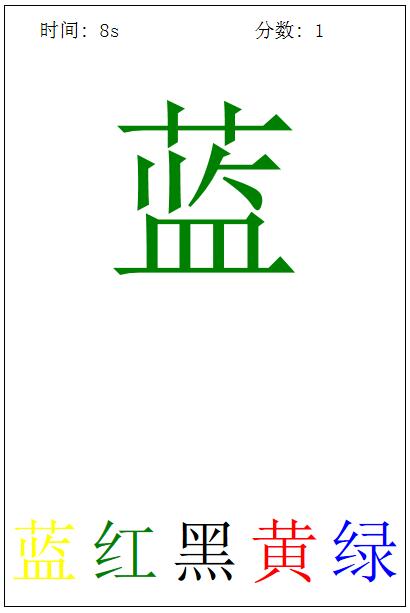
目標:根據畫面中那個大字「顯示的顏色」去選擇對應的顏色選項,而不是看它寫的是什麼字。這正是遊戲的迷惑點所在——字義和字色故意錯位,眼睛一定要放亮。
計分:初始 10 秒,每答對一題加一分,選錯則扣一秒。時間耗盡遊戲結束。
操作:鼠標點擊下方顏色即可。
效果對比
原圖:
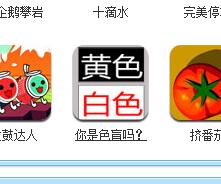
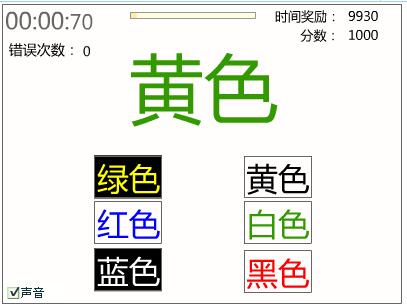
復刻版本:
代碼
<!DOCTYPE html> <html> <head> <meta charset="UTF-8"> <title></title> <style type="text/css"> .wrap { width: 400px; height: 600px; border: 1px solid black; margin: 0 auto; } .head { width: 100%; height: 50px; overflow: hidden; } .time { float: left; width: 150px; height: 100%; line-height: 50px; font-size: 20px; text-align: center; } .score { width: 150px; height: 100%; float: right; line-height: 50px; font-size: 20px; /*text-align: center;*/ } .middle { width: 100%; height: 450px; } .text { width: 100%; height: 300px; font-size: 200px; text-align: center; line-height: 300px; } .alert { width: 80%; height: 150px; margin: 0 auto; text-indent: 2em; font-size: 25px; } .bottom { width: 100%; height: 100px; overflow: hidden; } .bottomText { width: 20%; height: 100px; float: left; text-align: center; line-height: 100px; font-size: 70px; cursor: pointer; } </style> </head> <body> <div class="wrap"> <div class="head"> <div class="time">時間:10s</div> <div class="score">分數 :0</div> </div> <div class="middle"> <div class="text">藍</div> <div class="alert">根據上面的字的顏色從下面選擇正確的字,選擇正確自動開始</div> </div> <div class="bottom"> <div class="bottomText">紅</div> <div class="bottomText">綠</div> <div class="bottomText">黑</div> <div class="bottomText">藍</div> <div class="bottomText">黃</div> </div> </div> </body> <script type="text/javascript"> //變化的核心 獲得不重復的亂序數組(數組中下標值) function random(min, max) { return parseInt(Math.random() * (max - min + 1)) + min; } //不重復的數組 function randomArr() { var arr = []; while (arr.length < 5) { var temp = random(0, 4); if (arr.indexOf(temp) == -1) { arr.push(temp); } } return arr; } function fresh() { //中間字 變化 var textIndex = random(0, 4); colorIndex = random(0, 4); textDiv.innerHTML = textArr[textIndex]; textDiv.style.color = colorArr[colorIndex]; //獲取亂序下標數組 var textRandoms = randomArr(); var colorRandoms = randomArr(); for (var i = 0; i < bottomDivs.length; i++) { //通過亂序下標獲取文本,賦值給div bottomDivs[i].innerHTML = textArr[textRandoms[i]]; bottomDivs[i].style.color = colorArr[colorRandoms[i]]; //保存亂序下標 bottomDivs[i].index = textRandoms[i]; } } var textDiv = document.querySelector(".text"); var bottomDivs = document.querySelectorAll(".bottomText"); var timeDiv = document.querySelector(".time"); var scoreDiv = document.querySelector(".score"); var alertDiv = document.querySelector(".alert"); var textArr = ["紅", "綠", "藍", "黃", "黑"]; var colorArr = ["red", "green", "blue", "yellow", "black"]; var colorIndex=0; var timer = null; var isplaying = false; var countDown = 10; var score = 0; fresh(); for (var i = 0; i < bottomDivs.length; i++) { bottomDivs[i].onclick = function(){ //判斷 if(colorIndex == this.index &&countDown!=0 ){ //刷新 score ++; isplaying =true; //分數增加 fresh(); scoreDiv.innerHTML = "分數: "+score ; alertDiv.style.opacity = 0; }else if(colorIndex != this.index &&isplaying){ //點錯時間減小 countDown --; //更新時間變化 timeDiv.innerHTML = "時間: " + countDown +"s"; //判斷清理定時器 if(countDown <= 0){ clearInterval(timer); isplaying = false; } } } } //定時器,監聽游戲進行 timer = setInterval(function(){ if(isplaying){ countDown --; timeDiv.innerHTML = "時間: " + countDown +"s"; if(countDown <= 0){ clearInterval(timer); isplaying =false; alert("game over!!"); } //停止游戲 }else{ } },1000); </script> </html>
幾個實現要點
整個遊戲的核心是「答案與字面剝離」。中間大字用 textArr 裡的文本隨機取一個,顏色則獨立從 colorArr 裡取,兩者互不關聯,所以題面才會出現「紅色的『藍』字」這種組合。
記住 colorIndex 保存的是正確答案的下標,點擊時拿它跟被點元素的 index 比較即可判斷對錯。注意 index 是掛在 DOM 節點上的自定義屬性,用來標記該選項對應的顏色下標。
randomArr() 是個小技巧:用 while 循環配合 indexOf 去重,生成 0 到 4 的不重複亂序序列。用它同時打亂下方選項的文字和顏色,每題的排列都不一樣,避免用戶靠位置記答案。
遊戲狀態由 isplaying 控制。初始為 false,倒計時不會走;第一次答對後置為 true,計時才真正開始,這樣用戶有充足的準備時間。答錯扣一秒並刷新時間顯示,時間歸零則 clearInterval 並結束遊戲。
- 上一篇文章: 原生 JS 手寫 autocomplete 自動完成插件
- 下一篇文章: JavaScript 實現鼠標框選多選,而不是單擊選取